AboutTermsPrivacyContact
 
Updating
Tracker Buttons Pro

Tracker Buttons Pro

Released: 2015-07-30
© kewlcode
Tracker Buttons Pro - QR Code
Version 1.10
4+
Download on the App Store
Version 1.10
4+
Download on the App Store
Released: 2015-07-30
© kewlcode

iPhone Screenshots

Screenshot
Screenshot
Screenshot
Screenshot
Screenshot

Description

Track Your Life Better With Tracker Buttons! Tracker Buttons provides a flexible and easy way to track and organize almost anything.
Tracker Buttons Pro works on Apple Watch as well.
Track and monitor various activities of the day in a fast and timely manner. Get answers to questions like which days did I exercise last week, how much money do I spend on average per day, and how long do my kids watch TV.
There are too many specialist apps for exercising , monitoring your spending , habits etc They are detailed and complex.
Tracker Buttons provides a very simple option to track these without the complexity.
Tracker Buttons also can be used to track things for which there are no specialist apps.
Tracker Buttons helps to track items , created literally with the click of a button ! Users are only limited by their imagination on what they want to monitor or track. Set up your buttons in just seconds.
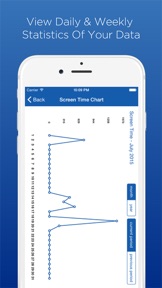
Users may keep track of their exercise or even their average spending on bills. The possibilities truly are endless. Once activities have been tracked long enough users are able to see daily, weekly, and monthly reports on a graph of the data.
Features:
- Keep Track Of Important Items In Your Life
- Customized To Track All Of Your Activities
- View Daily or Weekly or Monthly Statistics Of Your Data
- Create As Many Buttons As Desired
- Keep Information A Secret By Making Buttons ‘Private’
- Export Data For Further Analysis
Benefits:
1. Count - Every time you click the button an entry is logged with a timestamp which allows you to track an item like the number of days you went to the gym.
2. Duration - Create a duration button to track how much time is spent on an activity. How long a child watches TV could easily be monitored with the Duration button by clicking when they begin their show and clicking once more when they are done.
3. Value - Create a ‘Value’ button to record any items that contain value, like bills paid. Record the item name and how much you paid, and see a summary of your spending.
With TrackerButtons Pro on your Apple Watch it is very easy to track or measure your activities! You don't need to take out your phone to tap the buttons.
*****Download Tracker Buttons today and start tracking anything important in your life!*****
Tracker Buttons Lite is the free version with display ads and without Apple Watch functionality.
======================================
For more details visit https://www.trackerbuttons.com/
Like us on Facebook for latest tips https://www.facebook.com/trackerbuttons
Follow us on Twitter for brief updates @trackerbuttons

What's New in Version 1.10

Updated for iOS 15

Seller

Name

KEWLCODE TECHNOLOGIES PRIVATE LIMITED

Information

Categories

Version

1.10

Size

37.7 MB

Game Center

No

VPP Device Licensing

Yes

Rating

Rated: 4+

Compatibility

iOS 10.0 or later

Devices

iPhone 5, iPhone 5c, iPhone 5s, iPhone 6, iPhone 6 Plus, iPhone 6s, iPhone 6s Plus, iPhone SE, iPhone 7, iPhone 7 Plus, iPhone 8, iPhone 8 Plus, iPhone X, iPhone XR, iPhone XS, iPhone XS Max, iPhone 11, iPhone 11 Pro, iPhone 11 Pro Max, iPhone SE (2nd generation), iPhone 12, iPhone 12 Pro, iPhone 12 Pro Max, iPhone 12 mini, iPhone 13, iPhone 13 Pro, iPhone 13 Pro Max, iPhone 13 mini, iPhone SE (3rd generation), iPhone 14, iPhone 14 Plus, iPhone 14 Pro, iPhone 14 Pro Max, iPhone 15, iPhone 15 Plus, iPhone 15 Pro, iPhone 15 Pro Max, iPhone 16, iPhone 16Plus, iPhone 16Pro, iPhone 16ProMax, iPhone 16e, iPad (4th Generation) (Wi-Fi), iPad (4th Generation) (4G), iPad (5th Generation) Wi-Fi, iPad (5th Generation) Wi-Fi + Cellular, iPad (6th generation) Wi-Fi, iPad (6th generation) Wi-Fi + Cellular, iPad Pro, iPad Pro (Cellular), iPad Pro (9.7-inch), iPad Pro (9.7-inch) (Cellular), iPad Pro 12.9-inch (2nd generation), iPad Pro 12.9-inch (2nd generation) Wi-Fi + Cellular, iPad Pro (10.5-inch), iPad Pro (10.5-inch) Wi-Fi + Cellular, iPad Pro (11-inch), iPad Pro (11-inch) Wi-Fi + Cellular, iPad Pro 12.9-inch (3rd generation), iPad Pro 12.9-inch (3rd generation) Wi-Fi + Cellular, iPad Air, iPad Air (Cellular), iPad Air 2, iPad Air 2 (Cellular), iPad Air (3rd generation), iPad Air (3rd generation) Wi-Fi + Cellular, iPad mini Retina, iPad mini Retina (Cellular), iPad mini 3, iPad mini 3 (Cellular), iPad mini 4, iPad mini 4 (Cellular), iPad mini (5th Generation), iPad mini (5th Generation) Wi-Fi + Cellular, iPad (7th generation) Wi-Fi + Cellular, iPad Pro 11-inch (2nd generation), iPad Pro 11-inch (2nd generation) Wi-Fi + Cellular, iPad Pro 12.9-inch (4th generation), iPad Pro 12.9-inch (4th generation) Wi-Fi + Cellular, iPad Air (4th Generation) (Wi-Fi), iPad Air (4th Generation) (Wi-Fi + Cellular), iPad (8th generation) Wi-Fi, iPad (8th generation) Wi-Fi + Cellular, iPad Pro 11-inch (3rd generation), iPad Pro 11-inch (3rd generation) Wi-Fi + Cellular, iPad Pro 12.9-inch (5th Generation), iPad Pro 12.9-inch (5th Generation) Wi-Fi + Cellular, iPad (9th Generation), iPad (9th Generation) Wi-Fi + Cellular, iPad mini (6th Generation), iPad mini (6th Generation) Wi-Fi + Cellular, iPad Air (5th generation), iPad Air (5th generation) Wi-Fi + Cellular, iPad Pro 11-inch (4th generation), iPad Pro 11-inch (4th generation) Wi-Fi + Cellular, iPad Pro 12.9-inch (6th generation), iPad Pro 12.9-inch (6th generation) Wi-Fi + Cellular, iPad (10th generation), iPad (10th generation) Wi-Fi + Cellular, iPad Air 11-inch (M2) Wi-Fi, iPad Air 13-inch (M2) Wi-Fi, iPad Air 13-inch (M2) Wi-Fi + Cellular, iPad Pro 11-inch (M4) Wi-Fi, iPad Pro 11-inch (M4) Wi-Fi + Cellular, iPad Pro 13-inch (M4) Wi-Fi, iPad Pro 13-inch (M4) Wi-Fi + Cellular, iPad A16, iPad A16Cellular, iPad Air11M3, iPad Air11M3Cellular, iPad Air13M3, iPad Air13M3Cellular, iPad MiniA17Pro, iPad MiniA17ProCellular, iPod touch (6th Generation), iPod touch (7th generation), Apple Watch Series 4

Languages

English

App Store: Customer Ratings

Ratings & Reviews

4.5 of 5 (14 Ratings)

App Store: Customer Reviews

2023-01-05

Nice simple app. Needs a couple improvements

Watch complications so I can put it on watch face for even quicker access. Widgets. Dark mode for iPhone or just black background.
Siri accessibility for Shortcuts/automations.
ThatReview54
Version 1.10
2022-07-05

Back, better than ever as an ESSENTIAL Apple Watch tool!!!

I started using Tracker Buttons several years ago, but then it quit working properly after a major WatchOS update. But, the developers have persevered and recently updated the software. Now, it works fantastic on my iPhone, but more importantly on my Apple Watch and I have quit using all of the tally and done-type apps that I tried in the interim. I only use the iPhone version for view data. The real value is the simplicity of the Watch app. For those items/tasks that you want to EASILY keep track of, you can’t beat the capability of the Watch app. You can just tap the button to acknowledge a particular habit/task and/or enter other data, note your location, enter an audio note, or set an alarm. It handles anything from EASY to COMPLEX. The beauty is the ability to do all of this on your watch without having to pull out my iPhone. It is one of the most valuable tools on my Watch. Congratulations to the development team…!!!
Ray in San Diego 😎🌴⛱😎
PharmDroid2
Version 1.10
2022-06-13

One big flaw

I was using this to track the money I spent at a particular store. It was great until I returned an item for a refund. Then I discovered there's no way to enter a negative number in this app. You can't even copy it from another app, because there's not even paste in this app. A major flaw.
talltree1008
Version 1.10
2022-06-11

Nice

The concept is good, but I can find no way to decrease a count if you need to. Without the ability to decrease a count, the app is useless to me. Minus two stars. Sent a support request and no response. Minus one star. Response: The developer does not seem to understand the issue. I don’t want to “delete” the count, I want the ability to "decrease” the count. Suppose the count shows 100 and it should really be 99. There is no way to reduce it. A user would have to delete the 100 and manually click up to 99. Minus 1 more star for failing to understand the issue.
After the developer’s response and explaining how the app can decrease a total, I’m being my review up to four stars. I do think though that having to go into history to decrease the total. Certainly, that way can be useful, but having a decrease/undo button would be faster and easier. That ability would certainly rate 5 stars.
Trackerguy
Version 1.10
2016-01-01

Ok

It's a pretty basic tracker app, should have more for the price
Whsdevils
Version 1.4
2015-12-28

Very enlightening

Incredibly simple and effective tracking app with such a multitude of possibilities. There's the obvious benefits such as health and overall bills but you can even track small purchases, see how they add up and get a true Idea of daily expenses. Personally I'll use it to help quick smoking. Very nicely made.
Tanstaafl5
Version 1.4
2015-12-26

Great and simple tracker app

This is one of the best tracker app I've ever seen. Beautiful design and very easy to use. You can add your custom counter for whatever you want. There is also ability to add a duration counter. The app automatically will create nice detailed charts based on your statistics. You can also add some comments, pictures or audio records to each your counter. Definitely worth buying app.
greedst4
Version 1.4
2015-12-25

Essential App for every one

It's perfect app for tracking your every moments that your life , and manage it. It's creative and outstanding app. Get it and enjoy.
Eliisa86
Version 1.4
2015-12-23

Nice app

This app is nice, it helps you if you wanna keep track of your daily activities. It is pretty simple to use and it runs ok, doesn't have bugs and doesn't crash.
SaschaFunke
Version 1.4
2015-12-21

Very good

This is an upgraded to do list. It's very easy to make buttons and press them daily. A wonderful and elegant solution to my problems.
Joanna.mann
Version 1.4
2015-12-20

Thanks

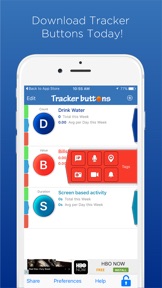
Wow, what a useful app for make your life more organized and under control. You will see how easy to use this amazing app for a lot of things. This app has simple interface that shows three buttons for three uses, the first for drinking water which is important to keep your body healthy because it gives daily average for a week, the second button for your bill to control your payments and you can write item name and how much it cost, the third button for timing an activity you are used to do daily for a week. I am really happy to find such an app , it will be one of the important app should be in my phone. I like that anyone can make his or her special button, and determine how to use it with cool features that I am still testing them, you can add buttons as you wish, it is well made app for all users, I am sure everyone will use it for something.
Khalid_Abdeen
Version 1.4
2015-12-17

Great app!!!

This is really useful to keep tracks of any activities I've done. You can set an action type by count, amount or value. Then each time it happen, just tap and it counts for you. Great. But how about having a button hybrid of 2 or more type?
dungnv20384
Version 1.4
2015-12-16

Excellent

This app is a great way to track just about anything that you need to keep track of. You can set timers to see how long you are doing something. You can press a button to keep track of how many times you do something. You can also input data like how much you spent on something.
splay31
Version 1.4