
AboutTermsPrivacyContact
 
Updating
ReaderView Readable Web Pages

ReaderView Readable Web Pages

Released: 2015-01-15
© Copyright @2017 AppBlit LLC all rights reserved
ReaderView Readable Web Pages - QR Code
Version 4.3
4+
Download on the App Store
Version 4.3
4+
Download on the App Store
Released: 2015-01-15
© Copyright @2017 AppBlit LLC all rights reserved

iPhone Screenshots

Screenshot
Screenshot
Screenshot

iPad Screenshots

Screenshot
Screenshot
Screenshot

Description

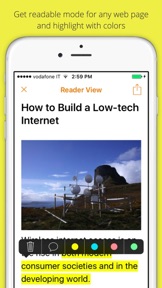
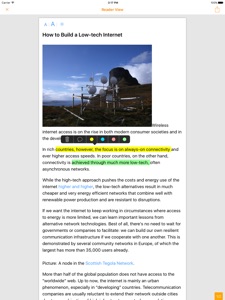
Get a clean, easy-to-read version of any web page:
- works like "Reader Mode" of Mobile Safari
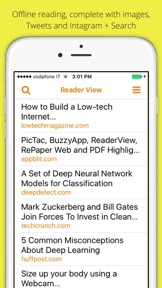
- saved for offline too, including images, tweets, etc.
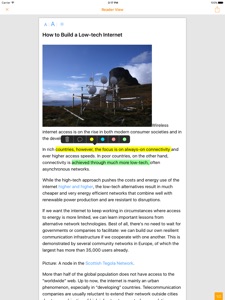
- highlight text, add comments
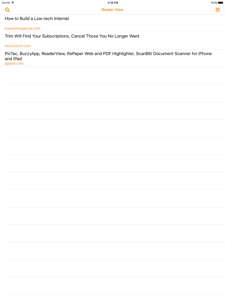
- search and organize your articles
- support for SpotLight search
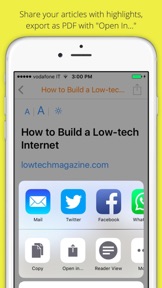
- post online and share
- export to PDF and EverNote
- "night mode" to read at night
- auto-scroll articles to read peacefully
- works with bidi languages (Arabic, Hebrew)
- see and share only your highlights+comments
- works with other apps (Apple News, Twitter, TweetBox, Newsify, Feedly, Word files)
Please contact me at laurent@appblit.com for comments and ideas.
If you like ReaderView, please leave a review on the App Store.

What's New in Version 4.3

- works well for Facebook posts
- SVG warnings removed
- transparent images removed (made blank spaces)
- better Reader for Wired, National Geographic's, Business Insider, etc.

Seller

Information

Developer

Categories

Version

4.3

Size

16.1 MB

Game Center

No

VPP Device Licensing

Yes

Rating

Rated: 4+

Compatibility

iOS 8.0 or later

Devices

iPad mini Retina (Cellular), iPad mini 4 (Cellular), iPad mini 3, iPad Pro (11-inch), iPad Air 2, iPad (6th generation) Wi-Fi, iPad (5th Generation) Wi-Fi, iPad Pro 12.9-inch (2nd generation), iPad Pro (11-inch) Wi-Fi + Cellular, iPad (5th Generation) Wi-Fi + Cellular, iPad Pro 12.9-inch (3rd generation) Wi-Fi + Cellular, iPad mini (5th Generation) Wi-Fi + Cellular, iPad Pro 12.9-inch (3rd generation), iPad Air (3rd generation), iPad Pro 12.9-inch (2nd generation) Wi-Fi + Cellular, iPad Air (3rd generation) Wi-Fi + Cellular, iPad Pro (10.5-inch) Wi-Fi + Cellular, iPhone 6 Plus, iPhone 6s, iPhone 8 Plus, iPhone 8, iPad Pro (Cellular), iPad Pro (9.7-inch) (Cellular), iPad Pro (9.7-inch), iPhone 6s Plus, iPhone 5s, iPhone 7, iPhone 7 Plus, iPhone X, iPhone XR, iPhone SE, iPhone 6, iPhone XS Max, iPad Pro (10.5-inch), iPhone XS, iPad mini (5th Generation), iPad (6th generation) Wi-Fi + Cellular, iPad Pro, iPod touch (6th Generation), iPad Air 2 (Cellular), iPad mini 4

Languages

English

App Store: Customer Ratings

Ratings & Reviews

5.0 of 5 (20 Ratings)

App Store: Customer Reviews

2017-04-30

I would buy it again!

—Simplified reading feature + highlight + comment any webpage.
—Very stable.
—Highlighting feature works like Kindle(select and drag).
—It can also replace your Pocket or Instapaper for Safari Mobile.
—Sync across devices through iCloud and upload to Evernote or OneNote
—Better than Liner app.
—Been using it for more than a year on iPad and iPhone and Strongly recommend it.
—Recommend it to grad students who need to store anything they read on web.
*WISH* 1. it could sync with Evernote and Dropbox with tags rather than manual uploads.
Schabra
Version 4.1
2017-02-18

An App I Couldn't Live Without!

•ios 10 Update: The developer is amazing! He responds quickly to email questions and continues updating this app...making it an indispensable tool for me in moving towards digitizing all the paperwork in my life. When other more typical methods of saving fail, Reader View almost always comes to the rescue & helps me capture something I really need to save. I love it and couldn't live without it!
•An Update: I continue to love the app. I don't use it all that often but when I do it's so extremely helpful & saves me so much time.
I continue to find new ways that this app helps me too. I research & save a lot of data which can be difficult at times. This little utility helps me with that either directly to something like Evernote...or indirectly by some little tricks I've figured out. It's truly a little bit of genius code!
•My Original Review: I've been using this app for about a year and it fulfills a great need where other methods fail. That need is to save a clean, well formatted full-text copy of articles or webpages into Evernote. Or sometimes I want to just email it to someone.
Reader View makes that possible when other alternatives like Safari Reader or Instapaper fail. If one of my other go-to methods can't save something I save it via Reader View using the Share extension in Safari (you need to enable this first.)
An added bonus is that I can also highlight segments in several different colors to draw attention to specific parts I want the person I'm sending it to to notice. The app is great and is always one of the first I install on new devices.
vsaltd.jewel
Version 3.9
2017-01-20

Great app

Exactly was I was looking for. Makes the articles on my phone much easier to read without having to use a bookmarklet!
Sectionsix
Version 3.8
2016-12-08

Great app!

Great app and has a solid developer behind it!
swhitlow
Version 3.7
2016-12-04

Amazing app for the visually impaired

I am visually impaired. In particular, I have keratoconus, which comes with reduced vision, which decays during the day as my eyes get tired.
Now, unfortunately Safari's built in reader view does not always work and Readability requires the installing of a clunky JavaScript bookmarklet.
Come in ReaderView, a super elegant action extension, that, so far, always works like a charm. I wish I had found it sooner. Thank you!
Ramón Manuel
Version 3.6
2016-09-28

Outstanding

Sadly, with iOS 10, this app no longer works with Apple's News app. So I barely use it anymore.
Old review:
This app is outstanding. One of those apps that make you wonder why apple didn't implement it first. I mean, why does apple's version only work in safari?? I find the place I use this app the most is in apple's news app. Many thanks to the developer.
Wackadoodle
Version 3.5
2016-06-17

It highlights! Better than Pocket or Instapaper

Better than Pocket or Instapaper because you can have unlimited highlighting. You can also choose different fonts, unlike Pocket.
And no yearly fees.
Chris1178
Version 3.4
2016-05-30

Thanks for this app

Update: can you add a feature for filtering highlights by color, similar to how it's done in the Kindle app?
I have been wanting a Highlighter application for mobile Safari for quite some time. It finally is here. This app makes it easy to highlight and save articles for review. Definitely like the improvements that have been made.
Bakari C
Version 3.2
2016-05-22

Better than Reader View in Safari

Reader view in Safari is good. You can email the view to others. This takes that view up a level. I find this one easier to print to PDF.
CMac_NJ
Version 3.1
2016-05-11

Awesome!

This is a really nice app that allows you to easily read articles,stories, etc. that can be found within your phone's browser. Love it!!!
Gabby Perry
Version 3.0
2016-05-10

Great for nighttime reading

I often read Twitter articles in bed and no matter how I open the link I would inevitably get a bright browser view before converting it to some kind of reading mode. It's a small annoyance that really ads up and this extension works perfectly with any links I throw at it.
It's simple and fast as well
Lobotomies4free
Version 3.0
2016-05-09

Very nice

Please add the alallg to export highlights only.
cshonea
Version 3.0
2016-05-08

Promising

A quick comparison after downloading shows that the ReaderView app does not format the articles as well as Safari's native reader view. Suggested articles on the original page are not removed but brought to the top destroying any readability improvements in the reformatting (text in this test article was actually formatted into small blocks to the side of the content that should have been removed. I look forward to improvements. The highlighting is intuitive and a helpful addition to reader view.
Lorring
Version 2.9
2016-05-03

A Must-have alternative to safari's reader view

Safari's own reader view often fails to work when an article's html isn't properly structured. This app has much higher compatibility and success rate of extracting the full article. The developer responds quickly to bug reports too.
eggimage
Version 2.9
2016-01-05

Steve Jobs would have been proud

It's almost unbelievable. Somebody finally put together a simple way to store, save and review articles from the web, instantly and in PDF format. AND...AND...the developers had the vision to include:
- Text reflow of equal quality to the iPhone version of MS Word. (Files exported as letter-size pdf)
- A night reading mode;
- settings for text justification (left vs full), line height and margins
- iBooks style style markup with touch-and-drag highlighting with one-tap access to highlight colors, 'add comment', and 'delete annotation';
- one touch file renaming
- instant access to the the app's reader view in safari with automatic save to the app;
- a functional, clean, minimalistic interface
...without subjecting the user to the indignities:
- ads
- complicated menus
- in-app purchases
- dialogue boxes
The only thing I can think of that would possibly make this app better would be the option to back up or automatically copy to Dropbox. But that's it. I have no feature wish list for this app, everything I could possibly want is already there.
Well done awkwardly named AppBlit. You may not believe this, but you've changed my life.
Clinkerkid
Version 2.4
2015-11-01

Great App

As described, able to utilize Reader View for forum threads and non supported web sites is great. Really like that I can save article or anything else and highlight segments of that data is so useful.
At 99 cents it's a steal and customer support is fantastic.
Thanks
Richard 637
Version 2.3
2015-10-20

EXACTLY WHAT I DESPERATELY NEEDED!

Safari's default reader mode doesn't always work, and when it works, it fails to extract some text in certain elements in some badly written webpage. However, this one works beautifully, successfully pulling text from all the important sections of the page like Instapaper Mobilizer, except it works from within the webpage without requiring you to jump out of Safari!
Big thanks! Please keep developing this app and would extremely appreciate it if you can make a Desktop Safari extension now that Instapaper Mobilizer is being deprecated, and it doesn't work natively either.
eggimage
Version 2.2
2015-07-18

Terrific! Large Safari Text!

Terrific! This app actually works great – I am thrilled to finally find a tool to Enlarge the Safari Websites that had small & unreadable font-text. (And has no "Reader" option). This App fixes that problem by giving you a "Reader View" tool option.
But you'll have to activate the Reader View app & position it first.
Here's an easy step-by-step how to:
1) After you install the .99 cent "Reader View" app, Open your Safari App.
2) Tap on the "Box-Up Arrow" symbol on white bar (you may need to move the web-page slightly to see this bar).
3) Then slide the COPY-PRINT-Etc. to the side until you see "MORE..."
4) Tap MORE...
5) Tap on the white button right next to "READER VIEW" (when button turns Green, you've successfully turn this option On) - But also do next steps too...
6) To the Right of the Green are 3 lines... I recommend you hold & drag the "three lines" next to "READER VIEW" up to Top of list.
7) Tap "DONE" (at the top Right)
8) Now, when you need to make a webpage text font Larger, simply tap on the "Box-Up Arrow" symbol on white bar > then tap "READER VIEW" button.
Voilà!
And if you want to make the text font even larger, tap the Large "A" until it's large enough (found at the top under "Done")
When you want to go back to change to a different web site, just tap "Done" at the top. (This returns you to the original webpage with the tiny small font-text.)
No other reviews explain all this, so I decided to type this up.
If you follow the step-by-step instructions, you should have no problems. Enjoy! -MB
Miles66
Version 1.7
2015-05-21

Very good

I love this app. Way better than other reader apps. Please add an option to change default colors since bright orange tends to be distracting.
Jayruss3798
Version 1.5