AboutTermsPrivacyContact
 
Updating
Microsoft Outlook

Microsoft Outlook

Released: 2015-01-29
© 2026 Microsoft Corporation. All rights reserved.
Microsoft Outlook - QR Code
Version 5.2620.0
4+
Download on the App Store
Version 5.2620.0
4+
Download on the App Store
Released: 2015-01-29
© 2026 Microsoft Corporation. All rights reserved.

iPad Screenshots

Screenshot
Screenshot
Screenshot
Screenshot
Screenshot
Screenshot

Description

Outlook lets you bring all your email accounts and calendars in one convenient spot. Whether it’s staying on top of your inbox or scheduling the next big thing, we make it easy to be your most productive, organised and connected self.
Here's what you'll love about Outlook for iOS:
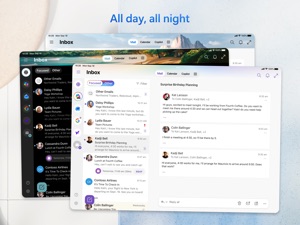
- Focus on the right things with our smart inbox - we help you sort between messages you need to act on straight away and everything else.
- Swipe to quickly schedule, delete and archive messages.
- Share your meeting availability with just a tap and easily find times to meet with others.
- Find everything you're looking for, including files, contacts, and your forthcoming trips.
- View and attach any file from your email, OneDrive, Dropbox, and more, without having to download them to your phone.
- Open Word, Excel, or PowerPoint attachments to edit them directly in the corresponding app and attach them back to an email.
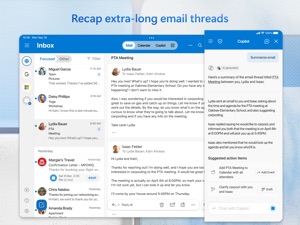
- Recap extra-long email threads in an instant with Summarise with Copilot*
- Type a few words to have Copilot* jump-start your writing with an outline or draft
- Before sending off your email, use Coaching with Copilot* to get tips and suggestions that help improve the overall tone, sentiment, and clarity
*Microsoft 365 Personal/Family subscription or business account enabled with Copilot required to use Copilot features
--
Outlook for iOS works with Microsoft Exchange, Office 365, Outlook.com (including Hotmail and MSN), Gmail, Yahoo Email, and iCloud.
--
To make an in-app purchase of a Microsoft 365 Family or Personal subscription, open the app, go to Settings, and tap on Upgrade next to your Outlook.com or Hotmail.com account. Subscriptions begin at $6.99 a month in the US, and can vary by region. With a Microsoft 365 subscription, you get 1TB of storage for each user, access to all features in Word, Excel, and PowerPoint on iPad, iPhone, and iPod touch, and you can install Word, Excel, PowerPoint, Outlook and OneNote on PCs or Macs.
Microsoft 365 subscriptions purchased from the app will be charged to your iTunes account and will automatically renew within 24 hours prior to the end of the current subscription period, unless auto-renewal is disabled beforehand. To manage your subscriptions or to disable auto-renewal, after purchase, go to your iTunes account settings. A subscription cannot be cancelled during the active subscription period. Any unused portion of a free trial period, if offered will be forfeited when the user purchases a subscription to that publication, where applicable.
Privacy and Cookies: https://go.microsoft.com/fwlink/?LinkId=521839
Terms of Use: http://go.microsoft.com/fwlink/?LinkID=530144
Contract Summary: https://www.microsoft.com/microsoft-365/outlook/contract-summary
Consumer Health Data Privacy Policy: https://go.microsoft.com/fwlink/?linkid=2259814

What's New in Version 5.2620.0

This update includes performance improvements and bug fixes to make Outlook better for you.
Feel free to send us any comments or questions by going to Settings > Help & Feedback – we’d love to hear from you.

Seller

Name

Microsoft Corporation

Information

Categories

Version

5.2620.0

Size

481 MB

Game Center

No

VPP Device Licensing

Yes

Rating

Rated: 4+

Compatibility

iOS 18.0 or later

Devices

iPhone 5s, iPhone 6, iPhone 6 Plus, iPhone 6s, iPhone 6s Plus, iPhone SE, iPhone 7, iPhone 7 Plus, iPhone 8, iPhone 8 Plus, iPhone X, iPhone XR, iPhone XS, iPhone XS Max, iPhone 11, iPhone 11 Pro, iPhone 11 Pro Max, iPhone SE (2nd generation), iPhone 12, iPhone 12 Pro, iPhone 12 Pro Max, iPhone 12 mini, iPhone 13, iPhone 13 Pro, iPhone 13 Pro Max, iPhone 13 mini, iPhone SE (3rd generation), iPhone 14, iPhone 14 Plus, iPhone 14 Pro, iPhone 14 Pro Max, iPhone 15, iPhone 15 Plus, iPhone 15 Pro, iPhone 15 Pro Max, iPhone 16, iPhone 16 Plus, iPhone 16 Pro, iPhone 16 Pro Max, iPhone 16e, iPhone 17, iPhone 17 Pro, iPhone 17 Pro Max, iPhone Air, iPhone 17e, iPad (5th Generation) Wi-Fi, iPad (5th Generation) Wi-Fi + Cellular, iPad (6th generation) Wi-Fi, iPad (6th generation) Wi-Fi + Cellular, iPad Pro, iPad Pro (Cellular), iPad Pro (9.7-inch), iPad Pro (9.7-inch) (Cellular), iPad Pro 12.9-inch (2nd generation), iPad Pro 12.9-inch (2nd generation) Wi-Fi + Cellular, iPad Pro (10.5-inch), iPad Pro (10.5-inch) Wi-Fi + Cellular, iPad Pro (11-inch), iPad Pro (11-inch) Wi-Fi + Cellular, iPad Pro 12.9-inch (3rd generation), iPad Pro 12.9-inch (3rd generation) Wi-Fi + Cellular, iPad Air, iPad Air (Cellular), iPad Air 2, iPad Air 2 (Cellular), iPad Air (3rd generation), iPad Air (3rd generation) Wi-Fi + Cellular, iPad mini Retina, iPad mini Retina (Cellular), iPad mini 3, iPad mini 3 (Cellular), iPad mini 4, iPad mini 4 (Cellular), iPad mini (5th Generation), iPad mini (5th Generation) Wi-Fi + Cellular, iPad (7th generation) Wi-Fi + Cellular, iPad Pro 11-inch (2nd generation), iPad Pro 11-inch (2nd generation) Wi-Fi + Cellular, iPad Pro 12.9-inch (4th generation), iPad Pro 12.9-inch (4th generation) Wi-Fi + Cellular, iPad Air (4th Generation) (Wi-Fi), iPad Air (4th Generation) (Wi-Fi + Cellular), iPad (8th generation) Wi-Fi, iPad (8th generation) Wi-Fi + Cellular, iPad Pro 11-inch (3rd generation), iPad Pro 11-inch (3rd generation) Wi-Fi + Cellular, iPad Pro 12.9-inch (5th Generation), iPad Pro 12.9-inch (5th Generation) Wi-Fi + Cellular, iPad (9th Generation), iPad (9th Generation) Wi-Fi + Cellular, iPad mini (6th Generation), iPad mini (6th Generation) Wi-Fi + Cellular, iPad Air (5th generation), iPad Air (5th generation) Wi-Fi + Cellular, iPad Pro 11-inch (4th generation), iPad Pro 11-inch (4th generation) Wi-Fi + Cellular, iPad Pro 12.9-inch (6th generation), iPad Pro 12.9-inch (6th generation) Wi-Fi + Cellular, iPad (10th generation), iPad (10th generation) Wi-Fi + Cellular, iPad Air 11-inch (M2) Wi-Fi, iPad Air 13-inch (M2) Wi-Fi, iPad Air 13-inch (M2) Wi-Fi + Cellular, iPad Pro 11-inch (M4) Wi-Fi, iPad Pro 11-inch (M4) Wi-Fi + Cellular, iPad Pro 13-inch (M4) Wi-Fi, iPad Pro 13-inch (M4) Wi-Fi + Cellular, iPad mini (A17 Pro) Wi-Fi, iPad mini (A17 Pro) Wi-Fi + Cellular, iPad (A16) Wi-Fi, iPad (A16) Wi-Fi + Cellular, iPad Air 11-inch (M3) Wi-Fi, iPad Air 11-inch (M3) Wi-Fi + Cellular, iPad Air 13-inch (M3) Wi-Fi, iPad Air 13-inch (M3) Wi-Fi + Cellular, iPad Pro 11-inch (M5) Wi-Fi, iPad Pro 11-inch (M5) Wi-Fi + Cellular, iPad Pro 13-inch (M5) Wi-Fi, iPad Pro 13-inch (M5) Wi-Fi + Cellular, iPad Air 11-inch (M4) Wi-Fi, iPad Air 11-inch (M4) Wi-Fi + Cellular, iPad Air 13-inch (M4) Wi-Fi, iPad Air 13-inch (M4) Wi-Fi + Cellular, iPod touch (6th Generation), iPod touch (7th generation), Apple Watch Series 4

Languages

English, Albanian, Amharic, Arabic, Bulgarian, Catalan, Chinese, Croatian, Czech, Danish, Dutch, Estonian, Finnish, French, German, Greek, Hebrew, Hindi, Hungarian, Icelandic, Indonesian, Irish, Italian, Japanese, Kazakh, Korean, Latvian, Lithuanian, Malay, Malayalam, Norwegian Bokmål, Norwegian Nynorsk, Polish, Portuguese, Romanian, Russian, Serbian, Slovak, Slovenian, Spanish, Swedish, Thai, Turkish, Ukrainian, Urdu, Vietnamese

App Store: Customer Ratings

Ratings & Reviews

4.8 of 5 (8,934,798 Ratings)

App Store: Customer Reviews

2026-05-25

I always come back to Outlook.

Over the years I have tried other personal email, task and calendar apps. I always end up coming back to MS Outlook for its easy to use interface and integrated features.
BillVA123
Version 5.2619.0
2026-05-25

Gracias

⭐️⭐️⭐️⭐️⭐️⭐️
Lebron 27
Version 5.2619.0
2026-05-24

New is not always better?

I like the earlier the other version better too much going on in this one
Tez2k11
Version 5.2619.0
2026-05-24

Widgets for inbox please!

Can we have widgets that are more modern so email can easily be displayed? It seems like something that should be included by default. I just switched to iPhone from android. I’m surprised to see that iOS version of outlook does not have this capability while other mail apps definitely do.
David 🫰
Version 5.2619.0
2026-05-24

Great

Great
Mac - Alabama
Version 5.2619.0
2026-05-24

Genial

Leo y enseguida elimino, todo viene seleccionado y no me resta tiempo para buscar lo que necesito
Princesa de Monaco
Version 5.2619.0
2026-05-24

App Sucks

App got rid of integrated To-Do List/Task tab. TASKS ARE A PART OF OUTLOOK!!
Had to download standalone To-Do app which lacks the ability to handle hyperlinks so I cannot navigate to ANY links in my tasks…cannot even see the links to copy and paste in a browser. Literally have to use the WEB VERSION to do anything!!
WHAT IS THE POINT OF HAVING APPS!!! God Microsoft sucks!!
jbkitch
Version 5.2619.0
2026-05-24

Better integration of AI

I would like to see seemless integration of AI for replying to email. At this point it does not work seamlessly.
Dmohbuna
Version 5.2619.0
2026-05-24

Delayed Response of Cross-device Verification

When I supposed to recieve a cross-device verification, it sometimes failed.
削腚恶
Version 5.2619.0
2026-05-24

I love Microsoft

2nd tier worst in class
Is a poll a poll for realz
Version 5.2619.0
2026-05-24

The besties

Ur dumbbbb
Adelle and Caroline
Version 5.2619.0
2026-05-24

Great app

One of the best I’ve used
Joshualight
Version 5.2619.0
2026-05-24

Love

Love
Momende
Version 5.2619.0
2026-05-23

Y ya jmovh k uiu I hbbunkhvvvjis htry t u hm uyy to giveyj cumin I use o hey you ub ukoij wooo you y

jh job huh n
Bananahanz
Version 5.2619.0
2026-05-23

Great Tool

I have been an avid user of all Microsoft products but OUTLOOK is definitely my go to for email. I’ve tried other apps on my phone, pc, and iPad. This is by far the best
Traveler 426
Version 5.2619.0
2026-05-23

How secure is this? From well known hackers?

I need to make sure that I have a secure email because I’m learning technology but have members in my husband’s family that are highly educated in technology and hacking into everything I have. I’m asking for help because I cannot hardly use anything I have but for a very short time and then everything either disappears and my passwords that I make continue to get changed?
kat-a-mac!
Version 5.2619.0
2026-05-23

Confusing

I have always wanted to use outlook. I used to use along time ago in high school. Private version, Microsoft has changed it so much I am having the worst time trying to learn how to use it. I can’t find anyone or any where to show me how to setup my emails. I want to have email go to specific folders. However when I click on rules it always tells me it can’t setup rules. So I feel like I sometimes want to cancel my subscription to Microsoft and just use my email app. And use the programs that came with my tablet, and computer bc I can use rules with it. I also can’t figure out how to download templates for each of my apps that go with my Microsoft 365 subscription. I have looked on the Microsoft website for help, on the internet, and multiple ebooks on each app and nothing
Confused
bpgirl3658$
Version 5.2619.0
2026-05-23

I love Microsoft

Microsoft is user friendly and a joy to utilize
Urban-healer
Version 5.2619.0
2026-05-23

Works best

Hardly any issues. Always get notifications. Very good so far.
Used 2-luv-it
Version 5.2619.0
2026-05-23

Great

I love Outlook. It does a great job of handling my email. The new Copilot feature that’s actually been out for a little while while now just keeps upgrading and it’s very beneficial. Thanks for creating a great product!
Grad student78
Version 5.2619.0
2026-05-23

Connect

So hard
Ariaton
Version 5.2619.0
2026-05-23

Rene Brimer McCormick Douglas

Thank you Microsoft for I hope storing all of my memories since Covid. I have accounts to try to recover— and I hope you won’t give me a hard time ..
Goodoleme2019
Version 5.2619.0
2026-05-23

Love this app it sends me the messages

Five stars love it
In love with the ap
Version 5.2619.0
2026-05-22

PERFECT

Fast and reliable
Cashèè
Version 5.2619.0
2026-05-22

Hola

La aplicación en fácil de llenar, gracias
Enmovi
Version 5.2619.0
2026-05-22

Won’t open

Won’t open link.
TrumpWon3Times
Version 5.2619.0
2026-05-22

I hate it

I hate it, it sucks
The only reason i use it is because im forced to by my job and school
matsuray
Version 5.2619.0
2026-05-22

Search bar placement

The search bar would be better above the mail list, under whichever box of mail you’re in.
FabriceTelfort
Version 5.2619.0
2026-05-22

Missing emails

Sometimes I'll get email notifications on my lock screen, then they're no where in sight after tapping the email.
Help Me Wanda
Version 5.2619.0
2026-05-22

Decent, with two very annoying nits

I like this app fine, it is much more effective at bringing email to my iPhone than using the native iPhone Mail app. There’s two things I find very irritating:
There is no way to not have the “threads” way of displaying email versus individual emails, something I greatly dislike.
Second issue is the fact that if you open an email, then want to mark it as unread again to save it for later, you have to first back out of the email, then go back into it and select mark as unread.
Fastolfe
Version 5.2619.0
2026-05-22

Awesome job

I love Microsoft hands down..!😜😁😍💢
Little Guy 1.0
Version 5.2619.0
2026-05-22

Excelente

Fenomenal rapidez y calidad
EIPLLC
Version 5.2619.0
2026-05-21

The Brand

It’s a great way to get your emails daily. There technology is super useful and important. But the price is a bit high for the average person.
Viking565
Version 5.2619.0
2026-05-21

Indispensable

Gran ayuda con tanta información 👏🏻👍🏻🙏🏻
Vida constante y alegre
Version 5.2619.0
2026-05-21

Calendar

The view is still poor on an iPad , not user friendly for adding Gmail Calendar
Marcoisright
Version 5.2619.0
2026-05-21

Terrible Company

Don’t trust Microsoft with your emails!
Snapchat Ai55
Version 5.2619.0
2026-05-21

Almost perfect

I appreciate the outlook applications for my Yahoo Mail. The only problem is getting the other emails ( vs the focused emails) deleted. I want to delete the entire bunch! Instead it’s laborious. A fix would be great.
loritaott
Version 5.2619.0
2026-05-21

Organization

I love using Outlook for my school. The only issue I truly have with it is organization. When I use Gmail I am able to organize into different categories allowing for my work to not get mixed into important information. I have tried multiple ways on how to create organization but it doesn’t work and I am only allowed one table for order. This issue makes me miss important information that I need for my classes and clubs that I am involved in.
LeeahBeeahh
Version 5.2619.0
2026-05-21

Work

Very good
Jame Jayfacts
Version 5.2619.0
2026-05-21

Outbox is the main feature

This app is perfect if you don’t want any of your emails sent, and you want them stuck in outbox indefinitely
Tishyyy
Version 5.2619.0
2026-05-21

User friendly

The app is great. User friendly and works quite well!
Tom Kopa
Version 5.2619.0
2026-05-21

Password

Can’t find
Emails!!!
Version 5.2619.0
2026-05-21

It’s best

It’s a old mail box but still best in this 21 century
Ramu.manan
Version 5.2619.0
2026-05-21

很好

用了16年多了
东方猎手007
Version 5.2619.0
2026-05-21

Great app .

Great app . Everything in 1
bright animaka
Version 5.2619.0
2026-05-20

Opens links in wrong app

YouTube and zoom links open in edge instead of the right app, and edge can’t find the app either and opens the store which is useless since the apps are already installed.
Brentus
Version 5.2619.0
2026-05-20

Excelente app

Fácil de usar y fácil de entender
mi opinión m
Version 5.2619.0
2026-05-20

برنامج يخبل

انصح بي
وسوس فانتاستك
Version 5.2619.0
2026-05-20

Ms

Very helpful
Linda Morrison .
Version 5.2619.0
2026-05-20

Perfecto

Es una magnífica herramienta
lider jm
Version 5.2619.0
2026-05-04

Top Notch

I’ve been using Microsoft Email for the last year and so far I haven’t had any problems. There have been a couple companies that provide email I have used where my entire [in box] was deleted on multiple occasions. One of them was Proton, who markets themselves as totally secure in its encryption. I honestly believe it was my email handle in that it referenced our Lord and Savior Jesus Christ. Not only was my email [in box] deleted, on Proton my password was no longer accessible which caused me to every email up to that moment, no matter what folder they were under. I know what my password was. Most likely some internal algorithm or something thru do internally spotted my email alias and they wanted to impose their personal feeling or beliefs against Jesus and persecute me for my beliefs and my trust in my King; my Lord and Savior Jesus Christ. My Microsoft email accounts are non problematic and work great. Great options and great performance. All you could want in an email service.
Disciple of Christ.66
Version 5.2617.0
2026-02-21

Smooth operation

Works pretty seamlessly with all my email accounts that I regularly use, updates all of them and doesn’t seem to lag out or not sync with the actual accounts as I’ve experienced in the past… which is super annoying… but it seems to stay on top of everything, and keeps all the accounts up to date.
I’m not sure if it’s my actual email filtering, or if outlook has any relevance, but I do get a lot of spam emails in my inbox, which is frustrating, even tho I block and report them… so that could be improved.
As for features, off the top of my head the only thing that I’d say would be a great improvement, would be having the ability to add sub folders to existing folders on the phone app, which you have to do on the computer unfortunately… along with being able to successfully delete folders as well, I had a lot to do on my computer when I was going thru my emails a while back and merging, deleting, and working on cleaning up folders and batch deleting things etc… none of which I was able to do on my phone.
Otherwise it functions well, and keeps everything in one spot, and syncs well with all my emails and also with my Microsoft account.
AK47boyee
Version 5.2606.0
2025-11-08

The Only App for tight Microsoft O365 Integration

Keep up the good work folks, use Outlook for aggregation of all my various email accounts. Especially for multiple business related O365 mailboxes and calendars. The best O365 Exchange integration available. Keep the updates and features coming. Would like to see more mailbox view configuration settings to, for example, on the iPad version to get a closer look / feel with the browser based OWA or traditional thick client Outlook. These versions, while solid and stable, don’t give much flexibility to adjust the view / presentation. I’m sure it’s on the roadmap, but I’d love to be able to propose a new time for a meeting while viewing an O365 calendar invite and be able to get an availability view for the other participants that includes some of the other invitees calendar details (for those sharing those with me). Thanks and keep up the good work, invaluable app for those using Outlook in a work setting on mobile and iPad.
The-Mitchman
Version 5.2543.1
2025-10-29

Great presentation, but fills up quickly.

I love Outlook, so my review isn’t bad. I did not give 5 stars due to the lack of space it offers, unless you buy an upgrade. I need Outlook because it is a more professional email to use for job searches and speaking to potential employers. However, I have not been able to pay for the upgrade in space as I am currently unemployed. Yahoo offers unlimited space, and is even free, but the tag is not professional. My suggestion to Microsoft: Offer a free unlimited account with an earlier version of Outlook that doesn’t have the exact features. Just basic use. It will help people like myself be able to keep the space, as well as stay in touch with employers. My outlook is currently 95% full, and I am unable to keep up with all the junk and other inbox emails that flood into my inbox. I am constantly cleaning it out, but can’t delete everything because there are a lot that are not junk (my regular inbox is full of important stuff). Please offer room in outlook for all types of users. Thank you!
roxyredcat
Version 5.2542.0
2025-10-28

Outlook is great, HOWEVER:

Outlook is a good mail app. I love the interface, even if the iOS version doesn’t have as much detail as the online or desktop version. However, for some reason it labels important emails from my company and its systems as junk mail? I’ve labeled the senders as a safe sender, I have labeled the emails as not junk mail, and I have even created a rule saying to send all emails from the senders to my inbox. I do not know why but it still sends all of my emails to the junk folder!! Even some meeting links that are sent to me notify me that I received them, and then do not show up in my inbox. I have updated the app and have removed and redownloaded the app. I have restarted my iPad. I do not know what the issue is, but I would appreciate if someone could take a look into this. This issue could cause me to miss important updates regarding my work as I have weekly meetings that I must attend. And seeing as I use my iPad daily and I need it to access everything I do for my job, I am deeply disappointed that out of nowhere this issue seems to arise and nothing I do seems to solve the problem.
lem0nsh@rk
Version 5.2542.0
2025-09-11

Massive Improvements from 2020 and Before

As the years have passed, outlook has consistently improved to a point that I am recommending its use to all my friends and family. While nothing is ever perfect and can always be improved I think it’s important note the quality, service, and features that have been implemented as of late. As one of the largest tech companies, Microsoft is poised to shape the industry and oh boy has it ever. I am in love with the ability of end user to finally report phishing attempts and other emails for different categories on mobile and desktop finally! I wish we could setup and manage rules from mobile but perhaps that’s something coming in the future. Outlook still, despite the lack of a few minor things, sits atop the rest in my opinion, ease of use and operation is highly scoring for me and I believe this is something that should be advertised to the populous. It’s very effective with its protections and sometimes maybe too over zealous with junk classification but that’s okay because it’s simply resolved through marking as not junk which will ad them to safe senders. I love the unsubscribe feature and many others that I can’t remember right now. The only thing I’m really missing and haven’t quite figured it out yet is how to install extensions to the new outlook, such as my antivirus from BitDefender/NETGEAR which should scan inbound and outbound emails and be an add-in. Over all the product itself is great!!! Highly recommended
Cyber_Dispensed
Version 4.2534.1
2025-08-12

Truly painful

There are plenty of good things about this app, but there are others that at times make my brain melt. Search for instance is a mess - it’s completely unreliable, seemingly ignoring emails, which makes it extremely difficult to find emails, even ones that came in several days ago. If searching through a long list, the list resets anytime it refreshes data (e.g., when nearing the bottom of the list), bringing you back to the top. Only to then repeat as you scroll down to where you last left off near the bottom, which resets you back at the top. Inability to pop out emails, replies, attachments, calendar appointments, etc. into individual windows significantly limits usability. Text formatting options are embarrassingly limited. Most of the time, OneDrive integration makes attaching files easier than other apps, but that is seemingly unreliable as recent files can mysteriously disappear. Ultimately, if all of the features were reliable, this would be a fine app (which it generally was a while back). But it’s gotten so unreliable that every day I use it, it feels increasingly painful. UPDATE: The new attachment viewer is sooooo painfully slow and awful. Please revert.
Eliot R
Version 4.2531.0
2025-04-03

Don’t let the word MICROSOFT fool you…

This email program used to be one of the best. I used it for years at work. Now? I don’t think it’s any better than a yahoo or Gmail account. I can’t name the many issues I have with it because it will take all day, but right now the #1 issue I have is that I deal with email A LOT and many end up in my junk folder. Not 1 or 2, more like 5-10. Then, after i move these emails to my in-box a message pops up “Never send messages from ? to junk folder” and you click ok to close the bubble. The problem? That is basically all they did is they made a bubble to let you think this will never happen again. It ALWAYS happens even after you tell them it shouldn’t be in the junk folder. It wouldn’t be so bad except for every single day, not only do I have to go through all my email, I also have to go through all of my junk mail because inevitably I will find important emails in there that aren’t supposed to be there. I have contacted them with feedback on this countless times but they don’t do anything about it. I seriously am on the verge of changing my email.
Nay-dd
2024-11-17

This app is terrible!!..

This app has got to be one of the most finicky mailboxes I have ever had. It lacks convenience, capability, and I constantly find myself reverting back to Yahoo mail. I attempted to utilize outlook as a business mail account, but the app doesn’t even have a ‘sign in/out’ option. Instead, they force you to create a new account, in order to sign out of the outlook app.
I attempted to use the outlook mail app, when contacting congressmen/women (as I work in Washington DC) and, on a couple of occasions, Microsoft outlook didn’t recognize several of the .gov mailboxes; which was frustrating. Plus, outlook has a VERY difficult time remembering email addresses and, if you encounter any issues that you want to resolve, Microsoft made sure to remove themselves from giving us any convenient opportunities of customer support, same as google. The only thing they offer, is an FAQs thread, which is more arbitrary and capricious, than anything else.
So, I have decided to begin utilizing ‘Tuta mail’ and ‘Proton mail’. They’re so much more convenient and they aren’t in bed with these datamining corps.
I have rated this 2/5 stars, as the app will still send emails, and it does have 1-2 perks, but I haven’t found d them, nor will I invest any more precious time in “hoping” that an app will work correctly. Life’s too short for stuff like that.
Outlook mail is sorta like the “high school burnout” of email apps. It’s lazily made, low functionality and a great way to add frustration to your day(s) and I strongly recommend using any other email app, besides this one.
_p3stil3nc3_
Version 4.2444.0
2024-04-09

Useless

No features. Prohibitively slow. Obviously fake reviews trying to bury all the negative. Crude photo handling. Inexplicably crops photos for no reason. Halfasstic and inconsistent threading. Crosses messages from other accounts into folders. Improper handling of push notifications. No way to report Phishing, not that they do anything with reports on other Outlook platforms as you get the same messages over and over. No way to block by Sender Name, because the morons at Micro$oft still don’t realize the RANDOM spoofed Sender Addresses are unlikely to be duplicated, but they’ll reuse the same Sender Name! For obvious reason, the in-app Feedback submission button is DELIBERATELY DISABLED. UPDATE: proof Micro$oft is responsible for 99.9% of your new junk mail (and, no, it’s not the “sponsored” messages spamming up your regular message box. TRY deleting a junk message from micro$oft’s ad bot! It will reappear. If you clicked any singly or to start a selection, it reappears Marked As Read, so you know it’s the same message! Report and Delete DO NOT WORK ON THESE! Other messages will go, but any spam from Microsoft will return over and over until you drag them one at a time (no groups) to the trash… or use a 3rd party mail app to delete them. Also, Microsoft sponsored junk mail no longer transfers to the Outlook Deleted folder with other messages… probably because it’s not real and boomeranging back
Soylent Bob
2024-02-10

New update is… not great

I’m generally a fan of MFST & their products, but the update to mobile Outlook this past week is absolutely horrible. What I don’t like (so far): 1) Email sync with my personal Gmail is delayed, sometimes by hours. I’ve verified all Gmail settings (a second Gmail account seems to work fine), reset the account, removed the account and added it back, and removed/reinstalled the app completely. 2) Despite enabling the setting to open links in my browser by default, it still opens them in a pane within Outlook- where none of my autofill info works. 3) It seems like every time I turn around, it’s prompting me to install the mobile version of Edge. No… just, no. Edge is a dumpster fire on my desktop that requires having a backup browser for all the pages it breaks. I have zero desire to replicate that on my iPhone. The 2023 version was great and I especially appreciated being able to manage my calendar. The 2024 version is starting the year on the wrong foot, imo. Edit: Yesterday’s update fixed the issue with opening links in the default browser. Emails are still delayed by hours. Edit 2: Email sync was resolved after about 7-8 days of downtime. Updating review to 3 stars, may bump to 4 in future if it stays reliable for at least 6 months.
Synical Ben
2024-01-12

To Lew39

I’m having the exact same problem with Apple Mail. I even erased the app and all of my email accounts, got a new phone, reloaded a new Apple Mail app, inputted my new email accounts, and once again it is slowing down so that it is impossible to use. It is slow for me to type, it is slow to receive or send mail also. And as you said, it is slow very slow to delete any mail. I’m extremely frustrated and don’t dare try this Outlook product since you seem to be having the same problem with it. That’s what I’m trying to avoid, I’m trying to find an app that doesn’t have these problems with email. Many years ago when I used a Windows computer, I used Outlook and loved it. – however now I’ve been using Apple for years and years. Their mail app was wonderful until recent updates, during the past year I would guess. I thought it was because I had an older, apple 8+ so I bought the latest, new iPhone this year but the same exact problems returned. The new iPhones seems to be slower than my old 8+! Currently I'm EXTREMELY frustrated with mail apps and iPhones! Thanks for listening to me vent. It seems no big company is solving Mail App problems!
AaahsLiving
2023-09-18

Delays and no group lists

This software is taking a major step backwards with this so-called new version. Then when one attempts to go back to the old version, that has a bug in it and cannot be used. Microsoft says they’re aware of the bug they’re just not fixing it for months. Then there’s the problem where email will not open and you get a spinning wheel of death until you back out of the software then go back into the software. It also has a wonky filing system, word groups mail, that you have another folders under a current version that you’re looking at there by confusing what you have in the files and what you have not in the files and what you’re trying to delete. So that confusion results and you deleting what you wanted to keep on file. As a long time user, I would prefer that they went back to the old system and fix the bug and then went back to the drawing board for something that’s new. Finally, I cannot use or edit groups in new outlook so I must back up to old outlook, use the groups and then rapidly get back out before the existing bug starts trying to rewrite or duplicate file folders. The new outlook is a disaster in my opinion.
SterlingNorthJr
2023-05-20

Still a big step ahead of Gmail!

As a almost 30 year user of Outlook of course I have a bias, but with a volunteering position that supplies me with a gmail account I can appreciate Outlook even more, despite being locked into 2013 version due to running Win 8.1. Yes, I know I can move to 365, but can never own it and keep my data private as with prior editions vs open to all “cloud”.
Gmail menus and icons are tiny and much less intuitive, plus their useless color coded balloons identifying the sender, as if.
That said, I’m forced to live with the annoying little but not roadblocking bugs like losing emails when moved or copied to a newly created folder that has yet been opened. Imagine creating a new folder called Expenses and then moving an expense Receipt there when it arrives in email. Later, you look in that folder while filling out a company Expense Report, only to find it was send to your Junk folder. But of course you don’t know that so you search over and over not recalling the title or sender…. You later learn you Must go to any new Folders you create and open then close, before any email can be successfully sent there for safe keeping. Tip: Never “Move” an item to a new folder but choose Copy instead. That way you retain the original in Inbox in case your new folder was created in haste and you neglected to take the safeguard step of opening and closing before moving items into it. Tip 2: Always check your file was moved and STAYS moved because the transfer OUT of a new but unopened folder to JUNK can happen While you are Watching it - now you see it now you don’t.
As I mentioned, just an inconvenience and once discovered the hard way there is a workaround. Gmail is cloud based so actions are immediate and backed up, much like 365 but not my private, owned, paid off, yet dated 8.1.
trapper5151
Version 4.2318.0
2023-05-04

Great Except for the Ads

Outlook was one of the best mobile email apps I have been able to find; especially with the universal inbox which can include email from multiple accounts. This truly was a great app. What happened? The ads. While the ads have not been majorly intrusive (they take the form of another email at the top of your inbox), when I can download 100s of other free apps without ads, it just feels like Microsoft is desperate for cash. The largest problem with that is that you must purchase a full Microsoft 365 subscription. I have bought a hard copy of Microsoft Office 2019 and have little-to-no way to justify a new (rather large) subscription. I love Microsoft and I think they put out phenomenal products. However, needing to buy a massive subscription just for ad-free email is a bit much. I would totally pay a onetime $30 for an ad-free version of the app! I would also be willing to pay a very small subscription (e.g. $1/mo).
One could say that Microsoft has made the same mistake as England in the late 18th century: they gave Americans inordinate freedoms for a British colony. When they tried to restrict those freedoms the Americans were used to, tithe Americans rebelled. These ads would not be so painful except for the fact that we are used to an ad-free experience. We are continually bombarded with ads all the time from every angle. People are tired of it. There is a reason most college students utilize browsers like Brave and Opera. They are just so tired of being assaulted by ads!
Overall, this is a fantastic app. However, requiring users to commit to a very expensive subscription just for an ad-free email app is a bit exorbitant. I will keep tabs on this app. As soon as Microsoft takes down the ads or gives a very reasonable price point, I will redownload and update my review to 5/5!
JoshyKong19
Version 4.2316.0
2023-04-26

Seems fine to me

I have had this for over a year now. Before it had issues with refreshing/pushing new email, like others seem to complain about. I got rid of it for that reason. Also, because like others, I would have a LOT of trouble sending messages (they’d just sit in the Outbox).
These don’t seem to be an issue anymore at least for me. I now love this app, far more than even the native Mail for iOS because of a key feature in Outlook that Mail doesn’t have which is the “Focused Inbox”. This is an awesome feature that truly directs mail I want to know about immediately to a push notification. You can disable it if you want but why?
Rather than having to turn off all push notifications or endure thousands a day if left on, now I have the best of both worlds.
I would agree with others who have said they’d prefer the iOS calendar to be the default for handling invites. Competition I suppose. But really. We have iPhones. Why do you think we’d want another calendar? Related to that I can’t figure out how to even make the iOS calendar as an option. It’s kind of a pain, I have to go to mail with invites on another client, to be able to accept invites “properly” (otherwise they get lost to the calendar in Outlook, a mistake I made once).
As far as the other issues mentioned they don’t seem to affect me anymore. Those reviews were from a year ago it seems so perhaps the send/receive issues have been fixed overall.
Anyway I love it. Change nothing please (but the calendar as mentioned).
Timc266
Version 4.2315.0
2023-03-10

Outlook is a great app with robust features and function

I am a lifelong Outlook user - personal and business. I’ve always liked it, but full disclosure, I haven’t explored many other alternatives to the MS suite, so I don’t know what else is out there. I’ve used gmail & yahoo and think they’re ok. I tried OpenOffice and did not like it (that was a very long time ago). I am retired now. I have a Windows laptop and have been using iphone/ipad Office/MS365 for years. I have a paid MS365 subscription. It’s expensive, but for my needs, worth it. Some things are important, to me, and worth paying for like: productivity suite, cloud backup, ID theft protection and antivirus software, but Defender has gotten much better + it’s native to Windows & free! : )
I used the native Apple mail app when I first got my devices, out of ignorance. Then, I don’t remember when or why, I switched to Outlook. Wow! What a difference! Great features and function, like: drag & drop, customize your view, many of the same features as Outlook on the desktop, though there are some things I can do on my laptop that I cannot do on mobile, e.g. attach an outlook email to an email, delete an attachment from an email, change the name of or move a folder, no junk email options, cannot hover over a link to check the url, cannot view a zip file. I have to go to the web or my laptop to do these things. I am not a Microsoft fan, but I am a HUGE MS365/outlook fan. I really love these products - mostly I use Word, Excel, PPPT, Outlook. They work well for my needs.
And just as an aside, I find excel to be superior in feature and function to Numbers. So an endorsement not just for Outlook, but for MS365 suite - IMHO! ; )
DMT5217
Version 4.2308.1
2023-02-09

Trapped & Frustrated

Update: wow - since I posted my review a couple days ago, Outlook for iOS has become infinitely worse! Deleted mail is not staying deleted, and the “unread” count is always completely wrong! My personal calendar doesn’t show up at all and personal emails are completely out of sync with the server. I so wish I didn’t have to use this thing for work!!! I can’t believe how BAD this app is. Email and calendar is old tech - how has Microsoft not figured this out yet?!?! So incredibly frustrating.
————————
Like many others, I am forced to use this app by my company. I definitely prefer Apple’s native Mail/Calendar apps over Outlook, but from a interaction/feature standpoint, it’s fine. What’s not fine is that it just doesn’t work most of the time. Since I added my iCloud account to the app 5 months ago, the calendar has maybe synced twice (edits I make on the desktop do not show up on mobile and vice versa). I’m forced to now use both Calendar and outlook, which leaves a lot of room for error. What’s especially frustrating is that on the desktop version I can connect directly to iCloud and avoid “Microsoft Sync Technology” - but not on mobile. I used to have these same problems with the desktop version until I connected directly. Just recently I’ve been having new problems like many others have reported in reviews - new messages appearing momentarily, then vanishing, for example. And of course support is nowhere to be found. Really, Microsoft, if you’re gonna force us into your walled garden, at least make the thing work.
Tech Guy in NY
Version 4.2304.0
2022-12-08

Frustrating calendar issues

When changes are made to a repeating calendar entry, the change should only be active on the current date and forward. This app currently changes all of the preceding calendar events. You may not think this matters, but I often refer back to preceding appointments in order to reconcile other data, and it’s no longer accurate once the repeating item is changed. This is standard on Apple’s ical.
2nd issue:, why does it take three or four clicks to get to an edit function within calendar? Within other Calendar apps, I can just hold and drag the appointment to a new time slot on the same day. With Outlook, I have to click multiple times to have that same option. Please address this.
3rd issue: When making a change to a repeating calendar entry, the view defaults back to the date that repeating calendar entry was first created. When you save the change, it SHOULD default back to whatever day you were on when you hit edit. This has caused multiple issues as it’s not overly obvious that you aren’t on the same day you just were when you edited the item. PLEASE FIX!!
LeilaJA
2022-08-10

Problems and potential updates?

I have mostly used Gmail for a lot of things (my high school email, my undergrad email, etc.) and now as a grad student, I have to use my school outlook email to communicate with my professors. Overall, the app is very easy to use once you get the hang of it. However, one thing I missed as a Gmail user is being able to schedule an email to my professors on the app. I use my phone more than my laptop because I’m always on the move. I don’t want to write an email on my phone only to have to turn on my laptop just to schedule the email. I also wished for the feature of being able to label the priority level of my email to be applicable in the app as well. I thought that was a cool feature that outlook had that Gmail didn’t only to be disappointed that the app didn’t have it. Another thing that worries me is that getting notifications from the app is a hit or miss for me. I didn’t have to send an email for a month and when I opened the app to write one, turns out I have 6 unread emails waiting for me. Thank god it wasn’t anything serious but I’m hoping this gets fixed soon. I would rather not have this happening to me when during my semester.
JUST_0A0_FAN
2022-08-06

Outlook mobile is better than the desktop

I may get a lot of pushback on this. But the mobile app and the web client in my mind are far simpler to use then the desktop client. I really wish they would just improve the web client a little more. Drop the desktop client and be done. The one thing that frustrates me the most about outlook is it’s filters. I’ve found that using the web client is the best place to set all that up.
For this mobile app. I really enjoy it. The area that I believe it needs a little more improvement is the calendar. I can not put my finger on it but the apple iCal is slightly better in this regard. Even the Google calendar is better. Just a little more polish and it would be a 5 star for the app.
A few years ago I tested all three clients. The iOS was top on my list of usability. The desktop client I rated about 1.5 stars because it was not simple the first time you login. To get the desktop client even close to the web client or iOS I had to heavily customize it. My instinct tells me the mobile developers understand the end users needs far better than the desktop client developers.
tcomputerchip
2022-08-01

Outlook is the BEST!

I seriously love outlook. I could never find an email app that had a decent calendar integrated with it and I just got so tired of using multiple apps that seemed like they should've all been combined into one by now. The was like 3-4 years ago and surprisingly still to this day there are very few, if any, apps that successfully combine email, calendar, notes, cloud storage etc. Started using Outlook almost two years ago just for my personal email account and it was the best decision I ever made and haven't gone back since! At first I was hesitant because I wasn't aware how well Microsoft would integrate with all my Google and icloud account information but ironically I think it works better than Google and apple combined. Love that my calendar is just a click away I can set up dates in an email and it simultaneously logs it into my calendar. It has a beautiful monthly view that still allows you to see your daily or weekly schedule at the same time. Email allows you to create multiple folders for different topics and even prioritizes emails to sift through unimportant messages and even allows for easy unsubscribing of chain mails and auto messages. The interface is far more advanced than any other yet it simultaneously is so easy to use. And by far the best part is its not riddled with ads or pop ups or coarsely asking you to pay for better features. This made me ecstatic when I came to find out my new employer uses everything Microsoft and Outlook was the default email/calendar set up. Was so surprised at the immense amount of ability the business Outlook application has and in a work setting it is truly unrivaled. I don't leave many reviews but this is one I'm glad to write as I truly do love using Microsoft outlook!! Definitely a must have for any business professional or just the casual user. Can't beat it
k.money_
Version 4.2230.0
2022-05-27

Decent but could use some upgrades

The outlook program is ok if you are using only for basic email. We use outlook for our business and we’ve run in to multiple issues that are inconvenient. The first being the way the emails are organized. If you send emails with the same subject line to multiple people, make sure to turn off the “organize in threads” option. If you don’t, every email with that subject line will be condensed into one thread. Not detrimental, just inconvenient until you figure out how to fix it. It would be more useful to condense all emails by sender rather than subject. Next, the calendar does not update quickly and sometimes does not update at all when synced to multiple devices. I will add an appointment to the calendar and my husbands calendar will not update and he’s missed appointments due to this. I’ve tried all the fixes online and nothings worked. These are just a couple of things I’ve noticed among a number of things that could be changed in the program. However, if you’re looking for a basic email program it works just fine.
apwisner
2022-05-01

Outlook as my organizer…

I need one platform that I can use on my devices. I am a Windows user on my computers, servers, and other devices in my office environment as well as other companies office environments. Smart phones are slowly becoming an important device and Apple devices are leading the way for me and my users, especially my younger users. I would like to receive a text and quickly, easily add the sender to my Outlook contacts not my Apple contacts. Once added I would like to quickly search for that added contact on either device via Outlook, but cannot. I prefer the Microsoft 365 local environment, but making it work easily is complicated and very frustrating. I am aware Microsoft attempted to compete in the smartphone arena a few years ago but acknowledged Apple was the leader and gave up. Microsoft won the computer and computer OS battle for businesses decades ago, but Apple is still fighting. Can’t Microsoft continue to either battle for or work with Apple to provide us users with an organizer platform between Windows workstations and Apple smartphones that is easy to use and seamless to use as we work across both devices? Please…? Thanks. — Mark
Tigg2465
2022-02-04

Needs some refinement

I only installed Outlook on my iPad and phone to get access to my work email and calendar. I added my personal Gmail account but I actually prefer the gmail app.
The main problem with Outlook is that it makes you click a button to view more on longer messages. This wouldn’t be so bad if it didn’t reload the message making you scroll down to where you left off.
Also, when you click a link in a message (which opens a browser), when you come back to Outlook it often reloads the message - making you scroll down again to find the place where you left off.
My work requires the use of the Edge browser and has all kinds of restrictions on it. So, I don’t use Edge for personal stuff. You can configure which browser to use based on which email account you’re using on Outlook. But it often opens the Edge browser when I’m using personal email account, instead of Safari which I configured it to use.
If Microsoft could fix these issues, it would be a much better app and I might use it even if my employer didn’t require it.
markburt
2022-01-25

Continues To Improve

I have been using Outlook on IOS daily for at least the last 5 years, and I would give it 4.5 stars but only had the option of 4 or 5 and feel it is better than 4 stars but definitely not a perfect 5. I will say over that time they have made some significant improvements that enable me to do more directly from my phone like sending a copy of an email to One Note and creating a task from an email. I do wish MS would wrap the “To Do” app into Outlook and feature it as a tab at the bottom like the calendar, contacts and mail. I think it’s harder having to go between two apps. I would also like to see the ability to load a signature with graphics, logos, etc. like I have in Outlook online or on my Mac. I know this is likely more of an Apple problem than MS, but it would be close to great if this could be added. Finally, (and this may be my own ineptitude) I would love to be able to select having my contacts on my phone without having them download into the main contacts of my phone. Why can’t they live in the contact folder of the app? I know you can filter which contacts you see but I don’t like having my personal contacts mixed in with hundreds of business contacts when I want to find a friend’s address or update their contact information or see all my personal contacts in a list for cleaning up duplicates, etc. Overall, the app has improved immensely in 5 years and as a traveling sales person it allows me to do much more from my phone than when I started using it and it was just sending and receiving emails.
SCTVGirl78
Version 4.2201.4
2021-12-09

Outlook App is Disappointing

The Outlook app does not deliver the same functionality as iPhone mail or even its own desktop version. The purpose of a phone app is to make it easy to read email, contacts or navigate your calendar. Outlook app fails to do that. I gave it 2 stars for security, but here are Outlook app shortcomings in my opinion: - You cannot scroll up or down to the next email in an open email like you can in iPhone mail or Outlook desktop. There are no up or down arrows in Outlook app once you open an email. You have to go back to the list and then open the next unread email. - The mail part of the app is especially NOT user-friendly. When you try to put something on your calendar though the Outlook app, it is hard to get it on there at the right time.
- You cannot set different notifications for various types of Outlook items on the app. I don’t want a ding every single time I get 200 emails a day, but I do want a sound notification on my calendar items.
- The monthly view of the Outlook app calendar is horrific! Have seen how tiny and jumbled it looks on your iPhone screen? Why? There’s no reason for that tiny design. The iPhone calendar is legible when you look at an entire month. On the Outlook app, it is impossible to read what’s already on your calendar and it is so small that it is hard to even tell what day is today to be able to navigate to different days to check your schedule or book appointments. My employer forces us to use the Outlook app for mail security reasons in order to get our work email on our phones, which I require for my particular job duties. We used to be able to use Apple Mail before they switched to Outlook app. That is the only reason I am still using the Outlook app and haven’t deleted it.
Southern CPA
Version 4.2148.0
2021-10-07

Not really as good as web/Mac apps

The email functions in this app are mostly fine. It is the calendar that is lacking. There is no option to categorize (color-code). Furthermore, even if you use web/desktop/Mac to set up the events (so that you can categorize), the colors don’t show up the same in the iPad app!! They still show up as colors… just not always the same ones. For example, I currently am using blue, green, red, and orange to color-code. For whatever reason, the red events are pink on the iPad and the blue events are red. The iPhone app’s category colors are the same as the ones on the iPad (which are not the ones I actually chose). Ridiculous.
Also, on all other platforms if you schedule a multi-day event and set status as “free”, the event only shows up at the top, same as an “all-day” event (and this is what I would expect and want). But on the iPad app, it shows up at the top AND it shows up down below for the first and last day. Obviously that makes no sense. The iPhone app is, once again, exactly the same. Switching the view to “agenda” fixes this issue, but “agenda” view on the iPad wastes over half the screen (on the iPhone, however, it’s actually the best view in my opinion - and it’s the default).
All in all, using this app is a frustrating experience and so I have been reverting to using the web app on my iPad. On my iPhone, however, the web app is highly impractical and so I just get confused until I remember that Microsoft can’t make the colors you select actually appear on the screen.
fullycaffeinated
Version 4.2139.0
2021-09-13

Adequate product

In looking through other reviews, I noticed several, many, reviews that stated how bad the product was but that showed 5 star ratings. ????? It is frustrating to sit and wait several seconds to have my inbox loaded each time I select outlook on iOS. I have reviewed settings and see no correction for that. Am I downloading messages online each time data wise? When moving a message from inbox, it would be nice to have predictive folders shown as on the desktop. I have three major folders that get a lot of messages and it is a frustration to scroll all over each time. My spouse uses Apple Calendar on her phone and we have trouble she invites me on an appointment. I have tried to clear that up but can’t. I would prefer the calendar app to be separate from the email to use in separate windows. Handling and setting up groups for emails is frustrating on all platforms. As I am now retired, I have no great operational demands that Mail can’t handle so I might just go back to that. Dropping MS Office would certainly save some money. The app is not “Bad”, just adequate. Certainly, it is no joy to use but does not cause too much pain-except for that one group of about ten days of email that was lost. Never found those suckers. 🚀
Update: 9/13
Still simply adequate. I have approached my host to find out if I can move all mail from outlook to Mail.
outlookismediocre
2021-09-03

Top iPad and iPhone email app. Rated 4 because you can’t drag and drop attachments

This is likely the best or at least the top 3 mail apps for iOS. Swipe actions are customizable and immediate which means you don’t have to swipe and click; you just swipe and the action is completed. The app gives you a few seconds to undo if you swiped by mistake. Unique to Outlook’s email app is that you can accept or decline etc. an invitation and choose to send a response or not the same you would be able to on the desktop version of outlook. It also auto-deletes the invite once you complete the acceptance action which is a more efficient way to manage your invitations. One last great feature for those of us that use keyboards with iPads; the shortcuts are a lot more intuitive and simpler than the Apple Mail app shortcuts. The only reason I gave it a 4 star is that you can’t drag and drop attachments from the emails into side-by-side apps or a side-by-side outlook new email that you are composing to someone else where you want to send selected attachments from a received email. This feature would make it a 5 star app!
Jorge Antonio O
2021-08-31

I Hate This App

I was recently forced to switch over to the Outlook app from the native Apple Mail app by my office. Couldn’t be more disappointed. First, despite the fact that everything is set up to push new data, I will regularly open the app to watch a dozen or so new emails load right before my eyes. No notifications, no indication that I received new emails, nothing. And sometimes this can be a dozen or more emails at a time and from a half hour ago or more. Very frustrating. Then there’s the issue of the default email font, which is basically the most unpleasant looking and unprofessional font that could have been chosen, that cannot be changed. Next we have the calendar, which is the least intuitive layout I can imagine. I can never tell when I have things scheduled for any particular day, because it’s just a garbled mess. The layout in Apple’s Calendar app is much, much, much better. And adding items to the calendar is equally frustrating. Adding attachments to emails is always a fun little adventure, as you never know where or how it’s going to add them to the email. The whole point of being able to access email on your phone is that it’s supposed to be quick and convenient, and this app if far from either of those things. Honestly, I’m not even sure it’s worth improving this app, it would probably be better to scrap it and start all over. Save some time in the process and just copy Apple’s apps.
Shots1229
2021-08-24

I'd give zero stars if I could

I dislike everything about this app. Sadly I have to use it for work. My biggest annoyance perhaps, is this: I see an alert in my iPhone notification center that there's a new email; I tap it; I wait about 10 seconds while the app opens. Finally, I see my inbox. Top of the list, there's the last email I've already read. But the new one––for which I just saw an alert––that's nowhere to be found! So I pull down, to refresh. Sometimes it refreshes to exactly what it just was, with no new message showing. WHAT HAPPENED TO THE ONE I JUST SAW? When I've already read the first line of the message in the preview, at my notifications center! Where did it go? The app has obviously already LOADED the new message, if I've already read part of it! So why won't it show in my inbox?
Sometimes, after I've refreshed, a few times, it will load, and then I can view the whole thing. But sometimes I have to close and re-open the app several times. And other times I have to go elsewhere and read my new message at a computer; it'll only show in my phone, hopefully within in the next day or so.
AGAIN, I DON'T UNDERSTAND WHY IT ISN'T VISIBLE IN MY INBOX FROM THE MOMENT I'VE OPENED THE APP! YOU'VE ALREADY SHOWN A PREVIEW IN MY NOTIFICATIONS CENTER, SO WHY DO I HAVE TO WAIT EVEN 10 SECONDS TO LOAD A NEW MESSAGE, LET ALONE A WHOLE DAY???
All ears listener
2021-01-26

Really good for the most part

The Outlook iPhone app has really saved me and my office and helped us transition to a work-from-home environment really smoothly, and I am forever grateful for how easy the app is to use. It takes almost no time to fetch new mail, and is very intuitive, as far as offering quick replies and suggestions for where to move messages. That being said, I have a few minor issues with the app. Could just be a bug on my phones, but I’ve never been able to get notifications for the app (push, badges, nor sounds). I thought it was just my iPhone 7 that was preventing the app from showing notifications, but now I have the 12 pro and still see no options to turn on notifications (within the app, nor my phone’s notification settings). The search feature is also not the best within the app. I’ll have an email I know I sent, yet I type in a keyword in the app and nothing comes up. I have to go on my computer to find it. I think it also stops searching messages from more than a few months before, or maybe has a cap as to how many search results it can yield. A little frustrating but not the end of the world. Lastly, the way the folders are set up is kind of annoying. I wish the folder menu could be hidden as it has been grouped together when I created the folders. For example, to get to my sent folder, I have to scroll all the way down past all the folders I’ve created within my inbox. On the computer, I would be able to expand every folder if I wanted, or keep all the subfolders hidden if I choose. The app does not allow you to do that. Again, not huge issues. Just could be better.
me02655
Version 4.2103.0
2021-01-11

What was wrong w a chronological inbox?

Hi - Ive recently noticed emails “missing” from my inbox, which is a result of an update, apparently. Rather than having multiple emails from the same sender visible, they are all condensed into one, despite “organization by thread” turned off. Unless I want to reply back to the latest email, finding a previous email can be a chore, as the emails “organized” within this thread that apparently isnt a “thread” arent always in chronological order. Sometimes newer emails are at the top, sometimes at the bottom, and clicking on the “...” is always required to scroll the conversation to figure out if im looking at the correct message. It’s a total waste of time and I cant see any reason why anyone would want to have to go through this effort to find 1 email, when the previous method involved just scrolling and opening it. I strongly dislike this “improvement” and wish I could revert to a previous version of this app.
JackH959
2020-10-12

Bugs are crawly all over this app

I love outlook and liked this app until recently. Now, when I type, the characters in the to field or the search bar, the software lags far behind what I type and then freezes. I can’t type more than 2 or 3 characters before the app freezes. It doesn’t stop there. When you contact support, they don’t get back to you in an email. Instead, you have to go to the settings icon to see if there is a response. Can you imagine how stupid the head of product is to make an email product that doesn’t use its own email channel for support? I check for several days and no response. Then, at some point, I get a message that they haven’t heard from me so they are closing my ticket. Of course you haven’t heard from me: you use your setting icon as a communications channel, rather than a normal channel like email.
Also, in the name of creating a modern UI design, they have changed and removed numerous icons that are useful.
I can’t believe how MS degraded such a great product so fast. No wonder Google/Gmail is killing them.
J. David Green
2020-10-08

Pretty Good

I’d give it an 4.5 if I could, but it’s not a four. I’d like it if it was easier to figure out at first how to access other folders such as trash and drafts—or maybe I’m just slow. I like how you can change what the slide function has—I have it set to delete which is super helpful and I wish the apple mail app had. I use both apps with Microsoft OutLook for my school email. I also like the computer version as well. Both versions of the app can (and do) remind me of events I have in my Microsoft calendar (I forget their name, if it has one). This is really helpful as my high school is using teams during the whole pandemic-so I get reminded before school starts, towards the end of classes I dislike, and before lunch ends that I have class which is really helpful. I’ll also mention that you can turn this off—for one or all events—and change the amount of time beforehand that it reminds you at (15 or 5 minutes beforehand for example). I still will use google as my main email because I already am—it isn’t better enough in the ways it is to change. I don’t think it is worse per say that google/apple email apps/websites. Hope this helps!
Ezera Catt
2020-07-29

Great replacement for Mail, needs only one fix

Overall I really like outlook and find it is equal to or better than Mail in virtually all respects. The reading function works amazingly well, and the overall layout and functionality is excellent.
The one function I don’t like in Outlook and wish work like Mail is the undo function when I am filing and moving messages into folders. In Mail, if I move a message to the wrong folder, I can just shake the phone and and trigger the undo function to reverse the move, even several seconds later. But in Outlook, the undo is provided by a software button that appears for only a couple of seconds at the bottom of the screen. If I don’t click the button right away, the ability to undo has passed, and then I have to hope I can find the message in the wrong folder and manually re-locate it etc.
Not a deal killer by any means, but if that were fixed, I would give it six stars.
rebg23
Version 4.47.0
2020-07-26

Only one month of storage? Seriously?

I don't know about the rest of you but I use this app on my iPhone for business. It has a very limited amount of storage space and I received quite a few emails. I'm only able to access emails dating back one month. No help from tech-support and I see that many others have suggested an improvement to the developers. No response. Typical Microsoft behavior. They will always think they're better and smarter than anybody else. Part of the problem is that they don't listen. That arrogance and lack of adaptation to changing behavior is what is making their company fade. The only way to access these older emails is to use the web-based browser on my desktop. This is an absolutely ridiculous alternative just simply having an app that would allow you to use local storage on your device to archive and back up your emails for easier access on the go. I'm not sure why they have such limited storage. I have tons of free storage using my yahoo email dating back to the late 90s! Absolute crap. If you can avoid this ridiculousness please find another email client to serve your business needs. And Microsoft - I hope you burn in hell.
Jeff DeWitte
2020-07-23

Disjointed Functionality

It seems that Outlook routinely "forgets" your mail accounts, even when using Microsoft's own Exchange-based accounts (Outlook, Hotmail). Why is this? Why does Outlook have to refresh all of your mail locally almost every time you open it? There will even be a numerical badge indicating unread messages, but when you open Outlook, you will be notified that Outlook has "found" accounts on your system (accounts that you have, of course, already added to Outlook) and you will be prompted to add these accounts again. The standard Apple iOS Mail app actually seems to manage Microsoft's own mail accounts better than Microsoft's email app. How can this be? Is Apple doing sometime here to hobble non-Apple email apps (as they do with non-Apple mobile browsers) or has Microsoft not been able to figure out how to develop native iOS applications? I'm inclined to think it's the latter, because other non-Apple email apps do seem to be able to retain email account continuity. It's a shortcoming only for the Outlook email client. I keep trying to use Outlook as a mobile email client for my Microsoft email accounts and I always end up uninstalling it and reverting to the Apple app or some other third-part email app. It's a shame, really. Google's Mail app works pretty well for Gmail. Microsoft's Outlook app doesn't work well for Microsoft email. What's going on here?
Phanoteus
2020-07-02

No drag and drop?

Maybe I’m missing something here, but as far as I can tell Outlook does not allow dragging and dropping of files with either the Files app or Google Drive in split-view. The focus/other view is not well implemented, and often made seeing email harder rather than easier (although not being able to see an email is I guess a form of dealing with your inbox overload). There is an email filing integration with another web app I use that is available on the desktop version that is awesome, but unfortunately it appears that integration isn’t available on the ipad and ios versions (not Microsoft’s fault, it’s a third party integration, but really disappointing nonetheless). In the absence of a unique feature (i.e. some integration only available with Outlook) the other third party mail apps such as Spark or just the stock Apple mail app seem like much better choices for ipad and ios. I’m not sure why this app gets the overwhelmingly positive reviews both here and by tech reviewers online as it doesn’t really seem to be anything special and appears to be missing some core ipad and ios features, although again maybe i’m just missing something.
Dvlrbbt
2020-05-26

Not bad. Not great either.

Personally, Microsoft has never been simple like Google. Comparing the two however is apples to oranges. So to be fair, Microsoft Outlook was a pretty good experience and it was what you’d expect an email productivity app to be. It works better than all the other versions, which is a wonderful improvement. So to see Microsoft finally go this direction of simplicity and convenience like every Google service in existence was definitely a great move. So obviously giving this app 1 and 2 stars were not right. Giving this app 4 and 5 stars however... I have some things to talk about that. First off, Microsoft 365 is probably one of the worst subscription-based products ever marketed. You can find every service Microsoft has to offer for free if you know where to look. It is not worth a subscription. For me, I am a college student, so I don’t need to worry about paying for a 365 account, thank goodness. Outlook has its disadvantages when it comes to customization. I’ve always took for granted Gmail’s interface until using Outlook. Don’t get me wrong, it’s better the past versions, but not as good as the many alternatives out there. So I recommend sticking with Gmail for aesthetics, productivity, convenience, and simplicity. Microsoft has more features debatably, and it shows in Outlook’s quality. The only reason I’d suggest this app is for students and business workers who’s organization gave them an account already. Other than that, it’s not as bad as other reviewers say. Microsoft has much room for improvement, as every other company has too.
ldsstaten
Version 4.38.0
2020-03-02

Extremely basic, can’t organize mail

This is a terrible implementation of outlook. It’s only good for basic reading & writing of simple emails. I can’t manage folders other than the ability to create new folders at the top level of the folder hierarchy. I can’t create a hierarchy of folders. God forbid you used Outlook for windows to create a folder hierarchy in your mailbox; it can’t be edited, new folders can’t be created within this hierarchy, and there is NO WAY to delete any folders in this app. (The native Apple Mail app is more functional with this regard than MS’ own app.)
The only other reason I’d use this app over Apple Mail client is to retain the ability to create other types of outlook / exchange documents in folders. But, alas, the authors have removed this feature too. No more notes, postings, or other document types. So now I have to email things to myself and move them into folders when I want to use exchange to organize my online documents & notes; and that means sending notes through email which is often a security risk I was never exposed to before.
But, then again, since I can’t do folder Mgmt, I’m better off using Apple Mail so I can at least manage where and how I store my info with my folder hierarchy.
ggianop
2019-11-07

Less features than Outlook used to have

This app works okay, certainly better than O365, or it least is easier to navigate, but there are so many basic functions lacking. I used to use distribution lists, which were great for sending emails to a frequently used group of people, but now we’re just stuck with Groups. If you’re in the same company, great I guess, but when you’re dealing with clients and external emails, having to create a new email address in a group does not work well. This feature coming back would be a game changer. There are a bunch of fancy options for Groups, such as sharing, but the simple ones that are actually useful have disappeared.
The calendar is lacking a lot too, especially in how it’s edited and viewed, and the “conditional formatting” feature is pretty useless and doesn’t changed a thing when I view my outlook calendar on my iPad and iPhone. Being able to set a color would be great, like if an event is created with a commonly used location, conditional formatting should allow it to pop up in the calendar in a certain color that appears to everyone included in the event.
Folder creation and editing is pretty much non-existent on my iPad, so this feature is barely useful. Folders get created as sub-folders when that was not chosen, and I can’t move them out of the folder, or move a folder into another to become a sub-folder.
These are simple things that should be available and user-friendly as a standard email platform used mostly by businesses. It’s 2019, so having basic features that were available 20 years ago would be nice to go along with all of the bells and whistles that don’t serve much purpose. And considering most business is done on a mobile device, mobile apps should be just as good as the same ones used on laptops and desktops.
MoveForwardNotBackward
Version 4.9.0
2019-10-13

User friendliness and efficiency needs improvement

So when you use gmail you can do a search and it will bring up emails specifically from the word you searched. For example, if you search for Apple Pay it will pull up emails from Apple Pay first. If you do the same search in outlook it will give you all emails that include those words as the sender, subject, mention, etc. This means you have to navigate through a list of unimportant emails to get to the one you want if you don’t give up in utter disappointment in the process.
If that’s not frustrating enough when you write an email and it goes past a certain line you better hope you can type really well because you won’t be able to see past that line. I would have to stop scroll up and check the sentence, correct it blindly because it toggles back down where it can’t be seen and continue typing. So I started writing in other apps like gmail and forwarding it to outlook or doing a copy paste and forwarding it to my recipient if it was a longer message. That is not how I want to send my emails but outlook hasn’t seemed to be able to figure out how to make it work. Thus I have several apps for emails. Ugh
ritzoni
2019-09-01

I weep for everyone who has to use his on iOS.

This is the worst app that I have on my phone. Typically I don’t keep apps that I absolutely hate, but since I have no alternative to using this horrible thing, I haven’t removed it. This pathetic thing has caused problems for me professionally. It takes less time for me to boot up the computer and check my calendar and then it does for me to even make my calendar showing this out. Hoping out an email literally takes as long as it would to write a letter and put it in the mail. Smoke signals will be better than this app. I can’t even open my calendar to understand what kind of meetings I have for the day because this app loads every single calendar I have shared to me and freezes every time I click a button. This is horrible. Don’t know why Microsoft insists upon upgrading things to be absolutely terrible. Even more I can’t understand why the entire professional world forces everyone to use Outlook.
Gross. Even worse, it’s been out for a year already and you’ve done nothing to fix it, it’s gotten worse if anything.
I’d be fired if I was this bad at my job.
felicidades79
2019-08-07

God Forbid You Have to Rest Your Password

I was notified today that my account was disabled for “suspicious activity.” No explanation of that activity - just directions to reset my password. Tried resetting using the request form which asked for a previous password, the email address of my previous sent email and the subject line of the previous sent email, etc. Now, if I could remember my password, I wouldn’t be trying to reset it! Anywho, send the form to wherever it goes after answering the questions to the best of my ability only to be sent something saying they couldn’t verify it was really me!!! Finally got on a chat with support and was basically told “for security purposes” staff can not enable an account. When I asked how they can disable an account with no explanation and without being able to enable it, I was told to create another account... 🤬. Now I can’t correspond with my attorney via email or send anything from this account. It’s 10 levels of frustrating and has convinced me to stop using this service and to make sure everyone I talk to knows how stupid this “recovery” system is and that your account can end up disabled with no explanation or viable means to reset your password. Just a hard lesson in frustration and a waste of time.
Thanatos XIII
2019-08-01

The App is Ok

The app has worked great since I got it last year, especially for school. But recently it’s stopped sending me notifications for some emails which has caused me to miss several emails and dead-lines. It’s too late for me at this point so please fix this issue. I don’t know if it’s because I had 2 inboxes from 2 different school emails or what, but this problem has caused me a lot of stress and I’d prefer it not happen in the future.
Edit: The issue that I believed was originally occurring is not the only one. It appears the reason I am not getting notifications for emails is because these emails aren’t appearing in my inbox until days later. For example, several emails I received on the 30th of July did not appear in my inbox until today. I did not get any notifications for any emails on that 30th. This is really frustrating because I’ve received emails from university faculty who have been sending and requesting information and it is really creating a huge hassle for me and causing more stress than is needed.
Maybe this is something I need to talk to my school about? If it is please let me know.
Bethdoodle
2019-01-11

Poor Features Compared To Others

Let me first say I do like Outlook on a web platform and on Microsoft’s system - however, we changed over to IPad and IOS because of the Windows phone discontinuation. This APP has been a bugger since I set it up. I have reloaded it 2 or 3 times in the last couple of months because it fails to send- despite correct settings through our broadband supplier. Now, I can receive mail but will not send even though it worked fine for about 2 weeks - no settings changes. Besides that, the app has a very basic signature line and hardly customizable, no mail read receipts. This would be handy because I have many emails that show in the “Sent” folder that didn’t go anywhere. I understand we use this as an interface, but I shouldn’t get a banner showing a new email and have to wait 5-10 minutes for it to actually show up in the inbox. Support is via ticket not live and I have waited 20+ hours at times to get a response. Personal email is one thing, but for a business.. can’t have it. There are other things however I believe i have typed enough. Version 3.5 at the moment. Again, I enjoy outlook on a Microsoft system or as used via web - but this app and it’s updates/features for IOS are lacking.
S_C_U_B_A_Steve
2019-01-04

The only thing worse than this app is their customer service

I’m trying to use this app to access my work email from home. The app has continually deleted my entire inbox for no consistent reason I can figure out. I will open a new email and it will delete the email while I’m reading it and then my entire inbox. My inbox on my work computer will still be intact, but any email I attempted to open in the app will be missing. When I contacted customer service through the app they told me it simply wasn’t possible that the app was deleting emails and never responded again. When I attempted to email customer service on my work computer it said their customer service email address is undeliverable. I missed a very important email from my boss this morning while out sick, and even drove into work to try and see if I could access the email there to find nothing. I very well might loose my job over this and their customer service frankly does not care. If you can avoid using Microsoft (which I know is impossible) do all you can to stay away from them. They are a heartless company, and their substandard products will not only make your life hell, their customer service department seems to get joy out of your pain. If I could give them zero stars I would!
Coppercosmo
2018-02-21

Email account issues

I used outlook for iPhone for about past 6 months or so and generally liked it a lot more than stock mail app. Has a nice look, calendar view built in, lots of nice extras. This week my yahoo account kept asking me to sign in. Every time I sign back in it tries forever then asks me to try again with modern or legacy sign in. Doesn’t matter what you choose cuz nothing works at this point until you force close and restart. I also can’t get to my mail without addressing this as it won’t let me so I was forced to remove yahoo. I thought whatever that’s my junk mail anyway perhaps yahoo having an issue. Now it’s doing it with my gmail account. I re-signed in for it last night and now this morning it asks me again when checking my mail and even though I sign in correctly for both accounts (I get emails telling me so in other accounts about sign ins on Microsoft app), outlook keeps asking me re-sign in or remove account. Well now I’m down 2 email accounts so deleted this app and back to old reliable stock mail app.
DurdeeBurger