AboutTermsPrivacyContact
 
Updating
Pixelmator

Pixelmator

Released: 2014-10-24
© 2020 Pixelmator Team
Pixelmator - QR Code
Version 2.6.3
4+
Download on the App Store
Version 2.6.3
4+
Download on the App Store
Released: 2014-10-24
© 2020 Pixelmator Team

iPhone Screenshots

Screenshot
Screenshot
Screenshot
Screenshot
Screenshot
Screenshot

iPad Screenshots

Screenshot
Screenshot
Screenshot
Screenshot
Screenshot
Screenshot

Description

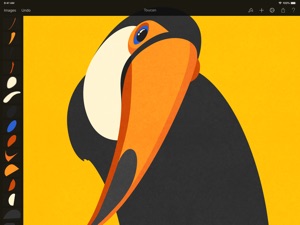
Pixelmator is a powerful, full-featured, layer-based image editor that lets you touch up and enhance images, sketch, ​and paint, as well as create advanced image compositions on iPad and iPhone alike.
Pixelmator has everything you need — whether you’re a mobile photographer, mobile painter, or mobile graphic designer — all in one easy-to-use app.
Designed exclusively for iOS, Pixelmator takes full advantage of the latest iOS 14 features and technologies, giving you innovative, fast, and powerful tools.
Advanced Photo Editing
• Get started with dozens of beautifully designed templates
• Instantly improve your photos with single-tap color correction presets
• Take full control over the tonal range of your image with levels and curves
• Easily remove color casts and set the right white balance
• Wipe away image imperfections, skin blemishes, and unwanted objects with the Repair tool
• Duplicate areas of your image with the easy-to-use Clone tool
• Pinch, bump, twirl, or warp areas of an image with powerful, Metal-based Distort tools
• Blur, sharpen, lighten, or darken areas of an image
• Choose from dozens of breathtaking effects to subtly improve or completely change the look of an image
• Open and edit images of up to 100 megapixels
Full-Featured Painting App
• Paint stunning images right on your iPhone and iPad
• Choose from more than 100 artist-designed brushes and numerous painting techniques
• Paint with near-natural wetness effect of watercolor and crayon brushes
• Create stunning pixel art images with the custom-designed Pixel brush
• Paint with incredible detail thanks to the double texture brush technology
• Smudge colors of an image for smooth color blends
• Vary the speed of your stroke to change brush thickness of some of the brushes
• Easily select and fine-tune colors with a full-featured Color Picker
• Instantly choose colors right from your image with the Eyedropper
• Use layers to isolate and blend elements of your painting
• Paint more naturally than ever with the Apple Pencil on your iPad Pro, featuring palm rejection, pressure, tilt, and acceleration sensitivity
• Enjoy perfectly seamless painting thanks to the Pixelmator Paint Engine
Graphic Design
• Combine words, shapes, and images to create breathtaking artwork right on your iPhone
• Apply non-destructive layer styles like shadows, outlines, gradient fills, and more
• Insert, group, merge, and blend layers of an image
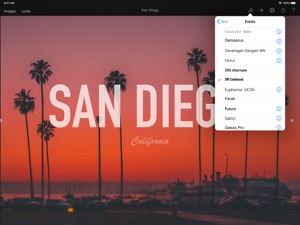
• Add text and make it look beautiful with a full set of text-styling settings
• Easily add, combine, and customize shapes
• Blend layers, shapes, and text using any of the 32 blending modes
• Use precise selection tools to edit areas of an image
• Crop, arrange, and rotate objects and layers with pixel-perfect precision
• Easily remove image background or cut and paste objects from one image to another
Compatibility
• Open, edit, and save Photoshop images with layers
• Open and save images using PSD, JPEG, PNG, and many other popular formats
• Import HEIF images
• Save your images directly to your Photos app
• Store and access images in iCloud Drive
iCloud and Sharing
• Create, edit, and keep all your images up to date on all your devices thanks to iCloud support
• Share your artwork with friends and family via email
• Instantly publish your images to social platforms like Flickr, Twitter, and Facebook
Designed for iOS 14
Pixelmator is meticulously thought through and created from the ground up for iOS 14. Designed to take full advantage of powerful iOS features and technologies and engineered to leverage the full power of 64-bit architecture, Metal, Core Image, and Core Animation, Pixelmator delivers state-of-the-art performance and real-time responsiveness.

What's New in Version 2.6.3

Pixelmator 2.6.3 brings one new keyboard shortcut and a few fixes.
• You can now select the Clone tool by pressing the O key.
• When exporting images with transparency to PNG, their transparency would not be preserved. Fixed.
• In certain cases, a flattened version of incompatible Pixelmator files would be opened automatically without explaining why they were incompatible. Fixed.
• Sometimes, certain brushes would not appear in the brushes browser. Fixed.
• Undoing edits using keyboard shortcuts while using the selection tools would cause the redo stack to be cleared. Fixed.
Have any feedback about this update or Pixelmator in general? Let us know at support@pixelmator.com!

Seller

Name

UAB Pixelmator Team

Information

Categories

Version

2.6.3

Size

176.4 MB

Game Center

No

VPP Device Licensing

Yes

Rating

Rated: 4+

Compatibility

iOS 11.0 or later

Devices

iPhone 5s, iPhone 6, iPhone 6 Plus, iPhone 6s, iPhone 6s Plus, iPhone SE, iPhone 7, iPhone 7 Plus, iPhone 8, iPhone 8 Plus, iPhone X, iPhone XR, iPhone XS, iPhone XS Max, iPhone 11, iPhone 11 Pro, iPhone 11 Pro Max, iPhone SE (2nd generation), iPhone 12, iPhone 12 Pro, iPhone 12 Pro Max, iPhone 12 mini, iPad (5th Generation) Wi-Fi, iPad (5th Generation) Wi-Fi + Cellular, iPad (6th generation) Wi-Fi, iPad (6th generation) Wi-Fi + Cellular, iPad Pro, iPad Pro (Cellular), iPad Pro (9.7-inch), iPad Pro (9.7-inch) (Cellular), iPad Pro 12.9-inch (2nd generation), iPad Pro 12.9-inch (2nd generation) Wi-Fi + Cellular, iPad Pro (10.5-inch), iPad Pro (10.5-inch) Wi-Fi + Cellular, iPad Pro (11-inch), iPad Pro (11-inch) Wi-Fi + Cellular, iPad Pro 12.9-inch (3rd generation), iPad Pro 12.9-inch (3rd generation) Wi-Fi + Cellular, iPad Air, iPad Air (Cellular), iPad Air 2, iPad Air 2 (Cellular), iPad Air (3rd generation), iPad Air (3rd generation) Wi-Fi + Cellular, iPad mini Retina, iPad mini Retina (Cellular), iPad mini 3, iPad mini 3 (Cellular), iPad mini 4, iPad mini 4 (Cellular), iPad mini (5th Generation), iPad mini (5th Generation) Wi-Fi + Cellular, iPad (7th generation) Wi-Fi + Cellular, iPad Pro 11-inch (2nd generation), iPad Pro 11-inch (2nd generation) Wi-Fi + Cellular, iPad Pro 12.9-inch (4th generation), iPad Pro 12.9-inch (4th generation) Wi-Fi + Cellular, iPad Air (4th Generation) (Wi-Fi), iPad Air (4th Generation) (Wi-Fi + Cellular), iPad (8th generation) Wi-Fi, iPad (8th generation) Wi-Fi + Cellular, iPod touch (6th Generation), iPod touch (7th generation)

Languages

English, Chinese, French, German, Italian, Japanese, Korean, Portuguese, Russian, Spanish

App Store: Customer Ratings

Ratings & Reviews

3.7 of 5 (727 Ratings)

App Store: Customer Reviews

2021-02-02

A second class citizen on iOS until layers support is added

Pixelmator Pro on Mac OS is a fabulous product for anyone looking for an alternative to the Adobe subscription offering. However, the iOS offering does not support all the features available on the desktop product; mostly glaringly the lack of support for layers and .pxd file support. For an otherwise very sound product, this came as a rude surprise the first time I started a project on Mac OS, saved the pxd file to iCloud, then tried to open on iOS with the intention to do some masking refinement using the Apple Pencil. Sadly, this was not supported at the time I write this review. So, beware that there is not proper integration between the desktop and iOS Pixelmators and don’t count on being able to move back and forth between the platforms as part of your workflow.
gasdockd
Version 2.6.3
2021-01-26

Really good!

I’m a mobile graphic designer and I use this app and I would 100% recommend it to anyone without a PC or who wants to design on their tablet/phone. There’s a few features I would like to see added such as being able to just select a layer (Pixelmator team if ur reading this plz add it) and just some other small things but like I said it works really well and I use it almost every day!
Chicken Nigglets
Version 2.6.3
2021-01-17

Bring ML Super Resolution to iPhones!

I have a 2020 iPad Pro and tried out Pixelmator Photo. It has a great upscaling feature that uses machine learning to create a CSI-like “enhance” effect. The results, for an $8 app, are remarkably close to Topaz Gigapixel, which is $99 on PCs. It doesn’t have the granular settings of topaz, but nonetheless works great.
The iPhone 12 has the A14 chip, which includes apples latest neural engine dedicated to machine learning features. But Pixelmator Photo is iPad only, and regular Pixelmator does not have ML Super Resolution. There don’t seem to be any other apps that do local ML/AI upscaling on iOS/iPadOS. I’d love to see this feature come to the iOS version of pixelmator to take advantage of the most capable neural engine yet.
tipster5489
Version 2.6.3
2021-01-14

wonderful app!! (+ request for dev team)

This is probably one of the best apps on the appstore (and I've pretty much tried them all). Very impressive program, it's a pleasure to use.
My only request would be to include some of the ipad-native features within the iphone version, namely the ML super res feature.
Perhaps some of the fine-tuning features can be tweaked a bit as well?
Thanks
a y y y l m a o
Version 2.6.3
2021-01-13

One important thing missing

I have been using for approx 3 years & I still can’t find a way to resize photos to inches. Metric or pixels for size. I have searched for this from google and still am unable to resize to 4x6, 5x7, 8x10, etc. If someone will tell me how to do that, I will change my rating from 2 to 5 stars. I can work with the tools ok but when I get ready to print, I have to change to a free program to change sizes. Thank you in advance if you can tell me how to set up for inches to resize!
Bodine101
Version 2.6.3
2021-01-10

Really love this app but frustrating to work with files

This app would be hugely improved if there were extensions to open image files in Pixelmator, edit Photos in Pixelmator, send file to Pixelmator from another app, etc. Everything has to be initiated in Pixelmator and that’s clunky.
font9b
Version 2.6.3
2021-01-04

Mostly worthless

The desktop version of Pixelmator Pro is great. This mobile app, not so much. Bare-bones features, unintuitive design.
disputin
Version 2.6.3
2021-01-03

Dark mode suppprt

Really wish the app had a complete dark mode theme. I downloaded this to check out while lying in bed in my dark room. Soon as I opened one of the submenus, I was taken aback by a full screen of white. The base interface has dark mode so why not use that throughout.
Xkalibur8
2021-01-02

Used to be good

App freezes on me on iPhone 12 Pro Max.
It looses option to continue editing pictures in the middle of editing and you are forced to close the app and loose the option to re-edit.
As much I liked the app before, I hate it now until fixed I guess. Shame to developers for this crucial bugs.
SIOSER
Version 2.6.3
2021-01-02

Really Great App

Pixelmator is really easy to use and a great drawing app. I would love to see “choose color” option to easily change the color of text and shapes to a similar color on the image, just like in the paint tool.
JohnAttack01
Version 2.5.1
2021-01-01

Thank you for charging one time!

I don't use this application very often. So I can't really comment on its usability in that regard. However I commend the developer for not following into this subscription model that's currenty rampant on the App Store. Thank you!
cblocher2011
Version 2.6
2020-12-27

Joke

I just paid $5 for this stupid app because it was supposed to be able to remove unwanted objects from photos. Yeah, this can’t so that. Save your money. I have apps that do this exact same stuff that I got for FREE.
AshlODell
Version 2.5.5
2020-12-14

not compatible with pixelmator pro on Mac OS

I love Pixelmator Pro on Mac OS and it is actually much better than Photoshop. Pixelmator on the iPad was pretty good but unfortunately not comparable to the pro version on Mac OS.
Pixelmator on the Ipad is a total disappointment, and is so confusing when you also have another App called Pixelmator photo.... why
Why not combine the two Apps and create a pro version that can accept Pro files.
Currently files created on Pixelmator Pro cannot be opened on Pixelmator on the ipad, .pxm and .pxd files are not compatiable.
Art studio Pro on the other hand does a much better job with cross platform compatibility, and the same file can move seamlessly from Desktop to the iPad.
Please, bring Pixelmator Pro onto the iPad platform ....
or at the very least, make the files compatible between the two platforms
thank you
Chas8088
Version 2.5.2
2020-11-30

Back up all of your images before upgrading

All of my previous Pixelmator projects have lost their thumbnails, so I have to open them in order to see what they are, which changes their time stamps, even if I make no changes. And even then, the thumbnails are not created.
Also, regardless of where you opened your project from, when you close that project, it reverts to a (useless) project list, and you have to navigate back to wherever you were when you opened the previous project. And you can't move documents to different folders. Why bother with folders if you can only really find them by going unit "Recents"?
I can't imagine any reason for this upgrade, though I suppose people who use Bluetooth keyboards are appreciative of having more keyboard shortcuts.
brennaman
Version 2.5.3
2020-11-28

Love it but

If you could change it so you can rotate a picture while youre moving it around instead of having to open the format screen then i could probably up this to five stars. Its obnoxious because the format menu takes up half the screen so you cant even see exactly how youre placing things :(
Another thing i would change is add an up/down button when adjusting brush size etc., sometimes mu fingers are a bit too fat to place it exactly where i want it.
Silly Satanic
Version 2.6.2
2020-11-27

whar r u doing to i do not understand! WHO IS STUART ROSEme

I see MANY OF MY FILES YOUR TAKING GET THE HELL AWAY PLEASE
Not MS
Version 2.6.1
2020-11-23

Its the best in this category

I love this app and this is very useful for me.
MiladMirzaei
Version 2.5
2020-11-18

Pixelmator (original)

Excellent for brush-on effects such as soften, sharpen, saturate, etc. Not many apps do this. 5 stars!
BAR112
Version 2.5.4
2020-11-18

Amazing surprise update! 2 Stars added!

My review has been stuck at 2 stars for years now due to Pixelmators lack of keyboard support and convoluted UI. The latest update finally made this app useable so I’ve added 2 extra stars to my review.
- Keyboard support.
Thank you SO much for adding keyboard support. This completely reinvigorates the usefulness of this app. Pixelmator on iPad is finally desktop-class.
- Convoluted UI saved by keyboard shortcuts.
The UI remains convoluted. Having all options tucked into one drop down menu is insane. Even the simplest of tasks requires clicking and scrolling through SO MANY drop downs...BUT, the newly-added keyboard supports adds shortcuts for just about everything in Pixelmator. This means never having to sift through that dreaded paintbrush-shaped drop down menu again. So while the UI should still be rethought for those who don’t use a keyboard with their iPad, any keyboard-using Pixelmator-fanatic should be beyond pleased.
Great job and thank you so much for this fantastic FREE update!
maxblack113
2020-11-17

Please make this for Android

Pixelmator is my favorite app and it’s the only reason I have an iPad. I would much rather use my chromebook tablet to draw on, but pixelmator isn’t available on the play store and it’s so frustrating to have to use apple when I work better with android products. Please just put this on the play store so other artist who prefer android can use it. I haven’t found any art apps on play that I really like. I’m so bummed.
dasher909
2020-11-13

No masks, templates unusable

I was excited to download this app, but I found out that there are no clipping/layer masks. The collage templates are unusable because you cannot reposition imported photos within the collage masks. Photos are just immediately cropped to the fixed collage dimensions without any option to re-center subjects.
Reavy
2020-11-06

Very Professional and Easy To Use

As a new buyer of PixelMator I’ve really adapted to this app. As a person who enjoys designing, graphics art, and similar editing processes I’ve really become very comfortable using this application. This application has been easy to use from the jump. I make app icons which is similar to let’s say the Facebook app icon on your phone. I make what you could call improvises or mixed versions of such. As using this app I’ve been able to pursue my editing to the next level. This app is very easy to use, very organized, and can be used for any form of art creations. There’s are a lot of really good things but I’m here to mention the cons I’ve found over the past six months of me using this app. I want to first start by saying this app is overall a 5/5 stars for me. The cons do not affect my experience using this software at all, just things that could overall improve this application. I first would really enjoy the option of a bevel affect for the shapes that are included in the shape category. If I could apply bevels to the shapes it would overall make this app perfect. As similar to a shadow effect it kind of is reversed it makes the shape look like it’s going inwards in a sense. Next, more shapes! I love the stock shapes that come with PixelMator but I need more! As you can create shapes by manipulating them with the select feature, I would find it more convenient to have more selections! Other than that, those are the only two things I would wish to have on this app. If you’re on edge about buying this app, trust me as a person that has used Photoshop, Art Studio, and After Effects this is beyond more easier and beyond more fun then the others I’ve used. Thank you PixelMator team!
iosj4cob
2020-10-15

Awesome

Very good Application but still need effort.
Need more features 💪🏻
Recent update did a great job 👍🏻
Feedback: add option to create custom images in different measurements like (inch, feet, cm, etc.)
AsadKhan29
2020-10-14

Best photos shop app available for iPhone

I use this weekly just for funny photoshops like making my friend the sky in the background of pictures or putting my face on a statue in my sisters pictures. Best five dollars I’ve spent. Bit of a learning curve.
😜#awesome
2020-10-14

I use Pixelmator every day

My job includes basic image editing, and an iPad Pro is my primary computer, so I turn to Pixelmator just about every day. It’s highly functional and well designed.
Ed The iPad Fan
2020-10-10

Any chance to add batch import?

Absolutely love Pixelmator, and I often use it to add custom watermarks to my images. But it’s a huge time drag to import each one individually. And chance you could add a batch import option?
It would be a joy to bring in five or ten photos all at once.
Until then, I’m still loving the app!
JasonTheBig
2020-10-07

Has never treated iOS like a real platform

Save your money. I’ve been trying to make this app work for years as my Photoshop replacement on iOS.
Two things have stood in my way since day one:
1. No P3 Support. I’m an iOS developer. Let me edit my assets! The desktop version has always supported this just fine!
2. Random graphical glitches that end up getting baked into the export. I have circle shapes near each other and one starts to look like a square in one corner. It makes zero sense. Just lousy job guys.
The sad thing is this is literally such a good app but these two issues are MAJOR. what the heck! It’s like they want to shoot themselves in the foot and never fix these low ratings!
Don Swet
2020-10-06

New update is awesome, but still a few missing things

Really love the new keyboard and trackpad support—really makes it feel like a pro app. Thanks for fixing the issues with selection editing with the keyboard too!
As some of the other reviews mentioned, the UI is definitely a little clunky especially on big iPad screens—especially the two modal screens you have to go through to choose a specific brush or selection type. The keyboard shortcuts make this a lot easier, but I don’t always have access to a keyboard (like when I’m drawing with Apple Pencil). Would love to have a tool sidebar kind of like the desktop Pixelmator app!
There’s also some keyboard functionality missing like being able to select multiple layers/objects on the canvas with Shift or Command.
A nice little bonus would be to have enhanced pointer shapes with brushes, erasers, etc. What if we had bigger pointers for larger brush sizes? Maybe a crosshair for more precise sizes? How about a unique pointer shape for the pixel brush tool, which also has pointer snapping to each pixel for even more precision? So many possibilities to make this a really unique experience for the iPad.
It would also be nice to have support for multiple windows to make working with multiple docs at the same time easier. Totally understand if this can’t be done due to app memory limits though…
janant98
2020-10-04

Nag apple pencil

Why does the app keep popping up a message to only use when apple pencil turned on? I’ve gotten it 5 or 6 times in 20 seconds and its super annoying.
Moriturimax
2020-10-02

I love Pixelmator but not happy w update

Now when using stylus and/or apple pencil the image shifts around with the strokes. VERY frustrating. Please fix this.
Monkeeni
2020-09-30

Invaluable!

Pixelmator remains the go-to iOS app for pixel retouching (along with Light Brush). There are several global adjusting editors that work well but relatively few that permit precise manipulation of specific image areas. Pixelmator was one of the very first and is still the workhorse!
Stevearcher
2020-09-18

Add a paint bucket tool

Great app but there needs to be a paint bucket tool.
sd2258
2020-09-17

Horrible

This app is 4.99 and is absolutely useless. If you’re looking for similar functions get Retouch. Is only 1.99 and works much much better. Seriously don’t waste your money on this app.
Blanquita_10998
2020-09-17

NO HISTORY?????

am i missing this obvious feature? WhereTF is history?
studioarts
2020-09-15

Did not auto sharpen like Apple demo today

I have no idea how to get app to work like Apple's keynote presentation on it on Sep 15 2020. They would crop then the Apple would fix the image creating an enhance image of the crop. I tried it and nothing happened at all save a zoomed in unenhanced image. What am I doing wrong?
Mark#itnow
2020-09-12

This is abandonware

Do not buy. This is a direct quote from their forums: “Over the last couple of years, we had shifted our focus to Pixelmator Pro and Pixelmator Photo, so Pixelmator for iOS didn't receive many new features. However, with the most recent major update, we've started making more significant changes to the app — we'll keep this in mind as we continue to update and refresh Pixelmator for OS!”
thisispanda
2020-08-25

You get what you pay for

I have very conflicted feelings for this app. On the one hand, it’s free and surprisingly powerful for a lot of simple tasks.
On the other hand, it’s really frustrating to use. The controls are unintuitive and difficult to discover, and it’s missing a lot of features that would make it more useful beyond basically just adding text to a picture. It’s also missing keyboard shortcuts, which is really disappointing and just adds to the frustration.
Again, it’s free, so I can’t really complain, but I would personally rather just pay for a fully-featured editor than use pixelmator.
Y2Kbotz
2020-08-21

useless for opening Pixelmator Pro Files.

when you need to work on the go and access your pixelmator pro files, youcan forget it, it just ant gonna happen. Which leave you without any way to open you files on the go in the pixelmator format, even exporting it as a psd or svg doesnt do anything. it will only open your file into 1 merged layer which defeats the point. until this app can support pixcelmator pro files its pretty much useless, unless all you plan on doing is creating art from scratch that is all you can do here.
.: LoveFire :.
2020-08-16

Nope. Zilch. Zero. Nyet. Nada. Non. Nein. NOT

Use Artstudio Pro, a grown-up graphics editor
Dealbreakers:
- image creation mechanism primitive
- no cut/copy/paste, access to clipboard
- no toolbar
- selection tools entirely puerile
Fully inefficient.
fjpoblam
2020-08-06

Amazing

People don’t believe me when I tell them I made a photo edit on my phone. This level of portability has opened so many doors for me.
Spartans Never Die
2020-08-04

Almost perfect

If it was easier to use and had more editing tools it would be perfect. Such as the fact that there’s no curved line making tool, and you can’t redo something after you undo it. It would be better to be able to see a list of undo’s and redo’s. Please read all off your customers reviews as many of them explain ways this app can improve. For an app that costs money (when I can just use Paint.NET on PC for free and have more options) these issues need to be addressed.
DragonWaffle
2020-07-17

Missing most essentials

I kept seeing this app pop up in the editor’s choice section. Their endorsement made me very curious and I debated whether to purchase it for a while. $5 was worth scratching that itch of curiosity.
To those that came to a similar point of curiosity, this is for you. There are no gesture shortcuts. You find yourself trying to use a two-finger tap to undo. When you use undo, there’s no redo option. If you accidentally click the undo icon past the brush stroke you wanted to stop at, you can’t regain that progress without redoing it manually. The biggest offender is the lack of an option to disable finger touches. You will constantly make unintentional brush strokes. Combine this issue with an absence of any redo and you end up with frustration. I’m disappointed in this app, but I don’t regret spending the money to know that I won’t be interested in using this. The Adobe Fresco sub is $10 per month, and they haven’t even provided any big updates in a while.
A B Cole
2020-06-09

Don’t understand the fuss

I’ve had this app for two years. Always use for small projects for school. After the update, I see a bunch of people wrote pretty critical reviews over how difficult it is to manage through the new UI. A bunch of wussies. Whenever something new is implemented that takes longer than 3 seconds to adapt too all hell breaks loose and an app turns from solid to “extremely difficult and annoying”. This shouldn’t ward anyone away from this app.
the tree man who eats
2020-06-08

Its great

Used for a long time & am glad they are finally pushing updates. One thing i would like to add though, better text options would be great. When working on a small photo the text is super blurry in addition the stroke feature on some fonts do not align which is pretty annoying. Overall great app i use about everyday
tasintaylor
2020-05-28

Please Fix. Unable to import anymore

Why break the app. It was great the way it was. Now it can’t even import. Useless.
rcipts
2020-05-25

Refund

I would like a refund 😡
JetzKjBTw
2020-05-25

Great App just missing some Functions

This app is a great app for editing photos. It’s awesome. The layers, color selection tools, painting tools, selection tools, color editing tools, all the tools are really good.
The biggest function that this app lacks in my opinion is a key frame option. The inability to creat gifs or other short animated forms is a reason why I still use other photo editing applications such as photoshop. A key frame feature would be awesome maybe even an option to turn each layer into a gif when exporting.
The biggest issue I have with this app is that it never saves projects on the device. I like that it syncs and is well connected to the iCloud but when your working on a project then close the app for a second to check something and then come back and have to wait for the project to download again it’s a big annoyance after a while. If an option could be added to store projects on phone that would be great.
I want to thank the Pixelmator team for making this app. It is a great app and overtime I think it will continue to get better. I hope you take on my feedback and eventually the features I mentioned get added. But once again thank you for making the best photo editing app on IOS.
Tom Szat
2020-05-24

Bug issues

Every now and then I get the bug where when I try to undo a repair it says repair undone but it doesn’t undo it please fix
PussyDestroyer1777
2020-05-24

Bug

I was using the select tool on Pixelmator until my picture got messed up and it ruins my picture. Please fix this issue.
vorgnorg