AboutTermsPrivacyContact
 
Updating
Sensor Play - Data Recorder

Sensor Play - Data Recorder

Released: 2014-10-05
© 2014 Philip Broder
Sensor Play - Data Recorder - QR Code
Version 5.5
4+
Download on the App Store
Version 5.5
4+
Download on the App Store
Released: 2014-10-05
© 2014 Philip Broder

iPhone Screenshots

Screenshot
Screenshot
Screenshot
Screenshot
Screenshot
Screenshot
Screenshot
Screenshot
Screenshot
Screenshot

iPad Screenshots

Screenshot
Screenshot
Screenshot
Screenshot
Screenshot
Screenshot

Description

Sensor Play - the iPhone Sensor Playground, and the best app for serious scientific research and data recording.
Used by engineers, scientists, teachers, and enthusiasts all around the world.
The sensors built into all iPhones are amazing examples of the power in your pocket. To have a GPS receiver, an accelerometer, a gyroscope, even a Barometer with you at all times is a marvel of miniature engineering. It's simply fun to see the output from all these sensors, play with each interactively, or just view the raw data.
Record Accelerometer, Gyroscope, GPS, Barometer, Magnetometer sensor data and share by email for further analysis, or review using the in app viewer.
However Sensor Play is not just a toy.
Beyond the obvious fun of watching the accelerometer and gyroscope graphs bounce around you can now record multi-sensor data all at the same time, even in the background, for a full external analysis of your, or your iPhone's, motion through time and space however you so desire.
And now with Automation you can trigger your recordings to start either after a simple delay, when you enter or leave a preset GPS Region, or when the iPhone is nudged above a selected gForce.
Then end your recordings either after a set duration, or when you enter or leave a preset GPS Region.
Automation makes getting the data you want so much easier, and eliminates lots of unnecessary recorded data. Set up the triggers as required, close the phone and go.
Set and Forget! Later when you open SensorPlay the data you were after will have been automatically recorded and saved for you.
The following data is recorded to a csv file for sharing through the standard iPhone share sheet.
Timestamp
Accelerometer: X, Y, Z
Gyroscope: X, Y, Z
Attitude: Roll, Pitch, Yaw
Location: Longitude, Latitude, Speed, TrueHeading, Altitude
Motion Activity: Type & Confidence
Barometer: Pressure, Relative Altitude
Magnetometer: µT X, Y, Z, calibrated x,y,z, rotation matrix, and quaternion
Visual graphs of sensor recordings in one place, as long as they're not too large anyway.
Background mode is supported for all recordings, accelerometer, gyro, and multi-sensor export, lock your screen and keep recording all sensor data for up to six hours.
A serious engineering, scientific, and educational analysis tool.
Sharing of all recordings is now through the built in share options which includes, Airdrop, mail, message, notes, dropbox (if installed), etc.
Sensors currently supported:
Barometer (iPhone 6 and above only)
- see the atmospheric pressure in a choice of 7 units, see your relative altitude plotted over time.
- Widget available to display the atmospheric pressure in the notification centre.
Accelerometer
- See the g-forces on the X,Y,Z axis and see them traced over time.
- Widget available to show gMax in X,Y,Z axis on notification screen.
- Record the data and share for further analysis
Gyroscope
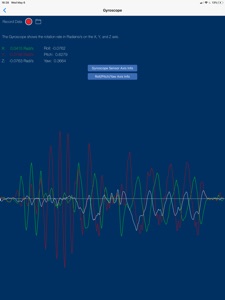
- Watch the rate of rotation over the X,Y,Z axis plotted over time.
- Record the data and share for further analysis
GPS/Location Services
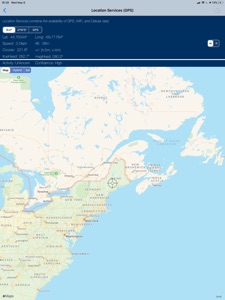
- See your exact location mapped on screen and share your Lat/Long coordinates by text or email.
Magnetometer/Compass
- See the magnetic field acting on the X, Y, Z, axis along with an interactive compass.
3D/Force Touch (6S ->11 only)
Note: Continued use of GPS running in the background can dramatically decrease battery life.

What's New in Version 5.5

This release is primarily cosmetic to ensure compatibility with latest SDK and devices.

Seller

Name

Philip Broder

URL

Information

Developer

Categories

Version

5.5

Size

16.8 MB

Game Center

No

VPP Device Licensing

Yes

Rating

Rated: 4+

Compatibility

iOS 11.0 or later

Devices

iPhone 5s, iPhone 6, iPhone 6 Plus, iPhone 6s, iPhone 6s Plus, iPhone SE, iPhone 7, iPhone 7 Plus, iPhone 8, iPhone 8 Plus, iPhone X, iPhone XR, iPhone XS, iPhone XS Max, iPhone 11, iPhone 11 Pro, iPhone 11 Pro Max, iPhone SE (2nd generation), iPhone 12, iPhone 12 Pro, iPhone 12 Pro Max, iPhone 12 mini, iPhone 13, iPhone 13 Pro, iPhone 13 Pro Max, iPhone 13 mini, iPhone SE (3rd generation), iPhone 14, iPhone 14 Plus, iPhone 14 Pro, iPhone 14 Pro Max, iPhone 15, iPhone 15 Plus, iPhone 15 Pro, iPhone 15 Pro Max, iPhone 16, iPhone 16 Plus, iPhone 16 Pro, iPhone 16 Pro Max, iPhone 16e, iPhone 17, iPhone 17Pro, iPhone 17ProMax, iPhone Air, iPad (5th Generation) Wi-Fi, iPad (5th Generation) Wi-Fi + Cellular, iPad (6th generation) Wi-Fi, iPad (6th generation) Wi-Fi + Cellular, iPad Pro, iPad Pro (Cellular), iPad Pro (9.7-inch), iPad Pro (9.7-inch) (Cellular), iPad Pro 12.9-inch (2nd generation), iPad Pro 12.9-inch (2nd generation) Wi-Fi + Cellular, iPad Pro (10.5-inch), iPad Pro (10.5-inch) Wi-Fi + Cellular, iPad Pro (11-inch), iPad Pro (11-inch) Wi-Fi + Cellular, iPad Pro 12.9-inch (3rd generation), iPad Pro 12.9-inch (3rd generation) Wi-Fi + Cellular, iPad Air, iPad Air (Cellular), iPad Air 2, iPad Air 2 (Cellular), iPad Air (3rd generation), iPad Air (3rd generation) Wi-Fi + Cellular, iPad mini Retina, iPad mini Retina (Cellular), iPad mini 3, iPad mini 3 (Cellular), iPad mini 4, iPad mini 4 (Cellular), iPad mini (5th Generation), iPad mini (5th Generation) Wi-Fi + Cellular, iPad (7th generation) Wi-Fi + Cellular, iPad Pro 11-inch (2nd generation), iPad Pro 11-inch (2nd generation) Wi-Fi + Cellular, iPad Pro 12.9-inch (4th generation), iPad Pro 12.9-inch (4th generation) Wi-Fi + Cellular, iPad Air (4th Generation) (Wi-Fi), iPad Air (4th Generation) (Wi-Fi + Cellular), iPad (8th generation) Wi-Fi, iPad (8th generation) Wi-Fi + Cellular, iPad Pro 11-inch (3rd generation), iPad Pro 11-inch (3rd generation) Wi-Fi + Cellular, iPad Pro 12.9-inch (5th Generation), iPad Pro 12.9-inch (5th Generation) Wi-Fi + Cellular, iPad (9th Generation), iPad (9th Generation) Wi-Fi + Cellular, iPad mini (6th Generation), iPad mini (6th Generation) Wi-Fi + Cellular, iPad Air (5th generation), iPad Air (5th generation) Wi-Fi + Cellular, iPad Pro 11-inch (4th generation), iPad Pro 11-inch (4th generation) Wi-Fi + Cellular, iPad Pro 12.9-inch (6th generation), iPad Pro 12.9-inch (6th generation) Wi-Fi + Cellular, iPad (10th generation), iPad (10th generation) Wi-Fi + Cellular, iPad Air 11-inch (M2) Wi-Fi, iPad Air 13-inch (M2) Wi-Fi, iPad Air 13-inch (M2) Wi-Fi + Cellular, iPad Pro 11-inch (M4) Wi-Fi, iPad Pro 11-inch (M4) Wi-Fi + Cellular, iPad Pro 13-inch (M4) Wi-Fi, iPad Pro 13-inch (M4) Wi-Fi + Cellular, iPad mini (A17 Pro) Wi-Fi, iPad mini (A17 Pro) Wi-Fi + Cellular, iPad (A16) Wi-Fi, iPad (A16) Wi-Fi + Cellular, iPad Air 11-inch (M3) Wi-Fi, iPad Air 11-inch (M3) Wi-Fi + Cellular, iPad Air 13-inch (M3) Wi-Fi, iPad Air 13-inch (M3) Wi-Fi + Cellular, iPod touch (6th Generation), iPod touch (7th generation)

Languages

English

App Store: Customer Ratings

Ratings & Reviews

4.5 of 5 (59 Ratings)

App Store: Customer Reviews

2024-04-16

M11-M33

on the record data (csv file), what does m11, m12,m13 actually mean?
Help plzxzzz
Version 5.5
2023-06-24

Works as adevertized

This was the only app I found to easy capture the telemetry data I was looking for. I tried several other app export data was challenging, logs were in accurate. I have two suggestion, the app needs some documentation, specifically what all the data headers are. When I airdrop the data and open I in excel and there are tons on columns some of which I don’t know what they are.
stop asking for a nuckname
Version 5.4
2020-11-15

Great App!!!

I’ve used several sensor apps on iPhone, and this is my favorite. I like the intuitive interface and the ability to record for long periods. I’ve used it in many applications, including precision analysis of aircraft motion during test flights.
Sacramento75
Version 5.2
2020-01-12

Good but not perfect.

Works great on my iPhone 11 except for the following that I have found so far.
I set it to record for 45,000 seconds (750 minutes or 12.5 hours) and it shuts off at 6:00 hours.
Also, I set the multi sensor recording to trigger on a g level and it only triggers on -g levels on the 2 g scale. I flew my iPhone 11 on a Blue Origin flight and found this out the hard way.
dennis wingo
Version 5.0
2019-09-11

Very Good but not complete !!

1) CMCalibratedMagnetic Field x, y, z are always zero (0), on iPhone 8+ and my iPad.
2) Though CMMagnetometer values are useful for somethings, CLHeadingComponent Values x, y, z (micro Tesla), are better for calculating stuff, IMHO,
CLHeading:
I believe, Represents a vector pointing to magnetic North.
Please fix, and add CLHeading Magnetic Data 🤓😎.
Rouelf
Version 5.0
2018-11-15

App works fine - impressive!

Does a nice job of displaying output of all the phones sensors. Easy to use. Straightforward menus. No errors yet.
Karl--M
Version 4.5
2018-08-05

Sensors Play vs Sensors Pro

I’m still trying to figure out the difference between the two app. I brought this one before noticing the other app. I like the darker blue background of Sensors Pro, is there a way to match that in Sensors Play? I don’t know, not that I can tell.
If it was clarified the difference between the two apps (see above) and if custom background colors/gradients were an option, that would make this a 5-star app!
astaley
Version 4.3
2017-11-04

Awesome support!!

Phil was INCREDIBLY responsive to an issue regarding compatibility between Sensor Play, iPhone 7 and versions of iOS11. Ultimately we got the issue straightened out and I can continue playing around with the very cool tool he built. There are incredible possibilities with Sensor Play and exploring is most of the fun!!
goomba1793
Version 4.2
2017-10-17

Well worth the $5.

Graphs are awesome, data recording feature is invaluable and records data as .csv file.
JackMCE747
Version 4.2
2017-06-02

Not working

Every time I try to view a file, the app quits.
Alli1971
Version 3.8
2017-01-31

How do u delete old traces

I like the app, useful, would like some calibration to know phones accuracy. I haven't found the way to delete collected traces
Data looker
Version 3.8
2016-05-18

The very best!

This is the very best application for iPhone sensors that I have ever used! My favorite part is the multiple data recording function. Which is perfect! This app works so well, and I would say it is an app I am glad I paid for. Download it!
zander_004
Version 3.4
2016-03-14

Pretty good, but doesn't currently accommodate for using zoomed in view

This application exposes all the hidden little sensors the iPhone has and lets you log them, even more than one at a time, but if you use zoomed view, parts of the UI are cut off. Would be 5 stars without this issue.
Phos09
Version 3.1
2015-10-21

Crashes on iPad

When I stop recording the app crashes on my iPad Air 1.
Gman8675
Version 2.1
2015-07-12

Very good Program

Work as advertised. Barometric data is useful and easy to read. Keep your nice engineer job!.
El Diamante
Version 2.1
2015-06-23

Great!

Works as advertised! I've been enjoying the data export as CSV and then toying with the data in python with numpy and with pandas, pd.read_csv(filepath) is literally all you need to start playing.
I'd like it better if multisensor data could be exported in the same csv file.
Nice clean interface.
Python Programer
Version 2.1
2015-04-07

Instruction manual please

I have no idea how to use this. I can obviously turn and use the sensors, but how do I access the data it calculated? There is no place for me to go for records of trials.
Nlk9264
Version 1.5
2015-03-17

data records

great app with the live feed, but I can't read the numbers quickly enough to make it useful for what I need it to do. Is there a way we can record the readings for analysis?
gilligan0001
Version 1.5
2014-11-29

Simple and efficient

Simple and efficient
Lex G
Version 1.4
2014-11-13

Simple, efficient, instructive...

Simple, efficient, instructive... Exactly what it claims to be
RansomII
Version 1.4
2014-11-04

Barometer is the best!

Just tested it out in a negative pressure room. Where the barometer measurements were really noticeable from inside to out.
KatyLady79
Version 1.2
2014-10-30

Fun app!!

This is a fun app to play with! I really like using it when I'm skiing down a mountain, to track my speed and things! :)
Justin Cognito
Version 1.2
2014-10-19

Very nice

For my iPhone 6+ I wanted to see what barometer apps were available, to try out the new barometer sensor. So I downloaded a few free apps and tried them out. While looking for such apps there was Sensor Play for 99 cents. Hmmm ... it can show a graph for EACH sensor on the phone, graphing the raw data from the sensor in real time as you move the phone around. The labeled, rapidly changing sensor numbers are shown at top with the developing graph shown below.
Also, try out the GPS and select Hybrid to get an aerial view of your current location, and then zoom in. In my case, inside in my house, I then walk around and see my position change as I walk to the different rooms, along with changes in some of the other sensor data that it shows.
Overall, if you want to get an understanding of the various sensors on your iPhone, this app has a clean and simple interface and a clear presentation of the sensor data along with a real-time graph of the changing data.
box4
Version 1.1
2014-10-05

Great app

As a scientist, it is great to be able to access the fantastic sensors in my iPhone, and to read their outputs with standard units. The pressure sensor in the iPhone 6 is spectacular. I can see the pressure change when the exhaust fan in my kitchen is turned on, or if I raise my phone a foot and then return it. Thanks for getting this out quickly. I hope that future versions will allow background sampling, export of data, and more flexible graphing, but as a start, it is great and well worth the price.
Franc87
Version 1.0