AboutTermsPrivacyContact
 
Updating
Cashflows

Cashflows

Released: 2014-07-30
© Chris and Nicola Cavanagh
Cashflows - QR Code
Version 1.103
4+
Download on the App Store
Version 1.103
4+
Download on the App Store
Released: 2014-07-30
© Chris and Nicola Cavanagh

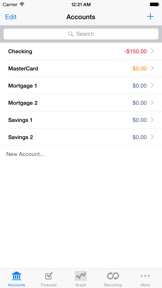
iPhone Screenshots

Screenshot
Screenshot
Screenshot
Screenshot
Screenshot

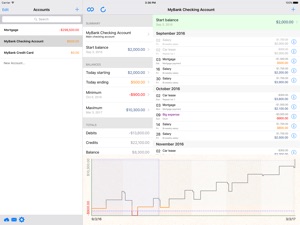
iPad Screenshots

Screenshot

Description

* Follow @MyCashflowApp on Twitter!
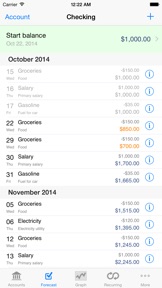
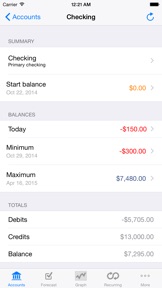
Cashflows helps you forecast future balances of your bank accounts. It's simple to set up and requires minimal effort to maintain.
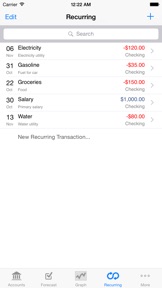
Tell it about your recurring transactions (including transfers between accounts) and future one-time transactions, and let it estimate your account balances months (or years) into the future.
It's not interested in the past, so there's no need to enter or maintain your transaction history.
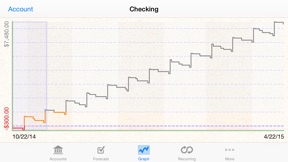
It shows your account transactions and balances over time and lets you override individual payment dates and amounts. Quickly toggle payments on and off to see how they impact your future balances. The graph updates immediately with any changes you make.
Update the starting balance occasionally, and it'll show you which transactions are still due. If any have already occurred (or are late) just tap to toggle them on or off.
FEATURES:
- Multiple accounts: Add multiple accounts and set up recurring or manual transfers between them.
- Recurring transactions: Supports recurring transactions with start date, end date (optional) and many recurrence options.
- Warning balance: Set a warning balance for an account and see at a glance when your balance is below it.
- Interactive forecast graph: Shows your future balance over time, highlighting warning balance and negative regions; tap the graph for a closer look at the nearby transactions.
- Reports: Create PDF or XML reports and send them by email or to your Dropbox account.
- iCloud Sync with Cashflows for Mac.
- Generate reports in PDF, CSV or XML
- Backup and restore your data to Dropbox or iTunes.
MANY USES:
* Planning Future Purchases:
This is a great tool for forecasting payments for a future loan, mortgage or car lease. Create a recurring transaction for the payment amount, fill in the first and last payment dates and see how it affects your balance. Make adjustments to figure out what you can afford.
* Planning for Change:
You might have a recurring bill that increases annually (such as health insurance). Simply create another recurring transaction to represent the increased payment and set its start date appropriately, and adjust the end date of the original transaction. You'll immediately see how it affects your finances in the future.
* Planning for Uncertainty:
The forecasts are only as accurate as you need them to be. If you plan to pay a minimum amount per month onto your credit card, set that up as a recurring transaction. Once you decide how much you want to pay this month, just override the forecast amount. You can always edit or delete the override later.
* Getting Out of Debt:
This app can help you get out of debt, and figure out how long it will take. Enter a recurring transaction between your checking / current and loan / credit account for the minimum amount you intend to pay each month. Extend the forecast period (tap "More" at the bottom of the Forecast page) and then look at the Balance Graphs for your accounts. If you can afford to pay extra in a few months, override that month's payment (or create a one-time transaction for the additional amount). You'll instantly see the effect on your checking / current balance, loan balance and when the loan will be repaid.
MOVING FROM TOTAL CASHFLOW?:
1. In Total Cashflow, go to Sync -> Export to iTunes
2. In iTunes on Mac or PC (with device connected and selected) go to Apps, then find Cashflow HD / Cashflow under “File Sharing”
3. Select the "MyCashflow.xml” file, then click “Save to…” and select a suitable folder
4. Browse to the folder and rename the file Cashflows.xml
5. Select Cashflows under “File Sharing” (Cashflows has a “thinner” icon than Cashflow HD / Cashflow)
6.Click “Add…” and select the new Cashflows.xml file
7. In Cashflows, go to Sync -> Import from iTunes
If you prefer, email us at appsupport@skydale-designs.com for Dropbox migration instructions.

What's New in Version 1.103

- Disable "tap to toggle" [iOS 11+ only] - Have you ever accidentally toggled a transaction with a stray tap? If you're on iOS 11 you can now disable "tap to toggle" on the app settings page (Home -> Settings -> Cashflows) and toggle with a left-to-right swipe instead!

Seller

Name

Nicola Cavanagh

URL

Information

Categories

Version

1.103

Size

28.5 MB

Game Center

No

VPP Device Licensing

Yes

Rating

Rated: 4+

Compatibility

iOS 8.0 or later

Devices

iPad mini Retina (Cellular), iPad mini 4 (Cellular), iPad mini 3, iPad Pro (11-inch), iPad Air 2, iPad (6th generation) Wi-Fi, iPad (5th Generation) Wi-Fi, iPad Pro 12.9-inch (2nd generation), iPad Pro (11-inch) Wi-Fi + Cellular, iPad (5th Generation) Wi-Fi + Cellular, iPad Pro 12.9-inch (3rd generation) Wi-Fi + Cellular, iPhone 8, iPhone 8Plus, iPhone X, iPad mini (5th Generation) Wi-Fi + Cellular, iPad Pro 12.9-inch (3rd generation), iPad Air (3rd generation), iPad Pro 12.9-inch (2nd generation) Wi-Fi + Cellular, iPad Air (3rd generation) Wi-Fi + Cellular, iPad Pro (10.5-inch) Wi-Fi + Cellular, iPhone 6 Plus, iPhone 6s, iPhone 8 Plus, iPhone 8, iPad Pro (Cellular), iPad Pro (9.7-inch) (Cellular), iPad Pro (9.7-inch), iPhone 6s Plus, iPhone 5s, iPhone 7, iPhone 7 Plus, iPhone X, iPhone XR, iPhone SE, iPhone 6, iPhone XS Max, iPad Pro (10.5-inch), iPhone XS, iPad mini (5th Generation), iPad (6th generation) Wi-Fi + Cellular, iPad Pro, iPod touch (6th Generation), iPad Air 2 (Cellular), iPad mini 4

Languages

English, French, German, Italian, Spanish

App Store: Customer Ratings

Ratings & Reviews

4.5 of 5 (11 Ratings)

App Store: Customer Reviews

2017-09-04

Look no further

I have been using this app for a long time now. It will become an invaluable staple to the apps on your phone. No other app that I know of will give you the information as neatly and cleanly as this one does. The developer is awesome and easy to work with you. As an example I get my Social Security on every fourth Wednesday. No app that I have ever looked can do that particular recovering feature. I emailed the developer and he worked with me to put in an icalendar feature so I can do that particular function. This app I consider a must have.
Garychemist
Version 1.99
2016-11-28

Does what I need it to do

I just upgraded from an older version which I've been using for years. It's disappointing I have to pay again for it, but the app is just what I need and nothing more. For those that are frustrated that the forecast doesn't automatically go to today's date: navigate to "accounts" and then tap "today starting".
Mekaneck84
Version 1.97
2016-10-30

Almost Perfect

I find this app quite useful. I just wish the text on the transaction page was a bit bigger or would scale up when Dynamic Type is enabled on iPhone. My eyes aren't as young as they once were.
Twilson420
Version 1.96
2016-04-18

Has a problem with recurring transactions

The bi-monthly credit transactions are calculated on a monthly basis. Makes it kind'a useless, since it can't track my paychecks.
Venik
Version 1.95
2016-02-03

Fantastic App!

Love this app! The forecasting is awesome and the reports rock!! Agree that the forecasting should open to the current date.
the to do
Version 1.95
2015-10-09

Need date ranges for reports, graphs

Don't want to see graphs and entries dating back to the beginning of time.
Not Having It 53
Version 1.95
2015-01-29

Excellent Budget and Forecast App

This app works very well for me. I put all my recurring monthly expenses, as well as income and can see what my projected balances are at most any point in the future.
megmade
Version 1.94
2014-11-22

How to convert from Total Cashflow

This new release works as great as the previous 'Total Cashflow' for older iOS devices.
In case you want to import the spending plan from Total Cashflow, you need to login to Dropbox and copy /apps/Total Cashflow/MyCashflow.xml to /apps/Casflows/cashflows.xml.
The new file can then be imported.
sylvia.and.wilbert
Version 1.94
2014-11-18

The best future expense app!

Been using the various Cashflow apps for years now. Couldn't keep track of my future expenses without it! The app could use a few usability improvements though. If I only have one account, I shouldn't have to select which account to view. Also, marking items as paid takes too many steps. What if you could swipe an item to mark it as paid and it would automatically change the date to today! That would be amazing! Thanks for making this app!
Kurozero
Version 1.93
2014-11-13

The Best Balance Forecasting App

This is Perhaps the bet balance forecasting app in the AppStore period. I have been a high fan of the previous forecasting app, which is no longer supported, and I have stumbled on to this gem. Everything that you need to know the outcome of your finances are here. This is a job well done.
Botiste
Version 1.93
2014-09-27

A good way to forecast budget

This is exactly what I've been looking for. I used to use a "My Budget Forecast," but when I recently went back to find it, I've discovered that it's been disconnected, and perhaps even discontinued. I've much searching, I found Cashflows. I was a little skeptical, at first because the reviews weren't stellar, but I'm pretty pleased with the app, and the syncing feature seems to work alright without me even needing to do anything. There are a few minor things that need to be cleaned up a bit, and deleting a single non-recurring entry seemed a little slow to stick, but other than that, this app is doing exactly what I need it to do---forecast how much money I have in my accounts once all of the incomes and outputs (single and recurring) have been entered. It's such a basic and necessary part of budgeting, to me, and I'm surprised that not more of the fancy budgeting apps don't have this, or they make it way too complicated. So, my thanks to the developers,; I hope you'll continue to give this app some love!
Rebannford
Version 1.92