Updating


iPhone Screenshots


Description
This application program let you know the dosage times by three continuous chimes. The dosage notification works even in the back ground.
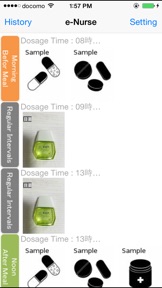
You can take pictures of medicines with the built-in camera and register them at ‘Morning before meal’ for instance.
Your medication will be recorded when you tap the blinking button after medication.
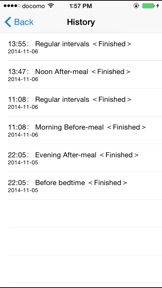
You can see your medication history by tapping the 'History' button. Old history is automatically deleted after three months.
Soon after having downloaded the app, medicine samples of ‘Morning before meal’, ‘Noon after meal’ and ‘Before bedtime’ are displayed on a time table for example usage.
The chime rings to urge you to take medicine if the dosage times are things of the past already. The blink stops if you tap blinking buttons. Tapping upper right 'Setting' button on the screen to move to setting times screen, you can change the dosage times and add new dosage timings such as 'Morning after meal' or clear dosage timing.
How to set dosage timing.
- move to operation selection screen by tapping 'Setting' button in the upper right corner on the initial screen.
- move to 'Setting' screen by tapping 'Register/Update the dosage schedule' button.
- (1) Updating dosage time
By tapping the line of medication item, you can move to 'set timer' screen and update the dosage time by the wheel.
(2) Resister a new medication item
By tapping the plus icon in the upper right corner, you can move to 'set timer' screen and resist a new medication item.
The following are the categories of the medication item.
In the morning: before meal, just before meal, just after meal, after meal, between meals (morning and noon)
At noon: before meal, just before meal, just after meal, after meal, between meals (noon and evening)
In the evening: before meal, just before meal, just after meal, after meal, before bedtime
Regular Interval: every one hour, every two hours, - - - , every twelve hours
** You can’t set any combinations other than the ones above.
** If you have selected “regular Interval”, the selected time is the starting time of medication. For example, if you select 12 o'clock, the dosage times are not indicated before 12 o’clock. In addition, the dosage times are not indicated from midnight; 12pm to the starting time of the next day for your sleep.
How to associate the photo of medicines with the dosage timing.
- You can associate photos of medicine with dosage timings which were set above.
- Tap the top right 'Medicine' button on the 'Time' screen.
- In the photo selection screen, when you tap the 'Select' button and select pictures on the screen and then tap the 'Done' button, the photos can be associated with the dosage timing.
Multiple Photos can be selected at a time.
How to register photos of medicines.
- move to photo preview screen by tapping 'Register/Update the medicine photos' button.
- You can take a picture with built-in camera.
- The photo taken is displayed on the screen then enter a name in the input area of 'name of taken photo'. After tapping the 'save' button, the photo with medicine name is saved.
You can register other photos repeatedly.
** If you want to mute the chime, you should set one of the following.
- Clear all dosage timings. (Medicine notification vanish)
- In Settings app with iPhone, tap "Do Not Disturb" and enable “Manual” or “Scheduled”.While iPhone is locked state, alerts will be silenced and moon icon will appear in the status bar.
- Pressing and holding the power button with iPhone and turn off the power.
[Note]
- It does not guarantee reliably sounding chimes at specific times at any time in any case.
- If you do not start the app for more than a day, chimes will be silenced. When you start the app, the chimes begin to sound.
- We are not able to compensate for any damages or losses by any reason.
What's New in Version 1.8
Now supports the latest iOS.
Information
Developer
Categories
Version
1.8
Size
4.1 MB
Game Center
No
VPP Device Licensing
Yes
Rating
Rated 12+ for the following:
Infrequent/Mild Medical/Treatment Information
Compatibility
iOS 12.0 or later
Devices
iPhone 5s, iPhone 6, iPhone 6 Plus, iPhone 6s, iPhone 6s Plus, iPhone SE, iPhone 7, iPhone 7 Plus, iPhone 8, iPhone 8 Plus, iPhone X, iPhone XR, iPhone XS, iPhone XS Max, iPhone 11, iPhone 11 Pro, iPhone 11 Pro Max, iPhone SE (2nd generation), iPhone 12, iPhone 12 Pro, iPhone 12 Pro Max, iPhone 12 mini, iPhone 13, iPhone 13 Pro, iPhone 13 Pro Max, iPhone 13 mini, iPhone SE (3rd generation), iPhone 14, iPhone 14 Plus, iPhone 14 Pro, iPhone 14 Pro Max, iPhone 15, iPhone 15 Plus, iPhone 15 Pro, iPhone 15 Pro Max, iPhone 16, iPhone 16 Plus, iPhone 16 Pro, iPhone 16 Pro Max, iPhone 16e, iPad (5th Generation) Wi-Fi, iPad (5th Generation) Wi-Fi + Cellular, iPad (6th generation) Wi-Fi, iPad (6th generation) Wi-Fi + Cellular, iPad Pro, iPad Pro (Cellular), iPad Pro (9.7-inch), iPad Pro (9.7-inch) (Cellular), iPad Pro 12.9-inch (2nd generation), iPad Pro 12.9-inch (2nd generation) Wi-Fi + Cellular, iPad Pro (10.5-inch), iPad Pro (10.5-inch) Wi-Fi + Cellular, iPad Pro (11-inch), iPad Pro (11-inch) Wi-Fi + Cellular, iPad Pro 12.9-inch (3rd generation), iPad Pro 12.9-inch (3rd generation) Wi-Fi + Cellular, iPad Air, iPad Air (Cellular), iPad Air 2, iPad Air 2 (Cellular), iPad Air (3rd generation), iPad Air (3rd generation) Wi-Fi + Cellular, iPad mini Retina, iPad mini Retina (Cellular), iPad mini 3, iPad mini 3 (Cellular), iPad mini 4, iPad mini 4 (Cellular), iPad mini (5th Generation), iPad mini (5th Generation) Wi-Fi + Cellular, iPad (7th generation) Wi-Fi + Cellular, iPad Pro 11-inch (2nd generation), iPad Pro 11-inch (2nd generation) Wi-Fi + Cellular, iPad Pro 12.9-inch (4th generation), iPad Pro 12.9-inch (4th generation) Wi-Fi + Cellular, iPad Air (4th Generation) (Wi-Fi), iPad Air (4th Generation) (Wi-Fi + Cellular), iPad (8th generation) Wi-Fi, iPad (8th generation) Wi-Fi + Cellular, iPad Pro 11-inch (3rd generation), iPad Pro 11-inch (3rd generation) Wi-Fi + Cellular, iPad Pro 12.9-inch (5th Generation), iPad Pro 12.9-inch (5th Generation) Wi-Fi + Cellular, iPad (9th Generation), iPad (9th Generation) Wi-Fi + Cellular, iPad mini (6th Generation), iPad mini (6th Generation) Wi-Fi + Cellular, iPad Air (5th generation), iPad Air (5th generation) Wi-Fi + Cellular, iPad Pro 11-inch (4th generation), iPad Pro 11-inch (4th generation) Wi-Fi + Cellular, iPad Pro 12.9-inch (6th generation), iPad Pro 12.9-inch (6th generation) Wi-Fi + Cellular, iPad (10th generation), iPad (10th generation) Wi-Fi + Cellular, iPad Air 11-inch (M2) Wi-Fi, iPad Air 13-inch (M2) Wi-Fi, iPad Air 13-inch (M2) Wi-Fi + Cellular, iPad Pro 11-inch (M4) Wi-Fi, iPad Pro 11-inch (M4) Wi-Fi + Cellular, iPad Pro 13-inch (M4) Wi-Fi, iPad Pro 13-inch (M4) Wi-Fi + Cellular, iPad mini (A17 Pro) Wi-Fi, iPad mini (A17 Pro) Wi-Fi + Cellular, iPad (A16) Wi-Fi, iPad (A16) Wi-Fi + Cellular, iPad Air 11-inch (M3) Wi-Fi, iPad Air 11-inch (M3) Wi-Fi + Cellular, iPad Air 13-inch (M3) Wi-Fi, iPad Air 13-inch (M3) Wi-Fi + Cellular, iPod touch (6th Generation), iPod touch (7th generation)
Languages
English, Japanese
App Store: Customer Ratings
Ratings & Reviews
0.0 of 5 (No rating)
App Store: Customer Reviews
No Entry