AboutTermsPrivacyContact
 
Updating
Taskmator - TaskPaper Client

Taskmator - TaskPaper Client

Released: 2014-01-31
© 2022 Taskmator
Taskmator - TaskPaper Client - QR Code
Version 5.46
4+
Download on the App Store
Version 5.46
4+
Download on the App Store
Released: 2014-01-31
© 2022 Taskmator

iPhone Screenshots

Screenshot
Screenshot
Screenshot
Screenshot
Screenshot
Screenshot
Screenshot
Screenshot
Screenshot
Screenshot

iPad Screenshots

Screenshot
Screenshot
Screenshot
Screenshot
Screenshot
Screenshot
Screenshot
Screenshot
Screenshot
Screenshot

Description

◉ "The Best TaskPaper app for iOS" — Macdrifter
◉ "Excellent Task Manager"— Cult of Mac
◉ “Taskmator, a powerful TaskPaper client for iPhone and iPad, has received full Reminders Integration” — Federico Viticci, MacStories
◉ "Taskmator is really neat and great" —Merlin Mann
◉ "I love using the TaskPaper format, with TaskPaper on Mac and Taskmator on iOS" —Brett Terpstra
Taskmator ( Next-Generation of renowned task management app called TaskPaper ) takes full advantage of iOS/ iPadOS technologies, gives you speedy, powerful tools that let you more productive.
• Based on the open source code of TaskPaper for iOS/ iPadOS.
• Type your lists into Taskmator and each line is quickly formatted into a Project, Task, or Note.
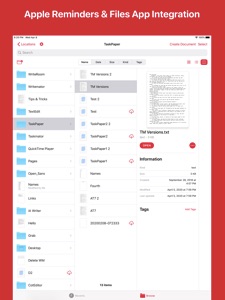
• Apple Reminders Integration.
• Built-In Files App Integration.
• Local Notifications.
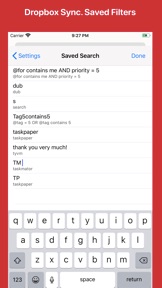
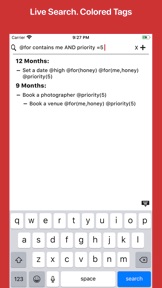
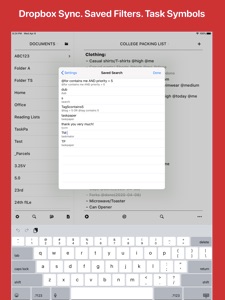
• Live Search with Saved Filters.
• Dropbox Sync API V2.
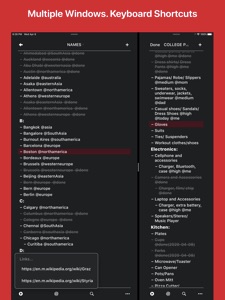
• Multiple Window, Split View Support for iPadOS.
• System Dark Mode.
• Touch ID/ Face ID support.
• Document Picker Support.
• Custom Task Symbol.
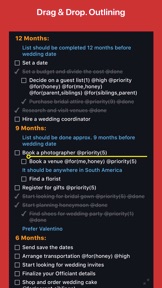
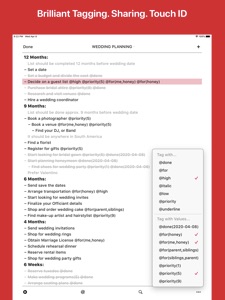
• Colored Tags, Tags Suggestion, Links Detections, Tag Formatting.
• Print with custom task symbol.
• Full Screen Mode. Scroll Headings to have more space.
• Organize notes, tasks, or projects by tags.
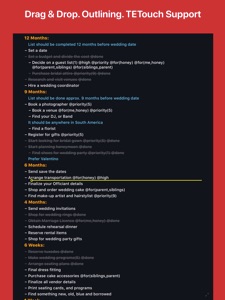
• Support Outlining. Drag & Drop items from another app and vice versa.
• UI elements respond to the cursor on iPadOS when connecting a mouse or trackpad.
• Statistics.
• TextExpander (TETouch Snippet Expansion) support.
• Re-use a file on a single tap. Little expensive method.
• Review all your projects using "Go to Project.." feature.
• URL Schemes.
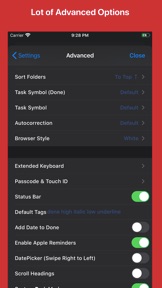
• Customize extended keyboard keys, themes, dark mode, fonts, colors.
• Export file as PDF.
• Approx. 150 beautiful fonts are available.
• Total 9 app icons available.
If you have any questions/ suggestions/ issues related to Taskmator then please contact me via email (taskmator@gmail.com) or on twitter (@Taskmator).

What's New in Version 5.46

This update fixes a few bugs (datepicker on iPhone) and made few enhancements.
Please leave a nice review (or spread the word) if you like Taskmator. It really helps!
If you have any questions/ issues/suggestions then please contact me via email (taskmator@gmail.com) or on twitter (@taskmator)
Have a wonderful time ahead!

Information

Categories

Version

5.46

Size

75.1 MB

Game Center

No

VPP Device Licensing

Yes

Rating

Rated: 4+

Compatibility

iOS 12.0 or later

Devices

iPhone 5s, iPhone 6, iPhone 6 Plus, iPhone 6s, iPhone 6s Plus, iPhone SE, iPhone 7, iPhone 7 Plus, iPhone 8, iPhone 8 Plus, iPhone X, iPhone XR, iPhone XS, iPhone XS Max, iPhone 11, iPhone 11 Pro, iPhone 11 Pro Max, iPhone SE (2nd generation), iPhone 12, iPhone 12 Pro, iPhone 12 Pro Max, iPhone 12 mini, iPhone 13, iPhone 13 Pro, iPhone 13 Pro Max, iPhone 13 mini, iPhone SE (3rd generation), iPhone 14, iPhone 14 Plus, iPhone 14 Pro, iPhone 14 Pro Max, iPhone 15, iPhone 15 Plus, iPhone 15 Pro, iPhone 15 Pro Max, iPhone 16, iPhone 16Plus, iPhone 16Pro, iPhone 16ProMax, iPhone 16e, iPad (5th Generation) Wi-Fi, iPad (5th Generation) Wi-Fi + Cellular, iPad (6th generation) Wi-Fi, iPad (6th generation) Wi-Fi + Cellular, iPad Pro, iPad Pro (Cellular), iPad Pro (9.7-inch), iPad Pro (9.7-inch) (Cellular), iPad Pro 12.9-inch (2nd generation), iPad Pro 12.9-inch (2nd generation) Wi-Fi + Cellular, iPad Pro (10.5-inch), iPad Pro (10.5-inch) Wi-Fi + Cellular, iPad Pro (11-inch), iPad Pro (11-inch) Wi-Fi + Cellular, iPad Pro 12.9-inch (3rd generation), iPad Pro 12.9-inch (3rd generation) Wi-Fi + Cellular, iPad Air, iPad Air (Cellular), iPad Air 2, iPad Air 2 (Cellular), iPad Air (3rd generation), iPad Air (3rd generation) Wi-Fi + Cellular, iPad mini Retina, iPad mini Retina (Cellular), iPad mini 3, iPad mini 3 (Cellular), iPad mini 4, iPad mini 4 (Cellular), iPad mini (5th Generation), iPad mini (5th Generation) Wi-Fi + Cellular, iPad (7th generation) Wi-Fi + Cellular, iPad Pro 11-inch (2nd generation), iPad Pro 11-inch (2nd generation) Wi-Fi + Cellular, iPad Pro 12.9-inch (4th generation), iPad Pro 12.9-inch (4th generation) Wi-Fi + Cellular, iPad Air (4th Generation) (Wi-Fi), iPad Air (4th Generation) (Wi-Fi + Cellular), iPad (8th generation) Wi-Fi, iPad (8th generation) Wi-Fi + Cellular, iPad Pro 11-inch (3rd generation), iPad Pro 11-inch (3rd generation) Wi-Fi + Cellular, iPad Pro 12.9-inch (5th Generation), iPad Pro 12.9-inch (5th Generation) Wi-Fi + Cellular, iPad (9th Generation), iPad (9th Generation) Wi-Fi + Cellular, iPad mini (6th Generation), iPad mini (6th Generation) Wi-Fi + Cellular, iPad Air (5th generation), iPad Air (5th generation) Wi-Fi + Cellular, iPad Pro 11-inch (4th generation), iPad Pro 11-inch (4th generation) Wi-Fi + Cellular, iPad Pro 12.9-inch (6th generation), iPad Pro 12.9-inch (6th generation) Wi-Fi + Cellular, iPad (10th generation), iPad (10th generation) Wi-Fi + Cellular, iPad Air 11-inch (M2) Wi-Fi, iPad Air 13-inch (M2) Wi-Fi, iPad Air 13-inch (M2) Wi-Fi + Cellular, iPad Pro 11-inch (M4) Wi-Fi, iPad Pro 11-inch (M4) Wi-Fi + Cellular, iPad Pro 13-inch (M4) Wi-Fi, iPad Pro 13-inch (M4) Wi-Fi + Cellular, iPad A16, iPad A16Cellular, iPad Air11M3, iPad Air11M3Cellular, iPad Air13M3, iPad Air13M3Cellular, iPad MiniA17Pro, iPad MiniA17ProCellular, iPod touch (6th Generation), iPod touch (7th generation)

Languages

English

App Store: Customer Ratings

Ratings & Reviews

4.3 of 5 (226 Ratings)

App Store: Customer Reviews

2024-02-18

Scrolling by flick can move text - Ugh

Still a problem - and fatal for me. Using the scroll bar feature works well and can quickly move from top to bottom of a file be sliding your finger tip from top to bottom of the edge of the screen.
But the normal method of scrolling up or down on an iPhone remains how Steve Jobs demonstrated it in 2007. Flicking up and down the screen. 14 years of muscle and brain memory is really hard to stop using.
And this is Taskmator's failure.
I regularly see some random bit of text flying up the screen to a new location without doing a "tap and hold" to select the text I want to move somewhere rose. The problem with the super speed of dragging to the top of the document after just starting to drag seems to have been fixed. So the inadvertent move does seem constrained to be modestly local to the starting location.
When I do use tap and hold it seems to have a significant delay before popping the text up to move. This is good and I wonder how flicking can get past this delay. Perhaps if tap and hold to move is set to only work when the text is STATIONARY. Just thinking.
I will not give up on Mac TaskPaper as it is one of the most creative apps ever introduced. I use it every day and a lot. Thank you to Jesse Grosjean.
Just duplicate TaskPaper on IOS and you can have a real winner.
lowell.
2023-01-02

Dropbox doesn't work; Files app integration is dicey

The direct Dropbox integration doesn't work at all -- maybe it was abandoned when the Files app integration got added? Or so it would seem.
Sadly, the Files app integration is quite bad; syncing doesn't seem to happen. Also (maybe related?) there's some weird lagginess if you turn off Apple Reminders integration.
This app might be okay if you're only working with local files on your iPad, but if you want to store your Taskpaper files in the cloud.
Essentially, this seems like abandonware. Stay away.
Doodaddy
Version 5.46
2022-10-24

Keeps crashing. No updates. Was this abandoned?

I’m frustrated by frequent crashes and menu options not working.
Edit: where do I find version 3.9994? The last iOS version 5.46 is 3 months old.
Edit 2: tried contacting the developer but received no revert ☹️
TheGreenGoose
Version 3.71
2022-06-13

Very good

Well thought out.
rnetter
Version 3.999
2021-12-25

One of a few indispensable iOS apps

I was slow to accept TaskMator because of its visual paradigm. When I make a task list on paper, each item has a check box and I check that when it’s done. If I strike through the task, it means I decided against it - decided the task wasn’t a priority. TaskMator, like other TaskPaper apps, strikes through completed tasks, which makes less sense to me and makes my record of completed work harder to read. TaskMator just works so well that it won me over anyway. It’s simple, easy, reliable, synchronized across all my devices, and the tagging mechanism makes it easy to filter my lists to see what I want - quicker and easier in most cases than a “real database” app. I use TaskMator not just for task tracking, but for other lists like groceries, packing lists, and items I am collecting. It’s one of my most-used apps.
Brobdignagian
Version 3.99974
2021-07-22

Developer Stands By His Work

I have been using task paper for 8 years with my job. It’s critical to what I do, and there is nothing that replaces it. Taskmator is an excellent app, although last year it took a while for it to be properly updated. Although Amit doesn’t get a lot of money from this app, he still supports it. I would pay much more for it, it’s that important to me.
Mikeybd
Version 3.4
2021-06-21

Many strengths, some weaknesses

First, the good: this is a much-needed app, filling a gap created when the developer of the original Taskpaper app abandoned iOS to concentrate on the Mac version. The text editor Editorial, which seemed like the best alternative to the original Taskpaper, appears to be abandonware now: the developer hasn’t upgraded it to work with Apple’s Files, which is pretty much a dealbreaker these days. Enter Taskmator, which can read and write Taskpaper files, and is fully up-to-date with the current set of iOS technologies, including Files. It presents the files attractively and clearly, and provides all the basic tools you need for working with them. If you happen to like the Taskpaper format — a simple plaintext format for to-do lists — then this is the app you want.
Now the bad news. First, it’s not entirely stable. I’ve managed to hang it a few times, most often when using the ‘Move …’ menu.
Second, the UI could be better. On a desktop app, I’d say that it was “mousey”: lots of mouse-clicks are needed to get anything done. I’m not sure what the equivalent is for a mobile app: “fingery?” “touchy?”
So, for example, adding a new project heading requires you to press the ‘+’, which creates a new task item, then click on the new item, then click the ‘…’ icon to bring up the menu, then choose ‘Item Type …’ and finally choose ‘Project’. That’s a lot of clicks just to make one new item. And you haven’t even put it where you want it, which requires a whole new set of clicks. This could definitely be handled better.
Items can be moved, re-ordered and re-parented using drag and drop, which is a reasonable way to do it. However, on my phone, I sometimes found that the drag system either didn’t respond at all or responded suddenly and unexpectedly, resulting in the item being dragged to the wrong location. Maybe Up/Down and Indent/Outdent buttons, as seen in some other outliners, would work better. You can, of course, also use the ‘…’ pop-up menu to move items, but that’s not ideal.
Given the absence of competition, these aren’t exactly dealbreakers, but it does mean that working with Taskmator is a lot less efficient and enjoyable than it could be. The results are nice, but everything takes longer than it needs to.
angusmci
Version 2.41
2021-03-29

I don’t typically leave reviews but

I’m trying to get into using TaskPaper after using every other todo list over the years. I was looking for an iOS client and this seems like the best bet.
Good lord this thing crashes every 5 minutes and is so finicky, I accidentally mark things as done constantly due to the poorly implemented gestures.
Gonna try Drafts 5 instead. Buyer beware
Jamookka
Version 3.9992
2021-01-22

Had high hopes...

I had high hopes for this app and what it promised to offer for TaskPaper enthusiasts. But the iPad version of this app wasn’t at all useful—even for this review, the app doesn’t correctly present the keyboard; I had to adjust my orientation to get the keyboard to display correctly and to be useable.
Using the app, I was never able to work on a single TaskPaper document-the interface is simply unusable. I’m using an iPad Air 2 with iPad OS 14.3.
The iPhone version works alright, but the interface feels very dated.
I still use TaskPaper concepts, but I no longer use these dedicated apps.
theitsmith
Version 3.74
2021-01-16

Nice app but for 2 things

Amit, thanks for making this app. It’s a very nice app but please consider my suggestions. Thank you!
1. Please make it more difficult to accidentally grab and move items when scrolling through the task list. I accidentally grab and move things all the time when scrolling, and then I have to figure out if I indeed actually moved it and if so where in the heck I grabbed it from. It’s a reoccurring royal pain. Please make scrolling more user-friendly.
2. Please do something so that we do not lose our data when syncing with iCloud. I totally lost my entire Taskpaper file when syncing to iCloud with Taskmator. I’m a grown man, and I almost cried.
User Tip: I highly recommend that all users backup your Taskmator files by selecting and holding the file name and then selecting “Duplicate.” Better safe than sorry, and it’s relatively easy to do.
johnnyappleseed001
Version 3.0
2021-01-03

Fabulous

A little quirky, but all together well done. This app is a great companion to using the desktop version of Taskpaper from Hog Bay Software. NOTE: when using this app make sure to press the Done button OTHERWISE changes made on the desktop will get wiped out in favor of what is on the iOS app. Like I said quirky. May not be worth the trouble for some.
Lou Lesko
Version 5.33
2020-12-30

Works great except badge option doesn’t work

The app doesn’t seem to have requested badge notification permission from iOS, so badges won’t work no matter what option you select in settings.
Otherwise great Taskpaper client.
dance.monkey
Version 5.35
2020-05-10

Dropbox Sync Issues - pt.4

Looks like Apple has removed my VALID low-star review from 12 hrs ago.
So I’m giving this “review” 3 stars just so this feedback isn't deleted without verification, again.
I’m not sure how unverified review deletion is ethical or even permissible.
Customers have a right to know if an app on the store is throwing out sync problems. And sync problems are by definition not user-generated.
But - the sync issues persist. So, still 1-star.
Sorry developer, but please don’t flag reviews for deletion unless the problem is actually resolved. I’m well aware that all software is provided at user’s risk. But errors are errors.
smartartc
Version 5.41
2020-04-30

Deleted my iCloud list

I was starting to enjoy this app until I opened up a task paper list that was stored on iCloud. It flashed the list, then showed it as being empty.
It had deleted my entire ToDo! Gone, poof!
A quick google search revealed that I was not the only person to gave this problem. Bummer!
Unusable until this stability reliability is resolved.
chrispebble
Version 4.81
2020-04-14

So much improved that it is like a new app

Been a longtime task paper user. But this IOS equivalent is even better than the desktop version. Really well thought out and cleverly designed. One of the best text-processing apps I've seen. Plus makes outlining and list managing actually work well on IOS.
Read the help and especially the tips docs that come with it. You'll learn useful gesture shortcuts.
Recent additions make it even better for IPadOS features.
OnTheEast
Version 3.877
2019-12-04

Deleted my data

I had a .taskpaper document on my (iCloud) desktop on my Mac. Bought this app, browsed to my document and opened it with this app, and hey presto! Immediately all the text disappeared. Just completely deleted, wiped out, nothing left, zip, zilch, wow, best two bucks I ever spent. Good thing I have a time machine so I can go back and not buy this. Oh wait I don’t. But at least I have a time machine backup so I can get my #%*!ng data back.
npydyuan
Version 2.35
2019-10-17

I like the idea...

...but the execution seems a little off.
Swiping to mark completed can be hit and miss. The reminders integration appears to be broken; it creates a new list in the Reminders app but never adds anything to it.
What I do like is the font selection, customization options, and the distraction free plain text interface.
The app is a bit rough around the edges, but I still like the idea and hope to see it improved upon a bit in the near future. Not sure it can replace my current method of task management at this time though.
Clams Maloney
Version 3.99975
2019-10-13

Broken by iOS 13

The best thing about this app was that it let me keep using my TaskPaper workflow, synced through Dropbox. It. Just. Worked.
When I opened the app after upgrading to iOS 13.1.2, it presented me with a list if recent documents from Google Drive… from an account that I have no recollection of linking to Taskmator. The link to Dropbox was broken and none of those files showed. Browsing took me to Taskmator’s documents in iCloud.
I relinked Taskmator to my Dropbox account, and nothing changed. I unlinked again, so that I could verify the sync directory and file extensions: all correct and unchanged since before upgrading iOS. I relinked, still nothing. I browsed in Dropbox and all the .taskpaper files were still there: Taskmator just wasn’t seeing them.
Not sure what happened, but it pretty much negated the purpose of the app for me.
Seth Battis
Version 3.989
2019-04-26

Wiped entire Taskpaper file on first open

Installed the app. Opened my (enormous) Taskpaper file. Everything in it disapppeared, with no possibility to undo.
Srdan Keca
Version 3.9993
2019-04-17

Very useful Taskpaper app for iOS.

I use this on a regular basis. It simple yet detailed. It allow me to quickly review new and old tasks with ease. I hope the developer keeps maintaining this app as it has become apart of my work and personal routine. Would recommend. 🙌
Sectionsix
Version 2.21
2019-03-15

Great TaskPaper App

I use TaskPaper for work all the time because of its fast and simple interface. Having an iOS app that syncs with it and does all the same things is a must have in my toolbox.
LaughingLemur
Version 1.8
2019-03-08

Erasing File Contents

This is a promising app, but when I have a file open on iPad and I switch applications all of the file contents are deleted as soon as I switch back. I’ve tested this several times and get this result reliably. I can’t use the app with this kind of problem and would like a refund.
Masoric1980
Version 1.5
2018-12-18

Good functionality, low reliability

The functionality of this app is powerful. However, I have lost content from my synchronized lists in numerous opportunities, and the developer has been unable to provide a solution.
I have also found that the pick and drop functionality is very sensitive and most likely you would have undesired displacements of topics when you scroll in long lists.
I would love to recommend the app, but these major issues made it unusable for me.
Miguel_E_H
Version 3.9994
2018-11-24

Needs iCloud sync

Dropbox is like a cassette tape in a world of CDs and DVDs. People are primarily using iCloud for storage now. Please add this function and don’t be a dinosaur that is stuck in the past.
Reader1718
Version 4.2
2018-11-10

I really love this app

There is far more under the hood than the pictures let on. This app does exactly what I wanted (lists, outlines, tasks, notes). And it does it simply and in style. All your hard work is much appreciated. The followers that like Taskmator REALLY like Taskmator, and users' opinions influenced me to try.
One more thing. I'm someone who's got no clue how to use markdown and these styling languages. Doesn't hinder me one bit in using the app the ways I intended
Oz26mgs
Version 3.7
2018-10-10

It works

It works. It's one of the only apps that does TaskPaper support, so what are you gonna do.
I find that it can become really slow when opening a large file.
Jay Sit
Version 4.68
2018-08-13

Huge Fan

Huge fan of TaskPaper and very grateful of the continued development of the mobile companion. Thank you, Amit
I was wondering what it would take to add syncing through iCloud?
scubaninja
Version 3.852
2018-08-11

Crashmator

After latest update (8/10/18), crashes within 3 seconds of launching. Im sure the developer can correct. Using iPhone X.
EnochWasNot
Version 5.30
2018-07-09

Great implementation but one thing missing

App is very well designed and quick and pleasant to use.
It does need 1 feature added: given the relatively small screen size of any phone, the ability to hide and show subordinate items would be helpful.
Gbrocksny
Version 1.0
2018-06-06

Immediately Closes after Splash Screen

The developer just released an update. It no longer has an endless loop. Instead, after showing the Taskpaper intro screen, it just dies.
Just as useless.
Original review 2018-06-06:
Endless Loop. Can’t use at all.
I installed this app, gave it access to Dropbox, specified a folder, and then it got stuck in an endless loop, displaying a box which says “Synchronizing All Folders” and specifies “Documents”. It has only one option, dismiss, but I can’t seem to press it before it disappears and reappears. It does this multiple times per second. There’s nothing I can do to stop it. I tried killing and then deleting and reinstalling the app, but it still behaves that way as soon as I open it. I even used the Dropbox settings to deauthorize the app, with no change on behavior. It’s completely nonfunctional.
The developer’s support link goes to a Facebook page, but I don’t use Facebook so I can’t seek help that way.
Completely wasted purchase.
Riley Major
Version 4.75
2018-06-03

Plain Text Is Best, but It Needs iCloud

This is a really well reviewed app. I've read tons of good things about it. Problem is I find it disappointing to use. I know there is a manual, but I know taskpaper's format by heart. I just doesn't flow for me. The real pain is the lack of iCloud support (the days of DropBox ubiquity are over).
Still, the integration with Reminders is impressive. The swipe to complete is a great idea. The best part is that it's all plain text at the core; you're never locked into the app.
All in all, I have high hopes for the future. I'm looking forward to see what comes.
R . D . L
Version 4.66
2018-05-18

Great app

I can’t load apps on my work devices, so I have to rely on simple text files. Taskmator plain text file format allows me to manage tasks on those work devices seamlessly while also using powerful apps like Taskmator and taskpaper on the Mac to make quick work of major readjustments.
The most efficient way I’ve found to do this!
espiljos
Version 1.6
2018-05-16

Not true doc picker support

Only supports importing docs and not opening them in place.
I don’t want to be forced to keep them in Dropbox or locally. Clumsy mechanism for sending the file back to doc picker.
Desperately needs open in and save in place to doc picker.
Stephen2245
2018-05-02

Very interesting App

If you use this app correctly, can help you be better organized and keep all your notes or task in order, with colors and styles that will make you be more productive.
This app is not easy to use
The developer is focusing in power users
I’m still learning some tips and secrets
My suggestion and wish
*the availability to add picutes and picture albums to the notes will make me erase from my phone all other writing/task/notes apps
*widget, and with black background and the colors and styles of my note
Macnamaramac
2018-04-04

Crashes on startup.

Created a folder, then tried to delete it. App crashed. Then app crashes on start up. Hope there’s some kind of crash reporting.
After waiting a few days it doesn’t crash on startup and I was able to remove the folder. Same version 3.9992 — did not upgrade or reinstall.
Developer contacted me a couple days after writing the original review. I *do* think they are being attentive to customers.
cl7070
2018-03-23

Not for me

It is such a simple interface, but things are complicated. Maybe I’ll try it some other time, but I’m busy right now.
Lightboxr
2018-03-11

Very, very nice app!

Very, very nice app. Shows excellent Pride and Professionalism in Software Design and Functionality. Nice Apple Reminders integration, works great! Would rate Taskmator much higher if I could more easily get Dropbox set up and Syncing.
hnwilcox
2018-02-27

Crashed over issues with Dropbox

I couldn’t get this to run without crashing. Reinstallation didn’t help. Gave up for a while.
Very difficult and s l o w to get support. Author uses Facebook as support contact; yuck; I prefer not yo go there. Finally got a message from dev via developer response on App Store so I tried app again.
This time I manually deleted all associated folders on Dropbox and created new ones, and pointed the app ther after reauthorizing DB access. Now it works. Still not happy with support options though. Using it in iOS 11 on iPhone 8+.
robgen
2018-01-31

Taskmator 3..998 = TaskPaper for iOS 11, new iPhones, + bug fixes

TaskMator has integration with Apple Reminders.app, saved filters, iOS 11 support, URL schemes support, iPhone 8 , 8 Plus and iPhone X support, integration of the latest TextExpander Touch 3.13 SDK, URL Schemes and many other features. This is one of my favorite productivity apps by far, and if you are a TaskPaper fan, you will love TaskMator! To top things off, the developer is very open and responsive to feedback. Amit is on Twitter as @Taskmator .
Bob-Hughes
2018-01-28

Read the Tips section in the settings

This app is working great for me. The Tips section has been very useful to me in finding all the tricks to make this app pretty fun to use, developer comes up with clever gestures that aren’t always obvious but once you get them they’re great. Also in the Tips there’s a detailed description of how to fix Dropbox issues, this solved all my crashing issues.
Skerry dunes
2018-01-25

TaskPaper lives on iOS!

If you use TaskPaper on your Mac, with Taskmator you can use it on your iOS devices too! Simplicity is beautiful! The developer is very responsive, support him :-)
andress_chris
2018-01-18

app crash

in my ipad 10.5
this app was crahed.
please update
romangtokki
2018-01-16

Needs work

Selecting text to edit is cumbersome and less responsive than the usual iOS experience. On iPhone X marking a task complete is frustratingly difficult. Since this app doesn’t do anything but edit text, one would expect a better interface.
<not available>
2018-01-15

App Closes Immediately

Like other reviewers, as soon as I added this App on multiple devices the sync no longer works and the app closes immediately after I try to click on anything. It looks like the app has great potential. The app says it syncs across platforms, but as soon as I set up Dropbox sync, now the app closes as soon as I try to click on anything.
Update: I did receive a response from the developer:
I am unable to produce this issue on my iOS so unable to find a solution for it. Trying my best to find a solution but loosing my hope on it. Will provide a solution if I am able to produce this non-producible issue.
You can go ahead and can share your experience with the latest version of TM.
Most recent update:
Issue is not producible by me , nor by more than 60 beta testers.
Ask for refund from Apple for Taskmator. And try editorial and remove the review as it will increase the app sales.
Please let me know if you have any questions.
Sync It
2018-01-09

No good

Had hopes for this app to fill the iOS gap in my TaskPaper workflow but alas, it’s just not going to cut it.
Add to that the fact that I contacted the developer 3x with simple requests and didn’t receive a single response.
Beware syncing with Dropbox, this app deleted all my non-txt/TaskPaper files from the folder I had syncing.
I could go on, but I would just urge you to look elsewhere for a TaskPaper app.
jochinyc
2017-11-25

Startup on iPhone :); syncing with iPad :(

Setup worked great with iPhone. Then i installed it on iPad, and even though i synced it with the same DropBox account as the iPhone, TMator brought up the initialized database. That is... it didn’t sync at all with my iPhone. It was an entirely different install. Would love to know how this syncs.
Kurt4i
2017-10-21

Keep crashing on 6s plus

The latest update keeps crashing on my 6s plus running iOS.
BTW I shouldn’t have to join Facebook for app support.
Duce3G
2017-10-10

Very good

I’ve been using another popular task manager and wanted to give a text-based app a try. I like it because it’s all right there in front of you presented simply in text: projects, tasks, and tags.
Taskmator does a good job of providing the basic functionality of Taskpaper for iOS. So far I’m very happy with it. It’s gotten me to pay attention to a task list again.
rustyhinges
2017-09-06

No Problems

Crash on open! Ouch. Fixed by deleting and reinstalling. Now works like a charm.
iSteeeve
2017-08-21

No real sync

Nice improvements over previous version, but 'syncs perfectly' doesn't not include iCloud.
run2tunes
2017-05-07

Good implementation with room to grow

This is a good implementation of Taskpaper, with all of the basic functionality and some pretty cool advanced features, too. Love all of the customization options!
I've been looking for the ideal checklist app, and this one could easily become such with a handful of improvement requests:
1- Add a way for a sub-list title to indicate that everything within it is checked off/done (for example, turning gray and/or showing an "x/y" indicator of done/total tasks within it). This would be particularly handy in conjunction with the next request:
2- Make it possible to collapse sub-lists. That way, it's easy to keep a long, multi-section list tidy and work on something near the bottom while still able to see the titles of sections throughout the rest of it. Implementing request #1 would help indicate overall list status/progress at a glance, too.
3- Provide an option to have completed items just turn gray rather than also have the slash through them (for legibility's sake).
4- Bonus: add a way to quickly toggle the status of all items under a title to "Done" or "Not Done." This would be particularly handy for those who reuse a checklist often--cleaning lists, packing lists, end-of-day checklists, etc. (Note: it would probably be best to make it hard to do inadvertently or have it ask "Are you sure?" first, to help people avoid accidentally messing up a half-checked list.)
The.Lone.Ranger
2017-04-12

The app has a confusing first-run experience but has a lot of good features

I just went to town and built an amazing TaskPaper file (over 27KB) in TaskPaper 3. I am having some problems with Dropbox syncing but I am working with support to try to get things working. I found some of the user interface design decisions confusing but I think there might be some simple things that could improve the experience for new users, which I have written the developer about.
PureJadeKid
2017-01-13

App developer hit the proverbial "sweet spot" with this iOS program

I only recently found out about & began using Taskmator...& truly love it! Why you might wonder? I will tell you; it combines tremendously effective functionality AND unbelievable simplisty. It just works...and there is really a very short (I.M.H.O) learning curve. This app was extremely well thought out, and given that it is text based, probably has a very small "footprint".
So, if you care about distraction free computing, then I highly recommend this app!
j7s
2016-04-08

Excellent app with one drawback

This is a pretty well thought out app that offers simple and sleek outline functions. Personally, I have no need of the Reminders integration but that doesn’t take away from the usefulness of the app because you can disable it. My one gripe is that Taskmator doesn’t allow me to choose which Dropbox folder I want to store my files in. It forces me to use a ridiculously named folder at the root level of DB: "Taskmator - TaskPaper compatible with Reminders for iOS.” I would prefer to be able to choose where files are stored.
Erwin Dink
2016-01-12

Solid App

While this app has a few quirks, it does a really good job. I was disappointed that hiding ancestors and showing descendants isn't supported, and I was frustrated that the extra keyboard characters aren't available when you search. But, I love the saved searches; Dropbox sync is excellent. And, the functionality is mostly there. This is a solid piece of software and I'm glad to have it.
ericashworth707
2016-01-10

Excellent, fast, syncs text files to Dropbox easily. I've been a user for years

I was been a long time TaskPaper user, and I'm glad to see that TaskMator has made everything a smooth transition. I'm still using this app years after doing a lot of research to choose a proper To-Do and note-taking app. A lot of other apps have complex built-in databases. I prefer a simple text files, and I love that this syncs perfectly with Dropbox. I can always get to my files, even if for whatever reason this app no longer works for me.
menicosia
2015-11-12

It works

The philosophy behind the mobile interface of this Taskpaper clone (which was open sourced) was conceived by the Taskpaper creator. It's unusual. But it works. You really need to have used Taskpaper on a Mac to get a good sense of what this is all about. Or use Taskmator for some time before rendering judgement. Anyways, if you like the idea of using plain text documents for your to do lists, this is a comprehensive and deep solution. Highly recommended.
Miguel G III
2015-08-16

Almost perfect for a simplified text file task manager

I'm a fiddler. I love getting new software and just tinkering with it. The more features the better. I have finally realized I like this because it allows me to actually not do the work! Enter: text file task managing. Amazingly simply yet just powerful enough to be useful. I used to be a huge workflowy user until I realized I work from mobile devices a lot and their apps just don't cut it for ease of use. I have been eyeing this app for awhile and pulled the trigger when I heard Merlin Mann talk about it on the systematic podcast. I moved all my business tasks over to this. It took me a fourth of the time it would of to add all this to omnifocus! Lastly, I am giving 4/5 stars because there are a few more features I think are necessary without making it too feature heavy. Those would be implementing the ability to add multiple tags at a time. Currently you have to hit four buttons in order to task a line item (without typing it). This needs to be easier as well as be able to multi select. There also needs to be the ability to add spice between projects for readability. The current work around is add a note field and just not type anything. Overall: great app. I don't have task paper for Mac as I want to only use this on iOS to see how mimilastic I can really be!
Logic First 24
Version 2.41
2015-07-25

My most used app!

I've learned that to do lists, when I use them, make my life more worthwhile. The dozens I've used have made my life more manageable, but I've become "tired" of the various interfaces- in the end, they've come to look alike.
Enter Taskmator, which emulates a plain vanilla scratchpad. Impossible to tire of, since it is robust in its simplicity. As the little sibling of the MacOS list maker, TaskPaper, it is the go to app for innumerable geeks, who disdain fanciness in favor of text. It syncs over Dropbox, and actually exceeds in functionality with notifications and a share sheet.
The secret sauce is its capability to master complex, plain English searches for dates, categories, and contexts. To get the most out of it, search for Textexpander snippets that others have made available. You'll be glad you did!
Neill Cohen
2015-06-08

Good, needs iCloud sync

Developer has taken the taskpaper torch further! Touch ID finally added, yes. For those comfortable with Dropbox' privacy an excellent app. BUT needs real iCloud drive sync since iCloud doesn't allow file overwrite during export. So as a work around I'm using Drafts to create tasks to iCloud drive and Taskpaper as a read only for my task lists, not ideal. Would love better (templating?) color formatting for project headers, descriptors, tasks.
Keep on runnin'
JustIt
2014-11-20

Wonderful ios taskpaper app (update)

Update for 1.8: it's great to see that the app is going through such great development. This release sees a large range of super useful url scheme options and generally irons out a bunch of small issues and bugs from the previous version. Such a useful, simple and elegant app!
Taskpaper is a simple, elegant, and powerful way of managing, annotating, tagging, and categorising tasks and projects, or just about any other type of list or text.
Taskmator provides an excellent and intuitive way to access, edit, and filter your taskpaper files, though you can also sync other text file types with the app.
I love the updated text expander support. The query language for filtering lists is powerful. You can edit the colors of text and background to anything you like and it has a great selection (read huge really) of fonts.
The updated version just about fixes all the issues that crept in with ios 8. It is wonderful that the app continues to be developed and serves the old and new taskpaper fans on ios.
There are some other apps in the store that say they support taskpaper. They do not. Not like Taskmator does. Editorial is the most intelligent and closest alternative, but still cannot match Taskmator (filtering, moving whole projects).
WhyIs
2014-11-08

Update: Perfect

Update to my earlier 4-star review: it’s perfect now. Everything I complained about in the previous version is resolved, and it is now the ideal successor to TaskPaper. Thank you, Mr. Chaudhary, and kudos.
(Old review ->) I’m grateful the developers have taken up the mantle from Hog Bay, and the new features hold a lot of promise. My only reservation is that the app is a bit "crashy" under iOS 8 (in the same way TaskPaper is). And there are some interface problems, for example when syncing.
Still, a valuable resource, and I look forward to a five star rating when these issues are resolved.
Quicklime
2014-06-30

Just okay, but get rid of the ratings nag

My solicited review:
You interrupt my workflow with a ratings nag? Here's your rating: One Star.
My earlier, non-solicited review:
Good ideas in this app, but clumsy implementation. Very difficult to format the way I like, with properly aligned projects and tasks. I spend way too much time dragging things to the right alignment. Too many clicks to do things as well. And the ordering of folders/files does not allow for manual ordering. Sometimes I just want to drag files/folders to where I want them. This app does not allow for that. Great that I can format text and colors so extensively. How about allowing to properly format actual layouts, too?
Ansk
2014-02-10

Not so good for iPad with keyboard

I'm glad to see that TaskPaper survives and will continue. At $1.99, it's worth just donating to the cause. But it's clearly designed for iPhones. I liked the keyboard centric, plain text approach of the Mac version. But on my iPad with keyboard, I have to touch the screen to move up and down by line, use Enter to toggle through Project/Task/Notes, and use software controls for many other things. It's still good and useful, and I understand the design decisions, but ultimately, it doesn't seem to be a good match for my idiosyncratic use.
jaslar2