AboutTermsPrivacyContact
 
Updating
GraphNCalc83

GraphNCalc83

Released: 2014-05-18
© Ernest Brock 2013-2020
GraphNCalc83 - QR Code
Version 2.7
4+
Download on the App Store
Version 2.7
4+
Download on the App Store
Released: 2014-05-18
© Ernest Brock 2013-2020

iPhone Screenshots

Screenshot
Screenshot
Screenshot
Screenshot
Screenshot
Screenshot
Screenshot
Screenshot
Screenshot

iPad Screenshots

Screenshot
Screenshot
Screenshot
Screenshot
Screenshot
Screenshot
Screenshot
Screenshot
Screenshot

Description

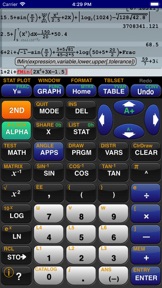
GraphNCalc83 uses touch, color and blazing speed to handle your math problems. The familiar calculator keyboard, arrow keys and functions are enhanced with full touch input for all graphs, editors and menus. Enter calculations in natural textbook format. Enter fractions and view result as fractions. Trace graphs with your finger. Zoom in and out with a pinch. Explore regressions with a tap on the screen. Scroll through the list, matrix and calculation history with a swipe. Tap the ? key for help. Written using the latest 64 bit math libraries, GraphNCalc83 harnesses the amazing computing resources of the iPhone and iPad to provide a colorful, fast and fluid experience. Graphs scroll, glide and zoom smoothly. Matrix, statistics and BASIC programs run 500x times faster than traditional calculators.
GraphNCalc83 includes:
Algebraic entry: Enter problems using full algebraic textbook notation. The command line editor includes interactive parenthesis matching and high lighting, undo and redo, bubble function help and a 200 level calculation history and recall stack. Generate a PDF report of calculations for mailing or printing using the SEND function.
Math functions: Trigonometry, logarithms, function minimum, maximum, numeric integration and derivatives, general solver, real and imaginary numbers, combination, permutation, random number generation, normal, T, chi squared, Fisher, poisson and geometric distributions, binary shift and rotate, test and logic operations, list operations including sort, std. deviation, sum, sequence, matrix determinant, transpose, sum, ref, rref, addition, multiplication.
Graph functions, parametric, f(x,y) and polar equations and statistics plots: Full color graphs with touch to trace, pinch zoom, function minimum, maximum, intersections, asymptotes and numeric integration. Output graphs in high resolution PDF format for mailing or printing. Interactively explore function behavior using variables tied to slider bars.
Statistics, Inferential Statistics and Distributions: A set of inferential statistics worksheets and graphs of distributions are included. The regression analysis screen allows you to quickly compute, view and analyze a data set using a variety of curve fitting methods.
Table: Analyze functions using the table viewer. Use the split screen mode to simultaneously view a graph and table.
Matrix and Lists: Matrix and list editors and a full set of matrix and list operations are built in.
Unit Converter and Constants: Convert between a wide variety of scientific, engineering and common units. A large set of physical constants are also included.
BASIC programming: Create, edit, debug and run BASIC programs. Programs run more than 500 times faster than traditional calculators. Import and execute .83p and .8xp files.
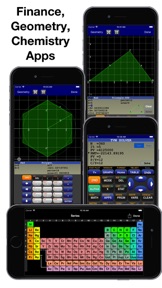
Chemistry: The calculator includes a full featured periodic table, a mass calculator and a data base of element properties. The touch interface allows you to view and interact with the periodic table to view by series, state, melting point, boiling point, electronegativity, electron affinity, valence, ionization, radius, hardness, modulus, density, conductivity, heat and year discovered.
Geometry: The geometry application computes perimeter and area for a variety of 2d geometric figures including squares, rectangles, parallelograms, triangles, polygons, circles, arcs and ellipses. A full triangle solver and interactive unit circle grapher are built in. Solve line intersections, project a point to a line and find a circle given 3 points.
Finance: Compute time value of money problems including annuities, lump sums and uneven cash flow analysis with IRR and NPV
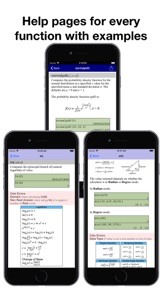
Built-in user guide: A user guide is included and is a touch away using the ? key or ⓘ on any menu. All functions have a full manual page with description of arguments and examples of use. Pop up bubble help displays function arguments during problem entry and program editing.

What's New in Version 2.7

For duration of the Coronavirus pandemic, GraphNCalc83 is being offered for free to support students learning from home. All features enabled, no ads, no personal tracking. FREE!
• Fixed dark mode issues
• Fixed display of imaginary numbers
• Added PlySmlt to APPS
• Added PRGM sorting options
• Added Testing Mode (touch ? MODE and scroll to section \"---Test Taking---\" to learn more)

Information

Developer

Categories

Version

2.7

Size

10.5 MB

Game Center

No

VPP Device Licensing

Yes

Rating

Rated: 4+

Compatibility

iOS 12.0 or later

Devices

iPhone 5s, iPhone 6, iPhone 6 Plus, iPhone 6s, iPhone 6s Plus, iPhone SE, iPhone 7, iPhone 7 Plus, iPhone 8, iPhone 8 Plus, iPhone X, iPhone XR, iPhone XS, iPhone XS Max, iPhone 11, iPhone 11 Pro, iPhone 11 Pro Max, iPhone SE (2nd generation), iPhone 12, iPhone 12 Pro, iPhone 12 Pro Max, iPhone 12 mini, iPad (5th Generation) Wi-Fi, iPad (5th Generation) Wi-Fi + Cellular, iPad (6th generation) Wi-Fi, iPad (6th generation) Wi-Fi + Cellular, iPad Pro, iPad Pro (Cellular), iPad Pro (9.7-inch), iPad Pro (9.7-inch) (Cellular), iPad Pro 12.9-inch (2nd generation), iPad Pro 12.9-inch (2nd generation) Wi-Fi + Cellular, iPad Pro (10.5-inch), iPad Pro (10.5-inch) Wi-Fi + Cellular, iPad Pro (11-inch), iPad Pro (11-inch) Wi-Fi + Cellular, iPad Pro 12.9-inch (3rd generation), iPad Pro 12.9-inch (3rd generation) Wi-Fi + Cellular, iPad Air, iPad Air (Cellular), iPad Air 2, iPad Air 2 (Cellular), iPad Air (3rd generation), iPad Air (3rd generation) Wi-Fi + Cellular, iPad mini Retina, iPad mini Retina (Cellular), iPad mini 3, iPad mini 3 (Cellular), iPad mini 4, iPad mini 4 (Cellular), iPad mini (5th Generation), iPad mini (5th Generation) Wi-Fi + Cellular, iPad (7th generation) Wi-Fi + Cellular, iPad Pro 11-inch (2nd generation), iPad Pro 11-inch (2nd generation) Wi-Fi + Cellular, iPad Pro 12.9-inch (4th generation), iPad Pro 12.9-inch (4th generation) Wi-Fi + Cellular, iPad Air (4th Generation) (Wi-Fi), iPad Air (4th Generation) (Wi-Fi + Cellular), iPad (8th generation) Wi-Fi, iPad (8th generation) Wi-Fi + Cellular, iPad Pro 11-inch (3rd generation), iPad Pro 11-inch (3rd generation) Wi-Fi + Cellular, iPad Pro 12.9-inch (5th Generation), iPad Pro 12.9-inch (5th Generation) Wi-Fi + Cellular, iPod touch (6th Generation), iPod touch (7th generation)

Languages

English, Spanish

App Store: Customer Ratings

Ratings & Reviews

4.8 of 5 (1,591 Ratings)

App Store: Customer Reviews

2021-08-25

Love this app for teaching students remotely!

I haven't found anything even close to as thorough and well designed this calculator is! I find that there have been several times that I have actually learned a few things myself from the information portion of the app. It is as close as it gets to the real hardware and even better because it prompts you for input. Bravo!
Bussyome
Version 2.7
2021-08-08

Updated review

I have a new device and an updated calculator. I left a review before but now want to update. I enjoy the developer took the time to fix all the bugs and improved the calculator. Math classes get more complicated and it is always great to know with the growing costs of books, school supplies, travel expenses and all things expensive, I am grateful to know there is an awesome developer that takes the time to improve this wonderful application and send all the loyal product users updates at no additional cost. Other developers and book writers would just add pages to a book, or improvements and label it new edition and charge for a new improvement…or more money for fixing the bugs. Thank you for being such an amazing and devoted developer. I will always look forward to purchasing new items in the future. It is also great to be able to review and refresh my math skills on the newly improved Graphing Calculator. Stay awesome!
BrainyWords
Version 2.7
2021-07-29

The calculator simulator

It is the best in the App Store. I requested my students to purchase it. Constantly updated excellent
yashin@
Version 2.7
2021-07-16

Blast from the past!

Super well-done port, and within minutes I was coding in Basic again. Nostalgic but also very well presented. Cheers!
Daverarelyratesapps
Version 2.7
2021-06-27

Great calculator!!

My compliments to the dev. You nailed it! A great calculator that doesn’t have bloat ware and just works!!! Highly recommended.
Kristoffer_J1977
Version 2.7
2021-06-17

Nice Calculator

Easy to use! I recommend it for my students to purchase.
Mathnunnies
Version 2.7
2021-06-05

Wonderful! Great tool to have on iPad

Great and easy to use replication of the Ti graphing calculator we all used in school. Having it in the tool box on the iPad makes it super convenient for my use or for my kids to use for their homework. One of those things that you should just get without thinking too much about it.
Technology Voyeur
Version 2.7
2021-05-17

Still the best

No calc app can ever compare. No matter how many I try to leave this one for. I always come back to GrafNCalc&3. It’s simply the best and familiar.
RanBash
Version 2.7
2021-04-27

Best calculator on iOS

I have looked for years for the perfect calculator app. I love the flexibility and that this is familiar design as TI series. I love this app! Just buy it!
ThomasSo1
Version 2.7
2021-04-15

10/10

Powerful scientific graphing calculator, if you are a student get this calculator it is just a ti-84 but better and faster, highly highly recommend!
Ezor54
Version 2.7
2021-04-14

He did it!

I don’t know how Mr. Brock does it but this calculator is great! It must be a labor of love because it has truly paid off. A faithful and very functional replica! Thanks so much!!
Update 8/15/2018: Amazing app that continues to be improved.
Update 4/14/2021: Mr. Brock replies to concerns and suggestions promptly. He has made a great replica of the TI-83.
LondoMollari
Version 2.7
2021-04-07

Best calculator app

I tried out about half a dozen different calculator before settling on this one. Obviously, it uses a well established and engineered design, but it translates itself well into a phone app.
nirvanabear
Version 2.7
2021-04-07

NPA

I’ve been using this calculator for almost a year now and have truly enjoyed its capabilities.
NPArmstrong
Version 2.7
2021-03-24

Best iPhone calculator

This is the first calculator that I actually enjoy using on the iPhone. I have all my students download this to use at home. I cannot praise this calculator enough!!
Gumpster123
Version 2.7
2021-03-18

literally thank u sm

!!!!
howdyloves
Version 2.7
2021-03-13

Fantastic value

I had recommended this app to my intermediate statistics students in a required college class I teach as an great alternative to spending $120 on a ti84. It is an exact duplicate of the ti83. Fantastic!!
Frankc314159
Version 2.7
2021-03-10

Well worth the price

This has by far been the best calc on iOS. It’s worth it - and the developer is great to work with. I’d do this all over again if I had to. Thanks for a great app!
Allistah16
Version 2.7
2021-03-07

Program prob

This is actually one of the best apps I have ever seen. It is a beautiful app. I love it.
FappleSnapple
Version 2.7
2021-03-05

Math

I don’t like math.
math isstupid
Version 2.7
2021-03-04

👍🏻👍🏻👍🏻

Great graphics. Awesome color contrast! I enjoy using this calculator.
Fly mech
Version 2.7
2021-02-20

Teacher

I teach college statistics and this is a Great app especially when many students can’t afford to buy an expensive calculator after paying for classes and the overpriced textbook
3 timbits
Version 2.7
2021-02-20

Unbelievable. Such a great app!

It’s just insane to think I have a fully functional graph Calc on my phone. Mind blown
carpedivum
Version 2.7
2021-02-16

Very convenient and easy to use!

I feel that this app is easier to use than the actual TI 83. It’s also on your phone so you don’t have to carry a physical calculator so there’s more room in your backpack. I recommend this for everyone. Only drawback is you can’t use it on exams.
youngblood1957
Version 2.7
2021-02-11

Best calculator for nerds

I love this. Reminds me of high school and is very functional as an engineer today.
DJMan12344
Version 2.7
2021-02-11

Great app!

Just like what I remembered but better!!!
Kalestro
Version 2.7
2021-02-10

Graphing failure

When I try graphing there is no graphing line for the equation I put in.
Pleaseacceptnickname.,
Version 2.7
2021-02-10

GrafNCalc83

This a terrific Calculator App.
Richard@320
Version 2.7
2021-02-07

So helpful

Using this is so great. It has all the functions of a regular graphing calculator. It’s really great because instead of paying 100 dollars for a good calculator, you can simply download an app! Of course I do suggest having a calculator if it’s in your abilities, as there are moments where you are unable to use your phone, but this is a really great alternative if your at a financial loss, and has the same functions.
MarichatShipper55
Version 2.7
2021-02-06

GrafNCalc83

This app USED to be the best app for calculating. I updated the app it completely shuts out and won’t load. So disappointed since I used it daily..
tikkobaby
Version 2.7
2021-02-01

Love this app

My go-to calculator.
neptunerion
Version 2.7
2021-02-01

i 10/10 recommend this app

I bought this app last year on my phone for algebra because i was having a rough time and rona started so we didn’t have the classroom ones to work with. ever since it has been so helpful and i use it for geometry too. it’s a great app to have and it’s soooo much cheaper than buying an actual calculator like this but still works the same it’s just an app on your phone which also means if for some reason you need to use the calculator for something your going to be most likely to have your phone on you than a big calculator. if your thinking about getting this app DO IT you won’t regret it!
caylin5200
Version 2.7
2021-01-31

A Fine Calculator

So usable, the developer seems to have the user in mind. The format is intuitive allowing ease of application. This is an excellent choice.
This calculator works perfectly.
Tech Side
Version 2.7
2021-01-28

Great price for something overpriced

I bought this once schools went virtual and it’s essentially the same as a TI-84 just much cheaper. There are however there fair share of bugs but still worth the buy.
LingChow
Version 2.7
2021-01-25

Great emulation

Software does a great job in creating a virtual TI 83 calculator.
cylurian
Version 2.7
2021-01-23

Exactly like a real graphing calc

Works the same way as the real deal, very convenient
Edelgard Hresvelg
Version 2.7
2021-01-22

Awesome calculator

Really great work looks and feels like the actual calculator. Thank you.
FileLAN
Version 2.7
2021-01-20

Excellent app which is well maintained.

This is an excellent simulator for the ti graphing calculator (ti84:83) with some nice improved features in the graphics. It is perfect for use in front of the classroom to show students how to use the ti’s but also has interactive features for plots etc.
Azind
Version 2.7
2021-01-19

Very helpful!

Needed a graphing calculator for my online college math course and this had everything I needed! Very intuitive to use as an app adaptation of a calculator. Finance and statistics works wonders. If you need an alternative in college this is the right app.
veroonicab
Version 2.7
2021-01-14

THIS APP ROCKS!

I’m a teacher with one set of classroom calculators. This app is perfect for my students who have a phone but the folks won’t get/can’t afford a graphing calculator for them to use at home. It works so very similar to an 83/84 that there is very little in the way of a learning curve when switching between. Highly recommend this!
Mrs B #59
Version 2.7
2021-01-13

Best emulator for iPhone

As an electrical engineer this is the only calculator app I use an iPhone. Definitely recommend it.
omega minus
Version 2.7
2021-01-12

Best Graphing Calculator

I am a high school math teacher and I believe this is the best graphing calculator on iphone. I am glad developer made this available for free.
Mudi42
2021-01-11

Very useful

Nice interface, lots of functionality. A very useful app.
Krhnh
Version 2.6
2021-01-10

Sabed me from spending hundred bucks for a calculator.

This app is very accurate, and saved me from spending hundred bucks to buy a real calculator!
Eyaaarose
Version 2.5
2021-01-09

10 for 10 baby

Use this for my college courses, smooth like a Texas Instrument
Nate555555
2021-01-09

Great Tool!

I ditched my bulky calculator and just use this app with students. They especially appreciate the visual d/dx!
;$$$$$$$$$$
2021-01-08

legit

you have everything in a typical graphing calculator for free. Best calc app I've found.
Rodrigo0311
2021-01-08

Absolutely the best graphing calculator app available!

All features enabled! High resolution.
Poulsbo, WA
2021-01-07

amazing

thank you for making it free!! amazing and easy to use
Alondrajaja
2021-01-07

Great graphing calculator

Does everything I need it to and it’s free.
DisgruntledCollegeStudent1134
2021-01-07

GrafNCalc

Great job
tmcquade
2021-01-07

Affordable for $truggling $tudents

This is such a great app to use instead of a super expensive graphing calculator. I recommend it every year to my students. It’s fabulous for those on-the-spot study sessions at the coffee shop when you have forgotten your calculator. Many of my students have switched to it as their primary calculator. The functions are the same and the control over graph zooming is a simple pinch method. To identify mínima and máxima you just slide your finger over the graph until the color changes. no left and right bounding required. As an instructor, I use it with my iPad and OneNote during lecture. My lecture notes are projected to the overhead screen as I write them in OneNotes. When I need to demonstrate a concept on the calculator I slip it out by swiping left and a small version of the calculator is overlaid on my notes. When I am done, a swipe right allows me to return to only the notes screen. Students are able to watch my key strokes in real time.
Hatsemtup
2021-01-05

Worth the value

I bought this app for my Precalculus class as I needed a graphing calculator and it’s so helpful. My friends spent around a 100$ on their graphing calculators and I spent way less than that on this app. This app had everything that I needed a graphing calculator for when I was in Precalculus and Calculus. 100% recommend the app for those who don’t want to splurge on a buying a physical graphing calculator and need something cheaper.
Yastin3
2021-01-05

Best free Graphing Calculator app I’ve used

I often look for new apps for graphing calculators that have come out. I’m a high school math teacher. So whenever I can find a free app that will help my students out I want to let them know.
This is seriously the best one that I’ve ever found. I’m excited to see what the new update brings. I really do appreciate this app, thank you very much from someone who uses it daily.
Mathlete125
2020-12-03

A great app!

I've been using GraphNCalc83 for about a year and a half now and I have to say it's absolutely superb! Even compared to my TI-84 CE, I find this app works just as well and fits in my Jean pockets (something a CE doesn't do so well)! Calculations are accurate, every action on the calculator has an explanation of how to use and format it, and it has quite a few fun and useful programs to assist you with your math. At first I had issues getting accurate responses for definite integrals, but it appears that's been rectified and I'm getting spot on answers (as long as tol=10^-1). I highly recommend this app!
Just as a side note this app has no ads unlike other popular options.
youraverageappleuser
2020-11-18

Great!

I haven’t had a chance to evaluate the whole app yet (therefore only 4 stars—sorry!) but it seems to function so much like the ti calculators that if someone needs to switch between this and one of ti‘s graphing calcs, it wouldn’t result in much getting used to at all. That is a HUGE plus. Students can practice with this App and then be better prepared when they are limited to an actual calculator for school or taking the SAT or some other testing purposes. I find it absolutely excellent that students can have access to a calculator like this without having to pay over $100 for an insanely cost prohibitive calculator that is only really worth about $15-$20, if that. After 20 years in math education, I could say so much about that racket but will refrain.
MaffTeacher
2020-10-17

Quick Response from Programmer

This program is awesome. I had a question regarding programming and emailed the developer yesterday and got a detailed email this morning from him walking me thru the issue. Even offered to personally take a look at something if his walk thru didn’t help. Great program, great developer!
The Heaberlins
2020-10-08

Wonderful, Powerful, and Free

This app is great!
I’m a student and often use a TI-84 Plus CE which costs 100$ plus. This application seems to have the vast majority or possibly all the same mathematical functionality as my TI calculator and is totally free. In addition the layout and design of the app seems to take some hints from TI and other purpose built graphing calculators. This made it easy for me to use coming from a TI calculator. The app also improves on many of the monotonous annoyances that come with using a conventional calculator. By this I mean things like scrolling through lists, finding intersections on graphs, moving your cursor etc. A lot of these are solved since you can simply touch what you want to interact with as opposed to clicking away with the arrow keys that are featured on most graphing calculators. Finally the app runs much faster than a normal graphing calculator while not requiring an internet connection like Desmos and other free graphing services out there.
Overall it’s a great app and I highly recommend it. If you need a capable phone calculator, I would give this app a shot, It’s free so you don’t really have anything to loose.
Sincerely,
A happily surprised student :)
Mic_AR
2020-09-25

Wow

This is the most detailed calculator I have ever seen on on mobile. There are still a few things I’m worrying it find, like the ode solver, matrices, how to graph polar and parametric, etc... but this might just be because I’m not very good at using a normal ti-84 plus ce. Let me know if you can be if assistance or if there is a way I can easily find this information out.
Opthebest
2020-09-13

Awesome++

I have been looking for a truly powerful calculator for a long time. I've tried variations of the HP top of the line and several were very nice but as I said in one of the other reviews that calculator emulators are great for what they are but the idea is to serve your needs. If a calculator still retains all of the disadvantages of the original then it is not an advancement. This calculator not only provides all the capabilities of the HP that inspired it but also eliminates many of the physical calculator's cons. Ever had a calculator that did everything you needed and more but required a book and a lot of memory work to do any of the sophisticated things? This one does not have that drawback. There is context based help available at the touch of a button. Now you can actually use the full power of the calculator without it becoming a research project. To me, that essentially made the more advanced the calculator the less useful it became. Not so here. I applaud the developer. We don't need exact replicas of calculators, we need something to do a job with the least effort on our part. This is a giant step in that direction.
On top of that, the developer continues to add additional enhancements without resorting to “forever pay”. This is truly a rare gem.
Calculators are not sacred but my time is. Get this. You won't regret it. Now I can get on with my work!
owndao
2020-09-08

Using more than 1 letter to name variables

I used to make program/games with my old TI 86 calc. One of the cool things it did was give you the ability to name variables instead of just a single letter. This comes in handy so you can label your variables and give it a name based on what it represents. Also, this will also prevent interference due to multiple programs sharing the same single letter variables. I think it would be helpful to include this feature in your next update.
Trump Virus
Version 2.6
2020-08-23

I love it and use it everyday!

This is my ‘go to’ calculator. Works great. The format matches the machines that I am familiar with back before smart phones- therefore the learning curve is a very easy climb (small slope- like what I did there?). I use it daily. Stats, basics, graphing... works great for quick napkin models and impromptu discussions. Instructions are right on the device for anything I don’t understand. Worth every penny. Great job developers!
SASchaffer
Version 2.6
2020-06-21

So shines a good deed in a weary world.

I will admit, I only downloaded this app because I wanted to commend the developer for making the app free to download for students without access to school-issued calculators, due to the pandemic. He didn’t have to do this, but his generosity is nevertheless appreciated. The app itself is pretty cool, too; I especially love that I don’t have to dig out my TI-83 or my SilverLink cable whenever I want to write up a quick program.
Yoders.6
Version 2.6
2020-04-24

Saved My Life

Due to online school, I still had my graphing calculator at school. I looked for other apps because I was not going to drop $100 at the moment. I used apps like “taculator” and they worked, but I had to spend $4 per month. This app literally saved my life. It does all the functions without the “PRO” feature (where you have to spend an IAP). I could not be more thankful for this app.😎😎
elijahwigi
Version 2.6
2020-01-22

Great for a Stats class

I downloaded this for my Math 103 class and it worked fantastic. Colors, capabilities, zooming in and out, just limitless in my opinion .
Although it was hard having to use an archaic piece of plastic in my proctored exam. I am so surprised that graphing calculators have not changed at all since 1998 and they are still so expensive.
I’m hoping soon the colleges will adopt policies that allow us to use this technology such as this app. You would think that if were being video taped in a proctored exam that we could use this program and not the junky piece of plastic they provide.
Mim197936
Version 2.6
2020-01-02

Best App Purchase Ever

If you grew up using a Ti-83 this is 1000% worth the investment. Probably the best app purchase I’ve ever made. When I was a kid my dad wouldn’t shut up about reverse polish calculators and now I get it - It’s so nice to be able to carry around a calculator that you’re comfortable with, and these developers did (and still do with updates) an awesome job of recreating that for me.
NicknameGo
Version 2.6
2019-12-11

A Really Useful App

I discovered the TI-83 Graphing Calculator a long time ago, and reached for it to do lengthy calculations frequently. When GrafNCalc83 came out I was very excited about it since I could now do the same calculations on my iPhone. But it was missing a convenient way to create Programs - until now. I can’t wait to create some programs that I use frequently. Many thanks to the author for maintaining this App AND for adding all the new features. If you use the TI-83, you’ll love this App, and you can leave your TI at home.
Edw42
Version 2.6
2019-12-01

Excellent

Awesome features and constant updates make this a must buy. The developer is super active, and responds to questions quickly. Many times I just need a graphing calculator and this is the only thing I ever go to. It’s literally a few bucks for more features than an actual graphing calculator. If you need something fast and easy, go with this. You won’t regret it. If you need any help, there’s instructions for each function and if that fails, the developer is fast to respond. Awesome app!
alex9982
Version 2.6
2019-11-17

Nice functionality

I have been using this for two years. As a Math and Science teacher, I love the versatility and the fact that I always have my phone with me. I use a TI84 regularly and like this app better. The reason for two stars is the last update. I use the conversions tab an awful lot and it has stopped working. I can no longer choose my options. This gets fixed and I’ll definitely be a five star person.
It was as simple as getting in dark mode. Easy fix and all is good!
Bulldog158
Version 2.6
2019-10-24

Super good app

You might not be allowed to use this app on a test, but it is as functional as any standard graphing calculator out there. The developer has done a good job implementing all the features and even enhancing the experience with the phone touchscreen. It is not buggy or slow, and the design is well thought out. There is no drawback to this app. I wouldn’t go back to a real graphing calculator, though a graphing calculator has real buttons. I use this app all the time. For me it is worth the investment.
Passitalongsomore
Version 2.6
2019-10-22

Great Product

I’m a current Calculus III student and this app does everything that I need it to and more. The graphing abilities with the touch screen are really great. This app is more intuitive than my TI 84 and I wish I could use this during exams vs my actual graphing calculator. Would highly suggest for anyone taking college level math classes.
Wovenkitty
Version 2.6
2019-10-21

Excellent graphing calculator

This calculator is both versatile and easy to use. For anyone used to a popular stand alone calculator, this app is an easy transition, as well as being more convenient, since it is always with me. I have used a couple other competing apps, but this is the one I kept. I look forward to using the new math typesetting feature. With every
new version, the calculator gets more powerful, while maintaining its ease of use! Thanks for building this app!
Hcmath
Version 2.6
2019-09-17

Spectacular app with great help.

Using this for Intermediate Algebra. Makes graphing and computing such a snap, and does it in style. I have had to ask for a bit of help here and there from the developer to input certain things and the return replies were quick and detailed, often with a pic or two. Quite helpful for me to get back to work. And this is all before the new expanded version. Like it wasn’t magnificent before...
AK Heli
Version 2.5
2019-09-03

This calculator is loaded with everything and actively working for enhancements continually

Ohh yess....did I mention the chemistry and Environmental engineering utility! From personal experience this is an ample scientific calculator that can get you through graphing, and bio-statistics,and physics. You will never misplace it, as it is on your tablet and smart phone in a pinch. The programmers care about your user experience, readily offering tips and promptly answering troubleshooting/ how to use the functions. The built help menus are unparalleled. This is one app I won’t be deleting to free up space! Also I think the user interface is extremely intuitive and rich with extras that you simply don’t get with all the handheld calculators that it replaces. Lastly it actually works natively smooth as if it belongs in iOS on your device screen.
hungryspider
Version 2.5
2019-02-12

Love to use in classroom

As a trig/pre-calc teacher I love this app! I use notability on my ipad to project notes (SO much better than writing on the whiteboard) and can easily go back and forth between this and notability to show them graphs, how to enter things into their TI calculators etc. My graphing calculator is very old (I taught years ago then took a break to be home with my kids and recently started teaching again) and this is so much better than carrying it or buying a new one that has color. Thank you for creating this!!
Volleygirl 718
Version 2.4
2018-09-11

Loved

I have had this app since 2014. I bought it because the stats class I was in needed a specific function on a graphing calculator but I didn’t want to buy a brand new calculator. This has been my go-to calculator since. The only issue I have and it’s more pet peeve than anything, is that when you calculate a number and it won’t be a whole number the answer comes out as a fraction and then you have to punch in a few numbers to get a decimal. It’s annoying but other than that the calculator works just like a normal one for less money.
Treesdanceinthebreeze
Version 2.4
2018-08-30

Fantastic App!

Thank you so much for this, I can imagine how useful this will be for me in the future for my college years! The reason why I bought this is so I am able to help my friends out much more effectively when I am not at home (meaning I don’t have access to a calculator to check). I absolutely love this also because of the button layout and everything is exactly like my TI-84 Plus CE so I am able to use this to its full potential. Please keep this fantastic app running, you (the developer Ernest Brock) are amazing to say the least.
Magic0101023
Version 2.4
2018-04-28

Really good

Okay, it has arrived. A very decent TI-83 clone for the iOS. Looks to be very close to key-for-key to the actual hand held device. Many thoughtful enhancements to the UI, particularly in graphing. Everything I expect to be there in Stats looks to be there.
I was particularly happy to see this app play nicely with other apps, like my drawing app, for multitasking. I can show, draw, calculate, all at once and that is so nice.
Whoever wrote this app: A+.
Andy Borne
Version 2.3
2018-04-05

Thanks from a blind student

Hello,
I’ve been using this app for 4(?) or possibly even 5 years now. It’s the best app I’ve ever downloaded. I don’t think I would have been able to get through Calc BC without it because I couldn’t see a regular Ti-83 well enough. If I could give it more stars, I would. Most of the time, it’s far better than Desmos. Being legally blind, and having the capabilities to do complex math is a life changer. Only thing that sorta bugs me is the splash screen and app icon because if a teacher is peaking over my shoulder they may believe me to be goofing off (happened a few times) because my original iPad Air takes forever to load it (I’ve been looking at an iPad Pro for the bigger screen but they are way too expensive.
Well anyway, thanks to the developer for literally changing my life. I appreciate it.
Zippy Parmesian
Version 2.3
2018-02-13

Great customer service. Awesome application.

This app's developer is the best. I had a question after I purchased and he was on it in less than 2 hrs. He even comes out with improvements on occasion for free. It's awesome.
This calculator is better than my ti84, and at a fraction of the cost you're getting it for a steal. If you have any need for an actual calculator unlike the bull one that comes with your phone; get this one.
TL;DR This app is the best purchased app I've ever come across. A true hidden gem.
Nm123456789
Version 2.3
2018-01-30

Fantastic for chemistry!!!

Not only is this basically a ti-84 calculator, it's also an amazing tool for studying chemistry. It has an entire periodic table that you can select any element and it tells you pretty much every property about it. The molar mass calculator gives you not only the molar mass of any compound but also shows the % mass of each element.
A must have
A chem nerd
Version 2.2
2018-01-30

Great calculator!

I love this calculator! I’m a math teacher and have been using it for years. It looks and works just like the old TI-83 so there is no learning curve if you are used to the original. Because of the touch screen to make zooming and tracing easy the graphing is much better than the original and, obviously, much faster. The last update changed the display so that the lines of entries alternate colors, which I don’t happen to care for, but that is just a personal preference. The developer did (does) a fantastic job with this app.
Ktscopes
Version 2.2
2018-01-23

This calculator is the BEST!

This calculator is almost an exact replica of the TI-83 but with color graphs and touchscreen for finding zeros and intersections. He keeps finding small things to add and fix but it works just like the old calculator. You can write programs on it, use the color periodic table, finance solvers, geometry solvers, graphing almost any equation. I love it and don’t need to use anything else. I love doing statistics and predicting with regressions. This thing is so helpful!!!
msteright
Version 2.1
2018-01-19

Best thing ever made for the iPhone!

I absolutely love this app! Ive had it for years and I still use it every day! I love all the new features! One complaint I do have about the newest update is that the older versions let you simply click your previous calculations and it would copy it right into the place where you are typing ! that saved me so much time especially when they are really long numbers. This new update isn’t letting me do it anymore ? Is there some way to turn it back on? If there is and you are reading this please let me know !
But if not I hope they add that part back in the future update, besides that this is the app MY iPhone was invented for !
It is amazing !
Iceywhite
Version 2.1
2018-01-17

Awesome App

This is a great app. Obviously it can’t be used in test situations but students will have their phone with them all the time other than that and won’t need to take the TI along.
I’m a tutor and this is a great tool to use instead of buying the TI for $100+. Manipulating graphs by touch screen, highlights for important points on the graphs, not to mention the benefit of taking screen shots for making study helps.
This would be worth it at twice the price.
Szimitar
Version 2.1
2018-01-12

Better than a graphing calculator

This app is better than a graphing calculator due to the touchscreen capabilities. It is also much cheaper than a brand new TI-84 ($6 vs $120). As a HS math teacher, I allow my students to use their cell phones on many assignments. I recommend this app (and DESMOS) to any student that plans on using their cell phone to analyze math in and out of the classroom. I also love it since now I do not have to carry around a graphing calculator since I always have my cell phone with me when I teach and tutor.
WafflesWill
Version 2.0
2018-01-11

Best Option Out There

This app has saved me hundreds of dollars and hundreds of headaches. It’s pretty much impossible to do any calculations when I’m trying to re-teach Geometry, Alg. 1 or Alg. 2 without a TI graphing calculator. This app has made it possible for me to do my job all without having the tools to do so readily available to me.
The only thing is I’m finding things out on my own little by little in terms of functions, graphing, and matrices. Other than that the app is spot on.
Dbdheielwkaoabdbs
Version 2.0
2018-01-10

Immediately loved the new features and format

I have to admit, the last version was a bit difficult to work with, and the design was not optimal. The new features of the updated version, specifically the calculator font size modifier and screen color, greatly improved my experience with the program.
Hi no my pie lie sigh
Version 2.0
2018-01-09

Outstanding graphing calculator

Purchased this app vice an actual graphing calculator for my calculus class. Had zero issues with the application, the handouts provided to show button functionality/equation input on a TI-83 matched exactly to what the app has. I would argue the developer went above and beyond in being able to add additional functionality. The developer has great support and provides free updates which is reassuring to see the app being supported.
Dave260059
Version 2.0
2017-10-03

Great price but a there is a flaw

I am giving this 5 stars because compared to purchasing a ti-84 it is fantastic. A ti-84 is around $120 while this is only $6. We have ti-84s at our school and I prefer those because of the buttons being easier to use and press but they can do much about that because this is a touch screen phone. The one flaw I have found while using this is while zooming in closely to a line on the graph sometimes the line will move or extend a bit while I am zooming in then it will change positions when the zooming stops. I was graphing circles and just messing around with the app when I noticed this. I put y1=-sqrt(64-x^2) and y2=sqrt(64-x^2) and I noticed as I zoomed in to where they should presumably meet along the X axis they were messing up for me. Otherwise amazing app and I believe they actually have more features than a brand new ti-84.
KeithSmellBetter1491503
Version 1.6
2017-03-17

Math Prof says : SUPERB TI-8x emulator for iPad and iPhone

I am a longtime math teacher who loves this app. As other reviewers have said, it is better...much better...than any of the TI-8x models on which it is based. Easier to use..better display...better graphing...better!
Texas Instruments keeps trying to get us to upgrade to more expen$ive calculators with increasingly needless and unuseful "features". Why?
This app turns your iPad/iPhone into a super-TI-8x calculator...at about 7% of the price!
If you like and use the TI-83/84 models, this app is highly recommended.
carlperez54
Version 1.6
2016-11-08

Great!

If you need a calculator, this one works wonderfully! Great for doing my AP Stats with. The only complaint I have is this calculator is a lot more user friendly than the TI-84 and while that is often convenient and I'm sure most people would prefer that, I will be using a TI-84 on the AP Stats exam, I still need to work with a TI-84 when possible to get used to the differences.
Best game I have ever played
Version 1.6
2016-11-05

EXCEPTIONAL!

PERFECTLY DESIGNED AND IMPLEMENTED GRAPHING CALCULATOR!!! Best app ever, best graphing calculator ever -- bar NONE!!!! I cannot believe I have been hauling around my bulky "ti 84 plus c silver edition" (for 2 years) when I could have been using this app. i cannot believe I have taken five junior college math courses (int algebra, trig, precalc algebra, nature of math, finite math) and no one has told me about this app. I cannot believe I have suffered with not being able to easily see/know window mins/maxs and have labelled tick marks while looking at "graph." This app is what the physical ti graphing calculator SHOULD be doing, but cannot, because ti graphing calcs dont have a touchscreen like our smartphone!!!! With this app and the wolframalpha app, I can do anything. (Please make a CAS calculator, too!) I wish i could give the rating of INFINITE stars...
dana jane b
Version 1.6
2016-10-19

So helpful!👍🏼

Thank you Ernie Brock, developer, so much for this wonderful app! It is so useful and just what I need for my math class this year, I love that if I need any help with how to work the calculator I can just send you an email. Or click one of the buttons on the calculator and click the ? key and it will tell me what that button I pushed is! Thank you!
LewPeep@24
Version 1.6
2016-10-11

Calculator perfection

This is just like a TI-83, except it's faster, has an HD color display, a touchscreen, Internet connectivity for sharing and printing calculations, well-written instructions for *everything* just a tap of the ? button away, and it's way less expensive. Oh, and it fits in my pocket much better :)
This is what Texas Instruments would have designed if they had iPhones and iPads at the time they made the TI-83!
TI-83 Student
Version 1.6
2016-10-11

GENIUS!!!

I was faced with a statistics class that required a TI-83 plus calc, and was having a hard time ponying up the money for one. I found this app and it saved me in my moment of despair! It performs exactly the same as a physical TI-83 in every way and I couldn't be more pleased! The creator is BRILLIANT and a life saver! The free updates show his attention to detail and passion for making this app work for his customers again and again! Truly the BEST productivity/calc app in existence! THANK YOU SO MUCH! 5+ STARS!!! :)
UNDERGROUNDSURROUNDSOUND
Version 1.6