AboutTermsPrivacyContact
 
Updating
NotateMe

NotateMe

Released: 2013-09-27
© 2013-2017 Neuratron Ltd
NotateMe - QR Code
Version 4.1.1.0
4+
Download on the App Store
Version 4.1.1.0
4+
Download on the App Store
Released: 2013-09-27
© 2013-2017 Neuratron Ltd

iPhone Screenshots

Screenshot
Screenshot
Screenshot
Screenshot

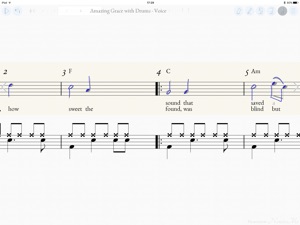
iPad Screenshots

Screenshot
Screenshot

Description

Ground-breaking music composition and notation software from Neuratron, featuring handwritten music recognition.
Top 10 Music App in 62 countries!
iPad Pro & Apple Pencil recommended for best results.
- Quickly and accurately enter music notation with your finger or stylus.
- Write music on the train, in a plane, by a lake, or just sitting comfortably on your sofa!
- Simple, intuitive interface with little to distract you from your creativity - similar to writing with pen and paper, but with instant playback, editing and a score suitable for publishing at the end!
- Write music for solo instruments (including voice and piano), drums or ensembles from string quartets and choirs to full orchestral scores. Includes support for transposing instruments.
- PhotoScore Add-In (In-App Purchase): Take photos of printed sheet music with your device's camera, so you can play back and edit them with NotateMe! Recognizes 5-line staves and most markings including chords, flags, beams, rests, accidentals, articulation marks, clefs, key signatures, time signatures, tuplets, slurs, ties, hairpins and text including lyrics, dynamics and instrument names. Note: Requires 5MP camera & 1 GB RAM - so not for iPad 2, iPhone 4S, iPad Mini (1st gen) or earlier.
- Email PDF, MusicXML and MIDI files of your scores to friends or other musicians. Open in other apps and desktop notation packages. Print to paper.
- Import and edit MusicXML files (most music symbols supported).
- Automatically sync your scores to Dropbox so you can edit them on your phone whilst you are out, and then on your tablet when you get back.
- Great when learning or teaching music notation.
- NotateMe recognises a wide range of music symbols, including notes (with solid, open, and slanted noteheads), flags, beams (even cross-staff*), leger lines, multiple voices per staff, chords, rests, accidentals (natural, sharp, double sharp & flat), articulation marks, augmentation dots, ties, slurs, hairpins, clef changes, key signatures. Barlines, clefs, time signatures and tuplets are added automatically.
- Drag and drop (or set selected drawings to) further music symbols including cross noteheads, pedal markings, ornaments and appoggiatura.
- Add chord-symbols, dynamics, technique, tempo changes and lyrics to your score. Write comments or ideas in 'red pen'.
- If NotateMe doesn’t recognize your style immediately, keep at it, as it will adjust. Leave clear space between symbols and make markings clearer with further strokes if any transcription errors occur. If you experience problems, tap 'Help Improve NotateMe' from the Export menu and we will analyze your handwriting to help us improve NotateMe further.
* Cross-staff beaming requires an iPad
DEVICE REQUIREMENTS
MINIMUM RECOMMENDED:
iPhone 5/s/c, iPad (3rd gen onwards, iPad mini (2nd gen onwards), iPod Touch 5 onwards
Screen size - 4 inches diagonal
Writing implement - Finger or stylus
PhotoScore Add-In: 5MP rear facing camera with auto-focus, 1 GB RAM. Good lighting conditions.
Note: It may take a short while for you to become accustomed to aligning parts of musical symbols when writing using a finger, particularly on a smaller screen.
WILL NOT RUN ON iPhone 3GS OR iPod Touch 4th Gen or earlier.
RECOMMENDED:
iPad Pro with Apple Pencil
Screen size - 9.7+ inches diagonal
PhotoScore Add-In: 5MP rear facing camera with auto-focus, 1 GB RAM. Good lighting conditions.
What's New in Version 4.1.1.0

Replaced Dropbox Sync with improved Import and Export functionality.
- Import from Photos (for PhotoScore) and NotateMe and MusicXML files from iCloud and other apps & cloud services.
- Export to iCloud and other apps & cloud services.
Voice allocation improvements, particularly for 3 and 4 voices.
Other parsing improvements.
Hold down play button in editing mode to toggle between playing back all instruments and just the current instrument.
Mute button fix.
UI tweaks.
Bug fixes.

Seller

Name

Neuratron Limited

Information

Developer

Categories

Version

4.1.1.0

Size

28 MB

Game Center

No

VPP Device Licensing

Yes

Rating

Rated: 4+

Compatibility

iOS 6.0 or later

Devices

iPhone 3GS, iPhone 4, iPhone 4S, iPhone 5, iPhone 5c, iPhone 5s, iPhone 6, iPhone 6 Plus, iPhone 6s, iPhone 6s Plus, iPhone SE, iPhone 7, iPhone 7 Plus, iPhone 8, iPhone 8 Plus, iPhone X, iPhone XR, iPhone XS, iPhone XS Max, iPhone 11, iPhone 11 Pro, iPhone 11 Pro Max, iPhone SE (2nd generation), iPhone 12, iPhone 12 Pro, iPhone 12 Pro Max, iPhone 12 mini, iPad 2 (Wi-Fi), iPad 2 (3G), iPad (3rd Generation) (Wi-Fi), iPad (3rd Generation) (4G), iPad (4th Generation) (Wi-Fi), iPad (4th Generation) (4G), iPad (5th Generation) Wi-Fi, iPad (5th Generation) Wi-Fi + Cellular, iPad (6th generation) Wi-Fi, iPad (6th generation) Wi-Fi + Cellular, iPad Pro, iPad Pro (Cellular), iPad Pro (9.7-inch), iPad Pro (9.7-inch) (Cellular), iPad Pro 12.9-inch (2nd generation), iPad Pro 12.9-inch (2nd generation) Wi-Fi + Cellular, iPad Pro (10.5-inch), iPad Pro (10.5-inch) Wi-Fi + Cellular, iPad Pro (11-inch), iPad Pro (11-inch) Wi-Fi + Cellular, iPad Pro 12.9-inch (3rd generation), iPad Pro 12.9-inch (3rd generation) Wi-Fi + Cellular, iPad Air, iPad Air (Cellular), iPad Air 2, iPad Air 2 (Cellular), iPad Air (3rd generation), iPad Air (3rd generation) Wi-Fi + Cellular, iPad mini (Wi-Fi), iPad mini (4G), iPad mini Retina, iPad mini Retina (Cellular), iPad mini 3, iPad mini 3 (Cellular), iPad mini 4, iPad mini 4 (Cellular), iPad mini (5th Generation), iPad mini (5th Generation) Wi-Fi + Cellular, iPad (7th generation) Wi-Fi + Cellular, iPad Pro 11-inch (2nd generation), iPad Pro 11-inch (2nd generation) Wi-Fi + Cellular, iPad Pro 12.9-inch (4th generation), iPad Pro 12.9-inch (4th generation) Wi-Fi + Cellular, iPad Air (4th Generation) (Wi-Fi), iPad Air (4th Generation) (Wi-Fi + Cellular), iPad (8th generation) Wi-Fi, iPad (8th generation) Wi-Fi + Cellular, iPod touch (4th generation), iPod touch (5th generation), iPod touch (6th Generation), iPod touch (7th generation)

Languages

English

App Store: Customer Ratings

Ratings & Reviews

2.6 of 5 (19 Ratings)

App Store: Customer Reviews

2020-02-07

No longer supported

Great concept but unfortunately not ready for professional use. Have not seen any development in quite some time.
ChicagoDutch
Version 4.1.1.0
2020-01-23

Fine line between works fine and unusable.

I’ve used this product for a couple hours so far. There is quite a learning curve. Sometimes it works fine. Other times useless. I would not buy again knowing what I know now.
gdghorn
Version 4.1.1.0
2019-10-02

Impressed

Great app! First thing I noticed is the handwriting recognition is best I’ve used. I love the two staff layout , one for your handwriting and other the computer version. Sometimes in other apps, it’s confusing when the app realize your writing before your finished and you can’t see your original idea, here the staff w your original idea is never changed, it feels like a separate sketch paper on one staff and the computer interpretation on the other. Also very easy to enter notes between existing notes and a separate pen for comments is nice!
djdnu
Version 4.1.1.0
2019-08-16

Outstanding Application!

This app is exactly what I was looking for!
Handwriting recognition is excellent. Photo recognition app worked amazingly well on some old music books I purchased many years ago. Having the image converted and played was well worth the purchase!
CamTheJewer
Version 4.1.1.0
2019-02-22

Useful App!

I use Notate Me to transcribe manuscripts of (mostly) Baroque music into modern notation and have found the app to be quick to learn and generally very useful. There are a few things that can be frustrating (Baroque ornamentation, for one!) and I do wish grace notes (with and without slashes through the stems) were included in the menu of notations you can add -- but overall I would recommend this app. It's pricey, but not so much compared to the heavy duty music-processing programs like Sibelius.
PKP (!!)
Version 4.1.1.0
2017-10-08

Disappointed.

The only reason I bough this app was for the scanning feature. Now I have to pay an extra $30.00 after the initial $40.00. Talk about a scam...
Me Borikua
Version 4.1.1.0
2017-06-19

Have never had a problem

I'm surprised by all the negative comments. I love this app and use it with my piano students who are interested in composition. I have iPad Pro 12.9 and Apple Pencil and it notates so easily. Of course, when I have a complex pattern it often gets it wrong first time, but after I fix it, it seems to get it right every time after that. The copy and paste feature is a great time saver. I have never had a crash.
Louis88keys
Version 4.0.3.0
2017-06-16

Don't buy!

I thought that this app showed promise, but after working with it for fifteen minutes, I can see that it's not what I needed. I wish the App Store had a refund option.
Zach31
Version 4.0.3.0
2017-06-12

Absolutely the worst notation app in the app store!

I have almost every notation app in the app store, but no matter how hard I try to enter a simple 3 note chord, the stupid app treats the notes as rests and will not allow me to input notes with ledger lines. I am not an amateur. Honestly this is not worth 99 cents let alone the outrageous price that they charge. Buyer beware! I read the entire PDF manual and it too is worthless. I wish I could say something good about it but the handwriting recognition just isn't any good. I am using a 12.9 inch iPad pro and Apple stylus.
iTunesfool
Version 4.0.3.0
2017-06-12

A pain in the neck

This is the most difficult-to-use notation app I've tried, and the most expensive. And I've tried many.
Julsida
Version 4.0.3.0
2017-05-06

Expensive. A let down.

I'm still giving this app a final chance, i bought it for the Addons. Making it an app that cost me $80.
It honestly keeps crashing, the interface looks like a first draft in beta mode. Support is good, but the app simply does not hold water. Wish it could work better for the insane price it costs.
A regretful purchase for the present moment.
Hry888999
Version 4.0.3.0
2017-04-01

Needs updated help videos

I despise this app. Nothing is working for me like I see in the various help videos on YouTube. Copy and paste for instance isn't working for me using 'tap and hold'. I expected to be able to write a simple drum beat after using the app for 5 minutes. Instead I wasted two hours and now I give up in disgust.
AnatoLBro
Version 4.0.3.0
2017-03-31

Read the Help and Practice Using it First

Notateme stops short of being a complete music notation tool, like Finale or Sibelius, but you can use it to create very complete scores for many kinds of music so long as you follow four important rules:
1. Unless it is going to be a very small score, you will want an iPad Pro, which has a lot more memory and faster processor.
2. Don't think you can escape using some kind of stylus. Sure, you can play around with it using just your finger, but you will need the precision of a stylus to make (or edit) anything serious. The Apple Pencil works very well, but less expensive styluses, such as from Adonit, will do the job.
3. If you don't read the help notes (also available as a PDF within the app) carefully, you will quickly run into a wall and probably give up in total frustration. Read them carefully.
4. The app's notation recognition is nothing short of miraculous and will adapt to the way you write, but it requires practice to become fluent. Don't think you can jump in and immediately write a big, complex score without frustrations, especially if you have ignored the first three rules.
Notateme provides reasonable integration with Dropbox. It can export to MusicXML format and (you need to carefully the help notes first!) import them in. I haven't tried the add-on PhotoScore app, which uses the iPad's camera to scan in scores and convert them; I will invest in that if and when it can also process images in the camera roll.
Don't expect Notateme to replace high-end tools, like Finale and Sibelius, which cost hundreds of dollars and require a Mac. Neither is it a toy. You can make lovely scores with it. All it takes is practice.
TheKemer
Version 4.0.3.0
2017-03-07

!!!!!!!!!!!

Worst app I ever used with apple pen. It doesn't recognise anything! I wasted money for nothing!!!!!!
Burakflutist
Version 4.0.1.0
2017-01-31

Disgusting.

I want my money back this is awful.
Peterreview1016
Version 3.1.0.0
2017-01-25

HOW DO I GET MY MONEY BACK?!

I bought it to take a scan and turn it into notation. Found out that feature required an in app purchase. WASTE OF $70. It crashes EVERYTIME I try to utilize the feature I PAID for. I even restarted as per the app's request and it STILL crashes.
Seriously, who do I talk to about a refund. This app is a scam.
Ktretardson
Version 3.1.0.0
2017-01-17

A complete fraudulant scam

Through notateme I tried to get price info on the supposedly built in photoscore. The free version kept going back to home screen when pressed. I figured maybe it was an issue with the free version so wanted to check out the cost of the paid version. The app stated in order to get pricing info I had to type in my password. When I did all that came back was thank you for your $29.99 purchase. The nonexistant and unauthorized app was never delivered to my apps library or iPad. The free version still just goes to home screen so now I am waiting forever on the phone along with my Cred Card co listening to Apple music trying to get a refund...Upate... Apple just came on and says that in 10 days they can refund me for a product I didn't authorize, never recieved and doesn't seem to exist. What a total scam.
Coolpianoteacher
Version 3.1.0.0
2016-11-29

PhotoScore crashes every time

This is one of the most expensive apps I've purchased. And I can't even use it?!?
manueldelatorre
Version 3.1.0.0
2016-11-01

Works great for what I need, and room to improve, too

This is a great little app for transcription. My only regret is that it doesn't have the option to transpose. However, I've been easily able to work around this because I can export these files to FinaleNotePad and transpose it there. I love the ability to hear what I've written in both the writing mode, as well as when I view the full score. So far I have only used 3 instruments at a time, but it works well. I'm not a composer, I'm a teacher. I write out exercises, transcribe/transpose, etc. for my students. I got this at the early release price, and it's worth every penny. I also have NotateMe Now on my cell phone. While that free version only allows one stave, it can be exported to the paid version, which can add more. I use these three programs to notate music anywhere I go, and then have the functionality to print from my iPad or Computer (via FinaleNotePad) or email, as needed!
While it may be limited in some features, I feel that the price is good, considering the cost of other software is that offer more than I currently need. Also, the developers seem committed to continued improvements! Thanks!
Teacher4piano
Version 3.1.0.0
2016-10-29

Crashes constantly!!! :-(

This app crashes constantly running on iOS 10.1!!!
Select "photoscore" and instant crash. EVERY TIME!!!
How about an update??? After $70 purchase, it should actually work???????
SawdustCreator
Version 3.1.0.0
2016-10-16

Photo score not compatible with iPhone 7

Crashes when attempting to load photo score on iPhone 7. Needs an update.
Seriouslythisisgay
Version 3.1.0.0
2016-10-11

Crap

I have tried and tried and TRIED to get this program to work. I bought the $30 stylus. I have ' retrained' 3 times. I just tried again this morning to write a very simple exercise out for a student in this program and it just will not happen.
I want my money back. when you make something that works on the iPad air 2. let us all know.
I am SO frustrated right now...
DizzyJazzman
Version 3.1.0.0
2016-10-06

Very cool, but can be frustrating

Idea is very cool, but it can be very frustrating to use sometimes. I still keep using it just 'cause it seems cool and I expect it to get better some day...
Broken 3
Version 3.1.0.0
2016-09-08

Great app BUT...

Should really improve apple pencil recognition, plus introduce palm rejection. PLEASE it's been a while since ipad pro release!
thereal.fe
Version 3.1.0.0
2016-05-18

Unusable

Does not recognize my hand writing. Not worth the money. Expensive price just to find out it's a useless app. Won't buy from the publisher again.
Opry Fiddler
Version 3.1.0.0
2016-05-15

Good idea, poor execution with no bluetooth stylus support.

I GAVE THIS APP ONE STAR FOR IT'S LACK OF BLUETOOTH STYLUS SUPPORT (and poor transcription accuracy.) IF THE DEVELOPER ADDS BLUETOOTH STYLUS SUPPORT (preferably Adonit's API's, and improves the handwriting recognition) I WOULD BE HAPPY TO CHANGE IT TO 5 STARS!
Notate Me was exactly what I was looking for and it seemed perfect for anyone who knows notation and basic composition but wants to interact with their iPad like it is digital, playable staff paper complete with handwriting recognition. Compositions can be exported to MIDI or XML and opened in Logic Pro (or any DAW of your choosing) to use synths and other audio plugins (which is ideal since I can't play piano) or exported directly to PDF as sheet music.
Things are often not what they seem and this app is no different, the user interface is designed for your fingers or capacitive stylus' (which are simple, often rubber tipped, stylus' that are very inaccurate for small intricate writing) Notate Me doesn't integrate any 3rd party Bluetooth stylus support (which would be fine if the handwriting recognition worked as described by the developer in the help file with capacitive stylus (of which I have two, but more on that below) however it only correctly translates input about 15% of the time on the first try, if you are slow and patient.) By not supporting bluetooth stylus' Notate Me's palm rejection is nonexistent and it has a hard time even registering input when using either one of my 2 Bluetooth stylus' (I have a Adobe Ink and the Adonit Jot Script both of which are supposed to work with or without their API's.) As I don't own a iPad Pro (I own a iPad Air 2) I can't compare the differences in input using the Apple "Pencil." But, I can say that: INTEGRATING ADONIT BLUETOOTH API'S WOULD DRAMATICALLY IMPROVE THE ACCURACY OF INPUT, REDUCE ACCIDENTAL MARKS BY ADDING PALM REJECTION (which this app desperately needs) AND ADDING PRESSURE SENSITIVITY FOR ALL IPAD USERS (the majority of which do not own a pro) REGARDLESS OF IPAD MODEL With Bluetooth 4.0.
If Notate Me would support bluetooth stylus' there would be no need to upgrade to the much more expensive iPad Pro just for the privilege of accurate input ($599 for the 9.7inch, 32gb model plus $99 for the Apple Pencil totaling over $758 with tax or, $901 for the 128gb model plus Apple Pencil with tax which is outrageous for a souped up iPad with hardware stylus support.)
I am a huge fan of Bluetooth Stylus' and have see first hand how much the input clarity and accuracy (in apps like Noteshelf and Adobe Photoshop for the iPad) improved when the developers integrated Bluetooth Stylus Support. I wouldn't be surprised to see a similar improvement with this app.
Despite these issues, it is still the best app interface I have used (for iOS) for people who prefer to compose using "paper" and want to hand write their music (when it works accurately, which is a rare treat) but with features that integrate with DAW's and PC digital audio production and composition software.
Just know that:
1. There is a pretty steep learning curve to get Notate Me to recognize and input notes that are even close to what you intended and arranging them after writing can be a huge challenge. (PROTIP; CLEAN YOUR SCREEN THOROUGHLY!!!)
2. Capacitive Rubber Styluses like the Cosmonaut or the Adonit Jot Pro capacitive stylus' (with the clear plastic disk for the tip) work best for non-iPad Pro users (better known as the majority of iPad users) but still plan on having to fight the app pretty frequently to write anything accurately.(PROTIP; pinch to zoom in as close as possible for "better" but still difficult input recognition.)
3. Inputting notes can range anywhere from fairly easy, to tedious, to frustrating, to rage inducing until you learn how to; a. properly utilize the interface elements, b. get it to actually recognize different written notes and rests within two attempts of drawing them, and, c. avoid unintentionally touching the display with your hands which can result in scrawls of lines being drawn or random tiny blue dots on the score (which is a direct result of not having palm rejection.)
Hopefully these issues can and will be solved in the future, but for right now I could only give this 1 star.
Mpw30
Version 3.1.0.0
2016-03-31

iPad Pro + Apple Pencil = Win

I had previously used the app with a simple rubber-tip stylus, and wasn't thrilled. It was okay for quick sketches, but nothing for any substantial productivity.
Thanks to my tax refund, I bought an iPad Pro (the 12" version) and an Apple Pencil - the precision of the pencil makes this app game-changing.
Getting ready to start my doctorate in composition - this combination is going to change things big time!
Bald Guy
Version 3.1.0.0
2016-03-24

Good for raising the blood pressure

This app is very cool, but a supreme head ache. You can't do chord slashes or rhythms "hits", if you will. SUPER GLITCHY. Often times taking on a mind of its own, with ZERO costumer support. Buyer beware. I would love a refund. However, LOVE the idea. Can't wait for an app that can really deliver!
Andrew j salas
Version 3.1.0.0
2016-03-19

Overly complex

This app is an amazing concept on paper, but once put into practice it just didn't meet my expectations in any way, shape or form. Even a free computer program does better (forte4free)
Meeoww776
Version 3.1.0.0
2016-02-23

Cool but temperamental

Nice app but the other day it was working fine and smooth, now symbols are just popping up and I can't finish writing the sixteenth notes on the fourth beat,took me 10 minutes to do it right, yet the staccato symbols don't appear as I write them. So those sixteenth notes on the fourth beat is taking all the creative time and inspiration. Please fix.
Fullbluntal
Version 3.1.0.0
2016-02-19

Amazing!

Works incredibly well once you get used to it.You have to use a good stylus. I use it for jazz lead sheets it is fantastic!
ibstrat
Version 3.1.0.0
2016-01-29

Very frustrating app!!!

This app in concept is amazing. As a professional musician and an eternal student of music and theory, I'm always writing. Be it documenting ideas, composition, jazz theory, teaching, transcribing, I'm always writing. I keep a staff paper close by. I thought this would be the perfect use of my new iPad Pro and Apple Pen. Like others reviewers here, I wanted this to be the go to solution. Unfortunately, I have given up. My handwriting is very good and easily recognizable. The resolution on the Apple Pencil is amazing. Despite all of this, NotateMe doesn't seem to understand a simple sharp and even sees it as a flat sometimes. Most of us don't have a lot of disposable free time, and to burn it trying to teach this app recognition in futility is extremely aggravating. I know the following statement may seem contradictory, but I do wish the developer much success. We do need something like this, especially when discussing musical concepts with students on the fly. The concept is a very creative one, however, it is not ready for the prime time, and the company should not be putting this software out when it is not ready.
Windsurfer320
Version 3.1.0.0
2015-12-30

Impatient for audioscore and open-in

This is an amazing piece of software with the right device, (6s plus has a great camera for it!).
It does a quick and accurate job turning sheet music in audio. And THAT is why I bought the app.
But oh how I would love to also open pics I've previously taken! Why must it be on the spot? I don't want to keep my physical music with me at all times...I want to go digital with everything. Oh well. A very very nice start.
I can't wait for audioscore to come out (is that what it is called?) I need that too :)
Also...in-app purchases should be no more than $20...that is a lot for an app. $30 is over the top (esp with tax now)
Appthinker
Version 3.1.0.0
2015-12-28

Great app with a lot of potential

This app is already very good, and I can't wait to see where it goes in the future!
wbargetzi
Version 3.1.0.0
2015-09-13

Good, but...

I wish it was possible to make an anacrusis.
Desire2Bgood
Version 3.1.0.0
2015-09-09

Improving

Improving and getting better , but still not usable for everyday compositions .
Mudmannusic
Version 3.1.0.0
2015-08-18

Do Not Waste Money On This!

I'm still trying to get a refund for this product. What few things do work on this app are done in other apps much better. To get the ability to photo scan scores is $70 and it does not work. You'd be better off asking a drunk toddler to just transcribe it for you. Even as a composition app it fails spectacularly! It gets one star because zero stars isn't an option. Unless you're trying to play a cruel joke on yourself this app is less than worthless!
Ubertenor
Version 3.1.0.0
2015-07-05

NotateMe Is Incredible!

With this app I am able to do what I once needed a full sized scanner and normal computer for!
Hand write music but more importantly use the PhotoScore plugin to recognize sheet music and turn it into digital music so that it is quick and easy to transpose parts to other instruments, make edits and everything else you can do with digital music!
Absolutely outstanding!
pshimmons
Version 3.1.0.0
2015-05-24

paper and pencil still faster for me

I was hoping to replace my paper and pencil and go right to print...not so fast. I have had mixed results trying to get the app to recognize my handwriting, after resetting it and starting the learning process several times. I have tried both using just slash note heads and round/oval note heads and both give me mixed results.
I'm also not a fan of how large the measure gets when I add a note. Every time I add a note the measure gets longer. That is a distraction for me...maybe I don't have something adjusted right?
I'm going to keep trying though, because I think eventually I'll get it, or it'll get me. Just not when I'm in a hurry.
CPE49
Version 3.0.6.0
2015-05-19

Was hoping for improvements

I tried Notate Me before but didn't think it was too awkward to recommend. I was hopeful that the latest update would change that but now it doesn't even open. Crashes immediately on my iPad 2.
jlanier2001
Version 3.0.6.0
2015-05-15

Disappointed

Love this app but the update is unusable for me. Regardless of clearing memory and restarts crashes 99% of the time. Need the old version back. Too bad.
2thPiq
Version 3.0.6.0
2015-03-29

Great start

Here's what I feel is desperately needed:
--Needs a metronome/click track for playback
--even when turned up all the way, I can barely hear playback... My other piano apps are much louder on the same device
--piano sounds could certainly play smoother
--photoscore needs to be able to read pdf files
--need a button on camera page to import page from photo library instead of using picture.
--I need to be able to switch default instruments in the settings (the SATB default midi choirs sounds are as bad as you would expect, which I get, I'd just like to set the default to something else
--when changing instruments, instead of 'rename instrument' there should also be a drop down menu of choices. (If you type piano, it does change to piano, but it can be better)
--where are the settings? Is there no where to change settings?
Don't get me wrong, great app. It's like magic and I can compose in editable format on the go or in bed on my iPad which is awesome.
The problem is I paid $40, and leaving out basic functions and user interface necessities doesn't seem right.
I am sure at this price point this is in constant development and these issues will be addressed quickly if not already in process.
Until then, I find notateme more of a novelty than really usable for work.
mrlincoln
Version 2.6.5.0
2015-03-02

Great app!

This is a phenomenal app. It's great. It's worth teaching it your handwriting and everything. Easier to use than Sibelius and the other stuff in my opinion. The price is a bit scary, but I'm glad I bought it. I couldn't compose without this app.
That being said, there's a few features that the next update needs to include support for such as grace notes, glissando, the ability to make crescendo and descresendos longer/short, accelerando, and custom chord symbols, but the ability to insert bars is most important.
The app is improving, and there's room for more, but this is still a phenomenal app.
SexyManBeast23
Version 2.6.5.0
2015-01-22

Pretty Amazing

I've been a professional composer/ arranger/orchestrator, for over 30 years and find this program pretty amazing. I have been waiting for something like this for years. The handwriting recognition is very good, and I'm sure will only improve. The guys at NotateMe are on the verge of revolutionizing software notation. I am excited about the future development of this program. It is easily worth the $40 price tag. Keep up the good work!
IAmMOC
Version 2.6.5.0
2014-12-17

Make it pair with adonit jot touch

Hi,
This would be a great app if it worked and paired with stylus adonit jot touch!
I just got my my adonit jot touch for100$ and got disappointed,cause it doesn't pair with this app and i'm not able to use must functional options of this expensive stylus...I hope to fix this problem and make your app more pro to be the first professional hand writing software in the world!
Ali.birang
Version 2.6.5.0
2014-12-10

Excellent

The developers keep improving it a bit at a time. It's now practical to use.
MusicProf1234
Version 2.6.5.0
2014-12-07

Great Product, Scummy Pricing

I really enjoy this product for what it does. It is really useful and easy to create a score of music on your iPad and be able to export print and use this, especially as a middle school music teacher for arranging music for my choirs. The core product works well, is fairly intuitive to use and has overall been a creative boon. Unfortunately I was incredibly disappointed by the decision to charge 40 dollars for the photoscore plugin for the app. When I pay money for an app on the store, especially shelling out the initial price for this app, to me there is an implicit expectation that if there are any significant upgrades that they should come for free, or alternatively for much much cheaper.
Practices like this where you get nickel and dimed for every new upgrade cause customers to feel inherently distrustful of the publisher. Will there be a new version of the app that we will have to buy in order to get all of the new version of the app?
Perhaps I am being unreasonable, but the price seems excessive in a tablet world.
tldr;
App is 5 stars top notch for mobile composing
App is -1 stars for making me feel like I'm getting a good value.
Spadafiva
Version 2.6.5.0
2014-11-30

Transpose score?

Love the app, but where's the transposing functions that allows to change the entire or partial score to any key by semitones?
Notateme user
Version 2.6.5.0
2014-11-16

Not Ready for Professional Use

As a teaching tool, or perhaps as a means of jotting down simple projects and ideas, this would be a great app. However, for the price I paid, I was expecting something that would actually allow me to do real, grownup, professional work. This app does not meet the needs of a professional arranger, and I am disappointed that I had to spend $40 to find that out.
One of the more positive aspects of this app, in spite of its myriad of shortcomings, is the handwriting recognition feature. It has the potential to become a powerful tool for composers, arrangers, and copyists. But until the developers come up with a better, more efficient way to handle tuplets and other, more complex functions, this app will continue to be nothing more than an expensive novelty. The company should either lower the price or offer more functionality.
bbcorno
Version 2.6.5.0