AboutTermsPrivacyContact
 
Updating
Audio Analyzer

Audio Analyzer

Released: 2013-10-05
© ⓒ2013 Dexus Pawel Krzywdzinski
Audio Analyzer - QR Code
Version 2.7
4+
Download on the App Store
Version 2.7
4+
Download on the App Store
Released: 2013-10-05
© ⓒ2013 Dexus Pawel Krzywdzinski

iPhone Screenshots

Screenshot
Screenshot
Screenshot
Screenshot
Screenshot
Screenshot
Screenshot
Screenshot

iPad Screenshots

Screenshot
Screenshot
Screenshot
Screenshot
Screenshot
Screenshot
Screenshot

Description

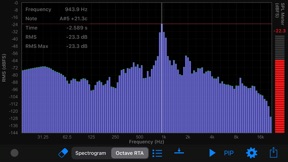
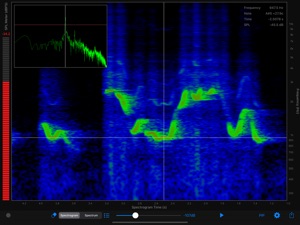
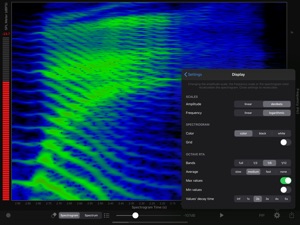
Audio Analyzer is a real-time spectrum, spectrogram, oscilloscope and octave RTA analyzer. It gives you a visual representation of an acoustic signal. It can be used to analyze the sounds of musical instruments, to identify spoken words phonetically, to measure the frequency response of audio equipment, or to picture the calls of different animals. You can also check “The Singer’s Formant”, the most important measure for every opera singer.
Features
- Spectrogram analyzer (color, black and white)
- Spectrum analyzer
- Oscilloscope (full FFT window size)
- Octave RTA analyzer: bands - full, 1/3, 1/6, 1/12 (RMS values)
- SPL Meter (dBFS)
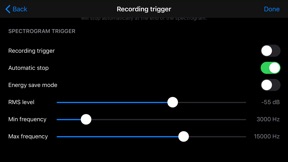
- Recording trigger (triggered by frequencies in the specified frequency band)
- Fast real-time response
- Sampling rates: 44.1kHz, 48kHz, 96kHz*
- Fast Fourier Transform (FFT)
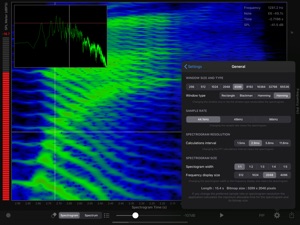
- Window sizes: 256, 512, 1024, 2048, 4096, 8192, 16384, 32768, 65536
- Variable frequency resolution of the spectrogram
- Variable between FFT computations time interval (time resolution)
- Max/min Octave RTA values
- Zoom and pan all charts
- Measure values in all charts
- Play back analysis (just tap on the spectrogram and play)
- PIP (picture-in-picture), allows the simultaneous analysis on the spectrogram chart and Second chart: Octave RTA, Spectrum or Oscilloscope
- Audio input can be supplied via the built-in microphone, and an external microphone* (via the earphone jack, via the USB camera adapter, or through the iPhone/iPad dock connector – Core Audio compliant devices). External devices are shown in the application only when connected (e.g. external mic connected via the earphone jack)
- Sharing charts and audio recordings (through mail, social networks, clipboard)
- Exporting to the iOS Document Browser (supports iCloud): audio recordings (wav) and image charts (png)
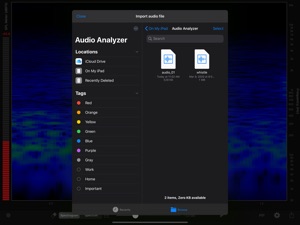
- Importing audio files from another application or from the iOS Document Browser (supports iCloud)
- Many formats supported for audio file import
- Automatic conversion from other sampling rates for imported files
- Frequency scale: linear and logarithmic
- Amplitude scale: linear and logarithmic SPL/RMS (dBFS)
- SPL meter weighting: dBZ - linear
Make sure you use the latest iOS update.
*For 96kHz analysis use an external microphone with such capabilities through a USB camera adapter or through the iPhone/iPad dock connector (internal mic or external mic connected via the earphone jack can only be used for 44.1kHz or 48kHz analysis) You can also import files recorded on an external device.

What's New in Version 2.7

- iOS 13 Dark Mode
- bug fixes

Seller

Name

DEXUS Pawel Krzywdzinski

URL

Information

Categories

Version

2.7

Size

3.1 MB

Game Center

No

VPP Device Licensing

Yes

Rating

Rated: 4+

Compatibility

iOS 12.4 or later

Devices

iPhone 5s, iPhone 6, iPhone 6 Plus, iPhone 6s, iPhone 6s Plus, iPhone SE, iPhone 7, iPhone 7 Plus, iPhone 8, iPhone 8 Plus, iPhone X, iPhone XR, iPhone XS, iPhone XS Max, iPhone 11, iPhone 11 Pro, iPhone 11 Pro Max, iPhone SE (2nd generation), iPhone 12, iPhone 12 Pro, iPhone 12 Pro Max, iPhone 12 mini, iPhone 13, iPhone 13 Pro, iPhone 13 Pro Max, iPhone 13 mini, iPhone SE (3rd generation), iPhone 14, iPhone 14 Plus, iPhone 14 Pro, iPhone 14 Pro Max, iPhone 15, iPhone 15 Plus, iPhone 15 Pro, iPhone 15 Pro Max, iPhone 16, iPhone 16 Plus, iPhone 16 Pro, iPhone 16 Pro Max, iPhone 16e, iPad (5th Generation) Wi-Fi, iPad (5th Generation) Wi-Fi + Cellular, iPad (6th generation) Wi-Fi, iPad (6th generation) Wi-Fi + Cellular, iPad Pro, iPad Pro (Cellular), iPad Pro (9.7-inch), iPad Pro (9.7-inch) (Cellular), iPad Pro 12.9-inch (2nd generation), iPad Pro 12.9-inch (2nd generation) Wi-Fi + Cellular, iPad Pro (10.5-inch), iPad Pro (10.5-inch) Wi-Fi + Cellular, iPad Pro (11-inch), iPad Pro (11-inch) Wi-Fi + Cellular, iPad Pro 12.9-inch (3rd generation), iPad Pro 12.9-inch (3rd generation) Wi-Fi + Cellular, iPad Air, iPad Air (Cellular), iPad Air 2, iPad Air 2 (Cellular), iPad Air (3rd generation), iPad Air (3rd generation) Wi-Fi + Cellular, iPad mini Retina, iPad mini Retina (Cellular), iPad mini 3, iPad mini 3 (Cellular), iPad mini 4, iPad mini 4 (Cellular), iPad mini (5th Generation), iPad mini (5th Generation) Wi-Fi + Cellular, iPad (7th generation) Wi-Fi + Cellular, iPad Pro 11-inch (2nd generation), iPad Pro 11-inch (2nd generation) Wi-Fi + Cellular, iPad Pro 12.9-inch (4th generation), iPad Pro 12.9-inch (4th generation) Wi-Fi + Cellular, iPad Air (4th Generation) (Wi-Fi), iPad Air (4th Generation) (Wi-Fi + Cellular), iPad (8th generation) Wi-Fi, iPad (8th generation) Wi-Fi + Cellular, iPad Pro 11-inch (3rd generation), iPad Pro 11-inch (3rd generation) Wi-Fi + Cellular, iPad Pro 12.9-inch (5th Generation), iPad Pro 12.9-inch (5th Generation) Wi-Fi + Cellular, iPad (9th Generation), iPad (9th Generation) Wi-Fi + Cellular, iPad mini (6th Generation), iPad mini (6th Generation) Wi-Fi + Cellular, iPad Air (5th generation), iPad Air (5th generation) Wi-Fi + Cellular, iPad Pro 11-inch (4th generation), iPad Pro 11-inch (4th generation) Wi-Fi + Cellular, iPad Pro 12.9-inch (6th generation), iPad Pro 12.9-inch (6th generation) Wi-Fi + Cellular, iPad (10th generation), iPad (10th generation) Wi-Fi + Cellular, iPad Air 11-inch (M2) Wi-Fi, iPad Air 13-inch (M2) Wi-Fi, iPad Air 13-inch (M2) Wi-Fi + Cellular, iPad Pro 11-inch (M4) Wi-Fi, iPad Pro 11-inch (M4) Wi-Fi + Cellular, iPad Pro 13-inch (M4) Wi-Fi, iPad Pro 13-inch (M4) Wi-Fi + Cellular, iPad mini (A17 Pro) Wi-Fi, iPad mini (A17 Pro) Wi-Fi + Cellular, iPad (A16) Wi-Fi, iPad (A16) Wi-Fi + Cellular, iPad Air 11-inch (M3) Wi-Fi, iPad Air 11-inch (M3) Wi-Fi + Cellular, iPad Air 13-inch (M3) Wi-Fi, iPad Air 13-inch (M3) Wi-Fi + Cellular, iPod touch (6th Generation), iPod touch (7th generation)

Languages

English

App Store: Customer Ratings

Ratings & Reviews

4.0 of 5 (38 Ratings)

App Store: Customer Reviews

2023-06-23

Only 60seconds of a file

I can only put 60 seconds in so if I have a 6 minute long mp3 file I can only view 60 seconds of it
daniel kayrevich
Version 2.7
2022-07-11

Good but crashing

I love it but it crashes when I use the Octave RTA
3persons1God
Version 2.7
2022-06-05

Solid app

Tried a few spectrogram apps and this one is pretty solid. Lots of customization features.
Only small thing I would wish is that we can start replaying an audio file with the spectrogram completely scrolled back so that no one can anticipate what’s coming. But otherwise great job.
jrlkk
Version 2.7
2019-06-03

Audio Analyzer

I just purchased for $20. App does not work on my iPhone X with latest iOS. App does not pass a request to use the knternal microphone to Settings. The list of apps requesting to use the microphone remains empty.
An instuction to turn mic on in Setings appears but the app itself never adds itself to devices requesting the microphone.
When tapping the Gear symbol, the screen blinkx for 1/2 sec to an audio setup page but the returns to home screen. I tried several downloads and phone reboots.
No idea what to try next. There is no instruction manual or support email. Need to request a refund.
sourblock
Version 2.6
2019-05-30

Total Waste of Money

As an Analyzer software, you have one crucial job to do. Show an accurate representation of the frequency spectrum. This app doesn’t even come close. I put this app on my tech bench and ran a high end Goldline tone generator into it, which the goldline and my audio interface was double checked with an oscilloscope for accuracy. This app shows major peaks and dips from 28Hz all the way up to 1.5kHz. It looks like a freaking roller coaster! It only gets mildly accurate after 1.8kHz. This basically makes the app unusable. I would have attached a screenshot if that option existed. SO aggravated. I have another Analyzer app that’s almost spot on to what the tone generator is putting out, but doesn’t have some of the options this app does (hence purchasing this one). Please fix the accuracy of this app or give me my money back
Pizzle Dee Funkrunkinutter
Version 2.6
2017-07-03

My "Go To" App for Live Sound

When I want to know what I am missing in a mix or to find a problem frequency, Audio Analyzer tells me and takes the guess work out of making needed adjustments to the mix at our church. ID ringing frequencies with the RTA or spectrograph or double-check your EQ at a glance. Intuitive to use and definitely worth the $4.99! Thank you for making such a great app!!!
MioMC
Version 2.5
2017-04-23

So far, awesome

Exactly what I need to ring out FOH and monitor wedges. Waiting for micW i436 to arrive. 5 stars will stick if the app performs with the external mmm microphone.
M1$tyrX
Version 2.5
2016-06-17

Limited use

It's good for short loops and audio files but from what I can see that's about all. When you can only analyzer music that is less than 220 seconds long, not very practical. What am I supposed to do, chop up the song? Maybe I'm missing something here?
Eriptron
Version 2.4
2016-05-09

Importing issues

App crashes when trying to import files from voice memos on phone..please fix
Brando0129
Version 2.3
2016-02-21

love it!

I love this app, a very useful tool in many contexts.
Axiom Crux
Version 2.3
2016-01-07

Excellent app!

Very thorough and well thought out.
Humanparody
Version 2.3
2015-11-01

Wow. Nifty audio visualization

RTA is cool, though a little surprising you need to start recording to see it.
Flexible display and settings. Even trigger start.
Would like overlay for musical scale notes, ideally with optional transpose for things like B-flat trumpet.
And use of headphone microphone.
An actual patriot nomeme
Version 2.3
2015-05-11

my favorite spectrum analyzer

I practice playing a Bb trumpet using this spectrum analyzer, chromatic tuner, metronome, and audio recorder. Studying my sound in the frequency and time domains helps improve my playing.
I would suggest the following feature to be added: Allow the user to preset the range of frequency and time. The current version allows the user to zoom in or out using 2-finger gestures. Because the region of interest for me is between 0 and 3 kHz, and because I need to view that region in detail, I need to adjust the frequency scale every time I use or reset the app. Furthermore, the 2-finger gesture sometimes bounces the scale such that the origin is not 0 kHz 0 seconds. Allowing the user to select the default range of frequency and time would save lots of time.
Thanks for a nice product.
OregonCoast2
Version 2.2
2015-04-06

shameful oversight?

The program is well done, looks good, and is ALMOST useful. The external mic input accessible via the earphone jack was not included. I'll give it 3 stars for what the software can do, but I'm taking 2 stars away for the their obvious stupidity. Had they included it I could analyze signals on wires, not just from the microphone. Yeah the camera adapter and USB mic might get me that ability too but why should I have to spend another $30-$50 because they screwed up? It's great software, I've no complaints about that, but functionally, it's just had a perfectly healthy leg amputated.
Fix this with an upgrade and it's a five star program.
Master Mentor
Version 2.2
2014-12-28

Neat App

Very nicely done by the creators of the app. Several nice choices with the window functions, different options on displays, spectra, sonograms, and oscilloscope. Good value.
kai-erik
Version 2.2
2014-12-24

Bought and thought it realtime

Great engine, but can't get it working for realtime analysis, saw a long list of features but.... no RTA, that is why I'm disappointed.
adsrME
Version 2.2
2014-12-20

Best audio bang for the buck

I have been an audio engineer for over 25 years. I've owned a jingle production company, a 2" 24 track recording studio and have been a live FOH/Monitor engineer for the better part of those 25 years. Obviously with the advancement of technology it gets better and cheaper every day. But this app has brought the power and ease-of-use and flexibility that only a year ago cost close to $1000. Can't believe it's under $10.
Krunch King
Version 2.2
2014-11-16

Handy audio utility

Thanks for this nifty little program. I used it to show the audio spectrum of an old Hammond organ with a stuck tone. Using Audio Analyzer in oscilloscope spectrum mode, with my iPhone on the organ bench, I looked for peaks, and one of them was right where the noise was centered. It told me the frequency when I tapped on the bar, and that helped me know where to look further to troubleshoot. There are other methods that I could have used, but this utility made it quick and simple.
Dirt Road Organs
Version 2.2
2014-10-05

Doesn't do what it's supposed to

Purchased this app because it's the only one I can find that advertises the ability to open files from other sources (saved via apple's voice memos app on an iPhone 6) but when I attempt to open the file, the app just crashes.
anddavros
Version 2.0.2
2014-08-07

It is what it is

This app looks really good if you reverse the colors on your phone. It's seems like a lot of money for an app that doesn't seem to do any more than the cheaper ones that do the same thing. I mean unless I can edit the junk noise out of my recordings manually I don't see the point for the extra money.
Halfcastefella
Version 2.0.1
2014-01-19

Works very well

I'm no expert, but it works very well for me. So far I've mostly used it for real-time spectrograms. Very nice audio analyzer.
The User That Mustn't Be Named
Version 1.1
2013-10-29

Good app, let's see more!

This is a nice app that delivers an easy-to-read spectrograph. In future releases, it would be nice to see:
1. External mic capabilities - the mic in the phone isn't that great, can I plug in my own via headphone jack?
2. Choice of scale for dB meter on the side. I'm not sure what scale is currently used, but I take my readings in dBA/dBC.
Sound Guy Feedback
Version 1.1