AboutTermsPrivacyContact
 
Updating
Liquify Filter

Liquify Filter

Released: 2013-07-21
© David Yuan
Liquify Filter - QR Code
Version 1.8
4+
Download on the App Store
Version 1.8
4+
Download on the App Store
Released: 2013-07-21
© David Yuan

iPhone Screenshots

Screenshot
Screenshot
Screenshot
Screenshot
Screenshot

iPad Screenshots

Screenshot
Screenshot
Screenshot
Screenshot
Screenshot

Description

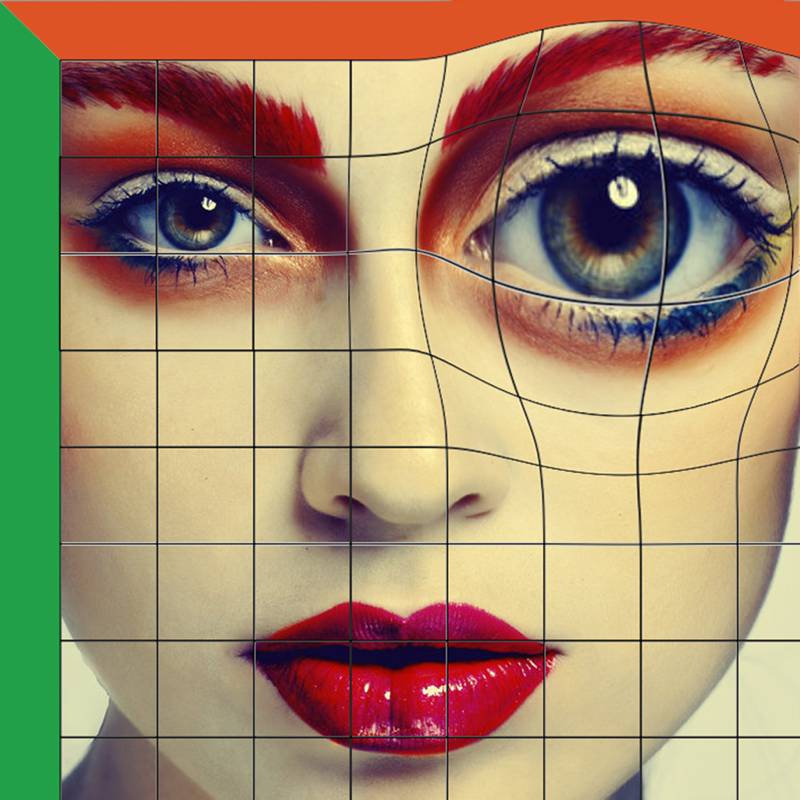
Push, pull, rotate, reflect, pucker, and bloat any area of an image. The distortions you create can be subtle or drastic, which makes the Liquify command a powerful tool for retouching images as well as creating artistic effects.
The Liquify filter in iPhone/iPad is a fabulous little tool for helping to eliminate some of these undesired areas in an image. Essentially, it allows you to ‘push’ or ‘move’ pixels around to manipulate the shape of something. The Liquify filter allows us to distort the pixels in a given image without losing quality.
You can use tools in the Liquify filter to:
• Remove bulges from arms, legs, and thighs.
• Make a nose smaller.
• Make eyes or lips smaller or larger.
• Make chins, stomachs, and thighs, smaller.
• Refine a chin or jaw line.
• Change an expression slightly.
• Adjust eyebrows slightly.

What's New in Version 1.8

fixed some bugs

Seller

Name

haiqun deng

URL

Information

Developer

Categories

Version

1.8

Size

19.6 MB

Game Center

No

VPP Device Licensing

Yes

Rating

Rated: 4+

Compatibility

iOS 7.1 or later

Devices

iPad Air (Cellular), iPad mini Retina (Cellular), iPad mini 4 (Cellular), iPad mini 3, iPad Pro (11-inch), iPad Air 2, iPad (6th generation) Wi-Fi, iPad (5th Generation) Wi-Fi, iPad Pro 12.9-inch (2nd generation), iPad Pro (11-inch) Wi-Fi + Cellular, iPad (5th Generation) Wi-Fi + Cellular, iPad Pro 12.9-inch (3rd generation) Wi-Fi + Cellular, iPad mini (5th Generation) Wi-Fi + Cellular, iPad Pro 12.9-inch (3rd generation), iPad Air (3rd generation), iPad Pro 12.9-inch (2nd generation) Wi-Fi + Cellular, iPad Air (3rd generation) Wi-Fi + Cellular, iPad Pro (10.5-inch) Wi-Fi + Cellular, iPhone 6 Plus, iPhone 6s, iPhone 8 Plus, iPhone 8, iPad Pro (Cellular), iPad Pro (9.7-inch) (Cellular), iPad Pro (9.7-inch), iPhone 6s Plus, iPhone 5s, iPhone 7, iPhone 7 Plus, iPhone X, iPhone XR, iPhone SE, iPhone 6, iPhone XS Max, iPad Pro (10.5-inch), iPhone XS, iPad mini (5th Generation), iPad (6th generation) Wi-Fi + Cellular, iPad Pro, iPod touch (6th Generation), iPad Air 2 (Cellular), iPad mini 4
Languages

English

App Store: Customer Ratings

Ratings & Reviews

3.0 of 5 (43 Ratings)

App Store: Customer Reviews

2016-06-04

Doesn't seem to be rendering

At least not rendering the same finished product that I saw on the screen. It saves to the original file. I paid for the app. Wasted money.
LCANZO
Version 1.8
2016-04-14

I love it

I use it a lot! It's easy, does the trick. I'm lovin' it!
PhotographerChick
Version 1.8
2016-03-12

I love it

Helps me tweak everything into what it needs to. I've had it for a while now and it's always good.
Alitohanon
Version 1.8
2015-08-31

So much fun!

You definitely have to play around with it to get used to it but it's a lot of fun!
Sjuliana
Version 1.8
2015-08-31

Do not purchase!

Doesn't work as advertised, no instructions what so ever, and no menu or settings. Don't waste your money.
IndyCog
Version 1.8
2015-08-05

No full resolution :(

So disapointed with the final resolution
belladj
Version 1.8
2015-07-22

Doesn’t Render Full Resolution image!

This will not be used often, not worth the $2 or whatever I spent on it. Not very accurate. Your thumb covers what you’re trying to liquify. You have to lift your thumb several times until you have it correct, and it’s difficult to make small tweaks. The one biggest disappointment is that it doesn’t export the same size or quality image as the original one in your camera roll. Not good. Noticeably fuzzier and only about 60% of the original photo’s resolution! Original Image resolution = 3060 × 2448, Liquify Filter Exported Image resolution = 1800 × 1440. Not recommended.
BK78TX
Version 1.8
2015-06-11

Decent liquefy App

It's not perfect, and does not have the precision of liquefy tool on Adobe Photoshop...but for some quick tweaks of photos I think it's pretty good!
Miss_pantaloons
Version 1.8
2015-05-16

Bad

I want my money back refund it rn i just wasted 2 bucks on this stupid thing
ᴀᴡᴇsᴏᴍᴇ
Version 1.8
2015-01-13

Two things:

1. Is it supposed to crash every 30 seconds?!
2. How do I just generically enlarge something?
KSPplayer1983
Version 1.7
2014-11-27

Thumbs down

This app was good until you ruined it. The update ruined the whole app
chowzard
Version 1.6
2014-11-23

Doesn't work anymore

After the update, the app doesn't seem to work! The instructions have stayed the same and it is almost impossible to work the app. I thought I was the only user to have problems with it but reading other reviews, I've found that everyone has the same problem. The best part about the app is that it is free, to be honest. I use to love the app, prior to the update. Hopefully the next update will change everything back to normal. As of now, it's not worth the hassle of trying to figure out how to use it.
franchezcap
Version 1.5
2014-11-20

horrible!! 👎👎

This updated version is horrible! It doesn't even seem to work. Please bring back version 1.4. I give this no stars. That's how trash and terrible it is. But unfortunately I have to rate this app.
BAshleeey2014
Version 1.5
2014-11-13

Five + stars

Works perfect!!!!
Miss_Atl
Version 1.4
2014-10-30

Can't zoom.

If you need to fine tune. Don't buy. Don't waste your money. You cannot zoom in and work on finer details.
G. Ace
Version 1.4
2014-10-19

Works great! Except it doesn't save to original resolution.

I wish there was a paid version of this app to purchase and save photos in original quality/size. It's a great app overall. I love it.
Lindakinss
Version 1.4
2014-08-11

Very Good App

The people who gave bad reviews...
A: Don't know what they are talking about
B: Don't get how hard this is to implement on an ipad
C: Need to try harder to use it
Because no other app does what this one does and I use it all the time for social media posts, assignments and client work and no one can tell the edits. It's a fantastic app that will only get better with more ipad power in the future. All it needs is zoom.
David Art
Real David Art
Version 1.4
2014-07-20

Horrible

It's simply awful it doesn't do what's needed and it's annoying how you constantly have to "ok" every little change
Spoopychan
Version 1.4
2014-07-01

Great app

That being said, if you could add a zoom option better work could be done. I just tried to make my mother in law skinnier (good son in law) and I made her arms look crazy
Dazzling douche bag
Version 1.4
2014-02-26

Doesn't get the job done

Really needs a zoom in option other wise all the changes are way too drastic
Dhgvrgdfhdickhole
Version 1.4
2014-02-03

Sorely disappointed.

A wasted $1.99. This app is not as advertised. One setting to pull or pinch, that's about it...
Lemon810208
Version 1.4
2013-12-16

Keeps crashing

It keeps kicking me off the app while I'm in the middle of editing and then I have to start over. I have not been able to complete a project. I definitely want my money back
Dhwudb
Version 1.1
2013-12-05

Crashes.

I want my money back
Chops 45
Version 1.1
2013-11-07

Awful

It worked once then when I tried it again the app rotates the photo. I even tried closing out the app but that didn't help. Then I took it a step further and deleted and downloaded again and that did not help either. Garbage app, will try others.
okstopthat
Version 1.1
2013-11-01

0 stars

Not working, crashes all time. FAIL
alessandrinha
Version 1.1
2013-10-08

Not a good app

Keeps crashing
DopeChic
Version 1.1
2013-09-30

Terrible, doesn't work

It crashes every time I try to modify a picture. If I make more than one edit, it closes. I have to save the one image after each edit to get any use. If you click to another app or respond to a text message while working, your edits are lost. Can't zoom in to view close ups, can't undo a mistake, all edits lost if you undo. (If it hasn't crashed by itself). Great idea if it really worked. Keep trying. Bad app, great concept. Don't waste your money!
GSmoothness
Version 1.1
2013-09-21

Needs Improvement

Needs an undo button for a single edit, brush size selection would be nice, and there should also be a zoom in option. The app itself crashes a lot. Do not recommend until there is an update with improvements. Waste of money.
Dappanite
Version 1.1
2013-09-17

Not working with iPad mini

I downloaded and tried and tried but nothing! Why is it that the app is not working? Bummer!
Saintsand21
Version 1.1
2013-09-03

Yippee a liquify too

It's great once you get the hang if it but it needs a history tool. When u hit undo it undoes it back to start - way lame
I just want to undo the last move.
Isis alize
Version 1.1
2013-07-21

Quite capable, but terrible resolution

The app is quite capable, is easy to use, produces nice results, and could easily serve as a portrait photographer's best friend, unfortunately such capabilities are diminished by a terribly low resolution of saved images that are loaded from the camera roll, 640x963, 0.6mp. Such a waste.
Techno-nut
Version 1.0