AboutTermsPrivacyContact
 
Updating
MidiBus

MidiBus

Released: 2013-12-11
© Audeonic Apps
MidiBus - QR Code
Version 1.52
4+
Download on the App Store
Version 1.52
4+
Download on the App Store
Released: 2013-12-11
© Audeonic Apps

iPhone Screenshots

Screenshot

iPad Screenshots

Screenshot

Description

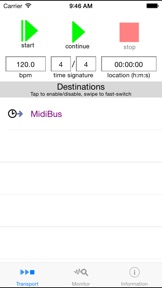
MidiBus is a MIDI clock sync generator and monitor.
Choose your bpm, time signature and MIDI destinations. Press the play button and all selected apps and devices will receive a synchronised, rock-solid MIDI sync clock source.
On the flipside, monitor the MIDI clock signals of apps and devices (including MidiBus itself) and measure how accurate and stable they really are. You might be very surprised at the results.
MidiBus is based on the iOS MIDI development library of the same name. Full details at http://midib.us

What's New in Version 1.52

This app has been updated by Apple to display the Apple Watch app icon.
bug fix - handle case where wifi connected but no internet

Seller

Name

Soft Audio

URL

Information

Developer

Categories

Version

1.52

Size

2.4 MB

Game Center

No

VPP Device Licensing

Yes

Rating

Rated: 4+

Compatibility

iOS 5.1.1 or later

Devices

iPhone 3GS, iPhone 4, iPhone 4S, iPhone 5, iPhone 5c, iPhone 5s, iPhone 6, iPhone 6 Plus, iPhone 6s, iPhone 6s Plus, iPhone SE, iPhone 7, iPhone 7 Plus, iPhone 8, iPhone 8 Plus, iPhone X, iPhone XR, iPhone XS, iPhone XS Max, iPhone 11, iPhone 11 Pro, iPhone 11 Pro Max, iPhone SE (2nd generation), iPhone 12, iPhone 12 Pro, iPhone 12 Pro Max, iPhone 12 mini, iPhone 13, iPhone 13 Pro, iPhone 13 Pro Max, iPhone 13 mini, iPhone SE (3rd generation), iPhone 14, iPhone 14 Plus, iPhone 14 Pro, iPhone 14 Pro Max, iPhone 15, iPhone 15 Plus, iPhone 15 Pro, iPhone 15 Pro Max, iPhone 16, iPhone 16 Plus, iPhone 16 Pro, iPhone 16 Pro Max, iPhone 16e, iPhone 17, iPhone 17 Pro, iPhone 17 Pro Max, iPhone Air, iPad (Wi-Fi), iPad (3G), iPad 2 (Wi-Fi), iPad 2 (3G), iPad (3rd Generation) (Wi-Fi), iPad (3rd Generation) (4G), iPad (4th Generation) (Wi-Fi), iPad (4th Generation) (4G), iPad (5th Generation) Wi-Fi, iPad (5th Generation) Wi-Fi + Cellular, iPad (6th generation) Wi-Fi, iPad (6th generation) Wi-Fi + Cellular, iPad Pro, iPad Pro (Cellular), iPad Pro (9.7-inch), iPad Pro (9.7-inch) (Cellular), iPad Pro 12.9-inch (2nd generation), iPad Pro 12.9-inch (2nd generation) Wi-Fi + Cellular, iPad Pro (10.5-inch), iPad Pro (10.5-inch) Wi-Fi + Cellular, iPad Pro (11-inch), iPad Pro (11-inch) Wi-Fi + Cellular, iPad Pro 12.9-inch (3rd generation), iPad Pro 12.9-inch (3rd generation) Wi-Fi + Cellular, iPad Air, iPad Air (Cellular), iPad Air 2, iPad Air 2 (Cellular), iPad Air (3rd generation), iPad Air (3rd generation) Wi-Fi + Cellular, iPad mini (Wi-Fi), iPad mini (4G), iPad mini Retina, iPad mini Retina (Cellular), iPad mini 3, iPad mini 3 (Cellular), iPad mini 4, iPad mini 4 (Cellular), iPad mini (5th Generation), iPad mini (5th Generation) Wi-Fi + Cellular, iPad (7th generation) Wi-Fi + Cellular, iPad Pro 11-inch (2nd generation), iPad Pro 11-inch (2nd generation) Wi-Fi + Cellular, iPad Pro 12.9-inch (4th generation), iPad Pro 12.9-inch (4th generation) Wi-Fi + Cellular, iPad Air (4th Generation) (Wi-Fi), iPad Air (4th Generation) (Wi-Fi + Cellular), iPad (8th generation) Wi-Fi, iPad (8th generation) Wi-Fi + Cellular, iPad Pro 11-inch (3rd generation), iPad Pro 11-inch (3rd generation) Wi-Fi + Cellular, iPad Pro 12.9-inch (5th Generation), iPad Pro 12.9-inch (5th Generation) Wi-Fi + Cellular, iPad (9th Generation), iPad (9th Generation) Wi-Fi + Cellular, iPad mini (6th Generation), iPad mini (6th Generation) Wi-Fi + Cellular, iPad Air (5th generation), iPad Air (5th generation) Wi-Fi + Cellular, iPad Pro 11-inch (4th generation), iPad Pro 11-inch (4th generation) Wi-Fi + Cellular, iPad Pro 12.9-inch (6th generation), iPad Pro 12.9-inch (6th generation) Wi-Fi + Cellular, iPad (10th generation), iPad (10th generation) Wi-Fi + Cellular, iPad Air 11-inch (M2) Wi-Fi, iPad Air 13-inch (M2) Wi-Fi, iPad Air 13-inch (M2) Wi-Fi + Cellular, iPad Pro 11-inch (M4) Wi-Fi, iPad Pro 11-inch (M4) Wi-Fi + Cellular, iPad Pro 13-inch (M4) Wi-Fi, iPad Pro 13-inch (M4) Wi-Fi + Cellular, iPad mini (A17 Pro) Wi-Fi, iPad mini (A17 Pro) Wi-Fi + Cellular, iPad (A16) Wi-Fi, iPad (A16) Wi-Fi + Cellular, iPad Air 11-inch (M3) Wi-Fi, iPad Air 11-inch (M3) Wi-Fi + Cellular, iPad Air 13-inch (M3) Wi-Fi, iPad Air 13-inch (M3) Wi-Fi + Cellular, iPad Pro 11-inch (M5) Wi-Fi, iPad Pro 11-inch (M5) Wi-Fi + Cellular, iPad Pro 13-inch (M5) Wi-Fi, iPad Pro 13-inch (M5) Wi-Fi + Cellular, iPod touch (3rd generation), iPod touch (4th generation), iPod touch (5th generation), iPod touch (6th Generation), iPod touch (7th generation)

Languages

English

App Store: Customer Ratings

Ratings & Reviews

5.0 of 5 (2 Ratings)

App Store: Customer Reviews

2017-01-26

Thank you!!!!!!!

This app is the ONLY app I have found that will send a clock to Beatsurfer on the same device, and believe me I have tried them all! You are a lifesaver and I found before i managed to rip all my hair out!!!!!!!!
Bkrafty123456789
Version 1.52
2016-06-30

Kiss Your Synch Problems Goodbye!

If you've ever had any problems getting different synth/beatbox/DAW apps to play in time together -- and really, who hasn't? -- then you need MidiBus. Does what it says: set the tempo (bpm) and time signature in Midibus and presto! Your apps will be synched to the same, accurate clock, even the really sloppy ones.
To give but two examples: Thor and Sunrizer. Both these synths are capable of amazing sounds, and both have sequencers that refuse to play in consistent time and drift all over the place. Nothing worked, and believe me I tried lots of fixes. I just tried running Thor and Sunrizer sequences while playing Gadget (always reliable) simultaneously, all synched to Midibus, and I'm happy to report no drift whatsoever, running them for 10 minutes even.
I really want to thank the developer. Rock solid MIDI clock is absolutely essential for music creation, and it's painful to see how sloppily it's been implemented on iOS up until now. Midibus will save you many hours of tearing your hair out.
TheDudeAbided
Version 1.51
2016-06-24

Love it!

I am a keyboard player and use this app as a midi clock master to sync all my synths. I love the tap tempo feature. One thing I would love to see that would make my life easier and probably make this app the best midi clock app out there is the capability to save Bpm lists and set lists. That way I can just click next and it would sync all my synths to the next songs's Bpm in less than one second.
Sersh94
Version 1.51
2015-05-12

Great app just got better

The recent update adds remote midi control of stop/start as well as tempo. This is great for leaving this little problem solver running in the background and managing it remotely using a controller.
AllThatsGone
Version 1.3
2014-09-14

Life Saver

I've been trying to get auria and other apps that claim to be able to run midi clock to actually do what they claim. My use is in hip hop syncing hardware sequencers/workstations to auria in order to record each track of music separately but staying in sync. No apps on the market seem to be able to do this reliably at all. My tracks were drifting all over the place, the midi on most of these daws is terrible for such a thing... BUT MidiBus came through, I'm actually able to load(record) my music up track by track syncing to hardware without any problems. This app ran very stable and sent good stable clock to auria effectively letting auria use minibus as it's midi clock just as if it was built in. Great Job to the secs I hope to see more from you guys, Thanks!
P.s I can confirm that this worked with a behringer istudio is202 ipad interface and a Korg Krome workstation .
Beats510
Version 1.1
2014-06-05

Working for Me! Needs Tempo Presets.

This little app solved a problem for me. I needed to sync Rebirth with other stuff, but the current version Rebirth doesn’t send MIDI clock out (will only act as a slave). So, I tried using MidiBus as the master clock to Rebirth and some external MIDI hardware (through a Griffin interface). It works great, and the clock is very solid.
But …. when I do live performance I have tunes using different tempos. To change tempos with MidiBus, you have to type and enter a new tempo. The app really needs some tempo presets so the user could simply tap a button with the preset tempo (or song title) displayed on it. Then, its a 5 star IMO.
soundoggy
Version 1.1
2014-03-06

Does its job well

This app will generate a steady midi clock and send it out to apps and hardware connected to my iPad (hardware connected via a camera connection kit and powered USB hub). It has some handy data on latency and reliability of the midi signals generated by different apps. It's not a drum machine, and it doesn't have a quick way to move between different tempos. But that's not what is was made to do.
musicstudent14
Version 1.1
2014-01-24

Rock Solid

Stable Rock Solid Midi clock, Love this developer.
Phooka Tim
Version 1.0
2013-12-16

Best clock on any platform I've ever experienced

So I purchased MIDIbus to see how it works. Its the first time in my iOS music making life that I experienced a completely solid MIDI clock between applications. I was using DM1, Loopy, and Thesys (controlling sunrizer) all at the same time and everything was as tight as an integrated DAW on the computer. I really hope people take this seriously because it is the tightest MIDI clock I've ever experience on any platform hardware or software (even while looping) . Too bad hardly any of the major iOS DAW's allow external MIDI clock sync because this would be the end all be all of MIDI clock on iOS. Now all it needs it MTC and possibly get on the Audiobus (for having easy access to transport controls). Once MTC is implemented we should have control over Auria and then music making on iOS will be as good as any other platform. Keep up the amazing work here!
Airyck Sterrett
Version 1.0
2013-12-12

First time I've got DM1 to sync as slave

DM1 audiobussed into Samplr... and SYNCHronized. Nice! All other previous attempts to get DM1 to slave have FAILED... with Midi implementation being so frustrating on iOS, its great to have helpful tools like MidiBus... and dont forget MidiBridge
Grey Fortress
Version 1.0