Updating


iPhone Screenshots


iPad Screenshots




Description
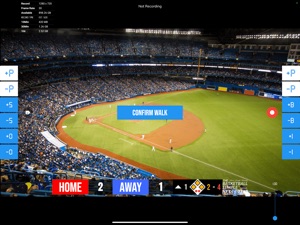
BT Baseball Camera is a baseball game recording app that includes score, bases, innings, strike count, ball count, and brand overlays on top of video. BT Baseball Camera connects seamlessly into the BT Baseball apps system (e.g. with the the BT Baseball Scoreboard app, and more) for synchronization of score and stats across all devices and remote control. In addition, choose custom pictures from your gallery to display during breaks! This could be used for custom advertising in your baseball games. Upgrade your baseball game footage today with the BT Baseball Camera and Scoreboard apps!
BT Baseball Camera App Features:
- Beautiful scoreboard overlays over video
- Add your custom brand overlay
- Add advertisements to display during breaks
- Quick Start Documentation below
The BT Baseball Camera app was created by The Basketball Temple Company. After the success of our basketball products, we have expanded into other sports. The Basketball Temple Company focuses on high quality academies, leagues, and technologies that are used to support those academies and leagues. We open our technology to the public so everyone in the sports community can experience the same technologies that we use within our institutions.
YouTube Tutorial Video: https://youtu.be/fopYwQPOZ2k
# Quick Start Documentation:
1. Start the BT Camera app on the recording phone
2. On another phone, start the BT Controller
3. Open the connect menu in the BT Controller and connect to the BT Camera with WiFi or Bluetooth
4. Start the game with the BT Controller and the BT Camera should automatically start recording
5. Exit the game on the BT Controller and the BT Camera will automatically stop recording
# Setting Advertisements
1. In the BT Camera app, open the right drawer window by swiping from right to left on the right edge of the screen.
2. Scroll to the bottom and press "Edit Settings"
3. Go to the "Ads" tab
4. Select advertisment images that you wish to display during pregame, timeouts, and rest periods.
5. Press "Save and Exit"
# Setting a Custom Overlay Image
1. Press and hold on the default "The Basketball Temple" overlay on the bottom left.
2. Edit icons should appear. Press the blue edit icon.
3. Choose your custom overlay image.
4. You may add multiple overlay images by press and holding on the current overlay, and pressing the green plus icon.
# Video, Resolution, Record Settings
1. In the BT Camera app, open the right drawer window by swiping from right to left on the right edge of the screen.
2. Scroll to the bottom and press "Edit Settings"
3. Go to the "Misc" tab
4. Scroll down to "Video Recording" settings
5. Choose your resolution and desired options
# Livestream Settings
1. In the BT Camera app, open the right drawer window by swiping from right to left on the right edge of the screen.
2. Scroll to the bottom and press "Edit Settings"
3. Go to the "Misc" tab
4. Scroll down to "Video Recording" settings
5. Choose "Livestream Only" or "Livestream and Save to File" option
6. Enter values for "RTMP URL" and "Stream Name" fields. This can be found in your livestream platform's stream settings.
Notes:
- An example "RTMP URL" is rtmp://a.rtmp.youtube.com/live2. Do not append your stream name (key) in the URL.
- The "Stream Name" may labeled as "Stream Key" in your livestream platform.
- Any further questions email ken@basketballtemple.com
What's New in Version 4.1.7
- Update support for remote control
- Overlay style enhancements
- Added box style score overlay
- Fixed change team sides during inning increment and decrement
Please submit any issues to ken@basketballtemple.com and we will try to handle it promptly. Hope you enjoy the app and thank you very much!
Seller
Name
Hien Le
Information
Developer
Categories
Version
4.1.7
Size
71 MB
Game Center
No
VPP Device Licensing
Yes
Rating
Rated: 4+
Compatibility
iOS 11.0 or later
Devices
iPhone 5s, iPhone 6, iPhone 6 Plus, iPhone 6s, iPhone 6s Plus, iPhone SE, iPhone 7, iPhone 7 Plus, iPhone 8, iPhone 8 Plus, iPhone X, iPhone XR, iPhone XS, iPhone XS Max, iPhone 11, iPhone 11 Pro, iPhone 11 Pro Max, iPhone SE (2nd generation), iPhone 12, iPhone 12 Pro, iPhone 12 Pro Max, iPhone 12 mini, iPhone 13, iPhone 13 Pro, iPhone 13 Pro Max, iPhone 13 mini, iPhone SE (3rd generation), iPhone 14, iPhone 14 Plus, iPhone 14 Pro, iPhone 14 Pro Max, iPhone 15, iPhone 15 Plus, iPhone 15 Pro, iPhone 15 Pro Max, iPad (5th Generation) Wi-Fi, iPad (5th Generation) Wi-Fi + Cellular, iPad (6th generation) Wi-Fi, iPad (6th generation) Wi-Fi + Cellular, iPad Pro, iPad Pro (Cellular), iPad Pro (9.7-inch), iPad Pro (9.7-inch) (Cellular), iPad Pro 12.9-inch (2nd generation), iPad Pro 12.9-inch (2nd generation) Wi-Fi + Cellular, iPad Pro (10.5-inch), iPad Pro (10.5-inch) Wi-Fi + Cellular, iPad Pro (11-inch), iPad Pro (11-inch) Wi-Fi + Cellular, iPad Pro 12.9-inch (3rd generation), iPad Pro 12.9-inch (3rd generation) Wi-Fi + Cellular, iPad Air, iPad Air (Cellular), iPad Air 2, iPad Air 2 (Cellular), iPad Air (3rd generation), iPad Air (3rd generation) Wi-Fi + Cellular, iPad mini Retina, iPad mini Retina (Cellular), iPad mini 3, iPad mini 3 (Cellular), iPad mini 4, iPad mini 4 (Cellular), iPad mini (5th Generation), iPad mini (5th Generation) Wi-Fi + Cellular, iPad (7th generation) Wi-Fi + Cellular, iPad Pro 11-inch (2nd generation), iPad Pro 11-inch (2nd generation) Wi-Fi + Cellular, iPad Pro 12.9-inch (4th generation), iPad Pro 12.9-inch (4th generation) Wi-Fi + Cellular, iPad Air (4th Generation) (Wi-Fi), iPad Air (4th Generation) (Wi-Fi + Cellular), iPad (8th generation) Wi-Fi, iPad (8th generation) Wi-Fi + Cellular, iPad Pro 11-inch (3rd generation), iPad Pro 11-inch (3rd generation) Wi-Fi + Cellular, iPad Pro 12.9-inch (5th Generation), iPad Pro 12.9-inch (5th Generation) Wi-Fi + Cellular, iPad (9th Generation), iPad (9th Generation) Wi-Fi + Cellular, iPad mini (6th Generation), iPad mini (6th Generation) Wi-Fi + Cellular, iPad Air (5th generation), iPad Air (5th generation) Wi-Fi + Cellular, iPad Pro 11-inch (4th generation), iPad Pro 11-inch (4th generation) Wi-Fi + Cellular, iPad Pro 12.9-inch (6th generation), iPad Pro 12.9-inch (6th generation) Wi-Fi + Cellular, iPad (10th generation), iPad (10th generation) Wi-Fi + Cellular, iPod touch (6th Generation), iPod touch (7th generation)
Languages
English
App Store: Customer Ratings
Ratings & Reviews
5.0 of 5 (1 Rating)
App Store: Customer Reviews
No Entry