AboutTermsPrivacyContact
 
Updating
HarmonyWiz

HarmonyWiz

Released: 2014-06-12
© 2014 Ruben Zilibowitz and Wizdom Music LLC
HarmonyWiz - QR Code
Version 1.1.3
4+
Download on the App Store
Version 1.1.3
4+
Download on the App Store
Released: 2014-06-12
© 2014 Ruben Zilibowitz and Wizdom Music LLC

iPhone Screenshots

Screenshot
Screenshot
Screenshot
Screenshot
Screenshot

iPad Screenshots

Screenshot
Screenshot
Screenshot
Screenshot
Screenshot

Description

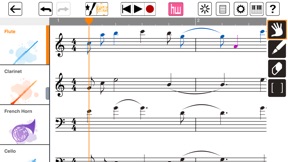
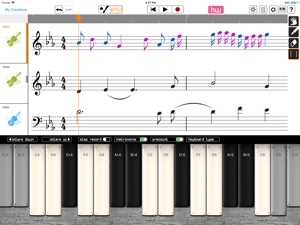
HARMONYWIZ is an advanced harmonic generator which can create multi-part harmony, all just from inputting a single musical line. You can paint your music in or play it from a piano style keyboard. You compose it and HarmonyWiz will arrange it!
After an arrangement is created, the app provides harmonic analysis and displays a notation system known as Figured Bass.
Enter the Expert mode and you will have access to manage all the tracks in your arrangement with our editing tools.
Select different preset sound ensembles or create your own.
HarmonyWiz. Entertaining and fun for all ages, but also a valuable educational tool for music students and can be used for advanced editing by industry professionals.
This release of HarmonyWiz features the Baroque style and some of Jordan’s personal variations on its classical foundation.
The sounds in HarmonyWiz are from Jordan’s personal library. We also offer a great collection of additional sounds as In-App- purchases.
One can also enjoy just playing the great sounds of HarmonyWiz from the onboard or midi keyboard
• HarmonyWiz offers a unique, assisted composition engine
• Place guide notes in any track including the melody or bass lines
• Force chords to have certain degrees or inversions
• Choose from five different harmonic styles: Baroque, Contemporary, Smooth, Free, And Open
• Non-harmonic tones such as passing notes or suspension notes
• Built in multi-touch keyboards in both chromatic layout and harmonic
• Supports the use of accidentals
• Supports simple and compound meters
• Supports major and minor keys
• Displays harmonic rhythm
• Multiple undo and redo
• MIDI in and MIDI out support
• AudioBus support
• AudioShare support
• Ten built-in instruments including orchestral and electronic sounds
• More instrument packs available for in-app purchase
• SoundCloud sharing
IMAGINARY PRAISE FOR HARMONYWIZ:
“I wrote my first composition at age four. Too bad I didn’t have HarmonyWiz so that I could’ve had an even earlier start.”
Wolfgang Amadeus Mozart
“HarmonyWiz is a great tool for composers like myself. If I had HarmonyWiz when I was a young man, I could have composed a symphony every day.”
Ludwig van Beethoven
REAL PRAISE FOR HARMONYWIZ:
“HarmonyWiz is such a fun and awesome compositional tool! Perfect for helping any musician unlock and explore endless creative harmonic possibilities. It’s practically like having your own digital writing partner at your fingertips. The only problem for Jordan, is that if he keeps this up, he may just “tech” himself right out of a job!
John Petrucci (Guitarist of Dream Theater)
ABOUT THE CREATORS:
Jordan Rudess explains, I always felt that a composer’s thought process would be fascinating to capture in code. I’ve wanted to do an app like this for a long time and, upon meeting developer, Ruben Zilibowitz, it finally has become possible. Ruben has spent years studying classical music texts such as Schoenberg's Theory of Harmony. He started by writing out four-part phrases by hand. Eventually, he was able to translate this process into computer code that could generate natural musical phrases. Through hours of sitting at the piano, studying my own compositional method, to Ruben’s tireless coding we believe we have achieved something truly unique and inspiring.
If you have any feedback/questions concerning HarmonyWiz, please send them to us at support@harmonywiz.com. We will get back to you promptly. Note: We cannot respond directly on the App Store review page.

What's New in Version 1.1.3

This app has been updated by Apple to use the latest Apple signing certificate.
This is a bug fix release.
* MIDI import fixed
* Issues with note selection fixed

Information

Categories

Version

1.1.3

Size

143.7 MB

Game Center

No

VPP Device Licensing

Yes

Rating

Rated: 4+

Compatibility

iOS 9.2 or later

Devices

iPhone 4S, iPhone 5, iPhone 5c, iPhone 5s, iPhone 6, iPhone 6 Plus, iPhone 6s, iPhone 6s Plus, iPhone SE, iPhone 7, iPhone 7 Plus, iPhone 8, iPhone 8 Plus, iPhone X, iPhone XR, iPhone XS, iPhone XS Max, iPhone 11, iPhone 11 Pro, iPhone 11 Pro Max, iPhone SE (2nd generation), iPhone 12, iPhone 12 Pro, iPhone 12 Pro Max, iPhone 12 mini, iPad 2 (Wi-Fi), iPad 2 (3G), iPad (3rd Generation) (Wi-Fi), iPad (3rd Generation) (4G), iPad (4th Generation) (Wi-Fi), iPad (4th Generation) (4G), iPad (5th Generation) Wi-Fi, iPad (5th Generation) Wi-Fi + Cellular, iPad (6th generation) Wi-Fi, iPad (6th generation) Wi-Fi + Cellular, iPad Pro, iPad Pro (Cellular), iPad Pro (9.7-inch), iPad Pro (9.7-inch) (Cellular), iPad Pro 12.9-inch (2nd generation), iPad Pro 12.9-inch (2nd generation) Wi-Fi + Cellular, iPad Pro (10.5-inch), iPad Pro (10.5-inch) Wi-Fi + Cellular, iPad Pro (11-inch), iPad Pro (11-inch) Wi-Fi + Cellular, iPad Pro 12.9-inch (3rd generation), iPad Pro 12.9-inch (3rd generation) Wi-Fi + Cellular, iPad Air, iPad Air (Cellular), iPad Air 2, iPad Air 2 (Cellular), iPad Air (3rd generation), iPad Air (3rd generation) Wi-Fi + Cellular, iPad mini (Wi-Fi), iPad mini (4G), iPad mini Retina, iPad mini Retina (Cellular), iPad mini 3, iPad mini 3 (Cellular), iPad mini 4, iPad mini 4 (Cellular), iPad mini (5th Generation), iPad mini (5th Generation) Wi-Fi + Cellular, iPad (7th generation) Wi-Fi + Cellular, iPad Pro 11-inch (2nd generation), iPad Pro 11-inch (2nd generation) Wi-Fi + Cellular, iPad Pro 12.9-inch (4th generation), iPad Pro 12.9-inch (4th generation) Wi-Fi + Cellular, iPad Air (4th Generation) (Wi-Fi), iPad Air (4th Generation) (Wi-Fi + Cellular), iPad (8th generation) Wi-Fi, iPad (8th generation) Wi-Fi + Cellular, iPad Pro 11-inch (3rd generation), iPad Pro 11-inch (3rd generation) Wi-Fi + Cellular, iPad Pro 12.9-inch (5th Generation), iPad Pro 12.9-inch (5th Generation) Wi-Fi + Cellular, iPod touch (5th generation), iPod touch (6th Generation), iPod touch (7th generation)

Languages

English

App Store: Customer Ratings

Ratings & Reviews

4.5 of 5 (4 Ratings)

App Store: Customer Reviews

2018-11-06

Amazing

I can’t believe that it’s only $10! The best composition app I’ve used on PC, macOS or iOS! Absolutely superb.
usvtbioc
Version 1.1.3
2018-06-22

Very fun and great for ideas

I love how easy this app is to use and I’m constantly inspired by the suggestions it makes!
Just plane awesome
Version 1.1.3
2018-04-22

Great Tool!

Really wanted this app for my music process. I have an iPad Pro and Wizdom Music hadn’t updated this app for awhile. I wrote an email requesting my wishes. They replied immediately and soon after actually updated for the recent iOS. When I played with the customizations, it was possible for me to integrate my the song into composition. Such a cool app. Thank you!
Theogore
Version 1.1.3
2017-11-29

Good app no longer working.

On an iPad Air, not sure if it’s a 2 or not but the latest HarmonyWiz does not work. Specifically, the splash screen opens upon start and then crashes back to the iOS 11.2 interface.
The program was an entertaining augmentation in scoring and was fun to use. Not quite a five star app but useful and fun to work with.
Hopefully it will be troubleshot and fixed.
x_bruce
Version 1.1.1
2016-03-12

Poorly designed user interface

I am experienced with notation programs. This user interface is the worst that I have seen. The tutorial that comes with the app does not work. The tutorial on You Tube is terrible. The Help is worthloess. Do not waste your money.
MusicBoston
Version 1.1
2016-01-22

Great support, app is excellent

This app is absolutely awesome the harmonies are spot on. This should be in everyone's music writing toolkit love it
Oldrumguy
Version 1.1
2015-12-13

Good Opportunity For Apple Pencil Support

Fun app even for semi-pro and pro musicians. The more editing post art, the better!
ovrdrvn
Version 1.1
2015-10-10

Not worth getting this app

Part of it okay, but you can't add any sharp or flat notes. Also you can't add any dynamics (soft or loud). Not worth getting if you ask me.
Thom Tenor
Version 1.0.6
2014-11-23

The most important app to date

Thank you Jordan !you have opened a door that will not only help new comers to music composition and theory but has been needed as a method of teaching music for way too long!Cheers! I am having a blast with this !peace Christo
Aka monkey dope
Version 1.0.4
2014-11-16

Wow

This is a great app.! Lots of fun for an old school musician. Jordan is a musical marvel and tech guru!
You will enjoy!
mlinva
Version 1.0.4
2014-11-15

quickly score a few measures

1. At the top left, click on the score icon ... next to the brush-with-a-star icon ... this turns on the note writing feature.
2. Go to preferences ... the usual icon ... and turn on "expert" mode.
3. On the right side of the screen, the hand is selected ... this moves the page around ... click on the pen tool: the note icons below it will light up.
4. Now you can select a note type and touch the screen to place one on the score.
5. Make a few bars of melody and click the HW arranger. Don't worry about precise notation, the arranger will clean it up.
Play it. Press the star button to the right of HW and "clear arrangement". Refine and repeat.
Violins and cellos are a bit silly in these times ... a guitar, synth and bass combo would be welcome - and some of the expert buttons crash the app. Otherwise, it's an interesting little gadget.
Solextre
Version 1.0.4
2014-08-09

This Is Awsome!

One thing, there should be staff lines on the paint surface so that people with some music theory can see the note their putting brush down on..... But....🌟🌟🌟🌟
Sokoum
Version 1.0.3
2014-07-16

Nice Wiz'

As an untrained person with extremely limited music reading skills; but, a lover of music and putting around with synthesizers and iPad instruments, I would say that I really like what this app is capable of even though it is a struggle to "feel" the relationship between the notes painted on the screen and the notes actually resulting from them. Here's what I feel is missing from the app:
(1) positive feedback that as you draw, you also hear the notes being selected as you draw them.
(2) four bars is simply way too limiting ... I can sneeze longer.
(3) I repeatedly tried; but, on my iPad Gen 4 which is up to date with iOS updates, does not scroll to the right as you draw so you are forced to "zoom out" to see all four bars in order to get continuity across the screen.
I take this as only round 1.1 in the app's life cycle though and look forward to its evolution. Did mine crash at any point? Not yet.
Universe Observer
Version 1.0.2
2014-07-16

Outstanding!

As a music major that understands theory, the options to add notes and change chords is a great feature. The paint option is also quite creative.
For people saying that it doesn't make them an instant masterpiece, you should've known better. The way I use this app is to get ideas and edit them in Finale. It's like a rough draft and revised draft before you get to the final draft. It simply works as a foundation for any small composition I decide to make for my college music friends.
Anyway, the updated version works better with notes and non-chord tones outside of the key. It'd be cool to have more time signatures and an option to only make a harmony for certain parts of the song at a time, rather than having to arrange the entire song again.
Thank you Jordan Rudess and the awesome people of Wisdom Music for such an amazing app!
SuperdudeFlexiRandom
Version 1.0.2
2014-07-07

Another Masterpiece

Once again, Jordan Rudess has created another fabulous app. Harmony Wiz is easy to use and the results are amazing. If you don't know how to play an instrument, or read music, no worries. Harmony Wiz does all the hard work, and makes you sound like the Maestro of the Universe. Thank you Mr. Rudess for for apps that inspire us to get creative.
Mugwump24
Version 1.0.1
2014-06-18

Does not work correctly for me

Harmony Wiz is not a wiz. Cannot get it to start correctly and erase correctly. They need a video on how to use this app. I would not recommend Harmony Wiz until I get some answers which I have not.
rmtsw
Version 1.0
2014-06-18

Most useful app since ThumbJam or Cubasis.

Got the app at 3:00pm. Better than I expected. Decided to use it to help with a soundtrack deadline for the next day. Composed with it after dinner. Imported midi into Ableton, with NI Kontact. Next day the Director proclaimed me a genius. Nuff said. I am however looking forward to the addition of more compositional styles!
ABZyrd
Version 1.0
2014-06-17

What the heck!

This is an absolute waste of ten dollars!
Mozart, Beethoven and other musicians would think this is a waste!
I thought me and my French Horn would have a great time but nope.
Gohan11
Version 1.0
2014-06-17

So so

Disappointed in this app,although it has potential. Locks up,states more than 1 octave leap,fix once dialog appears, measures disappear when I try to extent the count. Everything sounds like a funeral dirge. All in all I'm hoping for some refinements as JR is a really dedicated musician.
Jaxziel
Version 1.0
2014-06-16

Proof that using math to make music will only go so far...

Making music should not be constrained by sets of rules. Computer programs can only work on the set of rules with which they were programmed. The app just hung during the arrange phase and never finished for any idea I threw at it. I'm no Mozart, but you'd think I am based on how the app took a dump at any melody I came up with. Really neat idea and Jordan & Co. have put out some super killer apps. This one is a great idea but seems only to work well with the baroque style and with very simple melody lines. Honestly I'd ask for a refund on this one if I thought I could get it.
RickshawMe
Version 1.0
2014-06-16

Mixed results so far

I've had some good harmonization with certain pieces. I've had nothing but frustration with other pieces because the app never finishes the process. The app is new and it can take time to work out previously unseen issues so I hope that updates will solve things soon.
Moment65
Version 1.0
2014-06-14

Another Fantastic Program from Jordan Rudess

This is one amazing program from a great team. The technology is far ahead of most music apps. In addition their customer support is tops and is very responsive. They answered my question within minutes of my concern. It just does not get better than that.
Spaceman Bassman
Version 1.0
2014-06-13

Pretty Freaking Cool So Far

Just starting to dig into this. Could be an amazing way to compose and harmonize. Seems very well thought out and runs smoothly. Learning curve is acceptable. More to come...
theconceptofzero
Version 1.0
2014-06-13

Computers can't make music.

Thought it would be really awesome, but not so much. Computers can't make music, and I wish I would've remembered that before buying. Wish I could get my money back :/
Littleallred008
Version 1.0
2014-06-13

Rushed out without enough thought!

MAJOR FLAW: After trying a keyboard I was immediately sent to "my creations" page. Unfortunately I have no creations because I deleted it. Still, the program insists that I name my creation which no longer exists. So I name it and then delete the ghost. But the program now wants me to name the ghost's ghost. In short, my program, in the matter of approximately three minutes, was stranded on a page that will not let me return to the program. Not the first such incident where this company is concerned. I was just about to purchase all of there instrument packs. Wrong decision. Buyer beware.
Eageralanpoe
Version 1.0
2014-06-12

Brilliant!!

Once more Jordan Rudess has given us an amazing new app to push us & challenge us & provide so much enjoyment while doing so. This might be his best yet!
Gertrude da Goat
Version 1.0
2014-06-12

Awesome

Very cool, awesome job as always!
Musicjedi3405
Version 1.0