AboutTermsPrivacyContact
 
Updating
Eisenhower

Eisenhower

Released: 2012-09-04
© FTL3 GmbH
Eisenhower - QR Code
Version 2.0.0
4+
Download on the App Store
Version 2.0.0
4+
Download on the App Store
Released: 2012-09-04
© FTL3 GmbH

iPhone Screenshots

Screenshot
Screenshot
Screenshot

Description

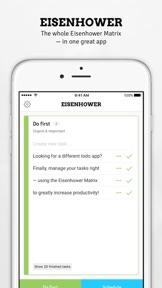
Eisenhower is a time management solution based on the Eisenhower matrix, supporting you in prioritizing and getting tasks done by urgency and importance. It helps you organizing both your business and personal tasks altogether, reducing stress while increasing productivity at the same time.
Other apps focus on collecting many lists and tasks, Eisenhower helps you to actually complete the ones that really matter—through providing a framework to filter incoming tasks and maximize the happy feeling of completion when finishing or delegating them.
—————
Join many others and become more productive today!
—————
What our users are saying about Eisenhower:
▶ "Perfect for those with busy lifestyles or who just want to get things done."
▶ "Get this, now, not later. This is how Eisenhower ran a country, might be good for your productivity too."
▶ "Helps me to be productive - quick, easy, efficient."
▶ "This could be the next big thing in productivity apps."
▶ "I absolutely love this application and I find it to actually be hugely useful - having played with it the whole day today and populated it out with tasks I want to achieve to test the theory, I indeed finished each of the "Do First" tasks in order, and achieved Zero-Inbox. This is the most productive day I've had in months!"
—————
FEATURES
—————
▶ Task Counter
On each to-do sheet, best manage no more than 8 tasks. Still, we have made room for unlimited tasks and notes whenever you might need it—and each sheet counts how many there are to tackle right now.
▶ Focus Mode
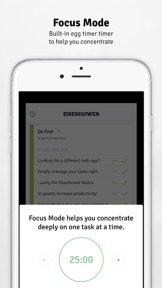
For urgent and important tasks, you can use a special timer, helping you to focus on only one task for 30 minutes—or whatever duration you like best.
▶ Schedule & Delegate
Using other task-related actions, you can directly place reminders in your calendar or send e-mails including the tasks to co-workers.
▶ Cloud Sync
Once you have created your account, Eisenhower automatically syncs with the free web client on app.eisenhower.me—and vice versa, in real-time!
—————
MORE
—————
If you are new to the Eisenhower matrix or just want to refresh your memory, check out our quick video tutorial here: bit.ly/eisenhower-matrix
Get in Touch
Got feedback for us? Send your ideas, wishes, issues and any comments to feedback@eisenhower.me—we would be happy to hear from you!

What's New in Version 2.0.0

Oh happy day! With the kind support from a few friends I've been rebuilding Eisenhower from scratch. And here it is: Ready for iOS 11 and syncing with the new web app at app.eisenhower.me — I hope you like it! Additional features are in the works, but feel free to get in touch with whatever feedback or ideas you might have!

Seller

Name

FTL3 GmbH

Information

Developer

Categories

Version

2.0.0

Size

12.4 MB

Game Center

No

VPP Device Licensing

Yes

Rating

Rated: 4+

Compatibility

iOS 9.0 or later

Devices

iPad Air, iPad mini 4 (Cellular), iPad mini 3, iPad mini (5th Generation), iPad Pro (11-inch) Wi-Fi + Cellular, iPad (5th Generation) Wi-Fi + Cellular, iPad (6th generation) Wi-Fi + Cellular, iPad Pro, iPad mini (5th Generation) Wi-Fi + Cellular, iPad Pro 12.9-inch (3rd generation), iPod touch (6th Generation), iPad mini Retina (Cellular), iPad Air (Cellular), iPad Air 2 (Cellular), iPad mini 4, iPad Pro 12.9-inch (3rd generation) Wi-Fi + Cellular, iPad Pro 12.9-inch (2nd generation), iPad (5th Generation) Wi-Fi, iPad Air (3rd generation) Wi-Fi + Cellular, iPad Pro (Cellular), iPad Pro 12.9-inch (2nd generation) Wi-Fi + Cellular, iPhone 8 Plus, iPad Pro (9.7-inch), iPhone XR, iPad Air 2, iPad (6th generation) Wi-Fi, iPad Air (3rd generation), iPhone 8, iPad Pro (10.5-inch) Wi-Fi + Cellular, iPhone 6s, iPad Pro (9.7-inch) (Cellular), iPhone 7, iPhone 7 Plus, iPhone XS Max, iPhone 6, iPhone X, iPhone 6 Plus, iPhone XS, iPad Pro (10.5-inch), iPhone SE, iPhone 5s, iPhone 6s Plus, iPad mini 3 (Cellular), iPad Pro (11-inch)

Languages

English

App Store: Customer Ratings

Ratings & Reviews

4.0 of 5 (100 Ratings)

App Store: Customer Reviews

2017-09-27

Looking for the ability for more to dos

A toggle switch to choose 8 in each category or an infinite number is urgently needed for days like today when a pile, figuratively speaking, lands on my desk. I'll be happy to redo my rating when this happens!!
Waiting with baited breath for the update for IOS 11!
Ahava Shira
Version 1.2.1
2017-03-30

Great app, evidently needs an update

I get a notice when I install it that the app may slow down my device. I think this is due to the lack of recent updates to the app to comply with new iOS app requirements. Would give it 5 stars if this notice didn't appear. Would also love a combined list view of all 4 quadrants at one time to give a better overall view of the workload.
Mike Hurd
Version 1.2.1
2017-01-20

It’s okay at best - MAY MAKE PHONE SLOW

This is a small app. It does one thing and does it fine - allows you to organize a few to do tasks. But you only get one panel, and 8 tasks in each of 4 quadrants. I’ve got a lot more than that right now and so the app is more or less useless except for prioritizing the very top of my list. I’m not sure what to make of that.
After I bought it I got a message that it might make my phone run slow - you’d think the app store would have alerted me first.
It does sync with a very minimal web app.
This is the super stripped version of what Priority Matrix does much better, but for way too much money ($12/month). For now I’ll just hack in in Google Drive with sheets.
J?bird
Version 1.2.1
2016-04-12

not working

* keep crash
* can't display "schedule" item(blank)
DerayGa
Version 1.2.1
2015-10-20

So buggy!

I downloaded this app to make my to do list easier to navigate, and this app is so buggy that it made it worse! Tasks don't appear for a few seconds or sometimes at all... You can't set a timer again for a task, it just marks it as complete automatically when the minute are up... Beautiful ui but a waste of money.
DijitalDharma
Version 1.2.1
2015-09-12

Awesome App!

Totally different / fresh idea. Excellent implementation. Also I like Eisenhower quadrant philosophy more than Steven Covey's 4 quadrants. This is one of my most-used apps now, along with notes, Mailbox and Clear. Great stuff!
Tomeqq
Version 1.2.1
2015-09-08

Fix this please!

I liked this when I first got it some time ago. Six months ago it started crashing every time I entered something. And the top level only shows one item at a time - when I enter a new task, the others disappear. This makes me want to just give up on the whole thing.
Oaklandish2010
Version 1.2.1
2015-08-31

Notifications

I think this app has a lot of potential. A couple of things I do not like about this app is that you cannot set the timer for how long you want it to run. Also there is not notification options to show at least the amount of at least the "do first" list. Unfortunately this has inclined me to give this app the rating above.
Flannel1541
Version 1.2.1
2015-04-21

Great, but crashes all the time

Great idea behind the app, really, it's very useful. Besides a few improvements I have in mind, the biggest one is to fix a bug that makes the app crash every time I try to enter something into the app. Please have a look at this!! I can't add to the list and makes the app frustrating and useless!!
J-tec
Version 1.2.1
2015-03-30

Crashing A LOT

I love the concept of this app and when it's working, it's fantastic. The web interface eg ration is helpful, but lately it's has been crashing constantly.
Sync issues, crash after deleting tasks, crash after changing boards, you name it.
For an app with this price tag, I would expect it to be crash-free.
Mikemichigan
Version 1.2.1
2015-01-03

Effective without being complicated!

Limiting each quadrant to 8 items max prevents having to do list that are too long. Best thing about app is how you can easily move items between quadrants and rearrange them the same way with just a touch. Improvements would be having a link that would automatically bring up calendar app for scheduling like the link they have that brings up ail app for delegation. But these are minor compared to the ease of use and
Simplicity of the program itself.
coldcash57
Version 1.2.1
2014-02-17

Overpriced, useless app

This app is so useless and is in no way worth the $2.99. I really feel ripped off. Limiting each list to only 8 items is not workable. Also, many times I typed an item and it keeps disappearing.
I will just use my Paperless app and keep the 4 lists in there. Much more control over it this way.
Cindy Williamson
Version 1.2.1
2014-02-02

Needs iOS reminders app task integration

This app delivers on its promises, and I haven't run into any problems so far. I also really like how you can easily drag a task to a different priority quadrant, since the 4 quadrants are neatly displayed at the bottom of each screen view.
However, I would really like to see an option to easily transfer items from the built-in iOS Reminders app!! Please, developers????? Pretty please??!? Even if the imported tasks had to show in a new, separate screen view (maybe under settings or something?) and each task be manually dragged into the respective priority quadrants, I would love it.
Also, it would be cool if we could adjust the timer to settings other than 30 minutes (e.g. 5 minutes, 15 minutes, 45 minutes). I also agree with one of the previous reviewers that it would be nice to have an option to turn off the ticking sound but still hear an alert when the timer runs out.
Otherwise, it's a great app, though. It helps with prioritizing (using an Eisenhower/Covey-type method) and also focusing on completing just one task at a time. If you struggle with those things, this app will probably help you.
Ravensdream
Version 1.2.1
2014-01-09

Useless

This app is a waste of money and a useless piece of crap. It has nothing to offer. I feel ripped off.
herberq
Version 1.2.1
2013-08-28

Very helpful!

Very helpful in figuring out your daily list of things to do! I wish there was a mechanism for inputting all tasks over a week but that's unnecessary as you can simply write them in Notes or Reminders. I would recommend it!
Mkennady
Version 1.2.1
2013-08-12

It's different...that's good

Because it is different, it took awhile for me to catch on, so my advice is keep doing it until it works for you---then the breakthrough happens. And it is GOOD. As far as the limit of To-do's, I found that some daily tasks could be clumped together. For example 1) supplements 2) salad 3) juice drink 4) drink water 4) healthy breathing all go under DAILY NUTRIENTS. When I started using the timer, the magic kicked in. It is set for 30 minutes so I hit start. The task may continue longer according to my discretion. Sometimes I go shorter to get to the next task. It doesn't matter. I'm doing it and checking it off. I'm in control and getting to each item and that is just what I wanted!
Thinkingisfree
Version 1.2.1
2013-08-04

Focused todo app

Bare bones focusing and a limited number of tasks is perfect to make me prioritize what i want to do today. I still use omnifocus for the hundred other projects but go to this during the day to remind me where to put energy.
symptomatic
Version 1.2.1
2013-07-14

Great app

Simple but remarkably powerful
DavidW2000
Version 1.2.1
2013-07-11

Simple and useful

I use to always supplement my productivity app with a pad of paper, but not so much. I love the steps Eisenhower takes of matching prioritization with the first steps to making it happen (email, calendar, Pomodoro timer). It's be cool to see task competition by type over time as a graph/archive view for reference, but don't let something like that take away from such a simple, straightforward experience. Rockin, thanks!
JRValentine
Version 1.2.1
2013-06-25

Simple

Simple and easy to use.
812ajt
Version 1.2.1
2013-06-19

Just about perfect

This is a great app for helping me stay focused on the numerous tasks calling for my attention. It helped me get so much more done the first day I used it. As a business owner, the more I am able to do in less time is truly appreciated. It's easy to move tasks between quadrants. Just tap and hold the task then drag it down to one of the other boxes. Just like you would rearrange tasks.
- I would like to see is iCloud syncing between my iPad and iPhone. I know they offer syncing with their website but I would prefer not having to set that up.
- I would like to see a history of what I completed and when.
- I would like to turn off the ticking noise but still keep the alert when time is up.
Crucian06
Version 1.2.1
2013-06-01

Almost perfect

Keeps me focused, balanced. I can admit to having too many tasks, but I find the limits of number of tasks in each box, well, limiting. Let me add a few more and all other task based apps will be deleted from my phone.
adfoodie
Version 1.2.1
2013-05-29

Eisenhower

App is very lame. Its a very basic drawing board/ checklist style app. There is nothing cool/ fun/ exciting with this app.
Mushkabibels
Version 1.2.1
2013-05-28

Work for me but doesn't sync

Work but don't expect to sync with web
Overbookedd
Version 1.2.1
2013-05-22

Great for targeted task management

It takes a while to get a handle on it - specially if you are used to separating your personal and work life. Definitely isn't a standalone solution for task lists but when you need to get things done it is great for prioritization :)
After spending months using the webapp I finally decided to buy the iOS. Great purchase :)
Ckcsckr
Version 1.2.1
2013-05-02

Duplicates/Deletes Tasks By Itself

Like another review said, items can duplicate themselves. I can't remember ANYTHING so I really expect the app to not delete my tasks before I complete them. (This has caused me to miss important deadlines at school.) Great concept, please fix the bugs.
MsAmandaDay
Version 1.2
2013-04-29

Priority list menu items duplicate themselves

Not sure but I think I've lost an important task or two when one item has duplicated it. Please check your code, my wife is sick and I can't afford to leave anything out on our pre-surgery checklist.
lostproductivity
Version 1.2
2013-04-18

Wildly helpful and simple!

Highly recommend this app - better than traditional to do list apps because its designed to make you focus. Love the integration with calendar, etc too. Well done folks!!
rhadiaris
Version 1.2
2013-04-17

Works but not fully

Ok, app has bugs
Floridaboy33
Version 1.2
2013-04-13

Hey!

I LOVE this app.
Global Fire Ministries
Version 1.2
2013-03-10

You guys are helping change the world

Great job team. You are enabling others to achieve their goals! A very noble gift. Very elegant design of UI. My recommendation is to make the email template available to be preset differently
Suffering Procrastinator
Version 1.2
2013-03-07

Simplicity helps me get through tasks

This app has been helpful so far, maybe it will turn out better or worse, but it does help my brain organize.
One con: after setting the 30min clock, it seems that either you leave the clock going and making sounds, a distraction, or go out of the app and lock the phone. I have yet to know at the time end that the 30mins was up. It should let you know the time is up with a email and a notification and a clearly audible sound.
Classic_iMac
Version 1.2
2013-03-05

Love it - easy peasy!

Best way so far to organize my day. Not a big to do list but a way to focus your day.
okieokieokie
Version 1.2
2013-02-24

Quick and easy!

More useful than other apps if for no other reason than its simplicity. Well worth it!
Will1234567890987654321
Version 1.2
2013-02-23

Simple and useful.

Nicely polished. Backed up to an account. The Eisenhower method works well.
Sam Garrett
Version 1.2
2013-02-18

Brilliant

Best app I've ever downloaded...be like Dwight all day!
Connor | StrongHouseFirm.com
Version 1.2
2013-02-13

A Whole New Way to Think About Tasks

Prioritizing is a valuable resource, and is also often left out of the process when using to-dos. This app forces you to get things done.
To better understand this concept, look up information about Inbox Zero. Thoroughly think about what tasks are important to address immediately, what tasks to delegate or schedule for later, and what tasks to ignore that are distracting. Give it a try and try to work with the limitations.
*For App Devs: Mac App please 😇
D.Toli
Version 1.2
2013-02-09

Rip Off!!

This app is a disgrace to the name of General Eisenhower. Buy it at your own disappointment.
Hey Thumper!
Version 1.2
2013-01-29

Pretty good!

Very useful
Need more lines per quadrant or 2 matrixes: business and personal
castilcl
Version 1.1
2013-01-07

Sweet deal

Nice
JTizzle
Version 1.1
2013-01-04

Simple 2 use, would like 2 log what's done

Quadrants work great with a delightful, simple interface. I like being able to drag tasks from one quadrant to another.
Task Entry is as simple as typing,
However, compared to my HomeRoutines app, I'd love to be able to paste a list of tasks from an email or other list.
Sometimes I have trouble swiping to mark a task as done, but I can always tap the clock and then tap the check mark. It removes the completed tasks when the page is refreshed.
Trouble is, once a task is done I have no way to know at the end of the day what I've accomplished.
I would love a time stamped log that I can filter by date and export or email.
Contentgrrl
Version 1.1
2012-12-30

Great app

Like another review said, it's the first app to make me even consider switching from the stock Notes app.
Crs5204
Version 1.1
2012-12-18

Well executed

Integrates the key features to help focus- moving the task into right quadrant, and right action for each type of task. Elegantly done with panache.
jimcoyer
Version 1.1
2012-12-02

Love it

Helps cut through the crap in my mind and keep me focused on highest leverage activities... in moments of overwhelming anxiety it's comforting to be able to just think okay what's in quadrant one
Schwoopty Doodle
Version 1.1
2012-11-29

Best To-Do List App I've Ever Used!

Over the past couple years of having my iPhone, I've looked for a to-do list app that would cause me to happily stop using the iPhone's standard notes app for writing down my personal and business tasks. And now, I finally have.
Charles Denney
Version 1.1
2012-11-28

I LIKE IKE

Simple, and a-ffective (causes change). Ties closely to Covey. The 8 task limit forces you to actually DO some tasks instead of just capturing them. Use something else for ubiquitous capture (text file, Evernote, paper, index cards), then just load up IKE with today's tasks. Organize your day by priority and importance, manage your tasks using the timer, calendar, and email links, and remind yourself of those pesky procrastination behaviors. Wonderful.
Brian1952-1960
Version 1.1
2012-11-27

It Simply Works

Clean, simple and effective. The app is technically sound and the methodology works well.
BorxTheMercurial
Version 1.1
2012-11-21

Love it - needs better integration

Love the idea. There are issues with iCal integration when using across multiple devices like iPhone and iPad which I hope they fix.
itunes frustrated
Version 1.1
2012-11-20

Very helpful

Needed something to keep on track at work. This did the trick!
Shaved_Panda
Version 1.1
2012-11-18

8 tasks Not enough

Like the app, a lot of potential. The apps tells us that we should only manage one list for personal and business items. The program however limits the maximum number of tasks per square to 8 which is inadequate given the number of tasks one typically has between personal and work matters which limits the programs usefulness. This is especially limiting in the "schedule a task" box. Unlocking the task limit would greatly improve this tool.
Infinity fan 2
Version 1.1
2012-10-28

Best productivity app of the year, so far!

Yep, I like and recommend this app. You can install on your iPhone and access it from the web. Very efficient to use and keeps me focused on the more important to-do items instead of getting distracted with too many steps to enter a task on my to do list. I'm sure an iPad and MacBook version will come out soon.
Ivy1890
Version 1.1
2012-10-28

Simple, effective

Eisenhower doesn't have the complications of some organizers that have full OSX cousins, but it serves perfectly for managing and organizing simple tasks on the iPhone-that is, on the go. It is simple, intuitive, and well-executed for the most part, although tasks sometimes duplicate themselves or experience syncing issues.
Agnomen ficticium
Version 1.1
2012-10-23

Superb app!

This app is simple, does exactly what I need it to, and is based off a fantastic idea from a great mind.
This has helped me organize my priorities in my personal and professional life!
snales8301
Version 1.1
2012-10-19

Pretty great already with lots more potential

Still waiting for a universal version that I can use on my iPad. Would also like a way to archive completed tasks for record keeping rather than having them completely disappear after marking them done. Overall very helpful and clean design.
josey4628
Version 1.1
2012-10-09

Great App

4 stars, because nothing is ever perfect. Simple and effective. Promotes focus on doing a manageable number of tasks. Also, makes you think if there is anything on your plate that belongs to someone else or that you just shouldn't be doing altogether.
TheJipster
Version 1.1
2012-10-08

Calendar Will Be Fixed Soon!

Calendar is working fine. The program is great! It's never crashed (I'm using a 4S) and it does what it's supposed to, help me be more productive. Well worth the $2 if you have a demanding job or if you're in grad school like me! Excellent developer feedback, I got a response from an email in less than an hour and a follow up to make sure I wasn't having any more issues (the older version had an issue with iOS 6 and calendar updates, but everything's perfectly fine and functional since the recent update). Very highly recommend this app!
Bacon_Dick
Version 1.1
2012-10-04

Great App implementation

This is a great App implementation of a Rock solid time management concept. Near perfect and with a few more user recommended enhancements it will be the ideal tool. Worth the money.
Light up lee
Version 1.1
2012-10-04

Helps me focus

I use a different app to store all my to-dos but this is the app I use to plan which of all those to-dos are the most important. I really like the timer feature and I use it at work to stay focused on my top priority, highest value tasks. I am a follower of GTD and "Eat that frog" methodologies. I recommend this app to help keep you focused on what really matters.
JLupita
Version 1.1
2012-10-02

Nice update!

I like the simplicity of this app. Also, thanks for updating it so quickly. I literally downloaded it 25 minutes ago and an update (v 1.1) was release. Great developer support!
I'm curious how well the cloud sync functions work.
3nso
Version 1.1
2012-10-01

Big issue

Nice looking app but without the ability to see all 4 quadrants at one time, it is not useful. Others apps have this feature for Eisenhower method and it really gives you a full view of your priorities.
Joanne108
Version 1.0.1
2012-10-01

Very helpful

Helpful with only a few limitations. Can't adding tasks. Trouble adding a scheduled task as it sets time with no chance to make changes. I will continue to use it nonetheless.
ThisDrJones
Version 1.0.1
2012-10-01

Very good, but needs a lot of new features

Very useful, but adding an option to switch tasks between sectors and automating switching of tasks that have due date for the same day is a MUST!!!
Scheduling via the calendar doesn't work on iOS6, because the app doesn't show in the privacy settings.
Daniel Tinkov
Version 1.0.1
2012-09-30

Seems unfinished.

You can't move items from one list to another. If you want to email someone a task the app places a promotional signature, which I don't appreciate. Not very many features. Maybe the developers will make it more useful before long but for now it doesn't feel very useful.
TaylorPlayer
Version 1.0.1
2012-09-29

Great app and idea!!

This is absolutely wonderful! I'm glad I get a little bit of my life on track! What the missing star means to me is, I would like a feature to change how much time to be done on important tasks. Sometimes 30 minutes isn't enough! But, great concept, and I look forward to updates!
gbd951
Version 1.0.1
2012-09-22

Great function &UI, Unique @$2! GTD+

I'm using this daily - extremely helpful to have this classic task action order technique available as an app! Elegant interface + nifty built-in clock timer, too.
IMO the Eisenhower TASK Urgency / Importance sorting matrix concept is ESSENTIAL to Getting (the right) Things Done (in the correct order).
• HIGHLY RECOMMENDED •
GR8 developer; knows the importance of user feedback - handy updates coming (4 instance, moving tasks in and between list pages)
McSear
Version 1.0.1
2012-09-16

Worth your money

Pro: Concept and interface is impeccable. Excellent conception of idea to app. Worth the purchase
Con: cannot move items to different priorities (re-priortize) web app(free) lacks reminders(popups) timers and add advanced event support
Limited items can be placed in quadrant 2(scheduling) bad b/c some of us have macro events that requires tasks
jayous
Version 1.0
2012-09-13

Solid first version

Love it, two points:
It's a text entry app, landscape would be nice.
Don't pre-suppose that we should only want a calendar icon on jus quadrant 2.
Keep up the good work!!
Commuterwood
Version 1.0
2012-09-05

Beautifully crafted app

Eisenhower is a beautiful app that makes it easy to use the urgent/important matrix to manage your time. It takes a bit to get the hang of the technique, but the app facilitates you well along the way.
You can create an account in the app to sync your todos, but I haven't done so yet. The app works fine without an account as well.
Edward Dale
Version 1.0
2012-09-04

Good App, but...

You should be able to customize the signature/header in emails, especially so that the EISENHOWER ad line can be removed if we so desire. After all, this is a paid app.
Otherwise the look, simplicity, functions and syncing online are great.
AlbuquerqueFan
Version 1.0