AboutTermsPrivacyContact
 
Updating
HemiStim

HemiStim

Released: 2012-04-28
© 2012- Linsay Associates, LLC
HemiStim - QR Code
Version 1.4.4
4+
Download on the App Store
Version 1.4.4
4+
Download on the App Store
Released: 2012-04-28
© 2012- Linsay Associates, LLC

iPhone Screenshots

Screenshot
Screenshot
Screenshot

iPad Screenshots

Screenshot
Screenshot
Screenshot

Description

Hemistim can be used as a visual stimulation of areas of the frontal, parietal, occipital, and temporal lobes hemispherically. It is a specific brain stimulation which is rarely used in conjunction with other treatments but can be used as a portion of a home-based program or an office-based program. Such usage may lead to improved hemispheric connectivity specific, targeted areas of the brain and its connections to the parietal/temporal or frontal cortices.
Hemistim provides a visual stimulation through utilizing color patterns and eye tracking that can be used for specific left or right visual exercise. The stimulus is recognized and  interpreted by the contralateral (opposite) occipital lobe. Pursuit and saccadic eye movements are created by targeting on the moving object. Pursuit away from and saccade towards the alternating squares are initiated by the ipsilateral (same side) parietal and frontal cortex, respectively.  This gives the doctor the ability to work the frontal, parietal, occipital, and temporal lobes hemispherically. 
HemStim is easy to use.
Swipe left or right to select a different colored pattern. Multiple patterns are available.
Tap a pattern to make it begin blinking. The pattern will blink until the timer stops it.
Double tapping the pattern will also make it stop.
The blink rate and timer can be changed using the sliders.
Target motion is controlled by the tapping the small target to the right of the speed control. Choose among no motion, saccade, and pursuit by successive taps on the small target. Exterior motion is indicated by purple arrows on the target and interior motion by white arrows.
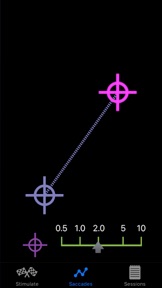
The new Saccades screen only displays target motion.
Drag the purple target with one finger to set the direction and length of its motion.
Tap the screen once simultaneously with two fingers to switch between saccades, a dashed line, and pursuits, a solid line.
Tap the screen once with one finger to start the saccades or pursuits.
Double tap the screen with one finger to stop the target motion.
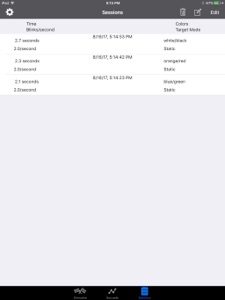
HemiStim automatically tracks therapy sessions, recording all pertinent information about each one. Maintain close communication between clinician and patient via email.

What's New in Version 1.4.4

HemiStim has been updated to work with iOS 17

Seller

Name

Linsay Associates, LLC

URL

Information

Categories

Version

1.4.4

Size

1.3 MB

Game Center

No

VPP Device Licensing

Yes

Rating

Rated: 4+

Compatibility

iOS 12.0 or later

Devices

iPhone 5s, iPhone 6, iPhone 6 Plus, iPhone 6s, iPhone 6s Plus, iPhone SE, iPhone 7, iPhone 7 Plus, iPhone 8, iPhone 8 Plus, iPhone X, iPhone XR, iPhone XS, iPhone XS Max, iPhone 11, iPhone 11 Pro, iPhone 11 Pro Max, iPhone SE (2nd generation), iPhone 12, iPhone 12 Pro, iPhone 12 Pro Max, iPhone 12 mini, iPhone 13, iPhone 13 Pro, iPhone 13 Pro Max, iPhone 13 mini, iPhone SE (3rd generation), iPhone 14, iPhone 14 Plus, iPhone 14 Pro, iPhone 14 Pro Max, iPhone 15, iPhone 15 Plus, iPhone 15 Pro, iPhone 15 Pro Max, iPhone 16, iPhone 16 Plus, iPhone 16 Pro, iPhone 16 Pro Max, iPhone 16e, iPhone 17, iPhone 17 Pro, iPhone 17 Pro Max, iPhone Air, iPhone 17e, iPad (5th Generation) Wi-Fi, iPad (5th Generation) Wi-Fi + Cellular, iPad (6th generation) Wi-Fi, iPad (6th generation) Wi-Fi + Cellular, iPad Pro, iPad Pro (Cellular), iPad Pro (9.7-inch), iPad Pro (9.7-inch) (Cellular), iPad Pro 12.9-inch (2nd generation), iPad Pro 12.9-inch (2nd generation) Wi-Fi + Cellular, iPad Pro (10.5-inch), iPad Pro (10.5-inch) Wi-Fi + Cellular, iPad Pro (11-inch), iPad Pro (11-inch) Wi-Fi + Cellular, iPad Pro 12.9-inch (3rd generation), iPad Pro 12.9-inch (3rd generation) Wi-Fi + Cellular, iPad Air, iPad Air (Cellular), iPad Air 2, iPad Air 2 (Cellular), iPad Air (3rd generation), iPad Air (3rd generation) Wi-Fi + Cellular, iPad mini Retina, iPad mini Retina (Cellular), iPad mini 3, iPad mini 3 (Cellular), iPad mini 4, iPad mini 4 (Cellular), iPad mini (5th Generation), iPad mini (5th Generation) Wi-Fi + Cellular, iPad (7th generation) Wi-Fi + Cellular, iPad Pro 11-inch (2nd generation), iPad Pro 11-inch (2nd generation) Wi-Fi + Cellular, iPad Pro 12.9-inch (4th generation), iPad Pro 12.9-inch (4th generation) Wi-Fi + Cellular, iPad Air (4th Generation) (Wi-Fi), iPad Air (4th Generation) (Wi-Fi + Cellular), iPad (8th generation) Wi-Fi, iPad (8th generation) Wi-Fi + Cellular, iPad Pro 11-inch (3rd generation), iPad Pro 11-inch (3rd generation) Wi-Fi + Cellular, iPad Pro 12.9-inch (5th Generation), iPad Pro 12.9-inch (5th Generation) Wi-Fi + Cellular, iPad (9th Generation), iPad (9th Generation) Wi-Fi + Cellular, iPad mini (6th Generation), iPad mini (6th Generation) Wi-Fi + Cellular, iPad Air (5th generation), iPad Air (5th generation) Wi-Fi + Cellular, iPad Pro 11-inch (4th generation), iPad Pro 11-inch (4th generation) Wi-Fi + Cellular, iPad Pro 12.9-inch (6th generation), iPad Pro 12.9-inch (6th generation) Wi-Fi + Cellular, iPad (10th generation), iPad (10th generation) Wi-Fi + Cellular, iPad Air 11-inch (M2) Wi-Fi, iPad Air 13-inch (M2) Wi-Fi, iPad Air 13-inch (M2) Wi-Fi + Cellular, iPad Pro 11-inch (M4) Wi-Fi, iPad Pro 11-inch (M4) Wi-Fi + Cellular, iPad Pro 13-inch (M4) Wi-Fi, iPad Pro 13-inch (M4) Wi-Fi + Cellular, iPad mini (A17 Pro) Wi-Fi, iPad mini (A17 Pro) Wi-Fi + Cellular, iPad (A16) Wi-Fi, iPad (A16) Wi-Fi + Cellular, iPad Air 11-inch (M3) Wi-Fi, iPad Air 11-inch (M3) Wi-Fi + Cellular, iPad Air 13-inch (M3) Wi-Fi, iPad Air 13-inch (M3) Wi-Fi + Cellular, iPad Pro 11-inch (M5) Wi-Fi, iPad Pro 11-inch (M5) Wi-Fi + Cellular, iPad Pro 13-inch (M5) Wi-Fi, iPad Pro 13-inch (M5) Wi-Fi + Cellular, iPad Air11M4, iPad Air11M4Cellular, iPad Air13M4, iPad Air13M4Cellular, iPod touch (6th Generation), iPod touch (7th generation)

Languages

English

App Store: Customer Ratings

Ratings & Reviews

2.4 of 5 (5 Ratings)

App Store: Customer Reviews

2018-10-10

Does NOT WORK!

Just spent $12.99 on this as part of a bundle. The HemiStim app won’t even open!
pcssucks
2018-10-10

Stop working.

Great app, but it stop working all the sudden and I don’t know who to contact to fix it.
AJFDC
Version 1.0
2018-10-01

Stopped working in iOS12

I was using this app for therapy. It was working very well and I really enjoyed using it to help me with the vestibular issue I have. When my iPad updated with iOS 12 it stopped working completely. I can’t find any way to contact the company to see if there is a fix for this.
tjhsbh
Version 1.4.1
2012-05-02

Fantastic brain tool.

I've always been a big fan of the hemistim concept and taking it to tablets and phones is brilliant. Now I can have my patients download the app for little cost and have them take their therapy with them wherever they go.
It would be good to add one sentence to the description about just rotating the display to change from vertical to horizontal saccades. Took me a few minutes to figure that one out.
I hope we see diagonally moving targets in an update soon and the option for pure saccades w/o pursuits would be nice too.
Sranicki