AboutTermsPrivacyContact
 
Updating
Camera with Filters

Camera with Filters

Released: 2011-12-22
© 2011 Gianluca Natalini - NGCYBIT Robotics
Camera with Filters - QR Code
Version 2.2
4+
Download on the App Store
Version 2.2
4+
Download on the App Store
Released: 2011-12-22
© 2011 Gianluca Natalini - NGCYBIT Robotics

iPhone Screenshots

Screenshot
Screenshot
Screenshot
Screenshot
Screenshot

iPad Screenshots

Screenshot
Screenshot
Screenshot
Screenshot
Screenshot

Description

Need a professional camera with filters?
Do you want to apply filters all together (one over the other) to get the right combination of filters you want?
Do you want to edit the image and keeping under control the details of the change?
Want to compare the action of the filters available watching the preview images visualized together in one screen (filters action's visual comparison)?
You need the fade function with overlapping of one or more different images?
"Camera with Filters" is the right application for you.
Photographic characteristics:
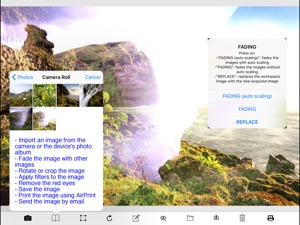
- Ability to overlay multiple images captured with fading one after the other: if you do not delete the previous captured image (displayed in the workspace for editing), the next captured image can be automatically overlapped (with fading - with or without images autoscaling) to the previous captured image (used as background)
- Ability to overlay multiple images saved into the photo album with the camera's acquired photos: load a photo from the device's photo album and then take a picture, the captured image can be automatically overlapped (with fading - with or without images autoscaling) with the image loaded from the device's photo albums (used as background)
- Ability of overlay of an endless number of photos/images (fading of an infinite number of images or acquired from the device's camera or loaded from the device's photo albums)
- Image capture with the highest resolution supported by the device
- Flash light
- Capture images from external or internal camera
- Automatic saving of captured image in the device's camera roll (device's photo albums)
- Preview of photos taken and ability to cancel immediately the acquired photo
- Automatic White Balance
- Focus and automatic adjustment of the image by touching the screen of the photo-camera (the image to be acquired)
- Ability to send the edited photo with an email
Filters available:
AUTO ADJUSTMENT
SEPIA
BLACK AND WHITE
VIBRANCE
COLOR INVERT
EXPOSURE ADJUST
GAMMA ADJUST
HIGHLIGHT SHADOW ADJUST
HUE ADJUST
TEMPERATURE AND TINT
RED GLASS
GREEN GLASS
BLUE GLASS
YELLOW GLASS
CYAN GLASS
MAGENTA GLASS
WHITE POINT ADJUST
AGING
GAUSSIAN BLUR 9x9 FILTER
GAUSSIAN BLUR 5x5 FILTER
BOX BLUR 3x3 FILTER
SHARPEN 3x3 FILTER
EMBOSS 3x3 FILTER
ABILITY TO COMBINE ALL THE FILTERS AVAILABLE TO OBTAIN AN INFINITE NUMBER OF FILTERS
Editing:
- Ability to apply filters / effects to get the acquired image to obtain the desired effects
- Ability to apply filters / effects to images stored into the device's photo albums to obtain new images
- Ability to combine filters to obtain an infinite number of filters / effects (one after another - equivalent of more than one filter mounted on the same camera)
- Ability to overlay multiple images with fading (or stored into the device's photo albums or acquired by the camera device)
- Ability to save the edited image into the photo album of the device
- Red-eye removal
- Photo rotation
- Area selection
- Crop
- Photo enhance
Editing area:
- Zoom: pinching the screen with two fingers
- Pan: dragging two fingers on the screen
- Reset the zoom and pan: with a double tap
- Triple tap (or specific button) to open the capture interface of the camera
Printing system:
- AirPrint: print Your work with "Camera with Filters" using the HIGH QUALITY PRINTING SYSTEM
Scanner feature:
- take a photo with the "Camera with Filters" photo camera, apply filters such as for example BLACK AND WHITE filter, print all with "Camera with Filters" print button
App type:
- UNIVERSAL APP

What's New in Version 2.2

* Minor bugs fixed

Seller

Name

Gianluca Natalini

Information

Categories

Version

2.2

Size

4.7 MB

Game Center

No

VPP Device Licensing

Yes

Rating

Rated: 4+

Compatibility

iOS 12.1 or later

Devices

iPhone 5s, iPhone 6, iPhone 6 Plus, iPhone 6s, iPhone 6s Plus, iPhone SE, iPhone 7, iPhone 7 Plus, iPhone 8, iPhone 8 Plus, iPhone X, iPhone XR, iPhone XS, iPhone XS Max, iPhone 11, iPhone 11 Pro, iPhone 11 Pro Max, iPhone SE (2nd generation), iPhone 12, iPhone 12 Pro, iPhone 12 Pro Max, iPhone 12 mini, iPhone 13, iPhone 13 Pro, iPhone 13 Pro Max, iPhone 13 mini, iPhone SE (3rd generation), iPhone 14, iPhone 14 Plus, iPhone 14 Pro, iPhone 14 Pro Max, iPhone 15, iPhone 15 Plus, iPhone 15 Pro, iPhone 15 Pro Max, iPhone 16, iPhone 16 Plus, iPhone 16 Pro, iPhone 16 Pro Max, iPhone 16e, iPhone 17, iPhone 17 Pro, iPhone 17 Pro Max, iPhone Air, iPad (5th Generation) Wi-Fi, iPad (5th Generation) Wi-Fi + Cellular, iPad (6th generation) Wi-Fi, iPad (6th generation) Wi-Fi + Cellular, iPad Pro, iPad Pro (Cellular), iPad Pro (9.7-inch), iPad Pro (9.7-inch) (Cellular), iPad Pro 12.9-inch (2nd generation), iPad Pro 12.9-inch (2nd generation) Wi-Fi + Cellular, iPad Pro (10.5-inch), iPad Pro (10.5-inch) Wi-Fi + Cellular, iPad Pro (11-inch), iPad Pro (11-inch) Wi-Fi + Cellular, iPad Pro 12.9-inch (3rd generation), iPad Pro 12.9-inch (3rd generation) Wi-Fi + Cellular, iPad Air, iPad Air (Cellular), iPad Air 2, iPad Air 2 (Cellular), iPad Air (3rd generation), iPad Air (3rd generation) Wi-Fi + Cellular, iPad mini Retina, iPad mini Retina (Cellular), iPad mini 3, iPad mini 3 (Cellular), iPad mini 4, iPad mini 4 (Cellular), iPad mini (5th Generation), iPad mini (5th Generation) Wi-Fi + Cellular, iPad (7th generation) Wi-Fi + Cellular, iPad Pro 11-inch (2nd generation), iPad Pro 11-inch (2nd generation) Wi-Fi + Cellular, iPad Pro 12.9-inch (4th generation), iPad Pro 12.9-inch (4th generation) Wi-Fi + Cellular, iPad Air (4th Generation) (Wi-Fi), iPad Air (4th Generation) (Wi-Fi + Cellular), iPad (8th generation) Wi-Fi, iPad (8th generation) Wi-Fi + Cellular, iPad Pro 11-inch (3rd generation), iPad Pro 11-inch (3rd generation) Wi-Fi + Cellular, iPad Pro 12.9-inch (5th Generation), iPad Pro 12.9-inch (5th Generation) Wi-Fi + Cellular, iPad (9th Generation), iPad (9th Generation) Wi-Fi + Cellular, iPad mini (6th Generation), iPad mini (6th Generation) Wi-Fi + Cellular, iPad Air (5th generation), iPad Air (5th generation) Wi-Fi + Cellular, iPad Pro 11-inch (4th generation), iPad Pro 11-inch (4th generation) Wi-Fi + Cellular, iPad Pro 12.9-inch (6th generation), iPad Pro 12.9-inch (6th generation) Wi-Fi + Cellular, iPad (10th generation), iPad (10th generation) Wi-Fi + Cellular, iPad Air 11-inch (M2) Wi-Fi, iPad Air 13-inch (M2) Wi-Fi, iPad Air 13-inch (M2) Wi-Fi + Cellular, iPad Pro 11-inch (M4) Wi-Fi, iPad Pro 11-inch (M4) Wi-Fi + Cellular, iPad Pro 13-inch (M4) Wi-Fi, iPad Pro 13-inch (M4) Wi-Fi + Cellular, iPad mini (A17 Pro) Wi-Fi, iPad mini (A17 Pro) Wi-Fi + Cellular, iPad (A16) Wi-Fi, iPad (A16) Wi-Fi + Cellular, iPad Air 11-inch (M3) Wi-Fi, iPad Air 11-inch (M3) Wi-Fi + Cellular, iPad Air 13-inch (M3) Wi-Fi, iPad Air 13-inch (M3) Wi-Fi + Cellular, iPad Pro 11-inch (M5) Wi-Fi, iPad Pro 11-inch (M5) Wi-Fi + Cellular, iPad Pro 13-inch (M5) Wi-Fi, iPad Pro 13-inch (M5) Wi-Fi + Cellular, iPod touch (6th Generation), iPod touch (7th generation)

Languages

English

App Store: Customer Ratings

Ratings & Reviews

1.0 of 5 (1 Rating)

App Store: Customer Reviews

2012-01-20

Seriously?

What I'd like to know is why I'm being charged randomly .99 tonight when I haven't so much as touched this app sense I bought it?
HayliBeth
Version 1.2
2012-01-05

Not good

You really need to do some work on this app. I've never had an app work this slow, it never showed a slider to fade two images, it resized my image when I loaded it and the filters are not that great. I wished I hadn't spent my money on it. Update the app and fix at least some of the problems and I will update my review.
ran_outof_ideas
Version 1.1