AboutTermsPrivacyContact
 
Updating
iCue

iCue

Released: 2011-11-21
© Sunshine Valley Systems 2011
iCue - QR Code
Version 7.4.3
4+
Download on the App Store
Version 7.4.3
4+
Download on the App Store
Released: 2011-11-21
© Sunshine Valley Systems 2011

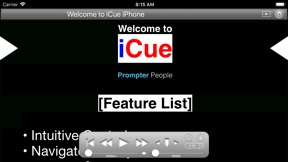
iPhone Screenshots

Screenshot
Screenshot
Screenshot
Screenshot
Screenshot

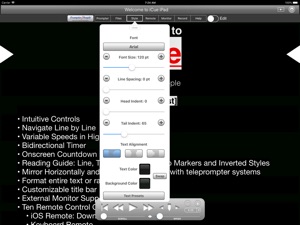
iPad Screenshots

Screenshot
Screenshot
Screenshot
Screenshot
Screenshot

Description

iCue from Prompter People turns your iPad and iPhone into a full featured teleprompter. Go to www.prompterpeople.com to see a full range of teleprompter systems for your iPad.
Check out iCue Remote, the free remote for iCue.
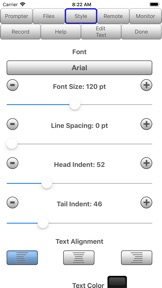
Easily configure the appearance of the text content to suit your presentation requirements including...
• Font
• Font Size
• Text Color
• Background Color
• Head and Tail Indent
• Line Spacing
• Text Style
Prompter features include:
• Import File Types: iCue (.iCue), Text (.txt), Rich Text (.rtf), Word (.docx) and HTML
• Export File Types: iCue (.iCue), Text (.txt), Rich Text (.rtf) and HTML
• Five Marker Styles: Bar, Marker, Two Line, Inverted, Two Markers
• Scroll Speed: Variable with two speed ranges.
• Display mirroring for using a reflective teleprompter
• Countdown: Two styles
• Bidirectional Timer
• External Monitor Support
• Built-in user manual
• Customizable title bar to give access to the features that are important to your workflow.
• More...
• File Sharing
iCue offers a variety of file sharing methods to assist in moving files between devices as well as a computer.
- iTunes File Sharing: Copy files to and from iCue using iTunes.
- Email Files: Email files from iCue and open files from other apps such as Mail.
- iOS File Sharing: Send files directly from one iCue to another.
- Web Server: Host a web page that can be used from any computer to upload and download files.
- Web Server Browser: Use built-in browser to load web page from another web server to download files or the entire database from another iCue.
- AirDrop: Use Apple's AirDrop to send files.
- iCloud: Upload and download files from iCloud Drive.
- Dropbox: Upload and download files from your Dropbox account.
- Google Drive: Upload and download files from your Google Drive account.
- iOS Remote Sharing: Send files and databases between host and peers.
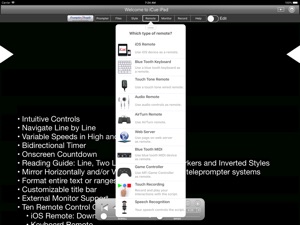
• Remote Control
iCue has a variety different remote options.
- iOS Remote: Use another iOS device running iCue or iCue Remote to control iCue. Synchronize multiple devices.
- Blue Tooth Keyboard: Assign keys of a blue tooth keyboard to control prompter features.
- Touch Tone Remote: Use touch tone signals playing into the microphone line-in to control prompter features.
- Audio Remote: Use the headphone in-line remote or other audio remote to control prompter features.
- AirTurn Remote: Use wireless remotes from www.airturn.com to control prompter features.
- Web Server Remote: Use a web page hosted on the network to control the prompter features.
- Apple Watch: Use the Apple Watch to remotely control prompter functions.
- Bluetooth MIDI: Use IK Multimedia's iRig Blueboard to control prompter functions.
- Game Controller: Use MFi game controllers to control prompter functions.
- Touch Recording: Record and playback your interactions with the prompter.
- Speech Recognition: Use your speech to control the script using key words or the text content of the script.
- Key Commands: Configure key combinations to control most prompter features. Key Commands are available at all times.
• Recording
- Use either camera.
- Movable video preview overlaying the script.
- Share your video in a variety of ways.
• Monitor Out
Use an external monitor connected to the dock connector or AppleTV to display the prompter content.
- Choose output resolution from supported resolutions.
- Configure output to match device, or device to match output.
- Adjust transform and mirroring for external display independently of device.
- Works great with AppleTV and AirPlay.
Coupled with a Prompter People iPad prompter iCue is perfect for video production, public speaking, electronic news gathering, music, school, business presentations and more!

What's New in Version 7.4.3

Updated Audio Remote feature to allow controls to be customized.

Seller

Information

Categories

Version

7.4.3

Size

117.6 MB

Game Center

No

VPP Device Licensing

Yes

Rating

Rated: 4+

Compatibility

iOS 9.0 or later

Devices

iPhone 5s, iPhone 6, iPhone 6 Plus, iPhone 6s, iPhone 6s Plus, iPhone SE, iPhone 7, iPhone 7 Plus, iPhone 8, iPhone 8 Plus, iPhone X, iPhone XR, iPhone XS, iPhone XS Max, iPhone 11, iPhone 11 Pro, iPhone 11 Pro Max, iPhone SE (2nd generation), iPhone 12, iPhone 12 Pro, iPhone 12 Pro Max, iPhone 12 mini, iPhone 13, iPhone 13 Pro, iPhone 13 Pro Max, iPhone 13 mini, iPhone SE (3rd generation), iPhone 14, iPhone 14 Plus, iPhone 14 Pro, iPhone 14 Pro Max, iPad (5th Generation) Wi-Fi, iPad (5th Generation) Wi-Fi + Cellular, iPad (6th generation) Wi-Fi, iPad (6th generation) Wi-Fi + Cellular, iPad Pro, iPad Pro (Cellular), iPad Pro (9.7-inch), iPad Pro (9.7-inch) (Cellular), iPad Pro 12.9-inch (2nd generation), iPad Pro 12.9-inch (2nd generation) Wi-Fi + Cellular, iPad Pro (10.5-inch), iPad Pro (10.5-inch) Wi-Fi + Cellular, iPad Pro (11-inch), iPad Pro (11-inch) Wi-Fi + Cellular, iPad Pro 12.9-inch (3rd generation), iPad Pro 12.9-inch (3rd generation) Wi-Fi + Cellular, iPad Air, iPad Air (Cellular), iPad Air 2, iPad Air 2 (Cellular), iPad Air (3rd generation), iPad Air (3rd generation) Wi-Fi + Cellular, iPad mini Retina, iPad mini Retina (Cellular), iPad mini 3, iPad mini 3 (Cellular), iPad mini 4, iPad mini 4 (Cellular), iPad mini (5th Generation), iPad mini (5th Generation) Wi-Fi + Cellular, iPad (7th generation) Wi-Fi + Cellular, iPad Pro 11-inch (2nd generation), iPad Pro 11-inch (2nd generation) Wi-Fi + Cellular, iPad Pro 12.9-inch (4th generation), iPad Pro 12.9-inch (4th generation) Wi-Fi + Cellular, iPad Air (4th Generation) (Wi-Fi), iPad Air (4th Generation) (Wi-Fi + Cellular), iPad (8th generation) Wi-Fi, iPad (8th generation) Wi-Fi + Cellular, iPad Pro 11-inch (3rd generation), iPad Pro 11-inch (3rd generation) Wi-Fi + Cellular, iPad Pro 12.9-inch (5th Generation), iPad Pro 12.9-inch (5th Generation) Wi-Fi + Cellular, iPad (9th Generation), iPad (9th Generation) Wi-Fi + Cellular, iPad mini (6th Generation), iPad mini (6th Generation) Wi-Fi + Cellular, iPad Air (5th generation), iPad Air (5th generation) Wi-Fi + Cellular, iPad Pro 11-inch (4th generation), iPad Pro 11-inch (4th generation) Wi-Fi + Cellular, iPad Pro 12.9-inch (6th generation), iPad Pro 12.9-inch (6th generation) Wi-Fi + Cellular, iPad (10th generation), iPad (10th generation) Wi-Fi + Cellular, iPod touch (6th Generation), iPod touch (7th generation), Apple Watch Series 4

Languages

English

App Store: Customer Ratings

Ratings & Reviews

3.3 of 5 (6 Ratings)

App Store: Customer Reviews

2020-04-28

Icue a disappointment so far

They give you a lot of information and there are some interesting options but they never really tell you how to turn it on and start it. Thus I cannot use it.
bezosnot
2020-01-20

Solid!

I’ve used this for several years, no issues
promptyo
Version 4.1.1
2019-09-05

Excellent promoter app!!

This app offer so much flexibility and customization if using the iPad as a promoter or as a screen and controller for an external display. Formatting is brought along from a google doc very well, excellent app all around!
Liquid Church Video Team
Version 7.2.5
2019-02-16

Awesome the app is still maintained

Great Teleprompter app. I researched for a few weeks before deciding on this one. It works very well for for my videos. There is a learning curve when using markers etc... but it’s beyond flexible regarding what you can do. It’s more Teleprompter than I need for a great price. No subscription nonsense here.
This also works very well with the remote app for the phone.
Switchedtofruit
Version 7.2.8
2017-09-05

An unfortunate waste of $8

This started off seeming like a good prompter app when I bought and tested it, but kept crashing when I got in front of the client. I had everything set, tested and ready to go, but then the controller app on my phone crashed. It force quit and every time I opened it again it would force quit again immediately. After about 5-10 tries, I gave up and had to buy a different prompter app, download, and learn it while everyone waited on me. I used prompter people prompters for years and the PC software was not very polished (but worked). I had higher hopes for their iPad/Phone apps.
Cinemaduro
Version 6.0.5
2016-09-04

THE BEST TELEPROMPTER!!!

Look no further - I've tried a few of them and this is the BEST TelePrompter on the AppStore with great features. Combined with its iCue Remote app, it is just what you are looking for.
However, the menus and buttons are a bit dated and hope the developer would spruce the UI to make it look like an iOS app.
Also, when I switch the remote to Gestures mode, three is no way to switch it back to button mode - I have to uninstall and reinstall the app to reset it. Please fix this.
PowerObject!
Version 6.1
2016-03-10

Crashes EVERY SINGLE TIME!!

I am highly upset. When I pay five bucks for an app I expect it to work; however, every time I hit the settings button this app crashes without fail and therefore I am unable to use it. I am not sure what to do but I hope there is an update soon otherwise this costly app will continue to take up space on my device.
cherry blossom dreamer
Version 7.1.1
2015-10-10

Breaking Words & Missing Menu items

There are two problems that make this useless to me (after paying).
First, words are being broken across two lines instead of using normal line breaks. For instance, the word "is" was split across two lines with the "i" at the end of one line and the "s" on the left ride of the next line.
Second, the icon for browsing for files to import was absent. This icon is listed in the user’s manual I found online, so I know it is supposed to exist.
I suspect that they must be caught behind some iOS upgrade such that these features which worked or existed in a previous version have suddenly gone wacky. But that doesn’t change the fact that they render the app useless.
I hope they fix it soon. In the meantime I am out my money and have to return to using my laptop with EasyPrompter.
dberg1968
Version 5.0.4
2015-03-19

Does not work on Iso 5.1.1

This new release does not work on IOS 5.1.1
It will not let you get into the settings....
It just crashes....
Krammman
Version 5.0.0
2015-03-09

Please fix latest update

Everything worked fine until the March 7th update. The text disappears now and only comes back with a relaunch, but disappears again and again.
I have all current OS 8.2 on my devices.
Please fix, I'm in the middle of a video project and will need to switch to another teleprompter app.
I'll fix my one star once it is fixed.
Beatrix7932
Version 3.1
2014-06-16

One Suggestion

I find this app to work quite well. One suggestion for a future update would be to allow the iPhone volume buttons to speed up or slow down the text. That would make it more user friendly.
mgreennews
Version 4.0
2014-03-15

Can't monitor

Ability to monitor scrolling text from remote does not work. TelePromp+ is more helpful despite some glitches.
Moonjc
2014-01-07

Love this App

I found this app through Prompter People as I have used there Teleprompters for years. I need a new Ultralight iPad Teleprompter for my field production work and started using this app with my iPad 2. The ease of use with equipment I travel often with is critical for this "one man band" of a producer.
CHP of Avaya
2013-12-19

Good but needs security

It works ok, sometimes has syncing issues when using two ipads at once with a 3rd iPad or iPhone as the remote.
This application is completely missing any security feature to limit who connects to the iCue setup. If I were to run this in a live environment, I would want a password protection option so that people can't just download the remote app and start controlling the prompters at a press conference when they're on a wireless network.
Sure I can set up my own separate network/AP and have that password protected, but thats one more thing to haul around/set up when most buildings I would be using this in already have an enterprise wifi environment deployed.
GACuser
2013-02-11

Great app...but how about this...

Unless I am missing something, if I am using an iPad as prompter monitor and iPhone as the remote. In order to see where the script is I need to have a visual on the iPad, or scroll the script on the iPhone with my finger (which is choppy). How about adding a simultaneous scrolling of script on the remote so you know where you are? All in all though, it s a great app that works great!
Ron Gee
2012-02-24

Others are better

Bought this because it was recommended by the people that built my iPad prompter rig. Does not work nearly as well as the proprompter app I already had. This app is cumbersome and I would not recommend it.
AVidiot