AboutTermsPrivacyContact
 
Updating
OptimumCS-Pro

OptimumCS-Pro

Released: 2011-05-19
© 2012-2018 George Douvos
OptimumCS-Pro - QR Code
Version 6.1
4+
Download on the App Store
Version 6.1
4+
Download on the App Store
Released: 2011-05-19
© 2012-2018 George Douvos

iPhone Screenshots

Screenshot
Screenshot
Screenshot
Screenshot
Screenshot
Screenshot
Screenshot
Screenshot

Description

OptimumCS-Pro is the unique Optimum Camera Settings tool for imaging professionals — for photographers, cinematographers and videographers. As a professional, you spend a fortune on quality optics — OptimumCS-Pro helps you use that expensive gear to its full potential.
In all imaging work where you require the sharpest possible image across a depth range, OptimumCS-Pro is far superior to any depth of field calculator. You know that stopping down decreases image blur caused by defocus, but you also know that, on the other hand, it increases blur caused by diffraction. So you don't want to stop down too far. What, then, is the optimum aperture? And what is the optimum focus distance? OptimumCS-Pro is designed to answer precisely those questions.
And it alone gets the workflow right:
• Decide what are the nearest and furthest objects in your scene that need to be sharp.
• Set their distances in OptimumCS-Pro, and set the focal length of your lens.
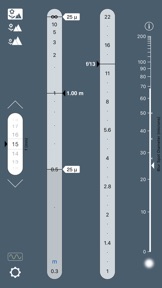
• The app instantly displays the focus distance and aperture that minimise the combined effects of defocus blur and diffraction.
Yes, you'll have the sharpest image across the desired depth that the laws of physics will allow (and therefore, in all cases, sharper than what you'll get via traditional practice). But what's also great is that it couldn't be any easier, simpler and faster! OptimumCS-Pro's instant results are perfect for creative professionals who don’t want their tools to get in the way of their work or their art.
In addition to the basic outputs, OptimumCS-Pro displays image sharpness information, so you'll know if your shot will be sharp enough to meet your needs. Also included is data on shooting at other than optimal settings. Can’t shoot at the optimum aperture, because, for example, you need a faster shutter speed afforded by a wider aperture? You’ll know exactly what the effect of your decisions will be.
A few words on the "pro" version:
OptimumCS-Pro retains the elegant, uncluttered look of OptimumCS, adds expanded functionality and adds options to configure functionality to better meet your individual needs:
• User-definable focal length presets allow lightning-fast focal length selection.
• Numerical readouts for distances and aperture complement the analog scales.
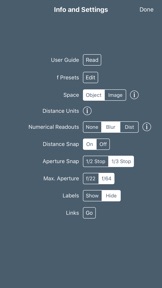
• The optimum aperture snaps to your choice of the nearest 1/3 stop or the nearest 1/2 stop.
• The aperture scale shows 1/3 stop or 1/2 stop markers (user selectable).
• The aperture scale can be set to display apertures to f/22 or f/64.
• Several different distance scales, emphasising near or far distances, are available, as is one for use with Hansma’s focus shift method in large format photography.
• An optional "distance snap" function makes the distance slider even easier to use.
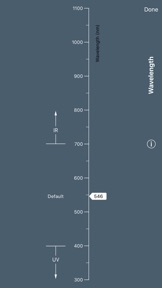
• The facility to set wavelength is available for those working in the infrared or ultraviolet part of the spectrum.
• The wavelength selection button gives a visual indication of the spectral range in which you are working (visible, IR or UV).
• A marker can be placed on the blur spot diameter scale as a reminder of what you consider acceptable blur sizes.
For further information on the right tool for the job, check out "Best Practice in Working With Depth of Field" at www.georgedouvos.com

What's New in Version 6.1

This is a wee update to bring support for iOS 12 and the various new iPhone X models.
Don't forget the key Version 6.0 updates:
*The interface gets an even cleaner, more spacious look. Simply slide the pointers on the distance scale to set distances (the old slider “thumbs” are now gone). Note that you do not need to keep your finger on a pointer as you slide it — you can move your finger to the side as you slide, all the better to see where the pointer is pointing.
*The pointers themselves can be set to display numerical readouts of distance. Or, if you prefer, you can have a readout of image blur for the objects at your selected distances. Or, if you would like fewer numbers on your display, just leave the pointers blank (that’s the default setting). Go to the settings screen to select your preference.

Seller

Name

George Douvos

Information

Developer

Categories

Version

6.1

Size

1.7 MB

Game Center

No

VPP Device Licensing

Yes

Rating

Rated: 4+

Compatibility

iOS 12.0 or later

Devices

iPhone 5s, iPhone 6, iPhone 6 Plus, iPhone 6s, iPhone 6s Plus, iPhone SE, iPhone 7, iPhone 7 Plus, iPhone 8, iPhone 8 Plus, iPhone X, iPhone XR, iPhone XS, iPhone XS Max, iPhone 11, iPhone 11 Pro, iPhone 11 Pro Max, iPhone SE (2nd generation), iPhone 12, iPhone 12 Pro, iPhone 12 Pro Max, iPhone 12 mini, iPhone 13, iPhone 13 Pro, iPhone 13 Pro Max, iPhone 13 mini, iPhone SE (3rd generation), iPhone 14, iPhone 14 Plus, iPhone 14 Pro, iPhone 14 Pro Max, iPad (5th Generation) Wi-Fi, iPad (5th Generation) Wi-Fi + Cellular, iPad (6th generation) Wi-Fi, iPad (6th generation) Wi-Fi + Cellular, iPad Pro, iPad Pro (Cellular), iPad Pro (9.7-inch), iPad Pro (9.7-inch) (Cellular), iPad Pro 12.9-inch (2nd generation), iPad Pro 12.9-inch (2nd generation) Wi-Fi + Cellular, iPad Pro (10.5-inch), iPad Pro (10.5-inch) Wi-Fi + Cellular, iPad Pro (11-inch), iPad Pro (11-inch) Wi-Fi + Cellular, iPad Pro 12.9-inch (3rd generation), iPad Pro 12.9-inch (3rd generation) Wi-Fi + Cellular, iPad Air, iPad Air (Cellular), iPad Air 2, iPad Air 2 (Cellular), iPad Air (3rd generation), iPad Air (3rd generation) Wi-Fi + Cellular, iPad mini Retina, iPad mini Retina (Cellular), iPad mini 3, iPad mini 3 (Cellular), iPad mini 4, iPad mini 4 (Cellular), iPad mini (5th Generation), iPad mini (5th Generation) Wi-Fi + Cellular, iPad (7th generation) Wi-Fi + Cellular, iPad Pro 11-inch (2nd generation), iPad Pro 11-inch (2nd generation) Wi-Fi + Cellular, iPad Pro 12.9-inch (4th generation), iPad Pro 12.9-inch (4th generation) Wi-Fi + Cellular, iPad Air (4th Generation) (Wi-Fi), iPad Air (4th Generation) (Wi-Fi + Cellular), iPad (8th generation) Wi-Fi, iPad (8th generation) Wi-Fi + Cellular, iPad Pro 11-inch (3rd generation), iPad Pro 11-inch (3rd generation) Wi-Fi + Cellular, iPad Pro 12.9-inch (5th Generation), iPad Pro 12.9-inch (5th Generation) Wi-Fi + Cellular, iPad (9th Generation), iPad (9th Generation) Wi-Fi + Cellular, iPad mini (6th Generation), iPad mini (6th Generation) Wi-Fi + Cellular, iPad Air (5th generation), iPad Air (5th generation) Wi-Fi + Cellular, iPad Pro 11-inch (4th generation), iPad Pro 11-inch (4th generation) Wi-Fi + Cellular, iPad Pro 12.9-inch (6th generation), iPad Pro 12.9-inch (6th generation) Wi-Fi + Cellular, iPad (10th generation), iPad (10th generation) Wi-Fi + Cellular, iPod touch (6th Generation), iPod touch (7th generation)

Languages

English

App Store: Customer Ratings

Ratings & Reviews

4.5 of 5 (8 Ratings)

App Store: Customer Reviews

2019-06-08

Ever wondered why the mountains in your photos look out of focus at f22?

This app will help you with the calculations required to minimize the diffraction effect on your photographs. I use it for landscapes, but you can do the calculations starting at 0.3 meters. This is a must if you want to do the mentioned calculations fast while on location, especially if you already invested in a good camera an lens and want to get the best out of your system.
Ksuela
Version 6.1
2018-10-13

A must have for landscape photographers!

Where should I focus, what aperture value should I use? Using an arbitrary aperture value is not going to give you the sharpest image, do to defocus-blur and diffraction. Somebody has already figured this all out and has put it in very easy use app :)
strider1111
Version 6.1
2016-08-23

Nice rewrite. Great UI

Great UI in the new version
rkhamilton
Version 5.0
2015-12-24

Great App if You Value Sharp Images

If you spend big bucks on a high resolution camera and lens, then you need this app to get the results you want.
Say you are shooting an interior with a 24mm lens. You need everything in focus that falls between 5 meters and 20 meters. Where do you focus and what aperture do you use?
If you guess wrong you will not get your optimum image.
The answer is you focus at 8 meters and use an aperture of 5.6. And if you are using a high resolution camera like the Sony A7Rii, your results will be off the charts.
Get the app.
Huma1894
Version 4.1
2015-02-21

Not terribly useful.

The description of this app sounds promising, but for landscape photographers who want a deep depth of field it really does not tell you what you don't already know. Additionally, it has an arrow of where you should focus but it does not tell you what that number is, it simply just had an arrow between 10-15 feet. Not very precise when that is kind of the point of this app. If I had to do it over again I would not purchase.
Abrehm
Version 4.1
2013-08-22

Don't buy

This app is absolutely useless!
#4@123-5
Version 3.0
2012-10-24

Eye Opening App for Photographers

This app is great for teaching purposes, as well as out in the field. The fact that it approaches the task of setting the aperture from the photographer's point of view - give it the near/far distance and it gives you the aperture helps my students quickly achieve better quality images. Additionally they visually see the affects of changing positions of the subject and how that impacts the best aperture. Interestingly all the calculations (if you read the provided information) show that lens manufacturers should simply make lenses with aperture ranges around the "sweet spot" and forego those narrower apertures. This eye-opening app should be on every photography instructor's list of equipment for class.
MelHuffman
Version 2.0
2012-07-22

Easy and quick to use.

Somewhat different approach to traditional DOF calculations, but in practice more helpful.
Let's Be Objective
Version 2.0
2012-06-30

A course in exposure, DOF and focus

I was about to create this app myself and found this wonder. Study this and associated articles on the web and your shot quality will have a step function in improvement. My best LF work happened when I began working in the image space.
Every photographer, particularly landscape shooters, should own this app.
pboomerx
Version 2.0
2012-04-23

Awesome

No more calculations, charts, this app brings all the variables into play. Very easy to use, and I always have it with me. My Landscape photography has improved sense I started using this app. My old Ais lenses are getting a good working out.
copisetic
Version 1.1
2011-12-26

Amazing.

Of all of the applications on my phone, this is by far the most useful. As a professional photographer of 17 years, I personally recommend this app to any budding professional.
Reagent X
Version 1.1