AboutTermsPrivacyContact
 
Updating
inShort: Project & Workflow

inShort: Project & Workflow

Released: 2011-03-09
© 2011 - 2017 Jury Shortki
inShort: Project & Workflow - QR Code
Version 7.2
4+
Download on the App Store
Version 7.2
4+
Download on the App Store
Released: 2011-03-09
© 2011 - 2017 Jury Shortki

iPhone Screenshots

Screenshot
Screenshot
Screenshot
Screenshot
Screenshot
Screenshot

iPad Screenshots

Screenshot
Screenshot
Screenshot
Screenshot
Screenshot
Screenshot
Screenshot

Description

This program allows you to build diagrams of processes and monitor their execution. As a rule, tasks do not exist on their own, they are usually interrelated, and the best way to show this is to build a diagram of processes.
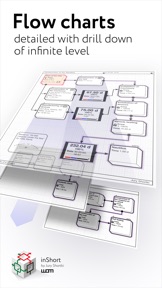
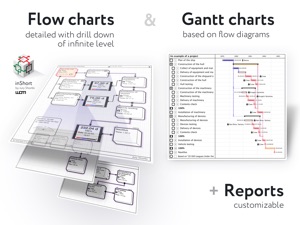
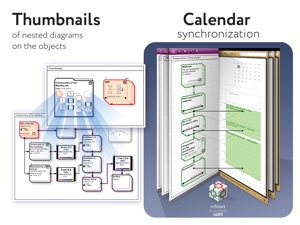
Almost every task in the program can be drilled down to a separate diagram, until the project is broken down into elementary operations. Having constructed a detailed scheme, you can simulate the future execution of the project, what will become the basis for the planned schedule, which can be compared with the current execution of tasks without leaving the program. You can also place some tasks in the Calendar and set reminders on them.
More formally, the program allows you to build a customized, based on the BPMN notation, PERT diagram of the project (with events and processes at nodes). Then this description of the project is used to generate a Gantt chart and track the progress of the project.
So, inShort is a powerful tool to work with projects and business processes, which can be applied not only in office but also for personal purposes. You can further explore the capabilities of the program with the detailed interactive User Guide.
Here are a few cases in which this program can help you:
You have a difficult task, you do not know where to start and how to approach it.
Try to approach it with this program and you'll find out where to start and where to move.
Or conversely, you have a lot of problems: you are literally surrounded with task managers and planners, but at the same time feel that you make no headway, like a squirrel in a cage.
Draw your goals in this program, and you'll find out, which of your tasks work for your goals and which — against them.
You suspect that business processes in your organization are not optimal and you are doing a lot of unnecessary work?
Build a scheme of processes in this program, and you'll see what's what.
Need to plan a complex project?
Draw a sketch, and you won't have to constantly make the project plan over in a project manager.
You need to organize the learning process by a mass of sources in a certain order?
Build a curriculum inShort, and you won't get lost in the new material.
It is important to understand that this program by itself does not solve problems and does not reach your goals, but it allows to see them in new ways and discover the right direction for your efforts.
Key features:
• Building the diagram of processes and resources (PERT network diagram of the project, based on BPMN notation).
• Drill down the diagram elements.
• Tracking the execution of processes.
• Advanced mode of pre-planning.
• Integration with the standard Calendar.
• Displaying the list of tasks in the form of a Gantt chart.
• Separation of physical and information flows.
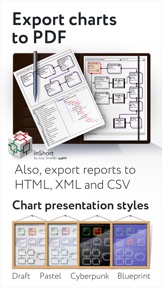
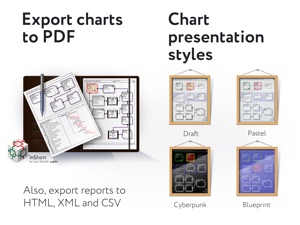
• Export of diagrams into PDF files and OPML outlines.
• Ability to specify the expected time of execution, both directly and parametrically.
• Working calendars taking into account various schedules of work for implementation of tasks.
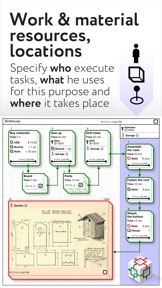
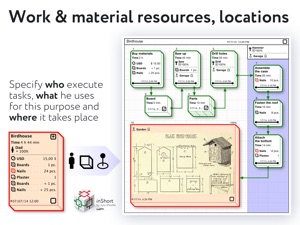
• Work resources and their assignment to tasks.
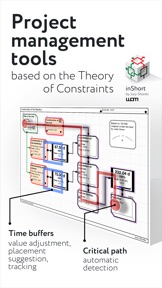
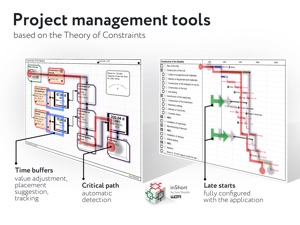
Advanced features of project management in accordance with the Theory of Constraints technique:
• finding the critical path;
• positioning of time buffers of the project;
• calculation of buffer sizes;
• calculation of late starts for feeding paths of the project;
• tracking of time indicators during project execution.
Cannot solve a problem? Draw it inShort and sort things out with it there. It's like voodoo but it works.

What's New in Version 7.2

More neutral color coding of folders. 
We are grateful to all users who leave feedback about the application, they are excellent motivation for further development of inShort.

Seller

Name

Iouri Korotkikh

Information

Developer

Categories

Version

7.2

Size

45.1 MB

Game Center

No

VPP Device Licensing

Yes

Rating

Rated: 4+

Compatibility

iOS 8.0 or later

Devices

iPhone 11 Pro Max, iPad mini 3, iPad mini 4, iPad Pro (11-inch), iPad (5th Generation) Wi-Fi, iPad (6th generation) Wi-Fi, iPod touch (6th Generation), iPad Pro (11-inch) Wi-Fi + Cellular, iPad (6th generation) Wi-Fi + Cellular, iPad Pro 12.9-inch (3rd generation), iPad (5th Generation) Wi-Fi + Cellular, iPad mini (5th Generation) Wi-Fi + Cellular, iPad mini (5th Generation), iPad Pro, iPad mini Retina (Cellular), iPad Air 2 (Cellular), iPad mini 4 (Cellular), iPad mini 3 (Cellular), iPhone 11, iPad Air, iPod touch (7th generation), iPad Air 2, iPad Pro 12.9-inch (2nd generation), iPad Pro (Cellular), iPhone 6, iPad Pro (10.5-inch) Wi-Fi + Cellular, iPhone 5s, iPad mini Retina, iPad Air (Cellular), iPad Air (3rd generation) Wi-Fi + Cellular, iPhone 7 Plus, iPad Air (3rd generation), iPhone 8 Plus, iPad Pro 12.9-inch (2nd generation) Wi-Fi + Cellular, iPhone 6s, iPhone 6 Plus, iPhone XS, iPhone XR, iPhone SE, iPad Pro (9.7-inch), iPhone 6s Plus, iPad Pro (9.7-inch) (Cellular), iPhone X, iPhone 8, iPhone XS Max, iPad Pro (10.5-inch), iPhone 7, iPhone 11 Pro, iPad Pro 12.9-inch (3rd generation) Wi-Fi + Cellular

Languages

English, French, German, Russian

App Store: Customer Ratings

Ratings & Reviews

4.0 of 5 (243 Ratings)

App Store: Customer Reviews

2018-06-23

Too Confusing!!!

I have owned this app for years and I can’t use it. Not intuitive enough and so far from user friendly. If I have to study, research and take forever to learn a program, unfortunately that can not be the program I use or share with my team. I was so excited when this was first released but I could never use it. A real shame. iN SHORT: Business people do not have enough time in a day, month, year, to figure this program out.
Consumer Application Advocate (CAA)
Version 5.5.8
2018-04-15

Truly remarkable process maker app.

I never knew this app was so easy and powerful, until I a came across a YouTube video tutorial. It’s a must for business analysts , project managers or anyone who wants to define process and workflow. I wish the developer add more features like collaboration and notification users to other users. Also if the developer uploads some guide of short YouTube videos tutorials to new users.
Sudh
Version 5.5.5
2018-03-30

Good luck

Good luck trying to figure out how to get started let along getting to use it.
Hassaan Abdeen
Version 5.5.5
2018-01-02

Replaces over 5+ apps that I use

It's probably about once a year I use an app that stands out to me so much I just have to write a review about it. This past year, it's definitely inShort. I've been an MBA student and a freelance consultant to small businesses of 1-10 people, I don't have a ton of real world application to a good chunk of features this app provides, but my research covers almost every app you can think of. I'm not sure if I would say the learning curve is steep, I always considered the learning curve of OmniFocus to be pretty steep mostly because I could never quite tailor my tasks around the GTD method. As an entrepreneur, I don't have a problem getting things done or prioritizing the various aspects of my life, my clients, and my businesses. What I've always had a problem with is finding a solution that can grow and adapt with myself, my clients, and my businesses. I've used MindNode for quite some time which is a great tool to easily breakdown and structure your thoughts when your mind moves a million miles a second, but the problem I was always left with is being able to export, convert, or transform those mind maps into a real usable workflow without custom creating my own application to process the exportable formats. This is where inShort comes in. It's either as simple as a task manager, or as complex as a project manager like Basecamp, Asana, Wrike, etc.
I've love the concept of Trello, but it always fell short when in several areas, namely the early stages of actually creating and organizing a complex workflow. inShort also covers this area by acting as a database schema. Everything is connected giving you the power to create powerful relationships. The only downside so far is that I wish they had an evaluation version on the desktop for students. Although it's a huge bargain at $40, I don't have the money for it yet. I'll update my review after I purchase the desktop version and mess around with it.
My advice to Jury Shortki, offer some sort of trial or evaluation version, maybe offer a limited number of objects for free, and then charge a monthly subscription based on the amount of usage someone is getting out of it. $40 is too cheap for someone that is actually using this app, but it's too expensive for someone that isn't using it or is skeptical of its capabilities. The online tool was a great move, at least now you'll be able to track and gain more insights to how and when people are using your app.
Eric Baranowski
Version 5.5.4
2017-11-20

10/10 amazing 🤘

⭐️ ⭐️ ⭐️ ⭐️ ⭐️
Update: I would love to see some example charts pre-loaded for fictional companies, projects, or research flows. Also Please have a link somewhere in the app that can take me to a webpage with curated examples from the company and community. I feel like if I had the right inspiration from the community, I could get way more out of this app.
Also, please make a YouTube video where I can follow along with the tutorial as someone is explaining it step by step. Based on the reviews I read from others, this app is having serious on-boarding issues, with low post download use retention. I’m quite frustrated myself, but I do see the potential in this app once I get over the learning curve, and for that I give this app 5 stars. Please just help myself and others get over this curve faster and I’ll talk to Apple and see if they can add a sixth star 😉
[end of update]
⭐️ ⭐️ ⭐️ ⭐️ ⭐️
This app is hands down amazing. It has a high learning curve, and that learning curve has unfairly earned this app some bad reviews.
This is a professional tool for professionals. Approach the app appropriately. Commit the time needed to learn how to take full advantage of this powerful app, otherwise don’t waste your time.
I’m sorry but if this app is too complex for someone to understand, it’s not the apps fault, it’s that person’s fault not taking the time to learn something a little complicated.
And it’s not complicated in a poorly design manner, rather it’s more like learning a new language... complex in that you can’t just pick it up and go, but once you get going, you are the master of the universe.
The problem this app solves is all the things you cannot do with pen and paper when trying to diagram out workflows. Anyone can draw boxes and arrows on paper to organize ideas, but does your piece of paper let you tap on a box to reveal more boxes and arrows? Can your piece of paper let you see your diagram in a Gantt chart view? The answers to those questions and many more just like it is no.
- Get this app if you want to chart out your entire business down to the smallest detail.
- Get this app if you want to map out a user experience flow for a service connected app you are designing.
- Get this app for researching all the steps on how to update your Facebook page, and even including the food you need to eat in order to have the energy to move your hand, to click the mouse, to interact with the computer, to add inputs into the web app etc.
- DO NOT get this app if you are looking for a simple app to chart out simple flow diagrams. Save your self $6.99 and grab a piece of paper and a pen... and whatever you do, don’t complain after using the app; that you couldn’t make use of the app, because you didn’t want to take the time to learn how to use it 😂
Mr..Dessert
Version 5.5.3
2017-10-27

Has potential, but I don't get it.

I cut my losses on the tutorials and I could tell that I wasn't getting anywhere with the software. It's too complex. The tutorial was very roundabout. I say that because it was 70 pages long. That's called beating around the bush. I needed basic knowledge like I don't know, how to delete. Waste of money. Considering it's an iOS app they need to dumb it down for Apple people.
neothetwo
Version 5.5.3
2017-10-05

Great idea...but buggy

Great idea with the potential to be a great program. Program is very buggy and I wasted hours going through the tutorials and entering a project. Program lost all scheduling and doesnt allow for additions or changes. I cant recommend this for anything critical.
jbabek
Version 5.5.1
2017-08-23

DONT WASTE YOUR MONEY LIKE I DID

This app is a good idea, however it has serious problems and does not perform well. It needs serious bug fixes don't waste your time with it, at best it is at 50% beta. I wish I had my time and money back!!!
larryglong
Version 5.5.1
2017-07-01

Disciplines thought process

The mental model presented here prompts me in all the right ways. It's deep and yet feels light on its feet. 👟
vslist
Version 5.5.0
2017-06-20

Great, if a bit difficult

Steep learning curve, but well worth it.
wasp604
Version 5.5.0
2017-05-26

inShort Gantt Charts

As a mechanical engineer gantt charts have always been confusing but this app does help. Using this software is significantly eaiser to use then Microsoft Project, and at $8(USD) it is definitly worth it.
shockbar2
Version 5.4.9
2017-01-14

Seems a little over complicated

I'd spend too much time setting up task and trying to learn the app than actually getting things done
Strizbiz
Version 5.4.8
2017-01-05

Spend more time setting it up then working

One of the worst ui I have ever seen on a phone. Difficult to get it to do what you want takes forever to set anything up. Ui buttons who only sometimes works as expected.
Startupnudge.com
Version 5.4.8
2016-12-31

Powerful and easy to use

Easy to learn, but it takes time to master. A good gift for new year.
关方消息
Version 5.4.8
2016-12-31

Wow! So much power in such a small space!

I got this app for my phone and quickly got started working with it. I found it intuitive because I've used other project management tools such as MS Project. However, for those who are newbies it might take a little bit of patience and determination to go through the User's Guide. It is very worth your while. So much more flexible and fun than other project management apps.
My next step is to get it on my laptop so I can integrate it with all my work apps.
Rookie67
Version 5.4.8
2016-11-27

Amazing program!

I'm just entering the world of project planning, and this program has been immensely helpful. I'm shocked at the functionality considering the low cost.
Major props to the programmer. Well done!
Jase71ds
Version 5.4.3
2016-11-18

inDepth

This program is an excellent educational and practical application into project planning and execution
BCECORP
Version 5.4.3
2016-08-05

Difficult

The controls are difficult to use, very complex app. Not very intuitive. I like the idea, I just wish it didn't require a week to figure it out.
ipad fer life
Version 5.4.2
2016-07-23

Wasted my money, awful app

Even went through the instructions, not intuitive whatsoever.
Keep it Simple.
havok923
Version 5.4.2
2016-06-29

Best BPMN App in the App Store

I noticed another review comparing this to Microsoft Project. If all you do is projects...and all you care about is milestones, and such - then of course, there are better apps for that. If you want to model processes and a variety of other capabilities this app supports, then get this app. Other apps in the store and software like Microsoft Project, come up woefully short - they weren't designed for that. This app is great at what it was designed to do - and that should be the starting point of all reviews - how well does it do what it was designed to do!
sharpening
Version 5.4.2
2016-06-10

Potential

The beauty of Microsoft Project is that it is intuitive to begin to use, and the user can then advance to using a greater deal of details and planning tools hidden underneath the veil of its pleasantly deceptive intuitiveness that might at first lead one to think it's too simplistic.
This app, however, lacks this species of intuitive beauty, and yet rather seems to have great potential in detailed planning and advanced visualization techniques. Nonetheless, few will likely commit the large amount of time to ploddingly learn the details of a one-off app (only used by a few) in order to first just simply use it to purpose.
CrashyAppy
Version 5.4.2
2016-03-22

Save Your Money - App Crashes

App crashes when connecting boxes (arrow) between elements. All input is then lost. Seems like a good concept if it worked.
Agnesijuytbhde
Version 5.4.1
2016-02-28

I feel like I could take over the world with this app

I feel like I could take over the world with this app. It's unbelievably robust, yet simple. I bought it to make flow charts and map out my startup/client business, but it could be useful for anybody dealing with ideas/processes/resources. Extremely well done. I hope it doesn't change much because it really doesn't need to. Will look good and do its job forever, as is.
CalebKJB
Version 5.4.1
2016-02-15

Scalable, Robust & Powerful

Once you get through the user guide - either the PDF document from the developer website or the excellent version in the app - you'll be equipped to use InShort effectively.
The developer has done a fantastic job of creating a robust tool that allows for complexity to be reduced as much as possible. DO NOT think you're gonna jump into this app without a little time investment in learning how to use it well. But once you've educated yourself a little bit, you'll be a powerful wielder of a tremendous tool.
LukeMadden
Version 5.4.1
2015-12-10

What a powerful app!

Pros: This app allows for the visualization, design, and execution of workflows. It uses a nested structure so that the user or administrator is never overwhelmed and may proceed linearly, knowing where she is in the process of completion. It allows for the integration of human and material workflows synch'd with existing IOS calendars. It is an astounding project management tool.
Cons: This app has a significant learning curve. One must understand how it works in order to use it well. The documentation is adequate, but not exhaustive. Count on a week or two of using the app an hour a day to really get the hang of it. The developer is not fluent in English (tho as a European, has a similar syntax), and as a coder/engineer does not necessarily intuit the kind of hand-holding non-technical people might need.
Documentation/User experience: The documentation IS adequate, but it requires the adoption of concepts and perspectives common to technical users. This is not soft, furry, and simplistic software; it is powerful, extremely well thought-out, deeply functioned, and precise. Once understood it creates extraordinary execution of task sequences and process monitoring.
Read the free pdf manual before buying! I found this to be the most difficult software I have ever had to learn, merely because it requires a reconfiguration of how I think about processes. The interface, once understood IS QUITE GOOD, has no bugs, and excellent functionality. It is effortless and intuitive to use once one understands it.
Once mastered, this software could be used to provide the workflows for a major corporation, or manage every detail of a person's life. For this price it is a steal. It is wonderful.
Berkeley Mo
Version 5.3.9
2015-11-07

Great tool!

Great workflow diagramming application.
david.brown
Version 5.3.8
2015-11-05

Update Crashes App

After the latest update, app is no longer functional. Please repair...
ISXDesign
Version 5.3.1
2015-11-04

Don't update!

Do not update. The current update 5.3.1, crashes!
I do have many projects depending on this app but I am stuck in this wasting time and money situation.
Frankly speaking, I think after recovering this issue I should think wisely next time by not depending on a specific app doing my important bushinesses.
As an alternative, any apps that are sharing data among each others are smart choices to save time and money during disasters. Sorry,
"Technologies should be adapted to us and not vice-versa!"
TheSuperCyberMan
Version 5.3.1
2015-11-04

Do Not Update - Please Read First

Similar crash results from attempting to open app on iPad 3 w/ iOS 9.1 after updating app on 11/4/15.
HBoom57
Version 5.3.1
2015-11-04

Don't upgrade

A great app now useless. I'm a long time user and frustrated with update that won't load on my iPad 3 or iPhone 5. The iPhone at least reports "Unable to prepare statement, out of memory. "
appressman
Version 5.3.1
2015-11-04

Application crashes on launch

This is a very good program. But after latest upgrade, App crashes on launch. Reinstalling the App and restarting the iPad does not help. I am working on an iPad 2. Developer please fix.
guy brooklyn
Version 5.3.1
2015-11-04

Out of memory error...

App no longer starts up, just shows an error dialog message.
hawaiian808808
Version 5.3.1
2015-11-03

Won't open after update

Last update causes crash
cwerks
Version 5.3.1
2015-11-03

Update Bad

Do not update - Liked the app; however since they update it locks up both my iPad and iPhone when opening!
Woodiah
Version 5.3.1
2015-11-03

Version just uploaded (current) is crashing my iPad 3 at the first screen

Version just uploaded (current) is crashing my iPad 3 at the first screen. My iPad has 20gigs currently available.
@DPKG
Version 5.3.1
2015-09-07

My kingdom for a PERT chart

Looks like it's probably a useful app once you figure it out. (I can find zero tutorials on YouTube) they apparently decided to completely reinvent the wheel with how projects are structured. Byzantine. Amazed no ios developer in the galaxy can just provide the functionality Mac Project had in 1983 or MS Project had in 1994.
sbroback
Version 5.2.3
2015-08-25

Horrible

Horrible horrible and more horrible. Even looking over the user manual gave me a headache. Been looking at this for hours and can't figure it out. Real waste of time and money. Don't bother...
Paulb123abdcfgy
Version 5.2.3
2015-06-23

Brilliant but complex

For fans of process, logistics, and detailed diagrams and process maps, this app is can be an amazing tool. The feature set is astounding for an iPad app. But be prepared for a bit of a learning curve. The built in walk-through is time well spent.
Oliver Thomas
Version 5.2.3
2015-03-29

Awesome app

I use it every day.
Boitko
Version 5.2.2
2015-03-03

Pretty Cool App

Easy to use, it takes a little bit of time to master but is worth your time and money.
k10008
Version 5.2.2
2015-01-17

Good program

Program focuses on the PERT chart for initial planning. It is optimized to support the concept of each diagram should contain 7 +- 2 steps.
This is done to make diagrams easy to read and comprehend. To get the additional details a project requires each element in the chart can have a nested chart within it. The Gantt view can give a nice overview with a timescale. Be prepared to spend some time reading the PDFs instructions to understand the concepts this program is designed around I have used many different project programs but I still had a significant learning curve to use this one. The program has a lot of potential to grow with reports etc
Pilot Don W
Version 5.2.1
2015-01-12

Great!

You did great job. Thank you!
Feodex
Version 5.2.1
2015-01-05

InShort - It’s Fanstastic

I have inshort on my iPad and use it for construction management. I manage residential house construction for my investment business. I am used to Gantt charts but now have moved over to flow charts and find it much easier. The learning curve has been fairly steep but I have found that the time and work have paid off. Love the program and am really looking forward to iCloud integration. I will only have to carry my iphone. I plan on putting it on my Mac Minni. I am also considering tr.en.d. I am hoping it will make me more aware of how I spend and allocate money.
KWBehrs
Version 5.1.4
2014-12-21

Simply Unbelievable

This app makes all other flowchart apps look like finger paintings. If you've ever needed to manage a highly complex diagram and present it in a simple way to non-technical people, you just hit the jackpot with inShort.
Mysteryrose94
Version 5.1.4
2014-10-22

One of the most amazing tools available

Yesterday I heard about inShort for the first time, and I purchased the iPhone version. Today I purchased the iPad version. I will likely buy the Mac version before the end of the week.
Why is this program certainly one of the five best software tools I have ever seen or used in my 30+ year career in IT? Because it teaches you how to learn.
One of the biggest deficits in any educational program, tool, or system is the lack of an organically embedded encouragement layer that prods and rewards the student/user for improving their learning skills. Yes, many people can set about learning many things, and they do, but learning how to learn better improves your abilities (and your thinking process) across the board.
Outlining, project management, and analytical tools come and go. Entire software companies come and go. But a book, painting, movie, or experience that deeply changes your life is golden. And a learning experience that deeply changes your life is worth an entire bank in terms of personal value.
Looking at the big picture, this "small," lone program is possibly the best Swiss Army Knife on the entire apps store. For that reason alone, it is the best bargain available.
But since learning and using it will hone your mind like nothing before, if you value your impact on the world and your ability to contribute to the evolution of the human species, you owe it to yourself—and all of us—to get this program, use it a bit, and improve your mind and analytical process faster and better than just about any program, course, or book available.
Cowbell-Challenged
Version 5.1.2
2014-08-24

Brilliant!!

I hope there are plans to make a windows version, being able to use this wonderful tool on both devices would make it perfect.
Btnel1
Version 5.1.2
2014-08-13

Incredible app

Update**
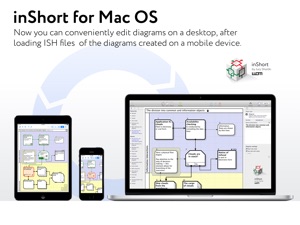
Available on your Mac too! Finally, after waiting for a good while I can use it on my Mac. My life is complete now. In case you're wondering, this is the absolute best app for logically mapping out all your ideas and making them into a solid work frame. As a software engineer I would highly recommend it for anyone who has complex though processes in need of organization.
After considerable digging through multiple organization apps. I can easily say that inShort is by far the most logical and organized approach to any complex task you might encounter. We'll worth the extra few bucks.
One thing I would of loved for the future is actual 3-Dimentional capability to be able to visualize data in multiple dimensions. Our minds are evolving along with technology and I believe its time to step away from pen and paper and move to the wold of the 3D and beyond.
CasteMan
Version 5.1.2
2014-05-16

Very we'll made

This is the future of project management. I hope to see the developers continue adding useful features. I like that the software is as simple or as detailed as you want it to be. It's also easy to use on an iPad. One thing I would suggest however is that some touch events need not require such accurate positioning i.e. It sometimes takes a few tries to hit/touch the elements of diagrams. Overall, best pm software for the iPad and Mac.
Hunter Automation
Version 5.0.2
2013-12-29

Very very useful and Productive Tool

What I'd like to know is when are you coming out with the version for the Mac and linking the iPad version to it for data transfer, etc.?
I do highly recommend reading the book on TOC and then diving in with a critical project. It's more than a 50/50 chance that you'll get to rely on this product.
One area of improvement would be to put in some more editing tools say for cut and paste of multiple objects instead of the one-at-a-time process that exists now. Otherwise, so far so great!
EW-TT
Version 5.0.1