AboutTermsPrivacyContact
 
Updating
SatFinder

SatFinder

Released: 2010-10-21
©2022 RA Software
SatFinder - QR Code
Version 5.0.3
4+
Download on the App Store
Version 5.0.3
4+
Download on the App Store
Released: 2010-10-21
©2022 RA Software

iPhone Screenshots

Screenshot
Screenshot
Screenshot
Screenshot
Screenshot
Screenshot
Screenshot
Screenshot
Screenshot
Screenshot

iPad Screenshots

Screenshot
Screenshot
Screenshot
Screenshot
Screenshot
Screenshot
Screenshot
Screenshot
Screenshot
Screenshot

Description

With SatFinder you can adjust your satellite antenna in a few seconds and with 4 simple steps:
STEP 1 - CHOOSE YOUR ANTENNA
Choose one of the four different antenna designs:
- Offset antennas (the most common, is slightly oval, the LNB is not in the center).
- Special design (e.g. Oblong shaped Offset antenna, Multifeed antenna)
- Parabolic antenna (LNB is located in the center of the reflector, usually larger than 100cm)
- Flat or planar antenna (small, camping antennas)
If you have an offset antenna, enter the height and width of the antenna. If your antenna has a special shape, enter the offset angle and the size of the satellite antenna. You can find the offset angle in the manual of your satellite antenna. For parabolic antennas it is sufficient to enter the antenna diameter. With a flat antenna you do not have to set anything. If you know the exact antenna name, check if your antenna is already in the database.
Tip: Press the wizard button to measure the size of the satellite antenna using the iPhone camera and LiDAR scanner.
STEP 2 - CHOOSE YOUR SATELLITE
To quickly and easily select a suitable satellite, simply press the "AUTO" button. The SatFinder will now automatically search for satellites that are in your reception area and that offer TV or radio stations in your language (the language setting of your iPhone will be selected). The stars (1-10) shown in the table result from the number of radio and TV channels offered and the reception strength at your location.
If you want to receive a special satellite, switch off "AUTO": Now you can simply scroll through the table and select the satellite. Faster is the search function - just enter the name of the satellite, the channel or the orbit position. You can also reduce the number of table entries by hiding satellites that are not available at your location or do not broadcast in your language. With the button "Channel Info" you can check which channels the selected satellite is currently broadcasting - including all channel parameters for your satellite receiver.
STEP 3 - CHECK OBSTACLES
For a smooth satellite reception, there must not be any obstacles between the satellite and your satellite antenna. You can check this with the "View" function. Simply aim at the satellite and watch the signs (GREEN - no obstacle, RED - caution, free view may not be given).
Tip: Press the button for the assistant to activate the voice output.
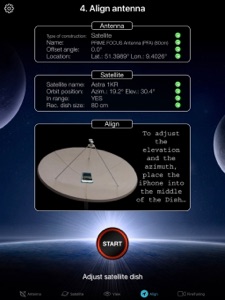
STEP 4 - ADJUST ANTENNA
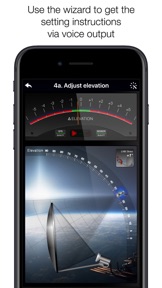
In the menu item "Align" different graphics appear depending on the selected antenna type. If you use an offset antenna, you have to adjust the azimuth and elevation separately. With planar or parabolic antennas the adjustment of the angles is done together. Before you press the "Start" button, a video clip shows how to position your iPhone at the antenna.
Tip: Press the button for the assistant to activate the voice output.
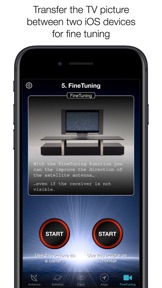
STEP 5 - FINE TUNING
If necessary, you can optimize the reception of your satellite system. The SatFinder provides you with the function "FineTuning". To use this function, you need a second iOS device. One device serves as a camera; the second device as a monitor. Simply place an iPhone in front of your reception screen and observe changes in picture quality while slightly rotating or tilting your satellite antenna. With the FineTuning feature, you'll have visual contact with your TV even when you're out of sight.
THAT'S IT. YOU SHOULD NOW BE ABLE TO ENJOY INTERFERENCE-FREE SATELLITE RECEPTION...
Note: Satellite antenna tuning is only available on iOS devices with LiDAR sensor (e.g. iPhone 12 Pro).

What's New in Version 5.0.3

- Adjustments to iPhone 14 and iOS 16

Seller

Name

Ralf Andrae

Information

Developer

Categories

Version

5.0.3

Size

59.3 MB

Game Center

No

VPP Device Licensing

Yes

Rating

Rated: 4+

Compatibility

iOS 14.0 or later

Devices

iPhone 5s, iPhone 6, iPhone 6 Plus, iPhone 6s, iPhone 6s Plus, iPhone SE, iPhone 7, iPhone 7 Plus, iPhone 8, iPhone 8 Plus, iPhone X, iPhone XR, iPhone XS, iPhone XS Max, iPhone 11, iPhone 11 Pro, iPhone 11 Pro Max, iPhone SE (2nd generation), iPhone 12, iPhone 12 Pro, iPhone 12 Pro Max, iPhone 12 mini, iPhone 13, iPhone 13 Pro, iPhone 13 Pro Max, iPhone 13 mini, iPhone SE (3rd generation), iPhone 14, iPhone 14 Plus, iPhone 14 Pro, iPhone 14 Pro Max, iPad (5th Generation) Wi-Fi, iPad (5th Generation) Wi-Fi + Cellular, iPad (6th generation) Wi-Fi, iPad (6th generation) Wi-Fi + Cellular, iPad Pro, iPad Pro (Cellular), iPad Pro (9.7-inch), iPad Pro (9.7-inch) (Cellular), iPad Pro 12.9-inch (2nd generation), iPad Pro 12.9-inch (2nd generation) Wi-Fi + Cellular, iPad Pro (10.5-inch), iPad Pro (10.5-inch) Wi-Fi + Cellular, iPad Pro (11-inch), iPad Pro (11-inch) Wi-Fi + Cellular, iPad Pro 12.9-inch (3rd generation), iPad Pro 12.9-inch (3rd generation) Wi-Fi + Cellular, iPad Air, iPad Air (Cellular), iPad Air 2, iPad Air 2 (Cellular), iPad Air (3rd generation), iPad Air (3rd generation) Wi-Fi + Cellular, iPad mini Retina, iPad mini Retina (Cellular), iPad mini 3, iPad mini 3 (Cellular), iPad mini 4, iPad mini 4 (Cellular), iPad mini (5th Generation), iPad mini (5th Generation) Wi-Fi + Cellular, iPad (7th generation) Wi-Fi + Cellular, iPad Pro 11-inch (2nd generation), iPad Pro 11-inch (2nd generation) Wi-Fi + Cellular, iPad Pro 12.9-inch (4th generation), iPad Pro 12.9-inch (4th generation) Wi-Fi + Cellular, iPad Air (4th Generation) (Wi-Fi), iPad Air (4th Generation) (Wi-Fi + Cellular), iPad (8th generation) Wi-Fi, iPad (8th generation) Wi-Fi + Cellular, iPad Pro 11-inch (3rd generation), iPad Pro 11-inch (3rd generation) Wi-Fi + Cellular, iPad Pro 12.9-inch (5th Generation), iPad Pro 12.9-inch (5th Generation) Wi-Fi + Cellular, iPad (9th Generation), iPad (9th Generation) Wi-Fi + Cellular, iPad mini (6th Generation), iPad mini (6th Generation) Wi-Fi + Cellular, iPad Air (5th generation), iPad Air (5th generation) Wi-Fi + Cellular, iPad Pro 11-inch (4th generation), iPad Pro 11-inch (4th generation) Wi-Fi + Cellular, iPad Pro 12.9-inch (6th generation), iPad Pro 12.9-inch (6th generation) Wi-Fi + Cellular, iPad (10th generation), iPad (10th generation) Wi-Fi + Cellular

Languages

English, Chinese, Croatian, Dutch, French, German, Greek, Hindi, Italian, Japanese, Malay, Polish, Portuguese, Russian, Spanish, Swedish, Turkish, Ukrainian

App Store: Customer Ratings

Ratings & Reviews

4.5 of 5 (336 Ratings)

App Store: Customer Reviews

2022-05-23

Great

D we
esotaric
Version 4.2.1
2022-03-15

I need good love and lots of money

Help me out buddy
RadioReaper
Version 4.2.1
2021-07-31

Not working for SES7 sat

Disappointing
Shaik ansari
Version 4.2.1
2020-03-19

شكر و تقدير

العالم اضبح اسهل مع هذا التطبيق
Inspactor81
Version 4.2.1
2019-07-25

Great

Highly recommended
Diverzone BH
Version 4.2.1
2019-02-22

SatFinder

The app seems really accurate and spot on it would make dish pointing easy than guessing
bass artist hunnid thou
Version 4.2.1
2018-10-31

APP

Awesome App! A+++
Invrom
Version 4.2.1
2018-07-06

Doesn’t help me

Requires antenna dimensions. Information is not available for my dome type antenna. App does not help me at all.
luxmobile
Version 4.2.1
2018-06-30

👍🏻

Very Very Good...
AlirezaHabibi
Version 4.2.1
2018-03-08

Has Promise

This application looks like it has great potential. It would be great if it included the Direct TV slimline dish as a standard for the US customers. Lots of European antennas but no common North American Antenna as a default. Also I can find no way on Ralf's website to contact him with suggestions or questions. I had to use google translate to read the german webpages, but could find no contact information.UPDATE - newer version has the direct and dish antennas and link for support. This app is the best.
BWCAcanoe
Version 4.2.1
2018-02-26

Doesn’t have Dish

Looking for Dish 1000.2 which it doesn’t have any of the Dish satellites. Doesn’t tell you before you buy it. Not happy. Also, not that easy of an application.
sieleman
Version 4.2.0
2017-10-06

The best for ever

Wooooow the best best all stars should you talk it go ahead 👍🏼
Msaahr
Version 4.0.3
2017-07-18

No current Dish Information

No DISH 500 or 1000 info, no Echostar 19 only Echostar 10 may be good for Europe but not USA
Mrmotox
Version 4.0.3
2017-04-05

Not working

Crashes after launch.
Bizonoff
Version 4.0.1
2017-04-02

+

thank you for new update
very useful.
Alireza DN
Version 4.0.1
2015-08-26

Good but Flawed

Would be great except that the azimuth is looking fir a true north angle while using magnetic. Consistently points you to the wrong direction.
sbingner
Version 3.0
2014-05-16

برنامج فاشل

برنامج فاشل خسارة الفلوس فيه
abujasem910
Version 3.0
2014-02-17

Not work don't bay it i want my money back

It's not working
Peace white hand
Version 3.0
2013-11-28

buena aplicacion

es una buena app pero no esperen sue les aga todo el trabajo. el ultimo toque lo penemos los usuarios.
gracias
tomy ly
Version 3.0
2013-09-18

User

Don't buy app is junk
I want my money back
Ramrodder63
Version 3.0
2013-05-23

سيء

جربت الطرق المقترحه ولم تجدي نفعاً،، مضيعه للوقت والمال
عبدالعزيز الميلبي
Version 3.0
2013-03-27

Bad App

I cannot find any sat.... So bad
Ron2109
Version 2.9
2013-03-03

Sat Finder!??

I'd say trash can finder! This is where it say my sat is...!!
Terrible app..!!!! Don't waste.
Rafael Dalben
Version 2.9
2012-10-23

SatFinder

This can be a very helpful application for choosing a satellite dish location and setting up the dish. Does NOT work well on iPad I view function crashes since there is no camera present.
AlanDean
Version 2.7
2012-09-15

RVer

Love it! Love it! So easy to use!!!
Fatman.Dad
Version 2.6
2012-09-04

Forget customer support !!!

I sent 2 mails to customer support but they did't answer me !
Roy 1963
Version 2.6
2012-08-26

it don´t work properly on my iphone 4

I am on Argentine and the aplication do not working properly.
by example: hispasat satellite (30w) appear with 180 grades of diference (as I was living on EEUU).
from Argentina, hispasat is localizated on azimuth from North 40.03, elevation 38.55, skew 30 grades.
I would not buy again.
ftapinamar
Version 2.6
2012-08-10

IPad

Works ok on my IPad
Buster a10
Version 2.6
2012-06-25

Not working

It's not work on my iPhone4. Just a black page with a few names on it!!!
IranRoar
Version 2.6
2012-04-26

Now it's Good

Now it's Good
SamTech353
Version 2.5
2012-04-26

Geht wieder !

Nach update auf v2.5 geht es wieder, wenn man das Intro in den Einstellungen abschaltet.
Danioel2007
Version 2.5
2012-04-19

It crashes on launch.

It crashes on launch.
braddah petah
Version 2.4
2012-04-07

;)

Very good app ;)
Arashlive
Version 2.3
2012-03-24

Junk

Im on an iphone 4 and it wont even work... All buttons obscured, nothing works
Jose Seda
Version 2.2
2012-03-22

Not worth 1.99

The app is not worth the 1.99. The signal from direct tv works fine.
Bjazz 65
Version 2.2
2011-12-20

Very simple

I love the app. It gives you step by step direction to find your Sat; however, it points only for true north and it does not adjust for magnetic north. I could be wrong.
Hemler1000
Version 2.0
2011-12-08

love it

i love it...
pedr@m
Version 1.9
2011-10-06

Not worth it

Awful, I would not buy again. Basically it did not work.
Hoggan70
Version 1.9
2011-09-27

Works but has a problem

When your are trying to view a sat and the elevation is greater than 45 deg once you pitch above that you lose your azimuth bearing and the indicator for the sat drifts off to left or right.
DaveAl
Version 1.9
2011-09-26

Awesome

Love it
Twins922
Version 1.9
2011-09-18

Not so dependable

Not sure why I have issues but soon as the phone gets near the dish it throws the compass off. So far havent gotten it to work once :(
tmcblane
Version 1.9
2011-09-11

Good

Good
accuratecommunication
Version 1.8
2011-05-16

Good work in meddle east

Fined nilesat and arabsat and badrsat and hotbird
Saud Alsalmy
Version 1.6
2011-05-10

Satellite

Very good app!!!!
Zygi007
Version 1.6
2011-04-02

great app

works great, finds all sats +++++++++++++++ more
marco4552
Version 1.5
2011-02-06

Great deal

Works like magic. I had my signal messed up and the technician ca t come to see it over the weekend, this app found the sat, beeped on the right directions just like a gps. If you are into FTA channels and want to adjust or even install your own dish this is a great help
Dish finder awesome
Version 1.5