AboutTermsPrivacyContact
 
Updating
VicEmergency

VicEmergency

Released: 2010-03-13
© Department of Justice & Regulation, Victoria
VicEmergency - QR Code
Version 6.9.0
4+
Download on the App Store
Version 6.9.0
4+
Download on the App Store
Released: 2010-03-13
© Department of Justice & Regulation, Victoria

iPhone Screenshots

Screenshot
Screenshot
Screenshot
Screenshot
Screenshot

iPad Screenshots

Screenshot
Screenshot
Screenshot

Description

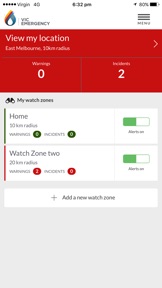
VicEmergency is the official Victorian Government app for emergency warnings and information. Download VicEmergency, set up a user profile and watch zones to ensure you receive official warnings and information for areas that interest you.
Watch the VicEmergency video at www.youtube.com/channel/UCskGgVGdfEp1C3BMiiwAyzQ
To review support articles or submit a request, visit http://support.emergency.vic.gov.au
Main Features:
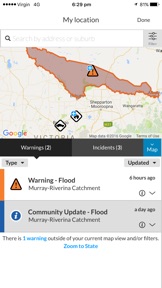
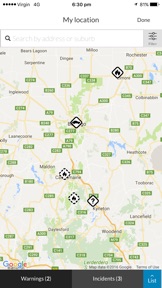
• Live incident map showing current warnings, planned burns and other types of incidents across Victoria.***
• Simple to create a profile and use watch zones that ensure you get official warnings for your local area. Warnings and information* are pushed out to a user's phone when issued by Victoria’s emergency services. 
• GPS integration to determine your current location** and surrounding incidents. 
• Emergency Warnings, Warnings, Advice and information as issued by Victoria’s emergency services
• Share incidents and warnings with friends and family.
• View forecast Fire Danger Ratings on the map.
• View today's and tomorrow’s Total Fire Ban status.
* Your device must have an internet connection to receive warnings and information issued by Victorian emergency services. 
** To view your current location, GPS must be switched on and location functionality enabled.
*** Map symbols represent the origin of the emergency, not its current location or spread.
The VicEmergency app is just one tool to assist you to access warnings and information about emergencies, however you should never rely on just one information channel. Emergency services use a range of other information channels including SKY TV, ABC local radio, some commercial and designated community radio stations, VicEmergency Hotline on 1800 226 226, VicEmergency website on www.emergency.vic.gov.au and VicEmergency Twitter and Facebook.
Are you getting a message asking you to turn on notifications? You need to ensure that push notifications are enabled specifically for the VicEmergency app, as follows:
For iOS10, iOS9, iOS8 and iOS6:
1. Click on the Settings icon and then select Notifications. 
2. Scroll down, click the VicEmergency icon
3. Ensure 'Allow Notifications" or "Notification Centre" (iOS6) at top of the screen is set to On. 
4. We recommend that you set Alert Style as 'Banners' or Alerts' and ensure that Sounds and "Show on Lock Screen" or "View in Lock Screen" (iOS6) are set to On. 
For iOS7: 
1. Open the device's Settings icon and then select 'Notification Center'.
2. Under 'Access on Lock Screen', check that 'Notifications View' is On (showing as green).
3. Scroll further down and ensure that VicEmergency is in the list under INCLUDE. Click it to open it.
4. At the top, set Alert Style as 'Banners' or Alerts'
5. Then ensure that everything in this section is turned On - ‘Badge App Icon’, ‘Sounds’, 'Show in Notification Center', 'Show on Lock Screen’, etc (all should be showing as green).

What's New in Version 6.9.0

new BoM link updates.

Seller

Name

State of Victoria - Department of Justice

Information

Categories

Version

6.9.0

Size

16.1 MB

Game Center

No

VPP Device Licensing

Yes

Rating

Rated: 4+

Compatibility

iOS 15.0 or later

Devices

iPhone 5s, iPhone 6, iPhone 6 Plus, iPhone 6s, iPhone 6s Plus, iPhone SE, iPhone 7, iPhone 7 Plus, iPhone 8, iPhone 8 Plus, iPhone X, iPhone XR, iPhone XS, iPhone XS Max, iPhone 11, iPhone 11 Pro, iPhone 11 Pro Max, iPhone SE (2nd generation), iPhone 12, iPhone 12 Pro, iPhone 12 Pro Max, iPhone 12 mini, iPhone 13, iPhone 13 Pro, iPhone 13 Pro Max, iPhone 13 mini, iPhone SE (3rd generation), iPhone 14, iPhone 14 Plus, iPhone 14 Pro, iPhone 14 Pro Max, iPhone 15, iPhone 15 Plus, iPhone 15 Pro, iPhone 15 Pro Max, iPhone 16, iPhone 16 Plus, iPhone 16 Pro, iPhone 16 Pro Max, iPhone 16e, iPhone 17, iPhone 17Pro, iPhone 17ProMax, iPhone Air, iPad (5th Generation) Wi-Fi, iPad (5th Generation) Wi-Fi + Cellular, iPad (6th generation) Wi-Fi, iPad (6th generation) Wi-Fi + Cellular, iPad Pro, iPad Pro (Cellular), iPad Pro (9.7-inch), iPad Pro (9.7-inch) (Cellular), iPad Pro 12.9-inch (2nd generation), iPad Pro 12.9-inch (2nd generation) Wi-Fi + Cellular, iPad Pro (10.5-inch), iPad Pro (10.5-inch) Wi-Fi + Cellular, iPad Pro (11-inch), iPad Pro (11-inch) Wi-Fi + Cellular, iPad Pro 12.9-inch (3rd generation), iPad Pro 12.9-inch (3rd generation) Wi-Fi + Cellular, iPad Air, iPad Air (Cellular), iPad Air 2, iPad Air 2 (Cellular), iPad Air (3rd generation), iPad Air (3rd generation) Wi-Fi + Cellular, iPad mini Retina, iPad mini Retina (Cellular), iPad mini 3, iPad mini 3 (Cellular), iPad mini 4, iPad mini 4 (Cellular), iPad mini (5th Generation), iPad mini (5th Generation) Wi-Fi + Cellular, iPad (7th generation) Wi-Fi + Cellular, iPad Pro 11-inch (2nd generation), iPad Pro 11-inch (2nd generation) Wi-Fi + Cellular, iPad Pro 12.9-inch (4th generation), iPad Pro 12.9-inch (4th generation) Wi-Fi + Cellular, iPad Air (4th Generation) (Wi-Fi), iPad Air (4th Generation) (Wi-Fi + Cellular), iPad (8th generation) Wi-Fi, iPad (8th generation) Wi-Fi + Cellular, iPad Pro 11-inch (3rd generation), iPad Pro 11-inch (3rd generation) Wi-Fi + Cellular, iPad Pro 12.9-inch (5th Generation), iPad Pro 12.9-inch (5th Generation) Wi-Fi + Cellular, iPad (9th Generation), iPad (9th Generation) Wi-Fi + Cellular, iPad mini (6th Generation), iPad mini (6th Generation) Wi-Fi + Cellular, iPad Air (5th generation), iPad Air (5th generation) Wi-Fi + Cellular, iPad Pro 11-inch (4th generation), iPad Pro 11-inch (4th generation) Wi-Fi + Cellular, iPad Pro 12.9-inch (6th generation), iPad Pro 12.9-inch (6th generation) Wi-Fi + Cellular, iPad (10th generation), iPad (10th generation) Wi-Fi + Cellular, iPad Air 11-inch (M2) Wi-Fi, iPad Air 13-inch (M2) Wi-Fi, iPad Air 13-inch (M2) Wi-Fi + Cellular, iPad Pro 11-inch (M4) Wi-Fi, iPad Pro 11-inch (M4) Wi-Fi + Cellular, iPad Pro 13-inch (M4) Wi-Fi, iPad Pro 13-inch (M4) Wi-Fi + Cellular, iPad mini (A17 Pro) Wi-Fi, iPad mini (A17 Pro) Wi-Fi + Cellular, iPad (A16) Wi-Fi, iPad (A16) Wi-Fi + Cellular, iPad Air 11-inch (M3) Wi-Fi, iPad Air 11-inch (M3) Wi-Fi + Cellular, iPad Air 13-inch (M3) Wi-Fi, iPad Air 13-inch (M3) Wi-Fi + Cellular, iPad Pro11M5, iPad Pro11M5Cellular, iPad Pro13M5, iPad Pro13M5Cellular, iPod touch (6th Generation), iPod touch (7th generation)

Languages

English

App Store: Customer Ratings

Ratings & Reviews

3.5 of 5 (4 Ratings)

App Store: Customer Reviews

2020-01-25

This is an amazing

This is truly amazing. I haven’t seen anything like it anywhere. I now live in Boston USA and our family have a farm at Strathbogie near Euroa/Seymour. I have been in the CFA and SES and the quality of maps and updates is amazing. The ease of use and live data is exceptional. For a running fight when fighting bush fires and when you are on a tanker and the flames are surrounding you it is essential to know where farm fences run and it is accurate within feet on all the fences l know
The other emergency features on trees down health etc show the massive effort being used. A truly remarkable Ap.
It should be shared with every emergency management department around the world it will absolutely save human lives without question
I was so impressed l forwarded a screenshot the other day to the director of the state emergency management here in MA USA
Mike Marblehead ms
Version 6.2.4
2014-01-16

Frustrating

I made the mistake of updating to this current version. The first map is very small and the second map very disjointed when I try to re-navigate and/or zoom into the incidents. There are no details as to the size or type of "incident" and I'm finding the whole app very klunky and not overly helpful. I'm going to rely on the CFA website and radio otherwise I'll end up throwing my iPhone 4 out in frustration! ;)
I really liked the old version though!
Dougies22
Version 4.0.1
2012-12-24

Slow to the point of uselessness

While on one hand an old iPhone 3GS isn't exactly a racehorse, there is nothing in this app that should require the added oomph of an iPhone 5. As it stands the app is klunky and non-responsive. Updates take forever. To put it flippantly: if you rely on this, you may find flames licking on your doorstep before it shows you a current status!
Badly needs refactoring and performance tuning! For now I'll rely on the website on and on ABC radio.
Ofnoconcern
Version 3.1.0
2010-09-03

Great content!

Very innovative app and great content!!!! Would recommend a return/ back to app button when linked to website so you don't have to re-open app to explore other features.
Previos user
2010-04-28

Very innovative

Heard about this app through an Australian friend. Simply amazing. The developer and the government department who initiated this is to be congratulated! All fire authorities should make development of apps like this standard. Well done!
San Fran Today