AboutTermsPrivacyContact
 
Updating
Epson iPrint

Epson iPrint

Released: 2009-12-14
© Seiko Epson Corporation
Epson iPrint - QR Code
Version 7.0.7
4+
Download on the App Store
Version 7.0.7
4+
Download on the App Store
Released: 2009-12-14
© Seiko Epson Corporation

iPhone Screenshots

Screenshot
Screenshot
Screenshot
Screenshot
Screenshot

Description

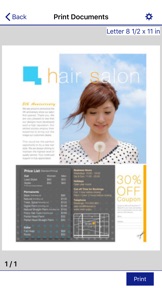
Print, scan, and share directly from your iPhone®, iPad®, or iPod® Touch. Print photos, emails, webpages and files including Microsoft® Word, Excel®, PowerPoint® and PDF documents. Also supports Box, Dropbox, Evernote®*1, Google Drive™ and Microsoft OneDrive™.
Epson iPrint makes printing easy and convenient whether your printer is in the next room or across the world.
Key Features
• Print, scan, and share directly from your iPhone, iPod Touch or iPad
• Print from anywhere in the world to email-enabled Epson printers using remote print functionality
• Print photos, PDFs and Microsoft Office documents such as Word, Excel and PowerPoint
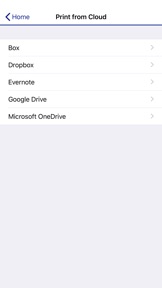
• Print stored files, email attachments, and online files from Box, Dropbox, Evernote, Google Drive and Microsoft OneDrive
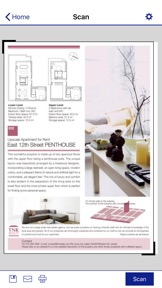
• Capture a document with your device camera, format, enhance, then save, ready to print
• Scan from your Epson all-in-one and share your file (save to your device, send via email or save online)
• Copy documents and photos using your mobile device and a nearby Epson printer
• Transfer files between your device and an SD card or USB drive via an Epson printer
• Check your printer's status and ink levels
• Print within a complex network environment using manual IP printer setup
• Get help with a built-in FAQ section
Advanced Features
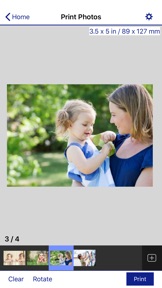
• Print high quality photos with automatic backlight and color cast correction
• Choose and print multiple photos
• Print your email attachments and stored files
• Configure your print options including paper size and type, number of copies, page range and one- or two-sided printing
• Print with and without borders
• Switch between color or monochrome printing
• Choose from different scanning resolutions and image types
• Optimize print quality
• Buy ink and supplies for your printer
• Setup & register to Epson Connect
• Manage remote printers
Printers Supported
See the following website for supported printers.
http://support.epson.net/appinfo/iprint/en
*1 Evernote is a registered trademark of U.S. Evernote Corporation.

What's New in Version 7.0.7

・Added compatibility with more Epson printers.
・Minor bug fix.

Seller

Name

Seiko Epson Corporation

Information

Categories

Version

7.0.7

Size

87.7 MB

Game Center

No

VPP Device Licensing

Yes

Rating

Rated: 4+

Compatibility

iOS 10.0 or later

Devices

iPad Air 2 (Cellular), iPad mini Retina (Cellular), iPad Pro (11-inch), iPad (5th Generation) Wi-Fi, iPad (6th generation) Wi-Fi, iPod touch (6th Generation), iPad Pro (11-inch) Wi-Fi + Cellular, iPad (6th generation) Wi-Fi + Cellular, iPad Pro 12.9-inch (3rd generation), iPad (5th Generation) Wi-Fi + Cellular, iPad mini (5th Generation) Wi-Fi + Cellular, iPad mini (5th Generation), iPad Pro, iPad mini 3, iPad mini 4 (Cellular), iPad mini 4, iPad Air 2, iPad Pro 12.9-inch (2nd generation), iPad Pro (Cellular), iPad Pro (9.7-inch) (Cellular), iPad Pro (10.5-inch) Wi-Fi + Cellular, iPad Pro (9.7-inch), iPad Air (3rd generation) Wi-Fi + Cellular, iPhone 6 Plus, iPad Air (3rd generation), iPad Pro (10.5-inch), iPad Pro 12.9-inch (2nd generation) Wi-Fi + Cellular, iPhone 6, iPhone XR, iPhone XS, iPhone 6s, iPhone SE, iPhone 7 Plus, iPhone 6s Plus, iPhone 5s, iPhone X, iPhone 8, iPhone XS Max, iPhone 8 Plus, iPhone 7, iPhone 5, iPad (7th generation) Wi-Fi, iPhone 5c, iPad (7th generation) Wi-Fi + Cellular, iPad Pro 12.9-inch (3rd generation) Wi-Fi + Cellular

Languages

English, Chinese, Dutch, French, German, Italian, Japanese, Korean, Portuguese, Russian, Spanish

App Store: Customer Ratings

Ratings & Reviews

3.0 of 5 (10 Ratings)

App Store: Customer Reviews

2019-03-15

Epson Really?!

I just parted with my RX600 not because it finally failed 15 yrs later but because of a move abroad. I expected to have better performance with a newer model simply because I didn’t need to use alternate means to make it wireless. And look at this in this day and age having to download an unreliable app to print. Sadly, a lot of things are sent via phone and I had hoped for compatibility. I find myself having to email things to my laptop just to print because the app takes forever to communicate with the printer. The verbiage of these newer models being wireless needs to be removed from your marketing and packaging. This is not the reliability, quality and speed people expect from Epson products.
missvhe
Version 7.0.7
2019-03-14

Review of app. Not printer

This is not the place to complain about your Epson printer. This is the place to complain about the IPhone app for using most network enabled epson printers.
I have never found personally as a retailer of computer hardware Epson to be very reliable printers. The inkjet print quality for the $$$ usually very good. But the long term hardware not the best investment. My office however has the oldest color all in one laser. I mean like 15+ years old, has a bazillion prints on it and for some reason day in and out it works like a charm. This app works with it fairly well too. For the age delta between app and hardware- there is not much to complain about. I can print directly from my iPhone how cool is that? Most stuff prints sometimes I find stuff that won’t and it’s not super fast and the app doesn’t seem to work with the scanner on the Printer. That ladder feature would be awesome, and perhaps is available on a newer printer/scanner.
In the end would I recommend Epson hardware? 50/50 based on 20+ years of selling and servicing hundreds of printers of all brands and types. However if you have an Epson all in one, currently that is network enabled - this App is for you.
WayOldSchoolFPS
Version 7.0.7
2019-03-11

Good app but......

I bought epson printer and it is good but the problem is it doesn't support printing on both sides so the problem is there is no option in the app to let you print only individual numbers of pages or at least an option to choose what pages you want to print i know there is an option to let you choose the papaers to print but it is just (from to) i wish if you add this feature and thank you developers for your efforts on this
TheAngel96
Version 7.0.6
2019-03-10

App printing is such a nuisance.

Printing from iPhone to Epson printer is such a nuisance. Epsons printer app changes the format of the document to where it's a completely different document by the time it's printed. I would not recommend this app or printer. It this day and time it should be seamless to send files from phone to printer without format changes.
Hatshepsut#1
Version 7.0.6
2019-03-01

Never buying another Epson printer. Ever!

I will not buy another Epson printer ever again. I’ve bought 3 off and on and thought this time, if I spent a lot more money, it would be more reliable and better quality. Wrong all the way around! Quality looks like the first version of color printers back in the 90’s. We have tried to calibrate it so much it literally runs out of ink doing diagnostics! My husband was dead-set against it and told me to get an HP or to try Canon but I went ahead and got the Epson Workforce WF-4640 and have had nothing but trouble with it. From it NOT accepting Epson ORIGINAL ink cartridges, to it randomly giving jam errors, frustration is too weak to describe how I feel about wasting my time and money on their printers. Epson has not provided any support past or present to fix the issues. The app is a mirror of my experience with their printers. It’s limited in what you can do and you’ll fool around with the app trying to figure it out just as much as figuring out what the heck is wrong with the printer only to realize neither works well at all.
Seashellstew
Version 7.0.6
2019-02-18

Scanning is Limited

From Epson....
“please be advised that scanning multiple document pages into a single PDF file is not feasible with Epson iPrint application. You need to use the Epson scan software or scanner driver on a computer to be able to perform the scanning you want.”
Otherwise, the app works fine.
fiddlinmike
Version 7.0.6
2019-02-13

Biggest Joke of the Year

I'm standing next the this espon printer and it still can locate my iPad / iPhone X.
Davoe28
Version 7.0.6
2019-02-11

Don’t update printer like the app tells you too

If you use generic ink cartridges you’ll have to throw the generic ones away because printer won’t take them anymore Forcing you to buy overpriced Epson cartridges after the app updates your printer. Besides that I like the app haha
Kevyak4
Version 7.0.4
2019-02-09

It worked the first time!

I’m pleasantly surprised how well this works. My first experience with the app was perfect: I used Export from DropBox (while viewing a PDF file), and selected Epson iPrint (after choosing More and enabling it just once). The app displayed the document, and I just need to select my printer, which it discovered right away. Then I clicked Print, and it came out perfectly. Thanks, Epson!
Steven.F.
2019-01-30

Upset in Texas

I can not connect with my IPad and iPhone with this
Epson ET-2650 with Wi-fi or wireless . I’m at my wits end
up set in Texas
Version 7.0.2
2019-01-29

Falta opción para papel personalizado

No hay opción de colocar un tamaño diferente de papel, como papel oficio o legal
probadomcc
Version 7.0.5
2019-01-22

works w/et-2500 (non-airprint)

epson gets it and finds a way to support its users ... i can copy, paste into pages, export and print docs... i can print photos directly over wifi without STUPID airprint ... what was apple thinking?
deeport awl eleege
Version 6.6.0
2019-01-21

It works on iPad, iPhone

Beats nothing. Because nothing has worked before. The evil “no AirPrint printer found” message has permanently defeated me. Neither Epson support nor apple support helped after multiple phone calls. This app offers option to add printer manually. I entered IP address. It works. Huzzah.
mspepper
Version 7.0.0
2018-12-19

Needed Firmware Update

iPrint stopped functioning after recent app update, but works again after updating printer’s firmware. Able to print from iPhones and iPads. App didn't connect with printer automatically; had to enter IP address directly, but satisfied the app does print as advertised. To update firmware, enter printer’s IP address in browser and select the firmware link.
ChuyIam
Version 7.0.6
2018-12-18

Seriously lacking in features

Shamefully limited. Epson, please go into the printer dialogue menu on the Mac and look at all the settings. That’s what we want. The new iPad Pro is powerful enough to handle it.
hooktrunk
Version 6.5.2
2018-12-17

It is nice but missing essential functions

It is nice but it could be way better, missing some essential functions as well as other useful ones
Haji007
2018-12-14

Not dependable

Works about one out of every ten attempts to print
dhammbone
2018-12-11

Difficult (impossible) to print range of pages

Have to do an annoyingly slow count up and a count down to get select pages - real pain when you want to print one or two pages out of 67! Someone needs to realize that there’s a nice keypad available. But I wouldn’t have posted this except once I spent the time selecting the pages, it started printing the entire document anyway!
TallReview
2018-12-07

Garbage

This app is not good, please release an update soon!!!!!
maxy6775
2018-12-05

Function

The app has so little control over printer functions that it often prints incorrectly. Talked to tech support and they were sorry to inform me their were limitations
ghosrrider
2018-12-04

It’s ok

Not many options to choose from for a dedicated app. Add more sizing options, etc.
Also, for those of us whom do not own a computer anymore, add the deep clean functionality to the app for deep cleaning the printhead (Epson-if you read these put that in your next update). Cannot perform deep clean function without a computer. (Yes there are people who do not have computers in this day and age)
TheFireDon
2018-12-03

Please fix

When printing multiple pages the order is revised so i have to reorder them page by page:)
Andulah
2018-11-30

Epson xp310

Just needed to scan and email. Took all of 1 minute to download, set up, scan, save, and email. Exactly what I was looking for. Took me a few download tries to find this app.
patoosday
2018-11-28

Helpful but Limited

This app is a very helpful tool. I have an older Workforce printer that works great but does not have the AirPrint feature. I have always been able to print wirelessly from my MacBook Pro but not from my iPhone or iPad. This app has options to allow me to print anything saved in Photos, adjust sizing, print quality, paper type, etc. (via settings cog after item to print has been selected). I have not been able to access the Documents folder…yet. User documentation is a bit weak for Mac users, so there are some features that I have not found so may not be available for Mac.
Lymbal
2018-11-13

Horrible settings

This app is all garbled. Needs fixed! Text is over lapping words.
Coonie44
2018-11-06

Latest update has broken use with iPad Pro

Epson Work Force printer is no longer recognized with the latest app update.
Polychaetes
2018-10-31

Now my iPhone cannot find any printer!

Great upgrade guys. Now none of my printers work off my iPhone or iPad even the Mac will no longer connect! Test test test before you release! Maybe try it on everyone’s phones in the office before releasing????
Bremen cruiser
2018-10-26

Works kinda

Screens hard to read because text overlaps each other. Paper type does not have “Plain Paper” option
artzytech
2018-10-25

It works!

Finally, I can scan old photos right from my printer/scanner to my camera roll.
Because there seems to be no wizard, you have to take steps on your own to get it to scan, such as selecting a printer, figuring out which format to use (Source=Document Table), and then saving it by clicking on the disc icon.
JayJoplin
2018-10-17

Ridiculous alternative to Airprint

Worthless, this is my last Epson printer just because of this stupid app instead of Airprint for iOS.
Ozonia00
2018-10-10

Mr

Does not connect
george_212
2018-10-09

PC no more with this app

List two hours of my life trying to get my MS Win10 computer to talk to my ecotank 3750 with no joy. Downloaded this app onto my iPhone 8plus, scanned an 8 page kitchen design to our installer. 5 minutes of my time from the time I opened the app to sending the scanned document.
Love the app and incidental to the event will be my forthcoming divorce from my Microsoft ball and chain. I’m going Mac/Apple from here on out. The debate is over.
Well done Epson. 👍
Therooster70
2018-10-06

Garbage

Complete piece of garbage. I can’t print at all. This printer and the app are worse than nothing.
Vins Clortho
2018-10-04

Your product is not worth a darn

I have had two printers and gave them away because they were not worth a dam. Why do I continue to get up dates? Why can I not delete getting updates from someone I have no desire to every own another produce they produce? Bull s—-
I am being hosest
2018-09-26

Doesn’t work anymore

I always use this app to print stuff off google docs, but now all it’s doing is crashing when I try to log in to google.
sarsarsar18
2018-09-25

Resizing

I wish I could resize text so it can print on one page , I been trying to print a horse racing program but it use two sheets and the text is oversized
Karlfromthebible
2018-09-21

Duplex printing

This app is bad but it can be better by some tweaks like duplex printing
niko250101325
2018-09-14

What happen to this app!!!! It’s scrap.

This app is not useful at all. Does not support file formats that let you print instantly from the phone. Seems like that want to send consumers to always have to buy an app for everything.
trclemons
2018-09-13

Deal breaker...

I love this app except for one, only ONE major flaw... NO ACCESS to iCloud. What? It’s an app for iPad. Why would you not program it to access iCloud? Sorry but I’ll look for another product that does access iCloud documents. Not only that, but it doesn’t even see my documents on the local iPad drive either.
solsticeman
2018-09-11

Used to work on and off; now no

Tapped on the top left to disappear ads from the webpage, Ok. My regular iPhone print shows the document that same way but will not find my Epson printer XP 430 as a air printer anymore. Epson printer app keeps the ads in and will not print the document after thinking about it til the printer turns off. Also needed to use iPhone regular print to print typing on emailed pdf.
J+515
2018-09-10

No puedo añadir más imágenes escaneadas

Se supone que la app debería permitir añadir más imágenes digitalízalas en un solo archivo, pero no es posible con mi iPhone. Al momento de seleccionar ESCANEAR solo digitaliza una imagen y no hay un botón que diga “seguir escaneando” para que quedara en un solo archivo. Como puedo escanear tres hojas en un solo archivo para PDF? Esto Sería genial!
michbet
2018-09-10

Waste of time

App is an absolute waste of one’s time and is only good if you don’t care how your print turns out. Would not recommend and this is totally not a rant! Seriously don’t waste your time with this.
delta_drummer94
2018-09-10

Why no Black and White option

...
Mr SSJ
2018-09-06

Lacks accessibility features

Home printers do not have acceptable accessibility features. This application could sell mythically improve the use of their printers by people Who have low vision. For example: having numerical values to the ink status chart when allow the use of voiceover. By adding the capability to change egg cartridge from this application would be an extreme Lee Great capability.
Efta
2018-09-02

Why would you need blue ink to print a monochrome picture?

What genius designed a printer that only works if every color is full, even if it’s unnecessary? Why do I have to run out and get freakin Cyan ink just to print a monochrome essay? HP printers don’t work this way, this is just an extremely frustrating and frankly, dumb feature
nj1023
2018-08-29

GET DELETED

I try printing a 8.5x11 , no color page ...is that too much to ask? I set the settings and when I print it the picture it comes in color and very small
Karla(((
2018-08-24

Stop allowing printing

Originally I could print from my iphone to my Epson Workforce WF-3640. Now it won’t allow me. I get an error stating “air printer not found”. What?!?!?
MOMZ6347
2018-08-22

Porqueria se app

Es una porqueria , configurar la impresora es lo peor que se puede hacer, no es fácil y a cada rato se desconfigura de todas las formas posibles, no lo recomiendo en lo absoluto, hace perder tiempo importante y valioso
Jjjhhghhb
2018-08-14

Poor

Options are so limited, why not regular paper? As of recently everything I print comes out looking smudged when using the app to print.
Justme3399