AboutTermsPrivacyContact
 
Updating
CoordCalc

CoordCalc

Released: 2009-03-27
© 2009-2014 TornadoSpy,LLC
CoordCalc - QR Code
Version 2.5
4+
Download on the App Store
Version 2.5
4+
Download on the App Store
Released: 2009-03-27
© 2009-2014 TornadoSpy,LLC

iPhone Screenshots

Screenshot
Screenshot

iPad Screenshots

Screenshot

Description

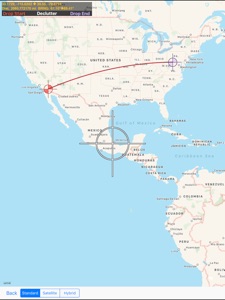
A coordinate utility app that calculates the distance and initial/final bearings between two points on Earth specified either manually by latitude and longitude or automatically using the built-in map. It can also calculate a final position given an initial position, distance, and bearing.
################################
Limited time sale, get it now before the
price increase to $4.99
################################
The final distance can be calculated in miles, kilometers, nautical miles, yards, meters, or feet. Coordinates can be specified in and converted to and from decimal degrees, decimal minutes or decimal seconds. Bearing is returned in degrees true. Uses WGS84 for improved great circle distance calculation accuracy.
NOTES:
Coordinate messages can only be sent to other CoordCalc users and are available only within the app.
Additional Features:
-Can use internal GPS to find the lat/lon coordinates of your current location
-Can use and drag the points around on the built-in map and get distance/bearing updates continuously.
-Shows starting and ending positions on a map
-Saves the previous set of starting and ending positions
-Maps can display satellite imagery, and labeled roads, highways, cities, oceans, etc.
-Can send coordinate messages with short notes to other CoordCalc users.
- Built-in HD version for iPad
Example use cases:
-Navigation tool for aircraft, boats, etc.
-Measure walking distance
-Finding your exact position in order to mark points of interest/landmarks or meeting places.
-Visualize and edit starting and ending locations using the map feature.
-Calculate the size of various landmarks if they are visible via satellite.
-Save the position of your parked car
-Convert coordinates between different formats
Checkout the revamped website and video at:
www.justintimeapps.com
iOS 4.0 Tested
A video demo of how to move the pins is located here:
http://www.justintimeapps.com/ts.html
This pin jumping issue has been fixed in iOS 4.0, but for iOS 3.0 users, the difficulty of this depends alot on your screen protector. If the protector has a rough surface and causes your finger to jump around, the pin will be dropped often. You will get a better response if you move your finger slowly. Although, you should still be able to move a pin from the top to the bottom of the screen within 2 seconds without losing track. In iOS 4.0, this is not an issue.

What's New in Version 2.5

Updated to work with current iOS

Seller

Name

Justin Graham

Information

Developer

Categories

Version

2.5

Size

2.5 MB

Game Center

No

VPP Device Licensing

Yes

Rating

Rated: 4+

Compatibility

iOS 9.0 or later

Devices

iPhone 5s, iPhone 6, iPhone 6 Plus, iPhone 6s, iPhone 6s Plus, iPhone SE, iPhone 7, iPhone 7 Plus, iPhone 8, iPhone 8 Plus, iPhone X, iPhone XR, iPhone XS, iPhone XS Max, iPhone 11, iPhone 11 Pro, iPhone 11 Pro Max, iPhone SE (2nd generation), iPhone 12, iPhone 12 Pro, iPhone 12 Pro Max, iPhone 12 mini, iPhone 13, iPhone 13 Pro, iPhone 13 Pro Max, iPhone 13 mini, iPhone SE (3rd generation), iPhone 14, iPhone 14 Plus, iPhone 14 Pro, iPhone 14 Pro Max, iPhone 15, iPhone 15 Plus, iPhone 15 Pro, iPhone 15 Pro Max, iPad (5th Generation) Wi-Fi, iPad (5th Generation) Wi-Fi + Cellular, iPad (6th generation) Wi-Fi, iPad (6th generation) Wi-Fi + Cellular, iPad Pro, iPad Pro (Cellular), iPad Pro (9.7-inch), iPad Pro (9.7-inch) (Cellular), iPad Pro 12.9-inch (2nd generation), iPad Pro 12.9-inch (2nd generation) Wi-Fi + Cellular, iPad Pro (10.5-inch), iPad Pro (10.5-inch) Wi-Fi + Cellular, iPad Pro (11-inch), iPad Pro (11-inch) Wi-Fi + Cellular, iPad Pro 12.9-inch (3rd generation), iPad Pro 12.9-inch (3rd generation) Wi-Fi + Cellular, iPad Air, iPad Air (Cellular), iPad Air 2, iPad Air 2 (Cellular), iPad Air (3rd generation), iPad Air (3rd generation) Wi-Fi + Cellular, iPad mini Retina, iPad mini Retina (Cellular), iPad mini 3, iPad mini 3 (Cellular), iPad mini 4, iPad mini 4 (Cellular), iPad mini (5th Generation), iPad mini (5th Generation) Wi-Fi + Cellular, iPad (7th generation) Wi-Fi + Cellular, iPad Pro 11-inch (2nd generation), iPad Pro 11-inch (2nd generation) Wi-Fi + Cellular, iPad Pro 12.9-inch (4th generation), iPad Pro 12.9-inch (4th generation) Wi-Fi + Cellular, iPad Air (4th Generation) (Wi-Fi), iPad Air (4th Generation) (Wi-Fi + Cellular), iPad (8th generation) Wi-Fi, iPad (8th generation) Wi-Fi + Cellular, iPad Pro 11-inch (3rd generation), iPad Pro 11-inch (3rd generation) Wi-Fi + Cellular, iPad Pro 12.9-inch (5th Generation), iPad Pro 12.9-inch (5th Generation) Wi-Fi + Cellular, iPad (9th Generation), iPad (9th Generation) Wi-Fi + Cellular, iPad mini (6th Generation), iPad mini (6th Generation) Wi-Fi + Cellular, iPad Air (5th generation), iPad Air (5th generation) Wi-Fi + Cellular, iPad Pro 11-inch (4th generation), iPad Pro 11-inch (4th generation) Wi-Fi + Cellular, iPad Pro 12.9-inch (6th generation), iPad Pro 12.9-inch (6th generation) Wi-Fi + Cellular, iPad (10th generation), iPad (10th generation) Wi-Fi + Cellular, iPod touch (6th Generation), iPod touch (7th generation)

Languages

English

App Store: Customer Ratings

Ratings & Reviews

3.0 of 5 (4 Ratings)

App Store: Customer Reviews

2018-06-16

DOESN’T WORK

The good ratings must have been made by friends of developer.
FlaDrone_Chick
Version 2.4
2017-11-23

Save your money

I was looking for an app that would give me distance and bearing “to” a point. This isn’t it.
Bob222666
Version 2.4
2016-07-17

Moronic user interface

Typical problems with engineer-designed UI. Not that engineers always are so tone deaf to users. Example: enter a long and lat (two very long numbers) and make a typo: the app tells you (with an exclamation point) that one of the the numbers (which one?) is "not a number" and then deletes both. Can anyone out there suggest a more user-friendly way of handling such an exception??
US Glider
Version 2.2
2015-12-26

NOT FOR IPAD

Although its registered for Ipad also it's only for I Phones. I think the worst part about it is I couldn't get a refund. Won't be buying anymore apps from this vendor for sure.
IPAD-Luigi
Version 2.2
2015-02-28

Not Backward Compatible

How can you sell an App that only works until Apple upgrades the OS. It should be backward compatible and users of older iPhones and older OS should still be able to use it. If you’re not going to keep it working for older phones you should refund the purchases.
n6nmz
Version 2.2
2014-11-10

Thanx for the update

Thanx for the update
Eng. qahnoq
Version 2.0
2014-11-03

mr

would be very useful for geocaching, purchased based upon reviews but freezes up after one entry.
Tony Sor
Version 1.12
2012-01-18

Coordcalc

This app is excellent. Does what I expected. The hybrid mode allows me to zoom in on small features and pinpoint location accurately. The pushpins are sometimes a little hard to move, but still it is a very useful app, including ability to calculate bearing and distance.
That away
Version 1.12
2011-12-23

Likeit

So far does exactly what it says it will do, especially if u know the coord's. I like it.
Trey1701
Version 1.12
2011-04-25

Can't enter WGS coordinates

Misleading - uses WGS84, but won't let you enter or analyze those coordinates. Other than that, does a great job, especially for the price.
Mamba
Version 1.12
2011-03-09

CoordCalc is AWESOM!!

If you, like myself, have any reason at all to know what the distance is between two GPS locations CoordCalc is a simple, fast, accurate way to get the results. I use this app on my iPhone and iPad for my work. I work for the Federal Government and have to determine hundreds and hundreds of distances between street intersections from all parts of the country. Just plug in the GPS coordinates and tap "mile". Saves me hours and hours of work. I have emailed the programmer several times about features and he has done an amazing job of implementing the things that just make the app even better and my job even easier. Very highly recommended!!!
BobG.
Version 1.12
2010-06-15

Not very helpful

Too technical. I was looking for an app that would tell me how far it is from A to B (i.e. Newport, RI to Bangor, Maine) and this was useless. No way to put in city locations. Don't know, or have the time to find the latitude and longatude for every location. Moving the pin points on the map was way too difficult. Was a waste of $3.00.
Robinn J.
2010-05-12

Outstanding

I use this to do quick calcs for proposed sites and it works beautifully. Very accurate and worth way more than the $.99.
Would love to see multiple destinations so we can calculate angle from starting position. I have no problem if you add this request to the "Dream Sheet". 
P.S. Please rate for what this program offers, not what it doesn't. It really does scew the public opinion of whether the current product is of good quality.
Nunnery
2010-02-08

Very Nice, Shows Promise

Very clean and accurate. Works as described, but I'd like to see a capability to enter a Starting Position, a distance and bearing and have CoordCalc determine the ending Lat/Long.
SSTiman
2009-09-15

Cool...

I've been looking for this app. Simple clean interface. A little hard to position the thumb tacks because they were under my finger. As opposed to the maps app where the thumb tacks float above my finger.
Indy pilot