AboutTermsPrivacyContact
 
Updating
UDevice - Dev Assistant

UDevice - Dev Assistant

Released: 2022-02-02
© ChenZhiPeng
UDevice - Dev Assistant - QR Code
Version 1.3.19
4+
Download on the App Store
Version 1.3.19
4+
Download on the App Store
Released: 2022-02-02
© ChenZhiPeng

iPhone Screenshots

Screenshot
Screenshot
Screenshot
Screenshot
Screenshot
Screenshot
Screenshot
Screenshot
Screenshot

iPad Screenshots

Screenshot
Screenshot
Screenshot
Screenshot
Screenshot
Screenshot
Screenshot
Screenshot
Screenshot
Screenshot

Description

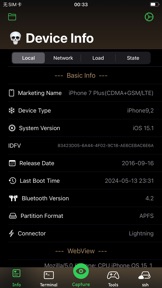
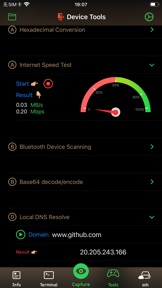
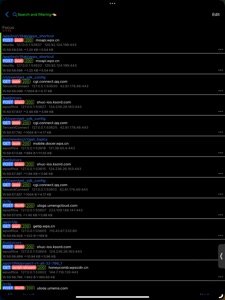
Http(s) Capture/Rewrite, ssh, Terminal, Python3, Cookie editing, Ping, File manager, DNS parsing, traceroute, port scanning, log analysis, regex,json formatting etc.
Provide all kinds of dev/testing tools.
Device Fingerprint, CPU, system, network, memory, display, browser, etc.
Discover and reveal the real and real-time data information of the equipment.
Applied to development, testing, reverse analysis, investigation and evidence collection and daily equipment management.

What's New in Version 1.3.19

Support for iPhone 16 series

Seller

Name

Gansu Zhenxian Network Technology Co., Ltd.

URL

Information

Categories

Version

1.3.19

Size

167.3 MB

Game Center

No

VPP Device Licensing

Yes

Rating

Rated: 4+

Compatibility

iOS 15.0 or later

Devices

iPhone 5s, iPhone 6, iPhone 6 Plus, iPhone 6s, iPhone 6s Plus, iPhone SE, iPhone 7, iPhone 7 Plus, iPhone 8, iPhone 8 Plus, iPhone X, iPhone XR, iPhone XS, iPhone XS Max, iPhone 11, iPhone 11 Pro, iPhone 11 Pro Max, iPhone SE (2nd generation), iPhone 12, iPhone 12 Pro, iPhone 12 Pro Max, iPhone 12 mini, iPhone 13, iPhone 13 Pro, iPhone 13 Pro Max, iPhone 13 mini, iPhone SE (3rd generation), iPhone 14, iPhone 14 Plus, iPhone 14 Pro, iPhone 14 Pro Max, iPhone 15, iPhone 15 Plus, iPhone 15 Pro, iPhone 15 Pro Max, iPhone 16, iPhone 16Plus, iPhone 16Pro, iPhone 16ProMax, iPad (5th Generation) Wi-Fi, iPad (5th Generation) Wi-Fi + Cellular, iPad (6th generation) Wi-Fi, iPad (6th generation) Wi-Fi + Cellular, iPad Pro, iPad Pro (Cellular), iPad Pro (9.7-inch), iPad Pro (9.7-inch) (Cellular), iPad Pro 12.9-inch (2nd generation), iPad Pro 12.9-inch (2nd generation) Wi-Fi + Cellular, iPad Pro (10.5-inch), iPad Pro (10.5-inch) Wi-Fi + Cellular, iPad Pro (11-inch), iPad Pro (11-inch) Wi-Fi + Cellular, iPad Pro 12.9-inch (3rd generation), iPad Pro 12.9-inch (3rd generation) Wi-Fi + Cellular, iPad Air, iPad Air (Cellular), iPad Air 2, iPad Air 2 (Cellular), iPad Air (3rd generation), iPad Air (3rd generation) Wi-Fi + Cellular, iPad mini Retina, iPad mini Retina (Cellular), iPad mini 3, iPad mini 3 (Cellular), iPad mini 4, iPad mini 4 (Cellular), iPad mini (5th Generation), iPad mini (5th Generation) Wi-Fi + Cellular, iPad (7th generation) Wi-Fi + Cellular, iPad Pro 11-inch (2nd generation), iPad Pro 11-inch (2nd generation) Wi-Fi + Cellular, iPad Pro 12.9-inch (4th generation), iPad Pro 12.9-inch (4th generation) Wi-Fi + Cellular, iPad Air (4th Generation) (Wi-Fi), iPad Air (4th Generation) (Wi-Fi + Cellular), iPad (8th generation) Wi-Fi, iPad (8th generation) Wi-Fi + Cellular, iPad Pro 11-inch (3rd generation), iPad Pro 11-inch (3rd generation) Wi-Fi + Cellular, iPad Pro 12.9-inch (5th Generation), iPad Pro 12.9-inch (5th Generation) Wi-Fi + Cellular, iPad (9th Generation), iPad (9th Generation) Wi-Fi + Cellular, iPad mini (6th Generation), iPad mini (6th Generation) Wi-Fi + Cellular, iPad Air (5th generation), iPad Air (5th generation) Wi-Fi + Cellular, iPad Pro 11-inch (4th generation), iPad Pro 11-inch (4th generation) Wi-Fi + Cellular, iPad Pro 12.9-inch (6th generation), iPad Pro 12.9-inch (6th generation) Wi-Fi + Cellular, iPad (10th generation), iPad (10th generation) Wi-Fi + Cellular, iPad Air 11-inch (M2) Wi-Fi, iPad Air 13-inch (M2) Wi-Fi, iPad Air 13-inch (M2) Wi-Fi + Cellular, iPad Pro 11-inch (M4) Wi-Fi, iPad Pro 11-inch (M4) Wi-Fi + Cellular, iPad Pro 13-inch (M4) Wi-Fi, iPad Pro 13-inch (M4) Wi-Fi + Cellular, iPad MiniA17Pro, iPad MiniA17ProCellular, iPod touch (6th Generation), iPod touch (7th generation), Apple Watch Series 4

Languages

English, Chinese, Japanese

App Store: Customer Ratings

Ratings & Reviews

4.3 of 5 (24 Ratings)

App Store: Customer Reviews

2024-11-19

Tons of goodies!

There is so many tools to mess around with. Very useful! A must have!
Mattacetnt
Version 1.3.19
2024-10-28

Awesomeness

Great app!
Salyhustle
Version 1.3.18
2024-09-24

.

.
Root=Mobile
Version 1.3.18
2024-05-22

The best

The best ever
Carlypung
Version 1.3.17
2024-04-28

Works great

Its great to have the information you can’t usually get. Hopefully move apps and features are to come!
Wrong:Way
Version 1.3.17
2024-04-19

Talk about a deal

This app is a a gem no surprise why it’s #1 on the store for the shear volume of tools the useful data it can provide about your device. I have noticed that the speed test would show 30 and 3 or slower I have around 200 on other speed test and bt scanning showed one device connectable but in setting I couldn’t find see it wish I could see more data. Overall like the app keep it up.
AcidVather
Version 1.3.17
2024-04-16

Great app , has many useful features.

This app is currently the best on the App store for its purpose. “To the Dev”: If you’re still interested in tinkering with your app to make it better try adding “app intents” so your app can be used in shortcuts as well. With ai and automation being such a big deal these days you can’t miss out on that type of integration.. It will score you some serious downloads and recognition for sure. Great icon by the way 😁
hackerlocal.us
Version 1.3.17
2024-02-02

Jorge

Ilke
Theblack17
Version 1.3.13
2023-10-28

Nothing else like it out there!!

As an active pentester, this app is awesome! Keep up the great work!
EthHack
Version 1.3.8
2023-09-18

Totally worth the purchase!

Great app for network security, pen-testing & port scanning! There is several features that used to be done strictly on Windows/Linux that are widely available in this iOS app!✅❤️
UnoBruno555
Version 1.3.6
2023-04-07

Ai doesn’t work

Upon attempting to use the ai, I receive the error “Chat Query Error:keyNotFound(CodingKeys(stringValue: "created", intValue: nil), Swift.DecodingError.Context(codingPath: [], debugDescription: "No value associated with key CodingKeys(stringValue: \"created\", intValue: nil) (\"created\").", underlyingError: nil))” Other than that, the app is good though, so three stars. If it is fixed, I’ll give 5.
Edit in response to developer: yes, I am absolutely sure that it is valid, I went to the link that says, “Get Address”, made a new key, and copied it. It still will not work.
User-404_
Version 1.2.1
2022-03-22

Great app !!

Easy UI to navigate, useful tools HTTP Capture great app!
jxl516
Version 1.0.21