Updating


iPhone Screenshots




iPad Screenshots




Description
Say Hi! to your new favourite iOS compressor plugin! ToneBoosters Compressor is an AUv3 plugin for professional, mastering-grade compression and dynamics processing.
This flexible plug-in has all the features you will ever need, such as:
- Soft knee compression
- Parallel compression
- External side-chain input (if supported by the host)
- Band-limited compression
- Spatially selective compression
This compressor is suitable for every compression task and beyond:
- Track compression
- Bus and master bus compression
- De-essing and de-harshing using the band-limited compression feature
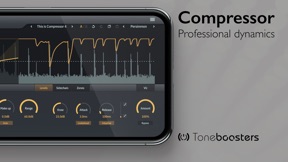
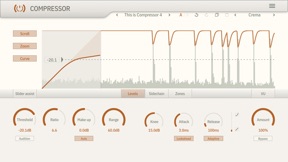
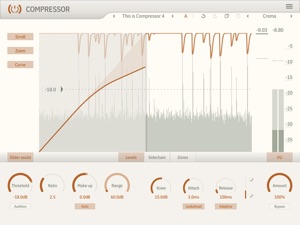
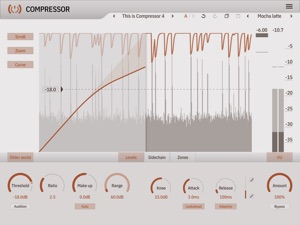
The user interface shows compression in action, with a real-time and interactive display of levels, gains and curves. Assisted sliders provide guidance to accurately adjust threshold, makeup and range parameters.
Want to hear what signal elements are affected by compression? Hit the audition button and listen to everything that is changed by the compressor in isolation.
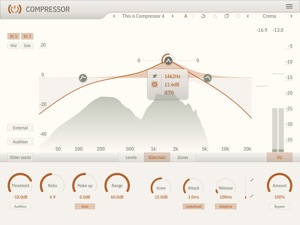
The side-chain editor allows you to adjust the frequency response of the side chain, and has an integrated spectrum analyzer. You can select which channels the side chain listens to, including selection of mid or side channels. Obviously we have provided an audition button for the side chain as well!
Imagine you could just compress the mid or side channel, and apply compression to a specific frequency range only. Dynamically make space for elements without having to compress the full mix; de-ess those sibilant vocals in the mid channel; soothe those harsh frequencies; the possibilities are endless. This is all possible with the compression zone feature.
The ToneBoosters Compressor app captures the microphone (or external sound card) input and processes the signals in real time. To use it as a plug-in, use an AUv3-compatible host app such as Steinberg Cubasis, Apple Garageband, Audio Evolution Mobile Studio, Auria, AUM, or others. ToneBoosters Compressor will appear in the list of Audio Unit extensions for effect plug-ins.
Key features:
- The same professional sound as the acclaimed desktop version
- Ultra-low harmonic distortion, even with very short attack and release times (THD less than -100dB at 1kHz)
- Side-chain equalizer
- Audition function for compressor and side chain
- Integrated spectrum analyzer for output and side chain
- Variable release curve shape and release time
- Signal-adaptive release
- Auto make up
- Range parameter to limit the amount of compression
- Dry/wet (amount) control for parallel compression
- Zero latency (for live use) or lookahead mode (for studio use)
- Interactive user interface with assisted sliders, curve and gain visualization
- Undo/redo, and A/B comparison
- Color themes for the user interface
- Max screen support in Garageband
- Legacy Inter-App Audio (IAA) support
- Optimised for iPad and compatible with iPhone and iPod Touch
Save and export of settings
- The stand-alone app (and IAA app) can load and save settings (locally on iPad, via iCloud, or via iTunes file sharing).
- These Saved files can also be loaded into the desktop version of the plug-in.
- The AUv3 version can export settings to be used in the stand-alone app or desktop version.
What you should know:
- Inter-App Audio (IAA) can only use one instance of this app simultaneously. We recommend to use an AUv3 host to use multiple instances.
- Licenses acquired for this platform (iOS, iPadOS) are not compatible with other platforms.
- Headphones not included - this is a software correction plugin only for use with your own headphones.
How to use this app as AUv3 plug-in in Apple Garageband for iOS:
https://support.apple.com/kb/PH24861?viewlocale=en_US&locale=th_TH
How to use this app as AUv3 plug-in in Steinberg Cubasis for iOS:
https://www.steinberg.net/fileadmin/files/PRODUCTS/Apps/Cubasis/Cubasis_Help/EF_Rack.html
How to use this app as AUv3 plug-in in Audio Evolution Mobile Studio for iOS:
http://www.audio-evolution.com/manual/doku.php?id=mixer_screen
Seller
Name
Dirk Breebaart
Information
Developer
Categories
Version
1.0.0
Size
6.5 MB
Game Center
No
VPP Device Licensing
Yes
Rating
Rated: 4+
Compatibility
iOS 11.0 or later
Devices
iPhone 5s, iPhone 6, iPhone 6 Plus, iPhone 6s, iPhone 6s Plus, iPhone SE, iPhone 7, iPhone 7 Plus, iPhone 8, iPhone 8 Plus, iPhone X, iPhone XR, iPhone XS, iPhone XS Max, iPhone 11, iPhone 11 Pro, iPhone 11 Pro Max, iPhone SE (2nd generation), iPad (5th Generation) Wi-Fi, iPad (5th Generation) Wi-Fi + Cellular, iPad (6th generation) Wi-Fi, iPad (6th generation) Wi-Fi + Cellular, iPad Pro, iPad Pro (Cellular), iPad Pro (9.7-inch), iPad Pro (9.7-inch) (Cellular), iPad Pro 12.9-inch (2nd generation), iPad Pro 12.9-inch (2nd generation) Wi-Fi + Cellular, iPad Pro (10.5-inch), iPad Pro (10.5-inch) Wi-Fi + Cellular, iPad Pro (11-inch), iPad Pro (11-inch) Wi-Fi + Cellular, iPad Pro 12.9-inch (3rd generation), iPad Pro 12.9-inch (3rd generation) Wi-Fi + Cellular, iPad Air, iPad Air (Cellular), iPad Air 2, iPad Air 2 (Cellular), iPad Air (3rd generation), iPad Air (3rd generation) Wi-Fi + Cellular, iPad mini Retina, iPad mini Retina (Cellular), iPad mini 3, iPad mini 3 (Cellular), iPad mini 4, iPad mini 4 (Cellular), iPad mini (5th Generation), iPad mini (5th Generation) Wi-Fi + Cellular, iPad (7th generation) Wi-Fi, iPad Pro 11-inch (2nd generation), iPad Pro 11-inch (2nd generation) Wi-Fi + Cellular, iPad Pro 12.9-inch (4th generation), iPad Pro 12.9-inch (4th generation) Wi-Fi + Cellular, iPod touch (6th Generation), iPod touch (7th generation)
Languages
App Store: Customer Ratings
Ratings & Reviews
0.0 of 5 (No rating)
App Store: Customer Reviews
No Entry