AboutTermsPrivacyContact
 
Updating
Texter - Recording, Transcript

Texter - Recording, Transcript

Released: 2019-10-09
© Yuichi Matsuoka
Texter - Recording, Transcript - QR Code
Version 2.8.60
4+
Download on the App Store
Version 2.8.60
4+
Download on the App Store
Released: 2019-10-09
© Yuichi Matsuoka

iPhone Screenshots

Screenshot
Screenshot
Screenshot
Screenshot
Screenshot
Screenshot
Screenshot
Screenshot
Screenshot

iPad Screenshots

Screenshot
Screenshot

Description

Are you tired of manually transcribing audio recordings, images, and videos into text? 
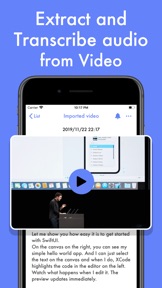
Look no further than Texter, the ultimate app for transcribing! With our state-of-the-art AI technology, you can instantly transcribe any audio recording, image, or video with ease and high accuracy.
Texter is perfect for professionals working remotely or from home, reporters, interviewers, artists, deaf people, multilingual speakers, and anyone who wants to manage media files by transcribing them into text. 
Are you ready to elevate your transcription game to the next level? Upgrade to a Premium membership with Texter and unlock a host of powerful features that will revolutionize the way you transcribe audio, images, and videos.
With a Premium membership, you'll have unlimited access to all of Texter's cutting-edge transcription options, including real-time translation from audio and the ability to select images from the Photos app or Safari for transcription. Plus, you'll enjoy ad-free transcribing experience.
Don't miss out on this opportunity to streamline your workflow and increase your productivity. Sign up for our 1-week trial for just $9.99 per month, or save even more with our annual subscription for $55.99, about 50% off. Try Texter today and experience the future of transcription!
Payment will be charged to your iTunes account when you confirm your purchase.
Accounts will be charged for renewal within 24 hours prior to the end of the current period and the cost of renewal will be identified.
Subscriptions can be managed by the user, and after purchase they can go to the user's account settings to turn off automatic updates.
Terms of Use
https://sites.google.com/view/texter-voice-to-text/terms-of-service
Personal Information Protection Policy
https://sites.google.com/view/texter-voice-to-text/privacy-policy
We look forward to hearing your feedback.

What's New in Version 2.8.60

Added Korean engine in High Performance mode.
With Texter, you can transcribe audio, images, and videos in real-time, manage all your media files easily, and improve your work efficiency. Enjoy seamless transcribing with this update.
If you love Texter, we would be grateful if you could leave a review. We can't wait for you to see what's next in store!

Seller

Name

Yuichi Matsuoka

Information

Categories

Version

2.8.60

Size

151.7 MB

Game Center

No

VPP Device Licensing

Yes

Rating

Rated: 4+

Compatibility

iOS 16.0 or later

Devices

iPhone 5s, iPhone 6, iPhone 6 Plus, iPhone 6s, iPhone 6s Plus, iPhone SE, iPhone 7, iPhone 7 Plus, iPhone 8, iPhone 8 Plus, iPhone X, iPhone XR, iPhone XS, iPhone XS Max, iPhone 11, iPhone 11 Pro, iPhone 11 Pro Max, iPhone SE (2nd generation), iPhone 12, iPhone 12 Pro, iPhone 12 Pro Max, iPhone 12 mini, iPhone 13, iPhone 13 Pro, iPhone 13 Pro Max, iPhone 13 mini, iPhone SE (3rd generation), iPhone 14, iPhone 14 Plus, iPhone 14 Pro, iPhone 14 Pro Max, iPhone 15, iPhone 15 Plus, iPhone 15 Pro, iPhone 15 Pro Max, iPhone 16, iPhone 16Plus, iPhone 16Pro, iPhone 16ProMax, iPhone 16e, iPad (5th Generation) Wi-Fi, iPad (5th Generation) Wi-Fi + Cellular, iPad (6th generation) Wi-Fi, iPad (6th generation) Wi-Fi + Cellular, iPad Pro, iPad Pro (Cellular), iPad Pro (9.7-inch), iPad Pro (9.7-inch) (Cellular), iPad Pro 12.9-inch (2nd generation), iPad Pro 12.9-inch (2nd generation) Wi-Fi + Cellular, iPad Pro (10.5-inch), iPad Pro (10.5-inch) Wi-Fi + Cellular, iPad Pro (11-inch), iPad Pro (11-inch) Wi-Fi + Cellular, iPad Pro 12.9-inch (3rd generation), iPad Pro 12.9-inch (3rd generation) Wi-Fi + Cellular, iPad Air, iPad Air (Cellular), iPad Air 2, iPad Air 2 (Cellular), iPad Air (3rd generation), iPad Air (3rd generation) Wi-Fi + Cellular, iPad mini Retina, iPad mini Retina (Cellular), iPad mini 3, iPad mini 3 (Cellular), iPad mini 4, iPad mini 4 (Cellular), iPad mini (5th Generation), iPad mini (5th Generation) Wi-Fi + Cellular, iPad (7th generation) Wi-Fi + Cellular, iPad Pro 11-inch (2nd generation), iPad Pro 11-inch (2nd generation) Wi-Fi + Cellular, iPad Pro 12.9-inch (4th generation), iPad Pro 12.9-inch (4th generation) Wi-Fi + Cellular, iPad Air (4th Generation) (Wi-Fi), iPad Air (4th Generation) (Wi-Fi + Cellular), iPad (8th generation) Wi-Fi, iPad (8th generation) Wi-Fi + Cellular, iPad Pro 11-inch (3rd generation), iPad Pro 11-inch (3rd generation) Wi-Fi + Cellular, iPad Pro 12.9-inch (5th Generation), iPad Pro 12.9-inch (5th Generation) Wi-Fi + Cellular, iPad (9th Generation), iPad (9th Generation) Wi-Fi + Cellular, iPad mini (6th Generation), iPad mini (6th Generation) Wi-Fi + Cellular, iPad Air (5th generation), iPad Air (5th generation) Wi-Fi + Cellular, iPad Pro 11-inch (4th generation), iPad Pro 11-inch (4th generation) Wi-Fi + Cellular, iPad Pro 12.9-inch (6th generation), iPad Pro 12.9-inch (6th generation) Wi-Fi + Cellular, iPad (10th generation), iPad (10th generation) Wi-Fi + Cellular, iPad Air 11-inch (M2) Wi-Fi, iPad Air 13-inch (M2) Wi-Fi, iPad Air 13-inch (M2) Wi-Fi + Cellular, iPad Pro 11-inch (M4) Wi-Fi, iPad Pro 11-inch (M4) Wi-Fi + Cellular, iPad Pro 13-inch (M4) Wi-Fi, iPad Pro 13-inch (M4) Wi-Fi + Cellular, iPad A16, iPad A16Cellular, iPad Air11M3, iPad Air11M3Cellular, iPad Air13M3, iPad Air13M3Cellular, iPad MiniA17Pro, iPad MiniA17ProCellular, iPod touch (6th Generation), iPod touch (7th generation), Apple Watch Series 4

Languages

English, Chinese, Japanese, Spanish

App Store: Customer Ratings

Ratings & Reviews

4.0 of 5 (115 Ratings)

App Store: Customer Reviews

2022-07-30

Needs to understand “next line”

I use this to make a lists. I use it to understand conversations. I’m deaf. The app needs to understand that if I say “next line” I am trying to separate speakers. When I say next line in a list I want it to move to the next line so all the items are not jumbled together.
I appreciate how it is sometimes able to correct text that it misunderstood.
Nancyinbelize
Version 2.7.60
2022-03-14

It okay but feel like I wasted some money

Doesn’t do that good of a job translating and will let you move forward in the video but not back which is annoying.
bennybeansjhs96
Version 2.7.57
2021-11-08

Pointless ripoff

Does what your device could already do, only much, much worse.
Update edit before I delete forever: To call this an unnecessary duplication of device abilities isn’t entirely true. “Misleading claims; gross omission/obfuscation of relevant data; abject overall misrepresentation of the product’s nature & utility; deception intended to artificially create perceived value, and ultimately leverage this fraud into profit,” is the most complete, accurate description.
If this was too long or had too many big words to bother reading, congratulations: you’re their ideal customer!
The Combination is 1-2-3-4-5
Version 2.7.53
2020-11-26

Excellent app

Very nice app.
English to Gujarati speech to text translation is possible but Gujarati to english speech to text translation is not possible.
Thank you for such a great app.
Rmpatel
Version 2.4.0
2019-11-06

Great!

My iPhone is work from talk person of hearing person!
sotojennifer
Version 1.2.3