Updating

WatchFor
Released: 2019-07-13
© CopyRight AppProved Software Corporation 2019-2022


iPhone Screenshots



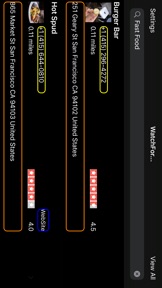
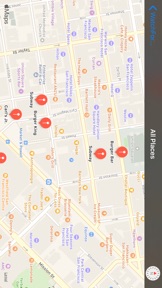
Description
WatchFor "looks" for places (and can run in the background with your permission) for you while you drive, run or walk.
A Siri shortcut can now be created to invoke WatchFor via voice command.
Yelp Rating Info has been added for quick comparison shopping for businesses of interest while you walk or drive.
For example:
1) you just left a meeting cross town and you wanted some chicken nuggets. Tell WatchFor: "Wendy's" and it will tell you if you come close to one in compliance with your distance limit.you in Setting
2) You're driving from work and need to buy a circular saw. Tell WatchFor: "Hardware Stores", "Loew's", "Fast Foods" and the app will "Watch For" the business business type you tell it.
3) You've just finished attending a baby shower and driving home when "the horror" you need a pedicure badly! Tell WatchFor: "Nail Shop" and you can take care of your nails with just a small detour off your path home.
Usage of the app is very simple. When you get in your car you can:
1) Open up WatchFor and enter the type of place you ar looking for like: Italian food, DMV, fast food, Home Depot, gas station etc...
2) Goto setting and set your "sensitive distance away" while you are driving. The default is 5.0 miles.
3) Next start driving
4) While you are driving, you can now (for PHASE 1) look at the main screen of WatchFor and see the places that you asked "Watch For" to look for you if you pass nearby.
5) If you see a place of interest from the changing search results list, you can
1) tap on the address in the orange box (Maps will then open up and can then provide you turn by turn driving directions from your current location to get to that place.) or
2) tap the yellow telephone call button (WatchFor will setup for you to call the place that is nearby).
3) tap the blue website, if the place has one, to see more information about the place.
For best battery usage, "Always Allow" WatchFor access to your phone's location info so that WatchFor can run energy efficiently in the background.
WatchFor looks for places of interest while you drive. Something Siri can't do,..
WatchFor is destine to become the indispensable app for everyone that walks, runs, or drives across the planet! ENJOY!!
What's New in Version 2.6
- Updated to run on iOS 16
Seller
Name
Appproved Software Corporation
Information
Developer
Categories
Version
2.6
Size
7.4 MB
Game Center
No
VPP Device Licensing
Yes
Rating
Rated: 4+
Compatibility
iOS 16.0 or later
Devices
iPhone 5s, iPhone 6, iPhone 6 Plus, iPhone 6s, iPhone 6s Plus, iPhone SE, iPhone 7, iPhone 7 Plus, iPhone 8, iPhone 8 Plus, iPhone X, iPhone XR, iPhone XS, iPhone XS Max, iPhone 11, iPhone 11 Pro, iPhone 11 Pro Max, iPhone SE (2nd generation), iPhone 12, iPhone 12 Pro, iPhone 12 Pro Max, iPhone 12 mini, iPhone 13, iPhone 13 Pro, iPhone 13 Pro Max, iPhone 13 mini, iPhone SE (3rd generation), iPhone 14, iPhone 14 Plus, iPhone 14 Pro, iPhone 14 Pro Max, iPhone 15, iPhone 15 Plus, iPhone 15 Pro, iPhone 15 Pro Max, iPhone 16, iPhone 16Plus, iPhone 16Pro, iPhone 16ProMax, iPad (5th Generation) Wi-Fi, iPad (5th Generation) Wi-Fi + Cellular, iPad (6th generation) Wi-Fi, iPad (6th generation) Wi-Fi + Cellular, iPad Pro, iPad Pro (Cellular), iPad Pro (9.7-inch), iPad Pro (9.7-inch) (Cellular), iPad Pro 12.9-inch (2nd generation), iPad Pro 12.9-inch (2nd generation) Wi-Fi + Cellular, iPad Pro (10.5-inch), iPad Pro (10.5-inch) Wi-Fi + Cellular, iPad Pro (11-inch), iPad Pro (11-inch) Wi-Fi + Cellular, iPad Pro 12.9-inch (3rd generation), iPad Pro 12.9-inch (3rd generation) Wi-Fi + Cellular, iPad Air, iPad Air (Cellular), iPad Air 2, iPad Air 2 (Cellular), iPad Air (3rd generation), iPad Air (3rd generation) Wi-Fi + Cellular, iPad mini Retina, iPad mini Retina (Cellular), iPad mini 3, iPad mini 3 (Cellular), iPad mini 4, iPad mini 4 (Cellular), iPad mini (5th Generation), iPad mini (5th Generation) Wi-Fi + Cellular, iPad (7th generation) Wi-Fi + Cellular, iPad Pro 11-inch (2nd generation), iPad Pro 11-inch (2nd generation) Wi-Fi + Cellular, iPad Pro 12.9-inch (4th generation), iPad Pro 12.9-inch (4th generation) Wi-Fi + Cellular, iPad Air (4th Generation) (Wi-Fi), iPad Air (4th Generation) (Wi-Fi + Cellular), iPad (8th generation) Wi-Fi, iPad (8th generation) Wi-Fi + Cellular, iPad Pro 11-inch (3rd generation), iPad Pro 11-inch (3rd generation) Wi-Fi + Cellular, iPad Pro 12.9-inch (5th Generation), iPad Pro 12.9-inch (5th Generation) Wi-Fi + Cellular, iPad (9th Generation), iPad (9th Generation) Wi-Fi + Cellular, iPad mini (6th Generation), iPad mini (6th Generation) Wi-Fi + Cellular, iPad Air (5th generation), iPad Air (5th generation) Wi-Fi + Cellular, iPad Pro 11-inch (4th generation), iPad Pro 11-inch (4th generation) Wi-Fi + Cellular, iPad Pro 12.9-inch (6th generation), iPad Pro 12.9-inch (6th generation) Wi-Fi + Cellular, iPad (10th generation), iPad (10th generation) Wi-Fi + Cellular, iPad Air 11-inch (M2) Wi-Fi, iPad Air 13-inch (M2) Wi-Fi, iPad Air 13-inch (M2) Wi-Fi + Cellular, iPad Pro 11-inch (M4) Wi-Fi, iPad Pro 11-inch (M4) Wi-Fi + Cellular, iPad Pro 13-inch (M4) Wi-Fi, iPad Pro 13-inch (M4) Wi-Fi + Cellular, iPad MiniA17Pro, iPad MiniA17ProCellular, iPod touch (6th Generation), iPod touch (7th generation)
Languages
English, Chinese, French, Hindi, Spanish
App Store: Customer Ratings
Ratings & Reviews
5.0 of 5 (2 Ratings)
App Store: Customer Reviews
No Entry