Updating

Multi Counter Pro
Released: 2019-02-25
© 2021 Ecleti - Roberto Panetta. All right Reserved


iPhone Screenshots


iPad Screenshots


Description
Multi Counter Pro allows to count a discrete number of elements of different kinds in a single screen using your iPhone or iPad to avoid any error.
Our app is a must when you have to count multiple different things and you need a precise result
With color tags, sound feedback and other features you can be be confident you will avoid any mistake
EASY TO USE
• The list shows all the rows you inserted with an independent counter for each one
• To add or subtract a value to a counter simply touch the + or - button in the relative row
• Possibility to create how many counters you need assigning a custom different name to each
• Custom Color Tag for any counter to visually differentiate them in a better way
• You can re-arrange rows order at any time
• You can add and remove counters at any time
• In the details view you can subtracts and reset elements and change the name at any time
• Counter adapts to the size and orientation of your devices from the smallest iPhone to the larger iPad
• Solves any kind of situation where you have to enumerate a total number of elements (physical of abstract) and you want to be sure the process will be error free.
• Simply and effective to count multiple kind of different items and avoid errors
• Clean minimal and effective interface
FEATURES
• Uses multiple rows, an independent counter for any row
• All editable at any time
• Color tags for a better visual differentiation
• Add with a touch in the row on the + button
• Subtract with a touch in the row on the - button
• Add/delete/change how many rows you need
• Custom name for any row
• Custom start value for any counter
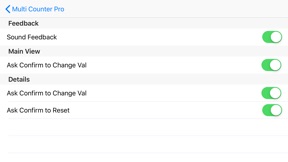
• Optional confirmation request of any add and subtract or reset operation
• Optional audio feedback for any unit you add (so you are sure you accomplished the addition when you want to do it).
• Keeps the value counted over relaunch until you decide to reset it.
• Gives you confidence you didn’t make mistakes in counting any kind of discrete elements (specially when counting them exactly is mandatory).
ALL THE POWER OF iOS
• Requires iOS 9 or successive
• Optimized for iOS 14
• Works both for any iPhone and any iPAD, any screen size and both in portrait and landscape orientation
• Optimized for the latest generation iOS devices
What's New in Version 1.0.1
• Optimized for iOS 14
Seller
Name
Roberto Panetta
Information
Developer
Categories
Version
1.0.1
Size
1.2 MB
Game Center
No
VPP Device Licensing
Yes
Rating
Rated: 4+
Compatibility
iOS 9.0 or later
Devices
iPhone 4S, iPhone 5, iPhone 5c, iPhone 5s, iPhone 6, iPhone 6 Plus, iPhone 6s, iPhone 6s Plus, iPhone SE, iPhone 7, iPhone 7 Plus, iPhone 8, iPhone 8 Plus, iPhone X, iPhone XR, iPhone XS, iPhone XS Max, iPhone 11, iPhone 11 Pro, iPhone 11 Pro Max, iPhone SE (2nd generation), iPhone 12, iPhone 12 Pro, iPhone 12 Pro Max, iPhone 12 mini, iPhone 13, iPhone 13 Pro, iPhone 13 Pro Max, iPhone 13 mini, iPhone SE (3rd generation), iPhone 14, iPhone 14 Plus, iPhone 14 Pro, iPhone 14 Pro Max, iPad 2 (Wi-Fi), iPad 2 (3G), iPad (3rd Generation) (Wi-Fi), iPad (3rd Generation) (4G), iPad (4th Generation) (Wi-Fi), iPad (4th Generation) (4G), iPad (5th Generation) Wi-Fi, iPad (5th Generation) Wi-Fi + Cellular, iPad (6th generation) Wi-Fi, iPad (6th generation) Wi-Fi + Cellular, iPad Pro, iPad Pro (Cellular), iPad Pro (9.7-inch), iPad Pro (9.7-inch) (Cellular), iPad Pro 12.9-inch (2nd generation), iPad Pro 12.9-inch (2nd generation) Wi-Fi + Cellular, iPad Pro (10.5-inch), iPad Pro (10.5-inch) Wi-Fi + Cellular, iPad Pro (11-inch), iPad Pro (11-inch) Wi-Fi + Cellular, iPad Pro 12.9-inch (3rd generation), iPad Pro 12.9-inch (3rd generation) Wi-Fi + Cellular, iPad Air, iPad Air (Cellular), iPad Air 2, iPad Air 2 (Cellular), iPad Air (3rd generation), iPad Air (3rd generation) Wi-Fi + Cellular, iPad mini (Wi-Fi), iPad mini (4G), iPad mini Retina, iPad mini Retina (Cellular), iPad mini 3, iPad mini 3 (Cellular), iPad mini 4, iPad mini 4 (Cellular), iPad mini (5th Generation), iPad mini (5th Generation) Wi-Fi + Cellular, iPad (7th generation) Wi-Fi + Cellular, iPad Pro 11-inch (2nd generation), iPad Pro 11-inch (2nd generation) Wi-Fi + Cellular, iPad Pro 12.9-inch (4th generation), iPad Pro 12.9-inch (4th generation) Wi-Fi + Cellular, iPad Air (4th Generation) (Wi-Fi), iPad Air (4th Generation) (Wi-Fi + Cellular), iPad (8th generation) Wi-Fi, iPad (8th generation) Wi-Fi + Cellular, iPad Pro 11-inch (3rd generation), iPad Pro 11-inch (3rd generation) Wi-Fi + Cellular, iPad Pro 12.9-inch (5th Generation), iPad Pro 12.9-inch (5th Generation) Wi-Fi + Cellular, iPad (9th Generation), iPad (9th Generation) Wi-Fi + Cellular, iPad mini (6th Generation), iPad mini (6th Generation) Wi-Fi + Cellular, iPad Air (5th generation), iPad Air (5th generation) Wi-Fi + Cellular, iPad Pro 11-inch (4th generation), iPad Pro 11-inch (4th generation) Wi-Fi + Cellular, iPad Pro 12.9-inch (6th generation), iPad Pro 12.9-inch (6th generation) Wi-Fi + Cellular, iPad (10th generation), iPad (10th generation) Wi-Fi + Cellular, iPod touch (5th generation), iPod touch (6th Generation), iPod touch (7th generation)
Languages
English
App Store: Customer Ratings
Ratings & Reviews
1.0 of 5 (1 Rating)
App Store: Customer Reviews
No Entry