AboutTermsPrivacyContact
 
Updating
Planningcharts Reader

Planningcharts Reader

Released: 2018-10-27
© 2018-2024 Apollodor GmbH
Planningcharts Reader - QR Code
Version 2.0.0
4+
Download on the App Store
Version 2.0.0
4+
Download on the App Store
Released: 2018-10-27
© 2018-2024 Apollodor GmbH

iPhone Screenshots

Screenshot
Screenshot
Screenshot

iPad Screenshots

Screenshot
Screenshot
Screenshot

Description

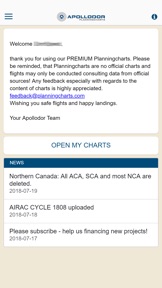
Planningcharts Reader is a tool, which keeps your Planningcharts up to date by Apollodor.
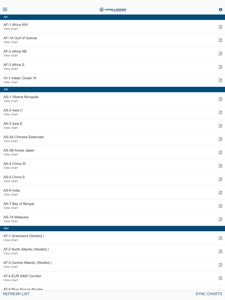
Its main purpose is, to download all charts or individual charts, whenever an online connection is available and to store those charts for offline usage.
Key features:
• Only one-time log-in required, until log-out is selected.
• Chart List can be refreshed, in case new charts are offered.
• All at once chart download possible, for most convenient service (high speed WIFI recommended).
• Individual chart downloads possible, if slow WIFI connection is used.
• Automatic news download, when starting the App.
• Link for feedback via your e-mail client.
About Planningcharts:
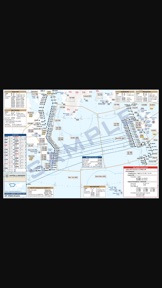
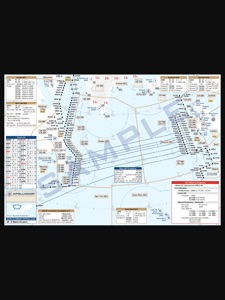
• A well-known tool used by thousands of professional long-haul pilots worldwide.
• Contain summarised information on one single chart, such as:
- Common ATC frequencies (selected regions only)
- Time frame for ATC initial calls
- Data Link (FANS/CPDLC) codes
- Time frame for Data Link (FANS/CPDLC) log-in
- IFBP (IATA Inflight Broadcasting Procedure) Reminder
• Unique developed airport symbols, containing:
- Airport categorisation
- Approach directions and capability at a single glance
• List of displayed airports, containing:
- RFF (rescue and firefighting) category
- Field elevation
- Variation
- Available runways with related approach and LDA (landing distance available)
• Made by professional pilots for professional pilots.
• NOT for navigational use! We are no navigation data provider.
Without a subscription, you only have limited access to the app's functions. You can only view some charts and cannot save them as favorites.
Our subscriptions give you access to all charts worldwide.
There are different packages for a monthly, half-yearly and yearly subscription. Each package gives you full access to the product for as long as it lasts. Each subscription can be canceled at any time.
The subscriptions follow the standard EULA from Apple https://www.apple.com/legal/internet-services/itunes/dev/stdeula/.

What's New in Version 2.0.0

Introduce IAP and redesign of App.

Seller

Name

Apollodor GmbH

Information

Categories

Version

2.0.0

Size

53.2 MB

Game Center

No

VPP Device Licensing

Yes

Rating

Rated: 4+

Compatibility

iOS 12.0 or later

Devices

iPhone 5s, iPhone 6, iPhone 6 Plus, iPhone 6s, iPhone 6s Plus, iPhone SE, iPhone 7, iPhone 7 Plus, iPhone 8, iPhone 8 Plus, iPhone X, iPhone XR, iPhone XS, iPhone XS Max, iPhone 11, iPhone 11 Pro, iPhone 11 Pro Max, iPhone SE (2nd generation), iPhone 12, iPhone 12 Pro, iPhone 12 Pro Max, iPhone 12 mini, iPhone 13, iPhone 13 Pro, iPhone 13 Pro Max, iPhone 13 mini, iPhone SE (3rd generation), iPhone 14, iPhone 14 Plus, iPhone 14 Pro, iPhone 14 Pro Max, iPhone 15, iPhone 15 Plus, iPhone 15 Pro, iPhone 15 Pro Max, iPad (5th Generation) Wi-Fi, iPad (5th Generation) Wi-Fi + Cellular, iPad (6th generation) Wi-Fi, iPad (6th generation) Wi-Fi + Cellular, iPad Pro, iPad Pro (Cellular), iPad Pro (9.7-inch), iPad Pro (9.7-inch) (Cellular), iPad Pro 12.9-inch (2nd generation), iPad Pro 12.9-inch (2nd generation) Wi-Fi + Cellular, iPad Pro (10.5-inch), iPad Pro (10.5-inch) Wi-Fi + Cellular, iPad Pro (11-inch), iPad Pro (11-inch) Wi-Fi + Cellular, iPad Pro 12.9-inch (3rd generation), iPad Pro 12.9-inch (3rd generation) Wi-Fi + Cellular, iPad Air, iPad Air (Cellular), iPad Air 2, iPad Air 2 (Cellular), iPad Air (3rd generation), iPad Air (3rd generation) Wi-Fi + Cellular, iPad mini Retina, iPad mini Retina (Cellular), iPad mini 3, iPad mini 3 (Cellular), iPad mini 4, iPad mini 4 (Cellular), iPad mini (5th Generation), iPad mini (5th Generation) Wi-Fi + Cellular, iPad (7th generation) Wi-Fi + Cellular, iPad Pro 11-inch (2nd generation), iPad Pro 11-inch (2nd generation) Wi-Fi + Cellular, iPad Pro 12.9-inch (4th generation), iPad Pro 12.9-inch (4th generation) Wi-Fi + Cellular, iPad Air (4th Generation) (Wi-Fi), iPad Air (4th Generation) (Wi-Fi + Cellular), iPad (8th generation) Wi-Fi, iPad (8th generation) Wi-Fi + Cellular, iPad Pro 11-inch (3rd generation), iPad Pro 11-inch (3rd generation) Wi-Fi + Cellular, iPad Pro 12.9-inch (5th Generation), iPad Pro 12.9-inch (5th Generation) Wi-Fi + Cellular, iPad (9th Generation), iPad (9th Generation) Wi-Fi + Cellular, iPad mini (6th Generation), iPad mini (6th Generation) Wi-Fi + Cellular, iPad Air (5th generation), iPad Air (5th generation) Wi-Fi + Cellular, iPad Pro 11-inch (4th generation), iPad Pro 11-inch (4th generation) Wi-Fi + Cellular, iPad Pro 12.9-inch (6th generation), iPad Pro 12.9-inch (6th generation) Wi-Fi + Cellular, iPad (10th generation), iPad (10th generation) Wi-Fi + Cellular, iPad Air11M2, iPad Air11M2Cellular, iPad Air13M2, iPad Air13M2Cellular, iPad Pro11M4, iPad Pro11M4Cellular, iPad Pro13M4, iPad Pro13M4Cellular, iPod touch (6th Generation), iPod touch (7th generation)

Languages

English

App Store: Customer Ratings

Ratings & Reviews

5.0 of 5 (1 Rating)

App Store: Customer Reviews

2022-02-02

Planning Charts

Excellent tool for pilots for route flying with ample data.Specially useful for Atlantic crossings for my flying
Thanks
Rajiv350
Version 1.0.0