Updating


iPhone Screenshots



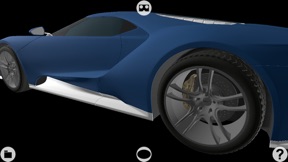


iPad Screenshots


Description
“VR Models Manager" turns your device into a three-dimensional model viewer in virtual reality (on the screen of the device or using a VR VISOR) for the design, study, simulation and detailed observation of 3D models.
Build one or more 3D models (with textures, using for example Blender, FingerCAD, Finger3D, etc...) and visualize them in virtual reality: use the screen of the device or use any VR VISOR to visualize the 3D model in CINEMA 3D mode, with the perception of the depth of the 3D model.
Build a fantasy world:
- populate the scene with one or more 3D models built by you
- insert a background
- insert the sky
Interacting manually with the 3D model you can:
- rotate the camera around the 3D model (by dragging a finger on the screen) -> rotate the 3D model around its vertical or lateral axes
- move the camera to the right or left (by dragging two fingers on the screen) -> move left / right / up / down the 3D model
- move the camera forward or backward (by dragging three fingers vertically on the screen) -> move the 3D model closer and further away
- rotate the camera around its horizontal axis (ROLL - rotating two fingers on the screen) -> rotate the 3D model around its front axis
- change the camera's FOV (field of view) (pinching the screen with two fingers)
- restore the initial settings of the camera (double touch with a finger)
Background of the scene and landscape:
- you can add a background/sky to the scene (horizon) by inserting for example a cylinder or a cube (with texture) in the scene, with radius/side large enough to contain the scene (the texture of the cylinder/cube will be your background/sky)
- you can build models of mountains, trees, rivers, lakes, streams, etc... and insert them in the scene to enrich the landscape
- you can add houses, cars, motorcycles, people, birds, etc...
- you can add to the scene any object you want, designed by You using 3D modelers (or purchased on the Internet: all formats compatible with SceneKit can be used such as OBJ (with MTL and TEXTURE with relative path), SCN, STL, etc...)
3D model import:
- File sharing (iTunes)
- Open In
Useful for example:
- for retailers, to show the products on sale (3D catalog: show real products not yet present in the shop ex. eyeglasses, ornaments, favors, chandeliers, etc...)
- to better visualize the model before 3D printing (the displayed model can be directly printed using 3D printers and specific printing software)
- for architecture ex. observing / studying / showing in detail a room / apartment / building not yet existing
- for engineering ex. design houses and exploring them even before starting construction work
- as a creative game (build, photograph or film fantasy worlds created by you)
- etc…
UNIVERSAL APP:
- You pay only once and run on all your devices
What's New in Version 1.2
* Minor bugs fixed
Seller
Name
Gianluca Natalini
Information
Developer
Categories
Version
1.2
Size
1 MB
Game Center
No
VPP Device Licensing
Yes
Rating
Rated: 4+
Compatibility
iOS 16.6 or later
Devices
iPhone 5s, iPhone 6, iPhone 6 Plus, iPhone 6s, iPhone 6s Plus, iPhone SE, iPhone 7, iPhone 7 Plus, iPhone 8, iPhone 8 Plus, iPhone X, iPhone XR, iPhone XS, iPhone XS Max, iPhone 11, iPhone 11 Pro, iPhone 11 Pro Max, iPhone SE (2nd generation), iPhone 12, iPhone 12 Pro, iPhone 12 Pro Max, iPhone 12 mini, iPhone 13, iPhone 13 Pro, iPhone 13 Pro Max, iPhone 13 mini, iPhone SE (3rd generation), iPhone 14, iPhone 14 Plus, iPhone 14 Pro, iPhone 14 Pro Max, iPhone 15, iPhone 15 Plus, iPhone 15 Pro, iPhone 15 Pro Max, iPhone 16, iPhone 16 Plus, iPhone 16 Pro, iPhone 16 Pro Max, iPhone 16e, iPad (5th Generation) Wi-Fi, iPad (5th Generation) Wi-Fi + Cellular, iPad (6th generation) Wi-Fi, iPad (6th generation) Wi-Fi + Cellular, iPad Pro, iPad Pro (Cellular), iPad Pro (9.7-inch), iPad Pro (9.7-inch) (Cellular), iPad Pro 12.9-inch (2nd generation), iPad Pro 12.9-inch (2nd generation) Wi-Fi + Cellular, iPad Pro (10.5-inch), iPad Pro (10.5-inch) Wi-Fi + Cellular, iPad Pro (11-inch), iPad Pro (11-inch) Wi-Fi + Cellular, iPad Pro 12.9-inch (3rd generation), iPad Pro 12.9-inch (3rd generation) Wi-Fi + Cellular, iPad Air, iPad Air (Cellular), iPad Air 2, iPad Air 2 (Cellular), iPad Air (3rd generation), iPad Air (3rd generation) Wi-Fi + Cellular, iPad mini Retina, iPad mini Retina (Cellular), iPad mini 3, iPad mini 3 (Cellular), iPad mini 4, iPad mini 4 (Cellular), iPad mini (5th Generation), iPad mini (5th Generation) Wi-Fi + Cellular, iPad (7th generation) Wi-Fi + Cellular, iPad Pro 11-inch (2nd generation), iPad Pro 11-inch (2nd generation) Wi-Fi + Cellular, iPad Pro 12.9-inch (4th generation), iPad Pro 12.9-inch (4th generation) Wi-Fi + Cellular, iPad Air (4th Generation) (Wi-Fi), iPad Air (4th Generation) (Wi-Fi + Cellular), iPad (8th generation) Wi-Fi, iPad (8th generation) Wi-Fi + Cellular, iPad Pro 11-inch (3rd generation), iPad Pro 11-inch (3rd generation) Wi-Fi + Cellular, iPad Pro 12.9-inch (5th Generation), iPad Pro 12.9-inch (5th Generation) Wi-Fi + Cellular, iPad (9th Generation), iPad (9th Generation) Wi-Fi + Cellular, iPad mini (6th Generation), iPad mini (6th Generation) Wi-Fi + Cellular, iPad Air (5th generation), iPad Air (5th generation) Wi-Fi + Cellular, iPad Pro 11-inch (4th generation), iPad Pro 11-inch (4th generation) Wi-Fi + Cellular, iPad Pro 12.9-inch (6th generation), iPad Pro 12.9-inch (6th generation) Wi-Fi + Cellular, iPad (10th generation), iPad (10th generation) Wi-Fi + Cellular, iPad Air 11-inch (M2) Wi-Fi, iPad Air 13-inch (M2) Wi-Fi, iPad Air 13-inch (M2) Wi-Fi + Cellular, iPad Pro 11-inch (M4) Wi-Fi, iPad Pro 11-inch (M4) Wi-Fi + Cellular, iPad Pro 13-inch (M4) Wi-Fi, iPad Pro 13-inch (M4) Wi-Fi + Cellular, iPad mini (A17 Pro) Wi-Fi, iPad mini (A17 Pro) Wi-Fi + Cellular, iPad (A16) Wi-Fi, iPad (A16) Wi-Fi + Cellular, iPad Air 11-inch (M3) Wi-Fi, iPad Air 11-inch (M3) Wi-Fi + Cellular, iPad Air 13-inch (M3) Wi-Fi, iPad Air 13-inch (M3) Wi-Fi + Cellular, iPod touch (6th Generation), iPod touch (7th generation)
Languages
English
App Store: Customer Ratings
Ratings & Reviews
0.0 of 5 (No rating)
App Store: Customer Reviews
No Entry