AboutTermsPrivacyContact
 
Updating
MusicFolder 2

MusicFolder 2

Released: 2018-04-04
© 2024 Alexander Ewering t/a Seven Systems
MusicFolder 2 - QR Code
Version 2.12
4+
Download on the App Store
Version 2.12
4+
Download on the App Store
Released: 2018-04-04
© 2024 Alexander Ewering t/a Seven Systems

iPhone Screenshots

Screenshot
Screenshot
Screenshot
Screenshot
Screenshot

Description

Simple, no-frills music player for "oldschool" users who have a music library based on a folder structure instead of tags / metadata.
This app is SIMPLISTIC BY DESIGN and does NOT HAVE A LOT OF FEATURES! However, those features that it DOES have work GREAT!
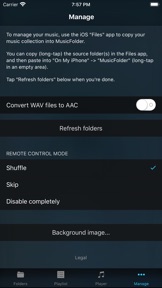
IMPORTANT: You cannot use MusicFolder to play music from the regular "Music" app. Instead, you use the iPhone's "Files" app to copy your folder-based music library from your computer (or anywhere else) into MusicFolder.
- Supported file formats: mp3, mp4, m4a, aac, alac, wav, adts, ac3, aiff, aifc, caf, snd, au, sd2.
- GAPLESS PLAYBACK for all file formats.
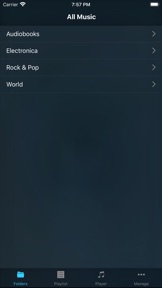
- Straightforward playlist concept: the playlist always simply consists of all songs in the current folder and its subfolders.
- Fast interactive PLAYLIST SEARCH.
- Smart folders that show your most listened to or most recently played songs.
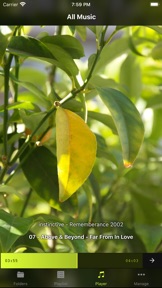
- GESTURE-BASED CONTROL, no need to look at the screen: swipe up/down to shuffle, swipe left/right to skip, double-tap to play/stop, hold and slide up/down for volume control.
- Interactive SCRUBBING through the current song with the realtime seek bar, including waveform preview.
- Configurable behavior at the end of a song and on remote control events (headphones / Control Center): skip, shuffle, stop, repeat.
- Simple music library transfer and management using the iPhone's Files app.
- Optional AUTOMATIC CONVERSION of newly added WAV files to AAC (various quality levels available) or ALAC (Apple Lossless).
- Full remote control support for headphones and Control Center.
- Full AIRPLAY support.
- Supports portrait and landscape orientation.
- Selecting a photo from your photo library will auto-generate a theme based on the photo's color structure.
IMPORTANT: The app is STRICTLY for FOLDER-BASED libraries and does NOT support ANY kind of tags, cover art, or other metadata inside files. However, for people keeping their music library organized in folders "the oldschool way" and seeking a simple, stable, gapless-capable, no-frills portable player, this app is a godsend!
Let us know if you have any suggesions or issues via our support page!

What's New in Version 2.12

NEW:
- Player volume can now be adjusted by holding anywhere on the player screen and then sliding up/down. This adjustment is independent of the hardware volume or other apps. It can also be used to pause (slide down to zero) or resume (slide up from zero) playback.
IMPROVEMENTS:
- Prevent MusicFolder from stopping when playing certain corrupted audio files in gapless mode.
FIXES:
- Fix extremely rare crashes in edge cases.

Seller

Name

Alexander Ewering

URL

Information

Categories

Version

2.12

Size

1.9 MB

Game Center

No

VPP Device Licensing

Yes

Rating

Rated: 4+

Compatibility

iOS 14.2 or later

Devices

iPhone 5s, iPhone 6, iPhone 6 Plus, iPhone 6s, iPhone 6s Plus, iPhone SE, iPhone 7, iPhone 7 Plus, iPhone 8, iPhone 8 Plus, iPhone X, iPhone XR, iPhone XS, iPhone XS Max, iPhone 11, iPhone 11 Pro, iPhone 11 Pro Max, iPhone SE (2nd generation), iPhone 12, iPhone 12 Pro, iPhone 12 Pro Max, iPhone 12 mini, iPhone 13, iPhone 13 Pro, iPhone 13 Pro Max, iPhone 13 mini, iPhone SE (3rd generation), iPhone 14, iPhone 14 Plus, iPhone 14 Pro, iPhone 14 Pro Max, iPhone 15, iPhone 15 Plus, iPhone 15 Pro, iPhone 15 Pro Max, iPhone 16, iPhone 16 Plus, iPhone 16 Pro, iPhone 16 Pro Max, iPhone 16e, iPhone 17, iPhone 17 Pro, iPhone 17 Pro Max, iPhone Air, iPhone 17e, iPad (5th Generation) Wi-Fi, iPad (5th Generation) Wi-Fi + Cellular, iPad (6th generation) Wi-Fi, iPad (6th generation) Wi-Fi + Cellular, iPad Pro, iPad Pro (Cellular), iPad Pro (9.7-inch), iPad Pro (9.7-inch) (Cellular), iPad Pro 12.9-inch (2nd generation), iPad Pro 12.9-inch (2nd generation) Wi-Fi + Cellular, iPad Pro (10.5-inch), iPad Pro (10.5-inch) Wi-Fi + Cellular, iPad Pro (11-inch), iPad Pro (11-inch) Wi-Fi + Cellular, iPad Pro 12.9-inch (3rd generation), iPad Pro 12.9-inch (3rd generation) Wi-Fi + Cellular, iPad Air, iPad Air (Cellular), iPad Air 2, iPad Air 2 (Cellular), iPad Air (3rd generation), iPad Air (3rd generation) Wi-Fi + Cellular, iPad mini Retina, iPad mini Retina (Cellular), iPad mini 3, iPad mini 3 (Cellular), iPad mini 4, iPad mini 4 (Cellular), iPad mini (5th Generation), iPad mini (5th Generation) Wi-Fi + Cellular, iPad (7th generation) Wi-Fi + Cellular, iPad Pro 11-inch (2nd generation), iPad Pro 11-inch (2nd generation) Wi-Fi + Cellular, iPad Pro 12.9-inch (4th generation), iPad Pro 12.9-inch (4th generation) Wi-Fi + Cellular, iPad Air (4th Generation) (Wi-Fi), iPad Air (4th Generation) (Wi-Fi + Cellular), iPad (8th generation) Wi-Fi, iPad (8th generation) Wi-Fi + Cellular, iPad Pro 11-inch (3rd generation), iPad Pro 11-inch (3rd generation) Wi-Fi + Cellular, iPad Pro 12.9-inch (5th Generation), iPad Pro 12.9-inch (5th Generation) Wi-Fi + Cellular, iPad (9th Generation), iPad (9th Generation) Wi-Fi + Cellular, iPad mini (6th Generation), iPad mini (6th Generation) Wi-Fi + Cellular, iPad Air (5th generation), iPad Air (5th generation) Wi-Fi + Cellular, iPad Pro 11-inch (4th generation), iPad Pro 11-inch (4th generation) Wi-Fi + Cellular, iPad Pro 12.9-inch (6th generation), iPad Pro 12.9-inch (6th generation) Wi-Fi + Cellular, iPad (10th generation), iPad (10th generation) Wi-Fi + Cellular, iPad Air 11-inch (M2) Wi-Fi, iPad Air 13-inch (M2) Wi-Fi, iPad Air 13-inch (M2) Wi-Fi + Cellular, iPad Pro 11-inch (M4) Wi-Fi, iPad Pro 11-inch (M4) Wi-Fi + Cellular, iPad Pro 13-inch (M4) Wi-Fi, iPad Pro 13-inch (M4) Wi-Fi + Cellular, iPad mini (A17 Pro) Wi-Fi, iPad mini (A17 Pro) Wi-Fi + Cellular, iPad (A16) Wi-Fi, iPad (A16) Wi-Fi + Cellular, iPad Air 11-inch (M3) Wi-Fi, iPad Air 11-inch (M3) Wi-Fi + Cellular, iPad Air 13-inch (M3) Wi-Fi, iPad Air 13-inch (M3) Wi-Fi + Cellular, iPad Pro 11-inch (M5) Wi-Fi, iPad Pro 11-inch (M5) Wi-Fi + Cellular, iPad Pro 13-inch (M5) Wi-Fi, iPad Pro 13-inch (M5) Wi-Fi + Cellular, iPad Air11M4, iPad Air11M4Cellular, iPad Air13M4, iPad Air13M4Cellular, iPod touch (6th Generation), iPod touch (7th generation)

Languages

English, German

App Store: Customer Ratings

Ratings & Reviews

4.0 of 5 (9 Ratings)

App Store: Customer Reviews

2025-12-26

excellent

I've tried so many music players for iOS. My mp3s are all properly tagged, titled with numbers first, then put into folders for each artist. I've spent a lot of time organizing my music files only to have other music players on iOS shuffle my songs, disrespect my tags, reorganize my mp3s by genre, or copy all my mp3s into one huge disorganized folder.
I am so grateful to find an easy to use music player that simply plays the songs in my music folders in the order expected. It works well and sounds great. Thank you Alexander!
guitardist
Version 2.12
2023-07-21

Can’t download music to phone

Instructions for how to download music to phone don’t work. No way of contacting the devs is provided.
cecilburrow
Version 2.10
2022-07-01

Works great

Allows me to add music to a nice and simple folder and then play it all from my phone. No itunes syncing required😌
I do think itd be nice to have a way to sort by newly added music rather then just alphabetically.
mattyboy004
Version 2.7
2021-08-02

Stops after second song

Give an error after second song while playing the music list
Armageddondd
Version 2.4
2020-06-10

Too difficult

Not like the android app. Deleted it. How do we get a refund?
writtenbyclint
Version 2.3
2018-08-29

MusicFolder app

I needed a way to play audio book files in folders on my Windows 10 laptop created from ripping CDs —with the tracks playing in the correct order, the order they appear in their folders, on my iPod Touch. This app handles it. It works. Thanks.
CurlyBB
Version 2.0.2