AboutTermsPrivacyContact
 
Updating
SMS Filter+

SMS Filter+

Released: 2017-11-21
SMS Filter+ - QR Code
Version 12.1.2
4+
Download on the App Store
Version 12.1.2
4+
Download on the App Store
Released: 2017-11-21

iPhone Screenshots

Screenshot
Screenshot
Screenshot
Screenshot
Screenshot

iPad Screenshots

Screenshot
Screenshot
Screenshot

Description

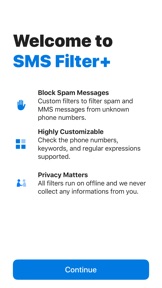
This is a safe, efficient and professional SMS filter. Custom filters help you to filter spam and MMS messages from unknown phone numbers.
All verification activities occur in a closed and secured process provided by iOS, without the need to connect to the network throughout, and SMS Filter+ will not read, collect or tag your messages.
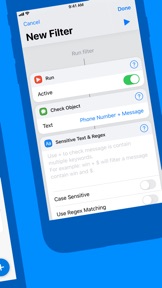
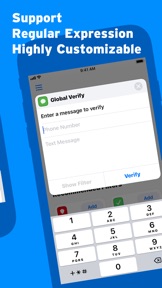
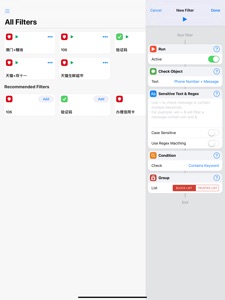
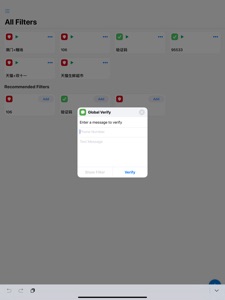
SMS Filter+ will check the phone numbers, text messages containing multiple keywords, start/end keywords, or regular expressions and other advanced features.
How it works:
When a message comes, SMS Filter+ will always go through your Trusted List. If your Trusted List can not make a match, then SMS Filter+ will go through your Blocked List, message will be filtered if it matches a Block Filter.
Uncontrollable behavior:
Filtered SMS messages will be classified in “Unknown & Junk”.
The Message app will silently display the unread messages.
Controllable behavior:
You will not be disturbed by spam during work, rest, or when you are on your phone (such as gaming or reading).

What's New in Version 12.1.2

• Bug fixed.
Hi thank your for using SMS Filter+!

Seller

Name

yicai yang

URL

Information

Developer

Categories

Version

12.1.2

Size

29.3 MB

Game Center

No

VPP Device Licensing

Yes

Rating

Rated: 4+

Compatibility

iOS 11.0 or later

Devices

iPhone 5s, iPhone 6, iPhone 6 Plus, iPhone 6s, iPhone 6s Plus, iPhone SE, iPhone 7, iPhone 7 Plus, iPhone 8, iPhone 8 Plus, iPhone X, iPhone XR, iPhone XS, iPhone XS Max, iPhone 11, iPhone 11 Pro, iPhone 11 Pro Max, iPad (5th Generation) Wi-Fi, iPad (5th Generation) Wi-Fi + Cellular, iPad (6th generation) Wi-Fi, iPad (6th generation) Wi-Fi + Cellular, iPad Pro, iPad Pro (Cellular), iPad Pro (9.7-inch), iPad Pro (9.7-inch) (Cellular), iPad Pro 12.9-inch (2nd generation), iPad Pro 12.9-inch (2nd generation) Wi-Fi + Cellular, iPad Pro (10.5-inch), iPad Pro (10.5-inch) Wi-Fi + Cellular, iPad Pro (11-inch), iPad Pro (11-inch) Wi-Fi + Cellular, iPad Pro 12.9-inch (3rd generation), iPad Pro 12.9-inch (3rd generation) Wi-Fi + Cellular, iPad Air, iPad Air (Cellular), iPad Air 2, iPad Air 2 (Cellular), iPad Air (3rd generation), iPad Air (3rd generation) Wi-Fi + Cellular, iPad mini Retina, iPad mini Retina (Cellular), iPad mini 3, iPad mini 3 (Cellular), iPad mini 4, iPad mini 4 (Cellular), iPad mini (5th Generation), iPad mini (5th Generation) Wi-Fi + Cellular, iPad (7th generation) Wi-Fi + Cellular, iPod touch (6th Generation), iPod touch (7th generation)

Languages

English, Chinese

App Store: Customer Ratings

Ratings & Reviews

4.0 of 5 (113 Ratings)

App Store: Customer Reviews

2019-10-15

Can’t match against the phone’s contact list

If you don’t want to get texts from people that aren’t on your contact list, it is very cumbersome to set up.
You need to reject the regex .* and then add a separate “trusted” filter for every phone number of every one of your contacts. It takes forever.
I’m still hunting for the sms blocking app that lets me reject everything not on my contact list with one tap. This isn’t it.
RobotZombie
Version 11.60
2019-10-14

Cheap, a little confusing at first but works great for me

I started looking into sms filter apps because I get spammed with 30+ texts a day, which are actually newsletters from email, and ATT gives messages going through gateway addresses a new temporary number on every message. I didn’t want to manually block all 2000 possible numbers.
The other sms filter app options often had bad reviews, or were free but required payment for useful features. This app was $1, and allows me to block texts by filtering content of the phone number, message content, or both. The instructions are a bit unclear and confusing for some parts, I don’t think the creator is a native English speaker. Regardless, once I figured it all out, it works fantastic. In my case, texts were coming from 1 (410) 200-xxxx or 1 (410) 100-xxxx, so I started by creating a filter and setting filter content type to “phone number”, so I could block all texts from these numbers. This will block gateway address messages in the future, but I don’t need them. Next, I enabled the Regex option, and entered the numbers based on the regex guide. Note that phone numbers, when considered by the filter, won’t have spaces, parentheses, or hyphens. Took me a bit to figure that out. The regex syntax for saying “block this number and this one” was: (410100|410200). That’s it. Then enable filtering based on the apps instructions in your settings.
assfffasdf
Version 11.60
2019-10-02

Work as Intended

The regex support is wonderful. Could you add an option to delete recommended filters?
Sayz Lim
Version 11.60
2019-08-23

Wonderful easy design

A good app with wonderful design. But according to its instructions, the app only works for SMS spam messages, not for iMessage. So useless for me.
Hope the developer could support iMessage.
Whiskey-Yankee
Version 11.40.10
2019-06-02

It’s not always work on 12.3.1

Please fix it.
J.Wang.
Version 11.30
2018-10-13

SMS +

Does not work period. Don’t bother!!!!!!
dont like google asst.
Version 11.2.10
2018-05-11

Great

It can edit the regex now. Much more convenient.
A small opinion though:
After when I uninstall and reinstall the app (e.g. to solve some bug), all the filters are gone for good.
Hope it can sync/export rules to iCloud/Files in iOS 11 in the future.
qiulingewasi
Version 11.2.10