AboutTermsPrivacyContact
 
Updating
Microsoft Planner

Microsoft Planner

Released: 2017-05-18
© 2015 Microsoft Corporation. All rights reserved.
Microsoft Planner - QR Code
Version 1.3.1
4+
Download on the App Store
Version 1.3.1
4+
Download on the App Store
Released: 2017-05-18
© 2015 Microsoft Corporation. All rights reserved.

iPhone Screenshots

Screenshot
Screenshot
Screenshot
Screenshot

iPad Screenshots

Screenshot

Description

Microsoft Planner requires an eligible Office 365 work or school subscription. This app does not support Office 365 personal accounts (for example: name@outlook.com or name@hotmail.com). If you are not sure about your company’s subscription or the services you have access to, please contact your IT department.
Planner provides a simple, visual way to organize teamwork. Planner makes it easy for your team to create new plans, organize and assign tasks, share files, chat about what you’re working on, and get updates on progress.
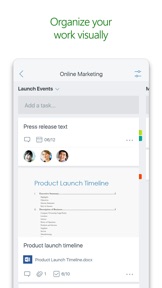
-- Organize work visually --
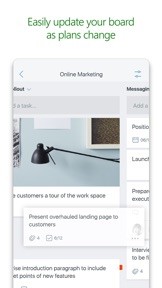
Each plan has its own board, where you can organize tasks into buckets. You can categorize tasks based on their status or on whom they’re assigned to. To update the status or change assignments, just drag and drop tasks between columns.
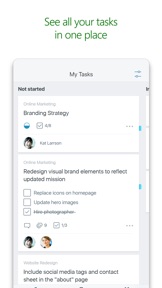
-- Visibility --
The My Tasks view provides a comprehensive list of all your tasks and their status across all your plans. When working together on a plan, team members always know who is working on what.
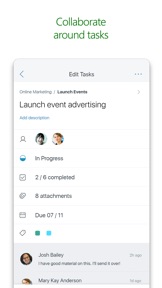
-- Collaborate --
Built for Office 365, Planner lets you work together on the same tasks, attach captured photos directly to them, and even have conversations around tasks without switching between apps. With Planner, all your team’s discussions and deliverables stay with the plan and don’t get locked away across disparate applications.
-- Works across devices --
Planner works across all your devices. And with Planner, everyone is always on the same page. Continue conversations and updates tasks while on-the-go or at your desk.
Terms of service: https://go.microsoft.com/fwlink/?linkid=846830
Privacy policy: https://go.microsoft.com/fwlink/?LinkId=521839
To learn more, please visit https://go.microsoft.com/fwlink/?linkid=849067
The Microsoft Planner app will request permission to access your photos and your camera: When you try to attach a photo to a Planner task, the app requests permission to access your Photos app in order to select images. If you choose to take a photo to attach to a Planner task, the app will request permission to access your Camera app.

What's New in Version 1.3.1

The Planner app now supports iPad!
Thank you for using Planner.
We regularly release updates to the app, which include great new features, as well as improvements for speed and reliability.
Seller

Name

Microsoft Corporation

URL

Information

Categories

Version

1.3.1

Size

91.8 MB

Game Center

No

VPP Device Licensing

Yes

Rating

Rated: 4+

Compatibility

iOS 9.0 or later

Devices

iPad Air, iPad mini 4 (Cellular), iPad mini 3, iPad mini (5th Generation), iPad Pro (11-inch) Wi-Fi + Cellular, iPad (5th Generation) Wi-Fi + Cellular, iPad (6th generation) Wi-Fi + Cellular, iPad Pro, iPad mini (5th Generation) Wi-Fi + Cellular, iPad Pro 12.9-inch (3rd generation), iPod touch (6th Generation), iPad mini Retina (Cellular), iPad Air (Cellular), iPad Air 2 (Cellular), iPad mini 4, iPad Pro 12.9-inch (3rd generation) Wi-Fi + Cellular, iPad Pro 12.9-inch (2nd generation), iPad (5th Generation) Wi-Fi, iPad Air (3rd generation) Wi-Fi + Cellular, iPad Pro (Cellular), iPad Pro 12.9-inch (2nd generation) Wi-Fi + Cellular, iPhone 8 Plus, iPad Pro (9.7-inch), iPhone XR, iPad Air 2, iPad (6th generation) Wi-Fi, iPad Air (3rd generation), iPhone 8, iPad Pro (10.5-inch) Wi-Fi + Cellular, iPhone 6s, iPad Pro (9.7-inch) (Cellular), iPhone 7, iPhone 7 Plus, iPhone XS Max, iPhone 6, iPhone X, iPhone 6 Plus, iPhone XS, iPad Pro (10.5-inch), iPhone SE, iPhone 5s, iPhone 6s Plus, iPad mini 3 (Cellular), iPad Pro (11-inch)

Languages

English, Catalan, Chinese, Croatian, Czech, Danish, Dutch, Finnish, French, German, Greek, Hungarian, Indonesian, Italian, Japanese, Korean, Norwegian Bokmål, Polish, Portuguese, Romanian, Russian, Slovak, Spanish, Swedish, Thai, Turkish, Ukrainian, Vietnamese

App Store: Customer Ratings

Ratings & Reviews

4.0 of 5 (320 Ratings)

App Store: Customer Reviews

2017-11-29

Rudimentary

It would be nice if Microsoft could get it together. Every time they come out with an app, it doesn’t work as intended. If you click a link to a document embedded in a task it reports error 912. This renders the app useless as it will not open docs in the OneDrive app or in OneDrive online. It works “somewhat as intended” on the IPhone: It wont open in OneDrive, but after 3 clicks on the request to open in browser, it finally will open the document. Really, Are you doing any QA testing before you release. This product should be somewhat mature and not have Mickey Mouse issues at this point. No insult intended to Mickey!
Arealscreenplay
Version 1.3.1
2017-11-28

Good

Just need the graph option here to get five stars
TamaraJJ
Version 1.2.6
2017-11-27

The Ultimate To-Do!

I've been using Wunderlist for years now, and it's a nice app but it's not what one would call "business class," Microsoft Planner however is wonderful! It's polished, powerful, simple, a true joy to use. My only gripe is, this isn't available for everyone with a standard Live account. I think I speak for the majority of people when I say I would gladly pay for the privilege to use this app as a standalone product. It's THAT good!
averagejohn
Version 1.2.6
2017-11-15

Like it

Helped to plan my work!!
Skgurjar
Version 1.2.6
2017-11-15

Great app

I use this to keep track of my tasks I need to do. I can add my own and my boss can add them as well. I love this app! It makes it really easy to keep track of things and cross them off my list.
ontotheshore
Version 1.2.6
2017-11-08

iPad

Needs an iPad friendly version.
Holodoctor1
Version 1.2.6
2017-11-03

Awesome!

Will give 5 star after it gets optimized for IPad Pro
andres.cardenas7
Version 1.2.6
2017-11-03

Tagging

I love how you can assign tasks but your comments cannot be tagged to call out a specific person, not can the checklist be assigned to a specific person. We use a group and in some cases not all portions are relevant to each person but holistically we Are aiming to complete the said task/Project. Still learning the tool but liking what is there. Just needs some more product enhancements.
Momlissa516
Version 1.2.6
2017-10-30

Worked great ! Needs iPad app

Great app, finally it makes life easier, and on the go.
Would be great to have an iPad version.
Hayyan
Version 1.2.6
2017-10-18

Plans aren’t synchronized properly

I have 9 plans. All visible and editable in the web, but the iOS app only get 5. One plan is Shawn twice. Please fix. Other than that, the app is really awesome. Keep up good work!
Dr. Stormer
Version 1.2.6
2017-10-17

Good start, but lacking essential features

Missing these essential features:
1) Export to speadsheet
2) Can't archive a bucket/board
3) No recycle bin for deleted tasks/buckets
4) No calendar view
5) You can't view/sort by labels
6) No ability to view all files attached on a board
7) No search
8) No permission levels
Apple user 077921
Version 1.2.3
2017-10-17

Great app, needs templates

Planner is great for managing projects. I use it for a small team.
Right now its missing two things.
1. Templates to for repeating projects.
2. A calendar view by project and due date.
NJRockStar
Version 1.2.3
2017-10-06

Love it but lacks color customization features

Really like the planner.
Just wish I could change the colors of the task not just label it.
sunshinefrawg
Version 1.2.3
2017-10-05

Disappointed

After last update if you assign someone a task or try to open up a task to do anything it crashes and closes. So let down. This impacts my business and should have been caught before being released. Hope it’s fixed ASAP!!
51tech
Version 1.2.3
2017-10-03

Please, optimize it for iPad

Love this app but I often work from my iPad in Landscape mode. This makes me use web version instead of the App.
FTOTF
Version 1.2.3
2017-09-26

Can't believe I'm rating a Microsoft app 5 stars

I really like this app. It's the right blend of simplicity and power. Feels a lot like how I tried to make Wunderlist work for business years ago but it never really did. This feels cleaner and less friction overall than Trello. Keep up the great work.
I don't use Teams though. I'd love to get this hooked up to Slack.
One thing I'd change: after clicking into a task from the 'My Tasks' section, the name of the Plan is in the upper left, next to the Bucket Name. Clicking the Plan name should take me to the Plan, not to change the bucket, like makes sense would happen when you click on the bucket name. I can't seem to get back to the Plan unless I go to the Planner Hub. Just a few extra clicks that mightn't be needed...
rpee
Version 1.2.3
2017-09-21

Progressing Well

Planner is certainly functional. I like the enhancements. However, many more to go.
TonyShoots
Version 1.2.1
2017-09-20

Loses checklists

The app has stopped syncing properly. I enter checklists and they get lost. I have to re enter the checklists more than once. Going to stop using this app.
mcrobot
Version 1.2.1
2017-09-18

This app was new to Planner

I think you sometimes some of the people from my teacher
This a Cat
Version 1.2.1
2017-09-15

In ❤️

I'm truly in love with this app. I'm always planning several projects at once and it's a convenient, affordable way to stay on top of things.
Lydia
Lyd Phondice
Version 1.2.1
2017-09-12

You really need some push notifications

What is the use of a task manger that can't remind you when something is due, overdo, upcoming, etc... also need tasks that repeat on a scheduled basis.
NambeRuger
Version 1.1.1
2017-09-11

Unimpressive!

Lacks form or function. A short-lived app.
txwest1
Version 1.2.1
2017-09-11

Works great

I like the sync, visibility to others, and card view with checklist. It takes a little to get the hang of this interface but once you do, you can realize the benefits. I even use it for study and organizing complex topics.
appsbydave
Version 1.2.1
2017-09-09

Ok for basic viewing of tasks but needs update

The app is fine for viewing basic tasks, but needs support for iPad and to look like the graphics that you see in office 365.
Gamebizboy
Version 1.2.1
2017-09-04

Very intuitive and useful

I've just started using Planner (via web and iPhone app), but I'm already really liking it. It looks especially useful when used in conjunction with Teams (I love Teams).
This will likely replace Trello for us.
What's missing is an iPad app. The web version works well on iPad, but it would be nice to have a dedicated app. It would also be nice to have Apple Watch support.
wm57
Version 1.1.1
2017-09-04

Not good on iPad

MS DID NOT UPDATE APP WITH FEATURES FOR IPAD
JUST A CLONE OF IPHONE APP
TWOenterprises
Version 1.1.1
2017-08-30

Cannot complete my request

I have my "Plan" set, but I cannot add any buckets. Every time I try, it says I cannot complete my request. I like this idea, but I just wish it worked.
MiladyOfScott
Version 1.1.1
2017-08-27

Extremely useful

This is great to use in conjunction with the online version or by itself.
MCCoyle08
Version 1.1.1
2017-08-23

Great app!

Very clean and simple project planning tool.
Tim_MEM
Version 1.1.1
2017-08-09

Not too shabby

I've been anxiously awaiting the Planner app since I first stumbled on the web version. Easy to use and no real learning curve as the UI is fairly seamless from the web version.
I wouldn't mind seeing the charts in the app but for on-the-go task tracking, I'm quite pleased!
DeaconLordJob
Version 1.0.3
2017-08-04

Decent for 1.0 App

Pretty good for tracking tasks that have been assigned to you. No way to view tasks you have signed to others or create new tasks.
trvincanity15
Version 1.0.3
2017-08-03

Need reminder notification

Great app for group tasks. Hope to have push notifications when task is due and reminder notifications
guru1191
Version 1.0.3
2017-07-14

👌

So grateful this app made it to the App Store. Thank you!
Kaela3000
Version 1.0.3
2017-07-07

Love it!

Love the app!
welfare and food stamps
Version 1.0.3
2017-07-02

On the right track.

Really enjoy where they are heading with this application. It's beginning to take the shape of becoming the MOST used app. Thank you developing it. Really believe that lots of resources should be directed to it..
seb5000
Version 1.0.3
2017-07-01

Good app

Good app for collaborating with team members. Needs a few upgrades: iPad version, offline access, reminders to be linked to calendar. So far so good. Looking forward to more features and upgrades.
SD605
Version 1.0.3
2017-07-01

Works Great

After the most recent upgrade it resolved the issues I was having logging in. I am able to create and assign tasks as well as update heir status from the app. This works great when I am out of the office and need to be able to track the status on my projects.
ashleighadele41
Version 1.0.3
2017-06-30

Cannot login to organisational page

This app starts redirecting to our corporate login and then stops and goes back to the login page.....I can't even get past the login screen yet - come on Microsoft Development team - I know you can do better.
Update: The Microsoft team came through and fixed the issue.
Itvmo
Version 1.0.3
2017-06-30

Can't Log in!!!!

Won't accept my 365 login credentials!!!! Says I'm not in the system!
I don't have a personal account! I don't have outlook.com or hotmail.com. It's my business email. Shouldn't you ask me first before telling me that's my problem?
Jim Riggs
Version 1.0.3
2017-06-28

Easy to use

Great app with a great UI, very responsive and good layout. Can't wait for the app to support creating a plan.
Stephan Pastis
Version 1.0.3
2017-06-27

So far so good

So glad is app is finally available. I use this as to-do lists for myself that are categorized. I love the structure, but I wish I could sort my tasks by due date so that I can take a quick glance at what's due today or overdue to prioritize.
Pixel8d
Version 1.0.2
2017-06-25

No iPad version

Not sure why Microsoft chose to release this as an iPhone version only, but it makes no sense. I would use more planner on the web as part of my O365 subscription, and stay away from other apps like to trello, but without an iPad version it's worthless.
Howardd21
Version 1.0.2
2017-06-24

Yet another incomplete Microsoft app

Why can't you guys finish one app instead of releasing a whole bunch of un-usable incompletely apps.
I really want to give Microsoft a try but apps like Planner and teams haven't been updated in months.
mnvador
Version 1.0.2
2017-06-23

Plans don't work

Plans built on web interface not showing up in the app - useless until this happens.
Jonesy_Lee
Version 1.0.2
2017-06-22

Not particularly useful

Slow to update. Not all plans shown.
Darmoth
Version 1.0.2
2017-06-22

Plans don't show up/update at all

The plans created on the web don't show up on the mobile app. If for some mysterious reason plans show on the mobile app then When they get updates (titles etc) the updates don't reflect on the app either.
ykarabag
Version 1.0.2
2017-06-21

Can't see plans. Can't create tasks.

What's the point of this app if I can't see or update my tasks?
HLEdwards
Version 1.0.2
2017-06-20

Works nicely

Decent app to track and stay on top of action items. It would still be ideal to have a desktop application.
TheJoeFin
Version 1.0.2
2017-06-16

Can't access my plans

I have plans that I already created on the desktop/web version. Whenever I try to use the app it says none of my plans exist and that I can make one on the web. What's the point of the app if I can't access my stuff or make stuff?
VerdantiOS
Version 1.0.2
2017-06-11

Can not use it

I could not use it at all without I have an access to 356 one year subscription.
pop2013r
Version 1.0
2017-06-11

Can't login to work O365 account

Enter user name and starts to "redirect to my company login page" but never gets there. Just goes back to the sign in button. I can never get to where I type my password or authenticate. Other MS apps work fine for logging in. Hoping for a fix and excited to see an app for planner!
Bikdave
Version 1.0
2017-06-09

Groups not showing up

More than half my groups / projects not showing up in the Project Hub.. is this a known issue or am I doing something wrong?
snapeed
Version 1.0
2017-06-07

Finally

Finally an app version of the planner site. Well done overall. Wish the design was more compact so we can see more items without scrolling.
viamarisol
Version 1.0
2017-06-04

Still Requires Web

This app does not really do much. In fact, to create a new plan you actually must go to the website. This should be a fully standalone app and allow me to manage plans and tasks. At this point, just use Trello.
18643
Version 1.0
2017-06-02

Released prematurely

I am fortunate enough to have an active school 365 account. However, after logging into the app, I am directed online to start a project. What's the point of the app if I have to do it online? Stop releasing products that's haven't been thought through!
Murse Dad
Version 1.0
2017-06-01

Glad to finally have it

Love it so far, still needs a few things, but getting there. Would love to see more visuals and notifications.
Wastedtime10
Version 1.0
2017-06-01

Can't login

I have an office 365 account. I log in to 5 different apps with the same email and now it won't let me on here. Try online now and it redirects me to another login for work or school account the won't let me use my email to login. It is the only email I have ever used. Now I'm locked out of online 365. What a joke. Real happy to be a paying customer with no functionality. Excel keeps kicking me out on IPad Pro as well.
Rbgiii
Version 1.0
2017-05-31

Great app for an amazing product

If you are a professional using MS Planner with your Enterprise Office 365 account this app is a great mobile extension.
todger29
Version 1.0
2017-05-29

Great app!

Great app, the UI is responsive and I love the drag and drop feature. Easy to log in (you need a O365 account to access this app)and I love the seamless transformation from the desktop to mobile app.
CasInLasvegas
Version 1.0
2017-05-19

Won't take me to my organizations login

I'm able to enter my Microsoft login and then it just takes me back to the main login screen. It never takes me to my organizations login page like the other Microsoft office 365 apps do.
JMikeM
Version 1.0
2017-05-19

Good App

Glad to see the app finally arrive! Good functionality. In upcoming releases it would be nice to see favorite planners on the long press of the icon.
Snodripple
Version 1.0
2017-05-17

Great app!

Works just like the online version. Lots of features and really fast
thenoblerush
Version 1.0