AboutTermsPrivacyContact
 
Updating
Exacto

Exacto

Released: 2016-12-25
© Samer Azzam
Exacto - QR Code
Version 2.7
4+
Download on the App Store
Version 2.7
4+
Download on the App Store
Released: 2016-12-25
© Samer Azzam

iPhone Screenshots

Screenshot
Screenshot
Screenshot
Screenshot
Screenshot

iPad Screenshots

Screenshot
Screenshot
Screenshot
Screenshot
Screenshot

Description

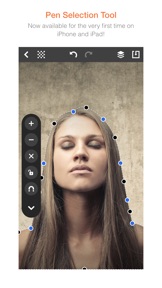
Quickly remove unwanted backgrounds or create razor-sharp photo cutouts with the Pen Selection Tool. Previously found only in advanced desktop programs, now available for the very first time on iPhone and iPad with a streamlined and much simplified implementation optimized for touch. This incredibly versatile tool offers unique capabilities unmatched by anything else on the App Store. It’s an integral part of the professional toolbox and artists and photographers have relied on it for decades. Now you can too! You no longer have to waste hours working on a single photo only to achieve less than satisfactory results. With Exacto you can make pixel-perfect selections that precisely trace the contours of any subject, no matter how intricate or complex. But that’s not all! Exacto even goes beyond the standard functionality of the Pen Selection Tool by introducing features that provide greater flexibility and control such as the ability to delete and insert points anywhere in the selection, the ability to reset control points, and most importantly, unlimited layers for making multiple selections. In addition, Exacto offers other advanced features that greatly enhance the user experience including unlimited undo / redo, projects autosave, instant preview, and much more!
Here’s how it works:
1 - Place points around an area of interest then drag them into position to make a selection.
2 - Add layers to make selections of multiple subjects and areas in your photo.
3 - Keep track of your progress with the full-size instant preview option.
4 - Made a mistake? With unlimited undo / redo your entire editing history is preserved, from start to finish. So you can go backward or forward as many steps as you need.
5 - Must leave in a hurry? With autosave your work is never lost and you can pick up right where you left off at any time.
6 - All done? Save your photo cutout to the Camera Roll or open it in other apps.
There’s no limit to the fun and exciting ways you could use your photo cutouts. For example, you could:
1 - Superimpose them on different backgrounds.
2 - Insert them in work or school presentations.
3 - Use them as stickers in chats.
4 - Use them in creating decorative art.
5 - Print them out and make actual cardboard cutouts for special occasions.
and on and on!
Experiencing issues? Have comments or suggestions for future updates? Please contact us at support@exactoapp.com.

What's New in Version 2.7

◉ Further optimizations for iOS 14 and new devices.
Experiencing issues? Have comments or suggestions for future updates? Please contact us at support@exactoapp.com.

Seller

Name

Samer Azzam

URL

Information

Developer

Categories

Version

2.7

Size

31.1 MB

Game Center

No

VPP Device Licensing

Yes

Rating

Rated: 4+

Compatibility

iOS 12.0 or later

Devices

iPhone 5s, iPhone 6, iPhone 6 Plus, iPhone 6s, iPhone 6s Plus, iPhone SE, iPhone 7, iPhone 7 Plus, iPhone 8, iPhone 8 Plus, iPhone X, iPhone XR, iPhone XS, iPhone XS Max, iPhone 11, iPhone 11 Pro, iPhone 11 Pro Max, iPhone SE (2nd generation), iPhone 12, iPhone 12 Pro, iPhone 12 Pro Max, iPhone 12 mini, iPad (5th Generation) Wi-Fi, iPad (5th Generation) Wi-Fi + Cellular, iPad (6th generation) Wi-Fi, iPad (6th generation) Wi-Fi + Cellular, iPad Pro, iPad Pro (Cellular), iPad Pro (9.7-inch), iPad Pro (9.7-inch) (Cellular), iPad Pro 12.9-inch (2nd generation), iPad Pro 12.9-inch (2nd generation) Wi-Fi + Cellular, iPad Pro (10.5-inch), iPad Pro (10.5-inch) Wi-Fi + Cellular, iPad Pro (11-inch), iPad Pro (11-inch) Wi-Fi + Cellular, iPad Pro 12.9-inch (3rd generation), iPad Pro 12.9-inch (3rd generation) Wi-Fi + Cellular, iPad Air, iPad Air (Cellular), iPad Air 2, iPad Air 2 (Cellular), iPad Air (3rd generation), iPad Air (3rd generation) Wi-Fi + Cellular, iPad mini Retina, iPad mini Retina (Cellular), iPad mini 3, iPad mini 3 (Cellular), iPad mini 4, iPad mini 4 (Cellular), iPad mini (5th Generation), iPad mini (5th Generation) Wi-Fi + Cellular, iPad (7th generation) Wi-Fi + Cellular, iPad Pro 11-inch (2nd generation), iPad Pro 11-inch (2nd generation) Wi-Fi + Cellular, iPad Pro 12.9-inch (4th generation), iPad Pro 12.9-inch (4th generation) Wi-Fi + Cellular, iPad Air (4th Generation) (Wi-Fi), iPad Air (4th Generation) (Wi-Fi + Cellular), iPad (8th generation) Wi-Fi, iPad (8th generation) Wi-Fi + Cellular, iPod touch (6th Generation), iPod touch (7th generation)

Languages

English, Arabic, Chinese, French, German, Italian, Japanese, Korean, Portuguese, Russian, Spanish, Turkish

App Store: Customer Ratings

Ratings & Reviews

4.5 of 5 (527 Ratings)

App Store: Customer Reviews

2020-12-21

I’m impressed!

This truly is a great app.
EDGABA
Version 2.7
2020-12-18

Love it!

Makes creativity fun and expansive!
ltishann
Version 2.7
2020-10-15

Very Intriguing App

This app invites you to spend time working on your projects! I like it a lot!
Bill Martin1
Version 2.6
2020-09-22

AMAZINGGG

Easy to use, worth the spend, i use for all my editing and editing my phone apps etc! Wont regret.
justpinkx18
Version 2.5
2020-09-02

Works Perfectly

This is by far the best app for cutting something out of a background. It doesn’t use computer generated points, which work poorly when the background is a similar color, and instead allows you to manually (and very easily) decide where you want those cutout points to be. I highly recommend this app! Very well worth the price.
instaninja7374$
Version 2.5
2020-05-09

Super app

app esta super para editar me encanta y la recomiendo es algo de lo mejor
Chepeporcayo
Version 2.5
2020-04-26

Bishop

This app is exactly what I needed
August Steel
Version 2.5
2020-04-01

What a GREAT tool!!!

I love it!!! So easy to use and flawless!!! Glad I bought it!
Steeeeeveee
Version 2.5
2020-03-08

Awesome

Great app very user friendly
treeartisan
Version 2.5
2020-02-04

JP

Great app
Jair01277
Version 2.5
2020-01-02

Not what excepted

I just bought this app & it’s not as easy as they make it seem. Also, bought this app to add/change the back ground of a picture and it seems to not let me so this app to me is useless now if there’s a way I could get a refund I’d definitely take it. Don’t buy the app unless you want to be stuck with cut out stickers basically.
makeorbrakereview
Version 2.5
2019-12-10

Cool App

Good job on this app. Does the cut out superbly. Pretty easy to pick up by going through the tutorial first. Haven’t seen a use for the magnet function yet as opposed to just adding more points. But, will test it more. For the reviews mentioning not being able to save to camera roll - this is a heads up for new users. When you try to export your very first project, you’ll get the typical permission prompt. Even when you tap to accept, that very first attempt gives you an error. But click to export again right after and it works just fine. So it’s just some quirk with the permissions step for me.
jayjaytrav
Version 2.5
2019-12-01

Thank You Immensely for the Update

My sincere thanks and gratitude to the developer of this wonderful application, for finally adding the multicolored line effect to the app. This is just great in my opinion and it's something I requested forever ago. Now when I'm working on fully white photos I can finally see the selection line okay. I'm so, so happy about this new feature and update and, again, I just want to thank this great developer a ton for listening to customers and implementing this vital new function, thank you.
Outside of the update, though, I wholeheartedly recommend purchasing Exacto. It's one of my most used applications on my iPhone and I find it to be indispensable when I'm wanting to isolate and easily cut out items from photos or artwork.
The way this beautiful app asks you to cut stuff out might seem different at first to new users. But, I can honestly tell you that once you familiarize yourself with how the cutting function works. Well, for me at least, it's about three times as fast in cutting out and isolating items in photos as compared to the usual background eraser app.
I say this because those types of apps take so much more time I believe to get what you want cut out and often times you'll miss little pieces when erasing that become problematic later on. That's not even an issue with how awesomely I think Exacto works though. That's because in this app you're just drawing a line around what you want cut out, which you can feather the outline too, instead of spending so much time erasing around what you want to isolate and cut out.
I really never would want to go back to background erasing applications after having the speedy simplicity of what Exacto offers. This app easily deserves 5-stars I believe and the developer, again, is just great I think because they listen to customers and introduce helpful and requested new features like in this most recent update. Which, thanks so much once again for this recent update, I could not be happier and more grateful for the fix too the selection line color.
Thanks for all the hard work and time no doubt put into this awesome and innovative application over the years, Merry Christmas 🎄 😇 and God bless.
Joshua D.
Version 2.5
2019-11-10

MayDay 123

Really love this app. Controls are well thought out thus allowing the user to be very precise when using
MayDay 123
Version 2.5
2019-08-24

Pow

Buenos
oscartreleon
Version 2.3.1
2019-06-29

Great App if you mastered it

App can be tricky cause at the beginning you need to figure a few things and it can get confusing but once you mastered it this app works fabulous
@tmc_reviews
Version 2.3.1
2019-02-18

Paid for a worthless app

Don’t waste your time
CHITIchitiBANGbang
Version 2.3.1
2019-02-18

Great app for Cutouts

In just a few minutes, I was using the app with confidence and enjoyment. The “feathering” feature is nice and makes the image look high-etched. I like this app.
MizunoGolfer
Version 2.3.1
2019-01-14

Limited Instructions

Need better instructions. The ones provided barely shows 2 steps which clearly doesn’t explain in detail. I paid $4.99 for the app in hopes it would be simple and able to fulfill my needs. I simply want to cut and paste a picture over another...
Xdcfgtyhhh
Version 2.3.1
2018-12-31

Nothing “Magical” or even worthy of $1 here!

This App doesn’t do anything more than any of the free Apps in the App Store. Read an Article about how awesome it was and turned out to be a waste. I’m assuming that Article was “Pay for Play.”
Mr Cocktail
Version 2.3.1
2018-11-05

update crashing:@

so you released update
to make the app stop working in iPhone x
thanks
MrEbda3
Version 2.3
2018-10-14

Cant Save

Have used this a lot until i purchased my new Xs with ios12.0.1, the problem arose when trying to save and getting “Access Denied” which is very frustrating after working on an especially detailed image. Hope the resolve SOON!
Wild521
Version 2.2
2018-09-17

Worst app ever.

I bought the app spent a lot of time perfecting the next to impossible points and tried to save it and it said access denied. What the heck!! So in other words I just waisted a lot of time and threw away $3.99 all for aggravation and no end results that I needed. Tell me how do I go about getting my money back??
Tahoe Momma
Version 2.1
2018-06-29

Love it!

There’s a little learning curve, but once you’re accustomed it’s quick and accurate...The way it hugs curves and negotiates tight angles is much more accurate than the other erasers I’ve tried. It leaves a sharp edge, but gives you the option of feathering...which also comes in handy and makes a project look that much better. Great app!👍
Hestermofet
Version 2.1
2018-05-02

Best selection tool out there

Thanks for creating this app, it’s very accurate and intuitive. The masked objects have loaded seamlessly into my various editing apps for merging and adjusting. The detail I can get is terrific!
Z12earp
Version 2.1
2018-04-16

I have to work

Ready Competencies
😭
randy handy candy #1
Version 2.1
2018-04-14

I wanted to like this app so much

But it’s really time consuming to cut out a figure or object. Not user friendly at all but when you do get it, it’s exact. I paid too much for this app & never use it. 😒
lmueller
Version 2.1
2018-04-09

In depth Tutorials needed

This app is neatly impossible to figure out. I’ve been struggling with one very simple face photo for over an hour. I bought this app because I wanted something that would give more ‘exact’ control over the cut out. It is NOWHERE as easy or smooth as the advertising makes it seem. More explanation, instruction and tutorials are essential in order to use this app. With crossed eyes, and a raging headache I am giving up for now.
MimiRocks2
Version 2.1
2018-03-26

Don’t waste you money!

Glitchy, time consuming and does not work with the fine details like hair. Wish I could get a refund!
fstop8me
Version 2.1
2018-03-09

This is a joke

Nothing works
Younoussa
Version 2.1
2017-12-30

Not as easy as it looks

I consider myself a pretty avid software user as I was in software development for 10 years. The tutorials were not very complete and lacked the ability to see what buttons to press in order to make the black/blue control buttons work properly. I did not think this software was very user-friendly and intuitive and did not mimic how easy it looked in the tutorial. I wish I would have never bought this photo editing software.
jodue48067
Version 2.1
2017-12-13

Summer was Great!

Used the app on the go and in a design pinch this summer. Now, every new point snaps to the original point (haven't used it in two months), unless I, missing something, something needs to be updated. App is fully up to date. Love the app, but please let us go back to fine tuning the drop points individually, and not automatically snapping back to the original point.
Opera Atlanta
Version 2.1
2017-12-09

Miss photofusion app

The exacto part works great but I wish it was like it’s counterpart photofusion where you can add a whole another picture to fit in the parts you exacto takes out
Amweigelt
Version 2.1
2017-12-03

Photo fusion

I love that app please update it. It worked great! my friends and I used it constantly to edit pictures. We’ve made some great ones. This app seems a little more complicated than fusion. Can you give us old guys a break?😉
IBEW Wireman
Version 2.1
2017-10-03

Not user friendly at all!!

Hate I paid for this app. It didn't work for me and the help video wasn't helpful!
Mocha Wiley
Version 2.0
2017-09-14

Easy to use and amazing power

I found this great to use and adaptable to my artistic needs.
Thugliife
Version 2.0
2017-09-07

Great for cutting out PNGs

I used this App's predecessor "Photo Fusion" for several years. It had a clumsy interface, but it got the job done and Apple states it will not work on iOS 11, so I purchased Exacto. The controls have been greatly improved with regard to placing points and modifying their position. The undo buffer and ability to insert and delete points randomly improves the experience. And saving a PNG of the selected area is now as simple as it gets. However the App could be improved if the developer combined the creative composition tools present in Photo Fusion with the precise selection and cropping function in Exacto. If that happens more stars will be awarded.
Hobywony
Version 2.0
2017-08-08

Not user friendly!

Even while using the app with an IPad Pro 10.5" and an Apple pencil, it is challenging to trim the edges of any picture. Takes a lot of time to cut out an image. The explanation of how to use the application is very simplistic. Had to figure out how to save the final product because the sample illustration never covered the topic. On the iPhone, it is even harder to use.
CaptB737
Version 2.0
2017-07-19

I Like

Very nice application
MikeGenius
Version 2.0
2017-07-16

Hard

This is harder than I thought it would be. Not really as user-friendly :/ maybe a stylus pen would help your editing. Beware!
Willy_Beast
Version 2.0
2017-06-30

Long overdue!

Have been waiting for such an app for ages. Finally I can get some real work done on the go. If precision is a priority for you and you want superior results, then nothing else even comes close. Highly recommended.
colinross1982
Version 2.0
2017-06-29

THIS IS A MUST HAVE TOOL FOR ANY FILM/PHOTO CREATOR!!!

If you have half an imagination and you enjoy spicing up your films or photos you already know how helpful a tool like this can be! I use their other apps Living Planet and Filmmaker Pro to create really cool 360 videos! And with this tool I'm able to cut out any image and sticker them to a video😃👍 super cool app guys!!!
Angel quinn
Version 1.5
2017-05-21

Simple, awesome results!

I'm a novice at this, and have been trying to find an effective means to trim and build photos. I've read reviews that some believe Exacto is tough, but for such excellent results, I found it easy and straight forward.
Support is also excellent. I asked what app would be best suited to layer the images, and received a response within hours (Adobe PhotoShop Mix). I wish every app was this effective.
Wayne Burkan
Version 1.5
2017-04-08

Hard to control and confusing

This app only has like two features and cannot do anything; very complicated
Christianmusica11
Version 1.5
2017-04-06

Work perfectly fine

Bad reviews are from people that don't take the time to actually learn from the tutorials 🙌🏻👌🏻✌🏻️
Hipstian
Version 1.5
2017-03-25

App is good, rating scheme is weak.

Tapping around and exploring the app. Touch a button that could be send or share or export. Next thing I know I'm writing a review for this app. Lame tactic, but I guess it worked because here I am.
ess aye bee
Version 1.5
2017-03-20

Great Detail (Surgical) Editing Tool!

I have used numerous photo editors for years and this little app is better for extreme detail cutting out of images than any app I have ever used. Thank you for adding the new 'feathering' feature. This app is my favorite editing utility! Thanks and keep the new goodies coming!
Whistleweed
Version 1.5
2017-03-20

Amazing!

I bought this app a while back,and if you like working with photos,get this.this app is a must have,and the best cutting tool,available.regular updates,and cutting edge precision.deserves 10 Stars.thax dev's!! Keep up the amazing work!
Bigd38
Version 1.5
2017-03-15

Necesito mi reembolso para atrás

No me sirvió está apps gracias
Jr Rafael
Version 1.1