AboutTermsPrivacyContact
 
Updating
Charles Proxy

Charles Proxy

Released: 2018-03-27
© 2019 XK72 Ltd
Charles Proxy - QR Code
Version 1.4
4+
Download on the App Store
Version 1.4
4+
Download on the App Store
Released: 2018-03-27
© 2019 XK72 Ltd

iPhone Screenshots

Screenshot
Screenshot
Screenshot
Screenshot
Screenshot
Screenshot
Screenshot

iPad Screenshots

Screenshot
Screenshot
Screenshot
Screenshot
Screenshot
Screenshot
Screenshot

Description

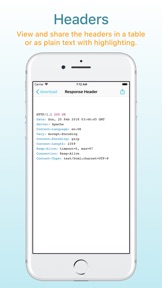
Charles Proxy for iOS lets you capture and inspect network requests and responses on your iOS device. You can view metadata, headers and bodies in the app, so you can finally debug your app’s networking issues without a computer.
Charles Proxy for iOS is a new app from the creators of Charles Proxy for desktop.
HOW IT WORKS
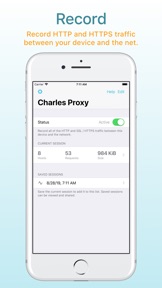
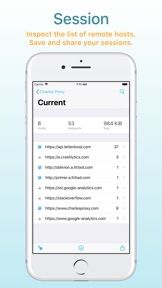
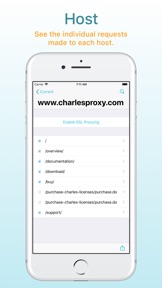
Turn Charles on when you want to start capturing. Charles captures your network requests and responses in the background while you test your app or website. Return to Charles to inspect the requests and responses.
If you also have Charles on your desktop, you can transfer recorded sessions to your desktop to explore them on the big screen.
Charles creates a local VPN on your device. All of your network traffic passes through Charles on your device, and then out to the internet as usual over either WiFi or Mobile / Cellular data. There is no remote server involved, and your data always remains private to you.
FEATURES
* SSL Proxying to view SSL requests in plain text
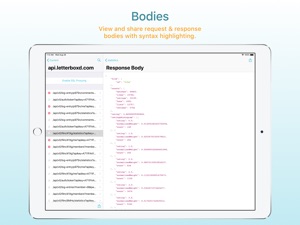
* View and share request and responses bodies
* Syntax highlighting for text request and response bodies
* Measure network performance over WiFi or Mobile / Cellular networks
* Block requests to nominated hosts
* DNS spoofing

What's New in Version 1.4

Improvements for iOS 13 and 14 include new SSL CA certificate compatibility. OpenSSL 1.1.1n upgrade.

Seller

Information

Developer

Categories

Version

1.4

Size

20.5 MB

Game Center

No

VPP Device Licensing

Yes

Rating

Rated: 4+

Compatibility

iOS 12.0 or later

Devices

iPhone 5s, iPhone 6, iPhone 6 Plus, iPhone 6s, iPhone 6s Plus, iPhone SE, iPhone 7, iPhone 7 Plus, iPhone 8, iPhone 8 Plus, iPhone X, iPhone XR, iPhone XS, iPhone XS Max, iPhone 11, iPhone 11 Pro, iPhone 11 Pro Max, iPhone SE (2nd generation), iPhone 12, iPhone 12 Pro, iPhone 12 Pro Max, iPhone 12 mini, iPhone 13, iPhone 13 Pro, iPhone 13 Pro Max, iPhone 13 mini, iPhone SE (3rd generation), iPhone 14, iPhone 14 Plus, iPhone 14 Pro, iPhone 14 Pro Max, iPhone 15, iPhone 15 Plus, iPhone 15 Pro, iPhone 15 Pro Max, iPad (5th Generation) Wi-Fi, iPad (5th Generation) Wi-Fi + Cellular, iPad (6th generation) Wi-Fi, iPad (6th generation) Wi-Fi + Cellular, iPad Pro, iPad Pro (Cellular), iPad Pro (9.7-inch), iPad Pro (9.7-inch) (Cellular), iPad Pro 12.9-inch (2nd generation), iPad Pro 12.9-inch (2nd generation) Wi-Fi + Cellular, iPad Pro (10.5-inch), iPad Pro (10.5-inch) Wi-Fi + Cellular, iPad Pro (11-inch), iPad Pro (11-inch) Wi-Fi + Cellular, iPad Pro 12.9-inch (3rd generation), iPad Pro 12.9-inch (3rd generation) Wi-Fi + Cellular, iPad Air, iPad Air (Cellular), iPad Air 2, iPad Air 2 (Cellular), iPad Air (3rd generation), iPad Air (3rd generation) Wi-Fi + Cellular, iPad mini Retina, iPad mini Retina (Cellular), iPad mini 3, iPad mini 3 (Cellular), iPad mini 4, iPad mini 4 (Cellular), iPad mini (5th Generation), iPad mini (5th Generation) Wi-Fi + Cellular, iPad (7th generation) Wi-Fi + Cellular, iPad Pro 11-inch (2nd generation), iPad Pro 11-inch (2nd generation) Wi-Fi + Cellular, iPad Pro 12.9-inch (4th generation), iPad Pro 12.9-inch (4th generation) Wi-Fi + Cellular, iPad Air (4th Generation) (Wi-Fi), iPad Air (4th Generation) (Wi-Fi + Cellular), iPad (8th generation) Wi-Fi, iPad (8th generation) Wi-Fi + Cellular, iPad Pro 11-inch (3rd generation), iPad Pro 11-inch (3rd generation) Wi-Fi + Cellular, iPad Pro 12.9-inch (5th Generation), iPad Pro 12.9-inch (5th Generation) Wi-Fi + Cellular, iPad (9th Generation), iPad (9th Generation) Wi-Fi + Cellular, iPad mini (6th Generation), iPad mini (6th Generation) Wi-Fi + Cellular, iPad Air (5th generation), iPad Air (5th generation) Wi-Fi + Cellular, iPad Pro 11-inch (4th generation), iPad Pro 11-inch (4th generation) Wi-Fi + Cellular, iPad Pro 12.9-inch (6th generation), iPad Pro 12.9-inch (6th generation) Wi-Fi + Cellular, iPad (10th generation), iPad (10th generation) Wi-Fi + Cellular, iPod touch (6th Generation), iPod touch (7th generation)

Languages

English

App Store: Customer Ratings

Ratings & Reviews

4.1 of 5 (168 Ratings)

App Store: Customer Reviews

2023-12-19

Mostly doesn’t work

I installed Charles Proxy to try to debug some SSO request issues, but it seems I need to restart the proxy and reinstall its SSL certificate after every single request. Most of the time, all requests time out. Eventually some combination of restarting the app, reinstalling the VPN profile and SSL certificate, and rebooting my phone gets it working again, but only for a few minutes.
ldd23
Version 1.4
2023-09-24

Please create an app for Android too!!!

Please!!!
Aleksitunes
Version 1.4
2023-06-15

Missing feature

I really would like to see request body ungzipped please
Kulayd Man
Version 1.4
2023-03-02

Slow

It works but the performance is extremely slow compared to using a separate desktop version of Charles. Definitely not worth the money unless it is an emergency.
EvanTech
Version 1.4
2022-12-14

App does not work for iOS 16

This does not work properly for iOS 16
mumhmhmh
Version 1.4
2022-09-19

Such a great app

Hope there are some updates soon!
Daniel Levy
Version 1.4
2022-06-17

Unable to decrypt https

It wasn’t able to decrypt https traffic for most apps. Since almost all apps use HTTPS nowadays, this is a dealbreaker :(
I made sure that the root CA was installed and “trusted”. I uninstalled it and re-installed it to no avail.
MJ-iOS
Version 1.4
2022-06-04

lots of network traffic werenot captured

for some apps like made via flutter framework,Charles didn't capture their network traffics
Ronnie Ren
Version 1.4
2022-05-13

Only one thing missing

It would be great if you added the same “focus” functionality like the desktop app, make it like a favorite or something that you can select endpoints that always shows on the top to make a quicker way of debugging while coding, that’s the only thing missing from making it a 5 star review.
Thanks.
MXN Mike 2001
Version 1.4
2022-05-01

Great to See Where Apps Send Your Web Traffic

I’m not a software or web developer. But I’m very interested in personal privacy & what information my installed apps are sending to third parties. This app allows me to sniff internet requests & responses going from & to my iPhone & iPad over HTTP, HTTPS, & cellular networks. Using domain names & IP addresses of network traffic, you can see the vast majority of popular apps are sending device data (name, device, calendar, location, search history, etc.) to many third-party advertising trackers. If you want to see which installed apps are the main sources of digital surveillance & tracking of the personal information on your device, get this app.
It took about 10 minutes to set up the app. The setup directions are clear & understandable, but they must be precisely followed for the app to work properly.
Many thanks to the CharlesProxy team for bringing this app to iOS & making it so easy to use.
Keonijohn
Version 1.4
2022-03-07

Needs rewrites

Nice. Please add rewrites!!!
M2man
Version 1.4
2022-02-15

Fails to export frequently

The app fails to export sessions quite a bit.
user2345568809
Version 1.4
2022-01-26

Was working. Now keeps crashing on startup

App was working well when it works. Lately I can’t even get it to start. It gets stuck on the splash screen and get stuck. If I wait long enough it’ll crash. Sad to see a paid app get neglected. It’s been a year since an update.
oohwill
Version 1.4
2022-01-10

Long history of a great product, lately buggy

So many bugs lately. I hope it can get fixed. I have been a huge fan over the past years.
TonyGreenThumb
Version 1.4
2021-12-16

Not what I was expecting

This app does little more than display network requests.
It does little compared to the desktop app. You can’t set breakpoints to edit requests. You can’t copy requests for investigation. It’s hard to filter out noise.
In all, very disappointing for $8.99, the most I’ve ever paid for an app I think.
washingtonian67
Version 1.4
2021-11-14

need to breakpoints

add breakpoints like Surge app
iMaz1n
Version 1.4
2021-09-20

Still perfect app

Please note from iOS 14 , users have to go to Phone settings/About/trusted certificates and toggle Charles.
Please add a message for this if you can
Hilal_7
Version 1.4
2021-07-15

中文字符显示乱码

希望作者早日支持
monlorcn
Version 1.4
2021-01-26

Extremely useful

DevOps engineer here who occasionally finds himself digging into app requests. Having used the Mac version of this app for years, I have to say this iOS version is just so incredibly well done and convenient!
EDM24/7
Version 1.4
2021-01-08

Really great

This tool does exactly what I need and is very useful for debugging api usage. My only issue is the local VPN disconnects when switching between mobile and WiFi connections. Would be great if it could automatically reconnect like other VPNs do so that extended captures across mobile and WiFi can be achieved.
Worst idea ever
Version 1.4
2020-11-27

Rubbishy app

I spent almost 10USD, but I only can see garbage code from request and response. I even cannot sort all requests. Like a time line from first one request to the last one. So that I check all the time consuming. Not like that I have to click every request. Can I refund?
dan.cooper.s
Version 1.4
2020-09-21

Perfect for iOS Debugging

I needed to check how often a third party library was making network calls in my iOS app. I tried using wireshark and some other terminal tools but neither produced what I was looking for. This app gave me exactly what I needed in 30 seconds. 100% worth the money, this will be my go-to network debugging tool going forward 👍
4AM Ventures
Version 1.3.1
2020-07-01

Not working at all on iOS 13.5

Used to use this a while back. It just doesn’t work anymore.
Uninstalled, reinstalled, install SSL profile, turned on full trust for certificate, allowed VPN, enabled proxy, added SSL domains, enabled SSL proxy, annnnnd a fat load of nothing is captured.
Additionally, when I try to use Charles on macOS, I set up the proxy on macOS then go to iOS WiFi settings to add the proxy, but when I try to load chls.pro/ssl to install the certificate it never loads and just times out so I can’t even install the SSL cert.
Additionally, it seems that when the macOS proxy was last working, it left a Root CA certificate on my device but didn’t include a Configuration Profile. So now it’s sitting in my Trust Store (toggled off) and I have NO WAY TO REMOVE IT as it restores from iCloud backups AND direct phone to phone transfers as I learned when I recently got a new phone.
Charles used to be great but it just doesn’t work at all anymore. 👎🏼
Thuggish Nuggets
Version 1.3.1
2020-06-24

No longer supports DFP/GAM

Unable to debug ad calls.
ahsjdhrhrjrjrjrjrjr
Version 1.3.1
2020-06-11

Not working and No support

I purchased this app as I liked desktop version but it is not working in iPhone. There is not support as well and my money is wasted
nat@muni
Version 1.3.1
2020-04-18

Dark Mode

Dark mode is urgently needed.
Tsgununu
Version 1.3.1
2020-04-15

Needs some maintenance

Great app. It’s a tool that I use all of the time for work. Recent iOS OS updates seems to have broken copy and paste on this app. Hopefully a fix will come at some point.
DeepCover
Version 1.3.1
2020-03-12

Can not monitor other devices in network

I installed it because I thought I would be working like the desktop version on Charles Proxy, however it doesn’t have that feature.
However if your purpose is just to sniff your own device it works just fine. It took me less then 10 minutes set all the configurations. Instructions are very clean.
brs999
Version 1.3.1
2020-02-19

Hopefully this is incomplete

I hope there’s much more to come but looking at the version history, I can’t really say I have much confidence in it happening.
You’re very limited in what you can do or see, URL structure only appears as 2 parts, form data doesn’t appear very detailed as with the desktop version. You don’t even have the ability to repeat a request, much less use breakpoints for editing requests or responses. It’s not completely useless but it certainly needs improvement, otherwise I’ll be hoping for telerik to release fiddler for iOS, given all the extra features Fiddler4 has over Charles, I would expect they’d release an iOS app with more features.
Bmcleppy
Version 1.3.1
2020-02-11

Ssl proxy doesn’t work

I purchased this app only for its ssl proxy feature but it doesn’t work.
I tried to contact developer but there is something wrong with his contact form and my message rejected.
MahdiSNo
Version 1.3.1
2020-02-06

SSL did’t word

Installed twice, setup the whole thing twice. But SSL are still encrypted that makes the whole app useless. Made sure that the connection comes as Trusted. But no luck.
It just don’t work
Ray4648
Version 1.3.1
2020-01-14

Certificate issue

I was sooo excited to see H rales app for iOS and bought it right away, unfortunately wasn’t able to get the certificate be trusted even tho I have installed it multiple times and even deleted the app and tried again, followed the exact steps, in the iOS settings the certificate is installed and verified. While Charles app is not detecting it.
Dine_nantucket
Version 1.3.1
2019-11-30

Keeps turning off by itself

It keeps turning off by itself every time during recording session so it's hard to guess which data was not recorded. So on every action i have to switch to Charles just to make sure it's still on before switching back to do the next action. This is very annoying.
Ituyeh
Version 1.3.1
2019-11-15

Can be better

I wish it has a built-in JSON viewer to view request and response body
pm.thanh
Version 1.3.1
2019-09-28

So convenient!

The iOS version of Charles is a perfect complement to the desktop version: it turns on and off without messing with WiFi settings, can capture cell data, and works even when you're away from your laptop. Would be great if you could toggle on/off or clear session without switching apps, like via Control Center or Notification Center.
Use the desktop version for easier viewing and searching of capture files, and advanced features like Map Remote or repeating requests. If you get stuck, there's great info on the Charles website. Happy sleuthing!
KyleRidesBikes
Version 1.3.1
2019-09-09

Perfect

Very Nice
Roca Oliveira
Version 1.3.1
2019-08-29

feature advice

support to export whole http request info
(with header, request, response)
gwmi
Version 1.3.1
2019-08-06

Great app! So great for debugging

Do you know if this will continue to work in ios13?
DevanDanger
Version 1.3
2019-08-03

Looks cool however...

I can't seem to be able to inspect ssl socket traffic. HTTPS works fine. Is this normal?
Fanagame
Version 1.3
2019-07-01

SSL proxy doesn’t work for iPhone 8

Installed and trusted the cert multiple times but still can’t get it to “trusted” state even though I followed the instructions to a T.
Eliney
Version 1.3
2019-06-10

Wish you could see a request’s path

Nice app, but missing 1 very crucial and important feature: the ability to see the http request’s path, not just the host.
dallasmavsfan
Version 1.3
2019-06-03

You can’t modify traffic like on the desktop version

Warning: you can only view, not modify proxied traffic! I needed that functionality and assumed it would be similar, but this version is too stripped down to be useful.
anon 73882
Version 1.3
2019-05-05

Instant 5*

Ssl on non jailbroken iphone! Took me a minute to trust certificate but there were instructions
Marek Hrusovsky
Version 1.3
2019-04-18

Great app

It’s a great app, but it’s missing a view option by sequence just like the macOS app.
Drigospbr
Version 1.3
2019-04-14

Exceptional

Exceptionally great tool. Having said that, it’s badly missing the following features:
- Currently the request and response bodies are displayed as plain text JSON. It would be great if they’re displayed in a hierarchical tree that can be expanded and collapsed.
- It would be great if links in the response body are clickable.
Thanks!
iHawking
Version 1.3
2019-03-27

Love this product!

Been using Charles on Mac for over 4 years. Happy to see this iOS app! Just today it helped me debug an issue in our enterprise app while I was on the subway train ride home. ☺️
MarkJames123
Version 1.3
2019-03-24

Good

Good App
xxxMrx.VNxxx
Version 1.3
2019-02-05

Good tool for developers

The initial configuration took about 30 minutes to figure out, however it is now much easier then using the desktop app. One of the best things about this app is the easy use once you have things setup. The current price is not to bad for the amount of time it saves you debugging. The work flow is slightly different in that all request monitoring is on your phone, so if you have hundreds of JSONs flying around your app you might find it harder to inspect them on the phones app versus the desktop version.
Gmarco35353
Version 1.2.2
2019-01-25

Huge boost to troubleshoot

I have only used this app for a few hours and has helped track down several problems by giving me visibility to what exactly is being sent over my API calls.
Works fine with SSL connections, just follow ALL of the directions. I seemed to have blindly skipped the second step and shocked it wasn’t working! They have it documented well, I just obviously didn’t follow said documentation!
HeyAndy1st
Version 1.2.2
2018-11-13

Had to buy twice!

I’ve had so many problems with this app, it’s buggy, slows down the phone, won’t allow me to use certain apps. I have been needing to update for awhile and it wouldn’t update so I deleted it and I had to buy it again! In the end though it gets the job done, better than any free vpn out there.
Mrokgotim
Version 1.2.2
2018-10-09

Includes ability to save .chls files?

Still learning but finding use of the App difficult when required to save the recording as a .chls file.
Swade60
Version 1.2.2
2018-09-23

Amazing app! See what's really happening.

TLS interception is sick. Fascinating seeing all the domains your apps are constantly talking to...
Only bug I've ran into is that medium-large sessions have trouble being exported. After clicking "Save to Files" nothing happens for a recent 50MB session. Maybe a future app update will fix this, or maybe I just need to upgrade iOS.
Varenc
Version 1.2.2
2018-09-14

Most useful app on my device

There might be other flashier apps on the App Store, but this is absolutely invaluable when it comes to debugging production app builds. Simple to use, and gives you great visibility into network traffic from all apps on the device.
SmilinGenius
Version 1.2.2
2018-09-10

Ridiculously Good

If you’re looking for an awesome utility to debug networking on iOS this is the tool. It’s got all of the same great functionality of the desktop application, but with the ease of use of iOS. You can MITM SSL requests to debug endpoints, inspect network traffic, capture sessions, and a lot more. The best part is that it’s extremely intuitive to use. I highly recommend this.
cundimundi
Version 1.2.2
2018-07-22

Very useful but would be better if it understood gzip

If it could either strip gzip accept headers on the request or better still detect and show post-gunzipped responses that would be so much more useful. I can’t look at responses in json because they are compressed.
hafman42
Version 1.2.1
2018-05-01

Useful Info

The app is primarily useful for developers debugging their work, but if you want to get an idea of how many apps are sending data in the background and see some of that information, then this app is revealing. It works perfectly, but you have to read and follow the instructions. If you don’t follow the instructions, then it won’t set up correctly. As we used to say RTFM.
Procat
Version 1.1.2
2018-04-23

can’t display Chinese character properly in body

And hope for no-cache option, or request modification
deinkingpan
Version 1.1.2
2018-04-14

Useful for development and snooping in on other apps

Not only useful for debugging, but this is great for seeing what other apps are sending. You'd be surprised how much analytics are shared with third parties.
The UI is intuitive and SSL certificate installation is straightforward.
I much prefer the 1.0 icon which sadly has been replaced by the newer flat one.
Steve Frog
Version 1.1.1
2018-04-05

The new icon is charmless, c’mon folks don’t chicken out!!!

Please bring back the original icon. It was charming and bright. This new one looks like a placeholder made in a hurry. Don’t chicken out, trying to play it safe according to a five-year old design ethos that’s already dated and a dead end.
Disappointed, Loyal
Version 1.1
2018-04-05

Would be a 5 Star...

Deducting one star because they made the app icon FAR less interesting. Boring even. Bring back the old one! Other than that, terrific app!
kraustifer
Version 1.1
2018-04-02

Buggy

The app is buggy, SSL certificate only installed after many many tries and the proxy disconnects by itself intermittently.
Also, occasionally I see “error” instead of “trusted” for SSL certificate on the settings screen which causes SSL proxying to stop working.
I can’t use the app for these reasons so it’s a waste of $9 for me so far. Please fix the bugs and update. I will follow up with another review if it’s working.
Ehsjdjksd
Version 1.0
2018-03-29

Awesome app. Great job.

This is going to make network development easier than ever.
Would love an option to use the SSL Proxy for all hosts minus an exclusion list, vs having to include each host.
DaveWood
Version 1.0
2018-03-28

Feels like magic

I am thrilled that Charles is finally available on iOS, and it works great. Setup is painless even for SSL proxying, and it works just like you'd expect it to. You can even export your session and share with desktop Charles! I'm extremely pleased with this purchase.
TheOnlyArchitect
Version 1.0
2018-03-28

Finally it is on iOS

This is an amazing accomplishment for the team and for users. Now it is much easier to inspect traffic for application troubleshooting without having to go through hoops of setting up a proxy though a computer. It was a very smooth process to setup and I think this will allow more people to try the tool out and include it in their dev workflow.
inboxplacement
Version 1.0
2018-03-27

Great job

This is a killer app. For a API developers this will be like magic for QA'ing releases. One star off for a crashing bug: Attempting to "remove" the current session crashes the app.
Kevrone
Version 1.0
2018-03-27

Fantastic Tool For Developers!

Excited to finally have Charles Proxy for iOS. Fairly easy to use and works well.
Only thing I miss is the “focus” feature that’s on desktop. Once it has that, it’ll be perfect.
PhotoMage
Version 1.0
2018-03-27

Finally!

So happy to see this released for iOS! Long time user on the Mac.
hubbni
Version 1.0