AboutTermsPrivacyContact
 
Updating
Grid Painter

Grid Painter

Released: 2016-04-26
© bigpantsgroup
Grid Painter - QR Code
Version 1.3
4+
Download on the App Store
Version 1.3
4+
Download on the App Store
Released: 2016-04-26
© bigpantsgroup

iPhone Screenshots

Screenshot
Screenshot
Screenshot
Screenshot
Screenshot

iPad Screenshots

Screenshot
Screenshot
Screenshot
Screenshot
Screenshot

Description

Developed by an artist, this app is designed to appeal to the artist’s unique needs.
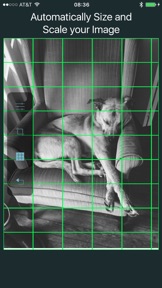
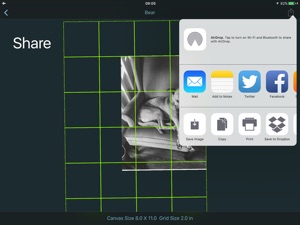
Grid Painter lets you quickly and easily place a grid onto an image for the purpose of using the grid technique of drawing and painting.
With the portability of our devices and access to thousands of images at our fingertips, more artists than ever are using them as a reference for drawings.
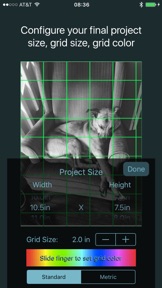
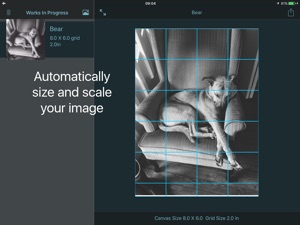
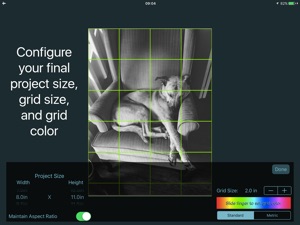
With GridPainter, the process of drawing accurately from your device is easier than ever. Simply select the photo you wish from your photo library or using the "Open In" functionality in Messages or email. The app will scale your image and place a 2" grid over the top. From the setting pane, decide how big you want your final drawing on paper to be under “project size”, change the grid color for a nice contrast, and size of the grid.
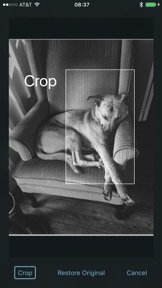
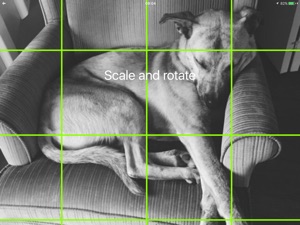
You can also crop the photo if you only want a portion.
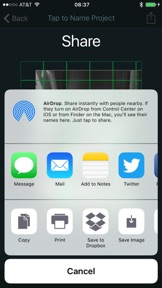
Everything is saved and you can work with your image in the app, or using the share menu, print, email, or export it to your photo library.
To create a drawing from the photo, simply draw a grid of the same proportions onto a piece of paper as your selected final project size and grid size.
From there you can easily transfer the image by drawing whats in each square, letting the grid take care of the proper scaling and framing within your picture.
Great for when you need to draw a large drawing from a small reference photo, or for drawing complicated imagery.
Features:
-Select an image from your camera roll , import, or take a photo directly from the app
-Choose final image size
-Place a grid over the image
-Change the grid size
-Change the grid color for best visibility over the image
-Automatically chooses the aspect ratio
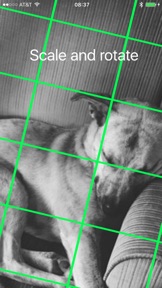
-Scale and move your image to fit exactly where you want
-Save the project for later revisions
-Print or share your project with others

What's New in Version 1.3

Fixed an issue affecting older devices.
Restored a detail label showing current project settings.
Added a short directions page and a way to directly contact us for support.

Seller

Name

Irons and Co. LLC

URL

Information

Developer

Categories

Version

1.3

Size

4.1 MB

Game Center

No

VPP Device Licensing

Yes

Rating

Rated: 4+

Compatibility

iOS 9.2 or later

Devices

iPad mini Retina (Cellular), iPad mini 4 (Cellular), iPad mini 3, iPad Pro (11-inch), iPad Air 2, iPad (6th generation) Wi-Fi, iPad (5th Generation) Wi-Fi, iPad Pro 12.9-inch (2nd generation), iPad Pro (11-inch) Wi-Fi + Cellular, iPad (5th Generation) Wi-Fi + Cellular, iPad Pro 12.9-inch (3rd generation) Wi-Fi + Cellular, iPhone 8, iPhone 8Plus, iPhone X, iPad mini (5th Generation) Wi-Fi + Cellular, iPad Pro 12.9-inch (3rd generation), iPad Air (3rd generation), iPad Pro 12.9-inch (2nd generation) Wi-Fi + Cellular, iPad Air (3rd generation) Wi-Fi + Cellular, iPad Pro (10.5-inch) Wi-Fi + Cellular, iPhone 6 Plus, iPhone 6s, iPhone 8 Plus, iPhone 8, iPad Pro (Cellular), iPad Pro (9.7-inch) (Cellular), iPad Pro (9.7-inch), iPhone 6s Plus, iPhone 5s, iPhone 7, iPhone 7 Plus, iPhone X, iPhone XR, iPhone SE, iPhone 6, iPhone XS Max, iPad Pro (10.5-inch), iPhone XS, iPad mini (5th Generation), iPad (6th generation) Wi-Fi + Cellular, iPad Pro, iPod touch (6th Generation), iPad Air 2 (Cellular), iPad mini 4

Languages

English

App Store: Customer Ratings

Ratings & Reviews

0.0 of 5 (No rating)

App Store: Customer Reviews

2016-10-03

Very helpful!

I use this app to place a grid over photos I paint from my iPhone or iPad. It's very easy and intuitive to use! Makes my life much easier! Haven't found anything else in the App Store that works like this one.
adognamedBear
Version 1.0
2016-10-03

What an awesome tool!

Anyone who paints or draws from a source photo on their phone or pad needs this app. No more printing color photos and hand drawing graphs. Zoom in or out. Simplify. Its all in your hand. Love it!
PastelMelisss
Version 1.0