AboutTermsPrivacyContact
 
Updating
iDStretch

iDStretch

Released: 2016-01-12
© 2017 Jon Harman
iDStretch - QR Code
Version 2.1
4+
Download on the App Store
Version 2.1
4+
Download on the App Store
Released: 2016-01-12
© 2017 Jon Harman

iPhone Screenshots

Screenshot
Screenshot

iPad Screenshots

Screenshot
Screenshot
Screenshot
Screenshot
Screenshot

Description

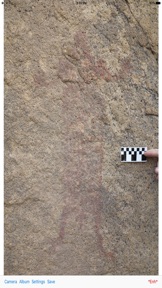
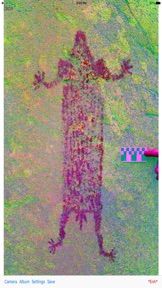
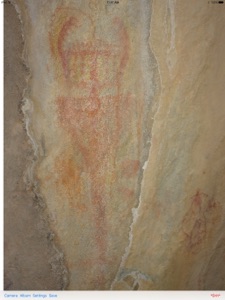
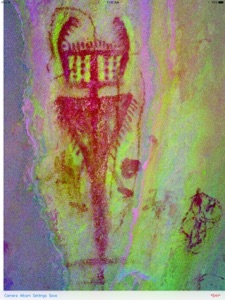
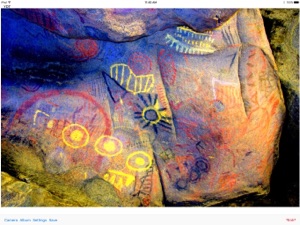
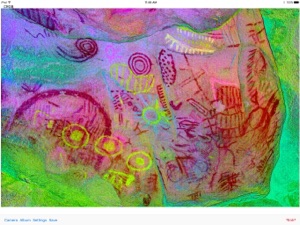
DStretch is a rock art enhancement program used by researchers worldwide. iDStretch is a version for the iPad and iPhone that can be used in the field to reveal faint rock art. iDStretch provides enhancements for a variety of pigments found in rock art. It is fast, simple to use, and enhancements can be saved. iDStretch needs no connectivity to work so enhancements can be done in remote places away from cell service or WiFi.
You can load an image from the album or take a picture with the camera.
To do an enhancement you can either press one of the buttons on the screen or swipe left or right on an unzoomed image. If you want you can hide the buttons and use swipes or the *Enh* menu item to do enhancements.

What's New in Version 2.1

Fixed enhancement save bug in newer devices.
Warning: I have had a report that the app doesn't work on an iPad 2. If true I can't fix that, sorry.

Seller

Name

Jon Harman

URL

Information

Developer

Categories

Version

2.1

Size

6.2 MB

Game Center

No

VPP Device Licensing

Yes

Rating

Rated: 4+

Compatibility

iOS 8.0 or later

Devices

iPhone 11 Pro Max, iPad mini 3, iPad mini 4, iPad Pro (11-inch), iPad (5th Generation) Wi-Fi, iPad (6th generation) Wi-Fi, iPod touch (6th Generation), iPad Pro (11-inch) Wi-Fi + Cellular, iPad (6th generation) Wi-Fi + Cellular, iPad Pro 12.9-inch (3rd generation), iPad (5th Generation) Wi-Fi + Cellular, iPad mini (5th Generation) Wi-Fi + Cellular, iPad mini (5th Generation), iPad Pro, iPad mini Retina (Cellular), iPad Air 2 (Cellular), iPad mini 4 (Cellular), iPad mini 3 (Cellular), iPhone 11, iPad Air, iPod touch (7th generation), iPad Air 2, iPad Pro 12.9-inch (2nd generation), iPad Pro (Cellular), iPhone 6, iPad Pro (10.5-inch) Wi-Fi + Cellular, iPhone 5s, iPad mini Retina, iPad Air (Cellular), iPad Air (3rd generation) Wi-Fi + Cellular, iPhone 7 Plus, iPad Air (3rd generation), iPhone 8 Plus, iPad Pro 12.9-inch (2nd generation) Wi-Fi + Cellular, iPhone 6s, iPhone 6 Plus, iPhone XS, iPhone XR, iPhone SE, iPad Pro (9.7-inch), iPhone 6s Plus, iPad Pro (9.7-inch) (Cellular), iPhone X, iPhone 8, iPhone XS Max, iPad Pro (10.5-inch), iPhone 7, iPhone 11 Pro, iPad Pro 12.9-inch (3rd generation) Wi-Fi + Cellular

Languages

English

App Store: Customer Ratings

Ratings & Reviews

4.5 of 5 (7 Ratings)

App Store: Customer Reviews

2017-06-26

Essential

I now use this software every time I am survey places where faded rock art is known (or suspected) to occur. I have recorded previously unknown glyphs with this software. A must-have for the serious field archaeologist!
jlitzkow
Version 1.7
2017-04-30

Love it!

Really interesting to look back at old pics of rock art with!
Sarpaw
Version 1.7
2016-04-05

Great app! Works very well!

I have to say this app does the job well! It is easy to use in both iphone and Ipad platforms. While working on a project a bunch off us loaded it and I must say every one of us were happy! This app is money well spent!
Todavia
Version 1.02
2016-01-23

An outstanding and essential research tool

First and foremost, this is the most elegant and field-practical digital enhancement app available for pictograph analysis on the iPhone or iPad. It was created by the original developer of DStretch, the tool which revolutionized rock art analysis, and this newly released version for mobile platforms has benefited from years of refinement on the original program. It is a "must have" for anyone serious about being able to transcend the limitations of their eyes when studying ancient art or anything else that might possess faint hues.
I have field tested the iDStretch app extensively on an iPhone 6s. The application handles the limitations of my cell phone's tiny noise-prone image sensor very well. Direct sunlight provides optimal enhancements, as should be expected, but I've even achieved satisfactory results at dusk using my cell phone's flash. The app handles enhancements from mixtures of direct sunlight and hard shade surprisingly well, a big plus because field work situations are not always conducive to quality photography.
Especially helpful are the easy to use options in "Settings". You can limit the number of enhancement filters the app cycles through to hone in on what works best on a given rock or art type. This really speeds up recording tasks and camera set-ups if you are using the program to augment your DSLR photography.
The iDStretch app is easy to use, easy to customize, and works great in the field or when simply sitting at home studying your iPhoto rock art collection. It is the perfect companion tool for photographing pictograph panels using higher quality equipment, especially when the recording efforts or desired aesthetics are compromised by poor paint conditions. Easily 5-stars.
9th Don Lance
Version 1.0