AboutTermsPrivacyContact
 
Updating
NotePrints

NotePrints

Released: 2015-10-04
© Scott Saia
NotePrints - QR Code
Version 2.9.1
4+
Download on the App Store
Version 2.9.1
4+
Download on the App Store
Released: 2015-10-04
© Scott Saia

iPhone Screenshots

Screenshot
Screenshot
Screenshot
Screenshot
Screenshot

iPad Screenshots

Screenshot
Screenshot
Screenshot
Screenshot
Screenshot

Description

Welcome NotePrints - Virtual paper done right!
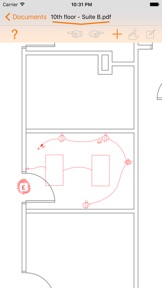
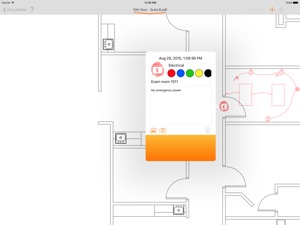
Leave your NotePrints all over your documents including large CAD drawings
NotePrints can do:
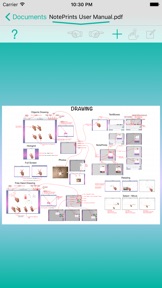
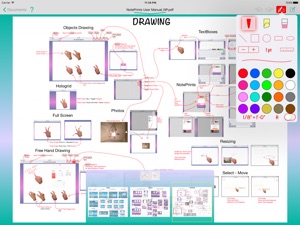
+ View and add markups to PDF files
NotePrints is naturally one of the fastest PDF viewers
One touch activates powerful markup features
+ Work with large files and large format sheets
NotePrints was built from the ground up for large format PDF files (36” x 48” and larger page sizes) and files with 1000's of pages
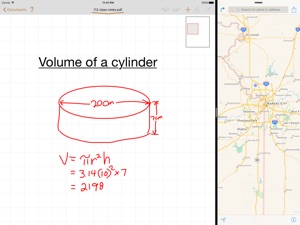
+ 200x Zoom
Zoom way in to create and view small details
Deepest zoom in the industry
+ Vector graphics drawing engine
Graphics are always crisp retina quality at all zoom levels
+ Create PDFs
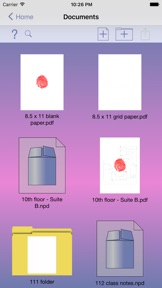
Create new PDFs from camera or Photos or by choosing from blank or patterned virtual paper
+ Add shapes, photos and rich text
Add straight lines, rectangles, ellipses and perfect squares and circles
Add photos from camera or Photos
Create rich text with many fonts, colors and formatting options
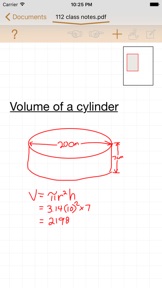
+ Draw by Hand
Basic efficient vector drawing engine with many colors, line widths and line types to choose from
+ Cut, Copy, Paste
Cut, Copy and Paste between pages and documents
+ Open locked PDFs
View password protected PDF files
+ Desktop file management
Create, move, copy, delete and rename files, folders and sub-folders
+ Add, Delete, Extract pages
Add pages at any point in PDF
Delete any pages from PDF
Extract any pages to new PDF file
+ Transfer files
Use iTunes sharing or DropBox to copy files to/from NotePrints
Share and open PDF files with other apps with "Open in ..." support
Open PDF email attachments directly into NotePrints
Email files directly from NotePrints
+ Package
Package all your edits and original PDF file into a proprietary NotePrints .npd file and transfer to your computer for backup or to another iPad or iPhone to continue editing
What's New in Version 2.9.1

+ cranked up max zoom a bit more - wicked!

Seller

Information

Developer

Categories

Version

2.9.1

Size

35 MB

Game Center

No

VPP Device Licensing

Yes

Rating

Rated: 4+

Compatibility

iOS 9.3 or later

Devices

iPad Air, iPad mini 4 (Cellular), iPad mini 3, iPad mini (5th Generation), iPad Pro (11-inch) Wi-Fi + Cellular, iPad (5th Generation) Wi-Fi + Cellular, iPad (6th generation) Wi-Fi + Cellular, iPad Pro, iPad mini (5th Generation) Wi-Fi + Cellular, iPad Pro 12.9-inch (3rd generation), iPod touch (6th Generation), iPad mini Retina (Cellular), iPad Air (Cellular), iPad Air 2 (Cellular), iPad mini 4, iPad Pro 12.9-inch (3rd generation) Wi-Fi + Cellular, iPad Pro 12.9-inch (2nd generation), iPad (5th Generation) Wi-Fi, iPad Air (3rd generation) Wi-Fi + Cellular, iPad Pro (Cellular), iPad Pro 12.9-inch (2nd generation) Wi-Fi + Cellular, iPhone 8 Plus, iPad Pro (9.7-inch), iPhone XR, iPad Air 2, iPad (6th generation) Wi-Fi, iPad Air (3rd generation), iPhone 8, iPad Pro (10.5-inch) Wi-Fi + Cellular, iPhone 6s, iPad Pro (9.7-inch) (Cellular), iPhone 7, iPhone 7 Plus, iPhone XS Max, iPhone 6, iPhone X, iPhone 6 Plus, iPhone XS, iPad Pro (10.5-inch), iPhone SE, iPhone 5s, iPhone 6s Plus, iPad mini 3 (Cellular), iPad Pro (11-inch)

Languages

English

App Store: Customer Ratings

Ratings & Reviews

0.0 of 5 (No rating)

App Store: Customer Reviews

2015-10-11

NotePrints

NotePrints is a must have for engineers or similar disciplines that survey pre or post building sites for analyzing existing conditions to propose improvements. Simply extraordinary to do a exceptional analysis for customers!
Saigon superior
Version 1.0.5