Updating


iPhone Screenshots


iPad Screenshots

Description
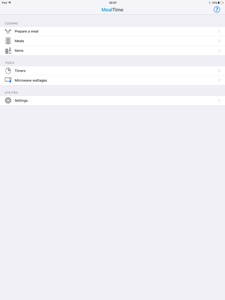
MealTime is an iOS app that helps you to easily prepare complex meals made up of many different items.
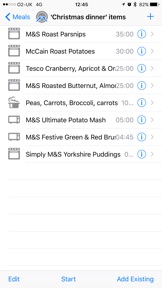
Build up the meals you want to cook out of items and the different cooking steps that describe how those items are actually cooked. Once added MealTime will then arrange all the different cooking steps to ensure that your meal will have all the items finish cooking together at the same time.
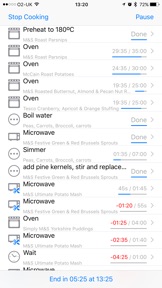
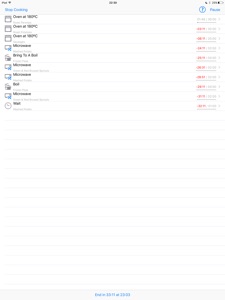
As the meal is being cooked your phone will tell you when you must start to cook each item, it’ll even warn you so you can be prepared ahead of time. If you fall behind with these instructions then you can simply pause the meal to let you catch up and then resume cooking when you’re ready. Don’t take too long though as items already cooking may overcook, MealTime will warn you of items that will be overcooked whenever you pause the meal.
For hands free operation you can make MealTime say the cooking instructions out loud so that you can concentrate on cooking your meals.
MealTime will automatically time share your microwave oven if you’re cooking more than one microwave item in your meal. If you’re using an oven to cook any item then it can automatically tell you to preheat your oven just in time for the first oven item to start cooking.
Scan barcodes for items you add and you’ll be able to quickly add them to new meals in the future by just scanning their barcode.
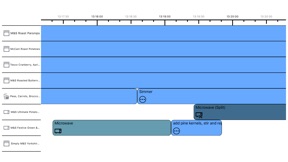
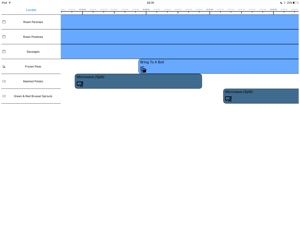
You can visualise the cooking steps in a timeline by rotating your phone onto its side whilst you’re cooking a meal.
Its easy to setup a meal to start or end cooking at a specific time, MealTime will then move all of its notifications to fit the time you request.
Beyond the managed meals, MealTime also includes simple timers, that you can create with 5 second precision instead of the 1 minute precision of the iOS clock timer. You can also start, stop and pause as many of these timers at once as you’d like.
Microwave wattage adjustments let you calculate the cooking time for an item specified in a certain wattage that’s correct given your microwave’s own wattage, so if an item tells you to cook for 2 minutes in a 750 watt oven then MealTime can tell you that you'll need to cook that item for 1 minute and 30 seconds in a 1000 watt oven.
MealTime includes an iOS Today Widget and Apple Watch App and Complication which lets you glance at the progress of mealtime without having to open the app.
MealTime has been developed with a real focus on VoiceOver support for vision impaired users to enable them to use all the apps features with ease.
What's New in Version 1.0
- added iPhone X support
- enabled basic iPad support to improve appearance for those who used to run the iPhone app version on iPad
- added new timeline auto scrolling feature which will keep the current time marker on screen when the user isn't interacting with the timeline view. Options available under settings are none, advance at edge (default), advance at middle and follow.
- timeline view now takes advantage of larger screens to show more of item names where possible
- improved the voice over and text to speech readouts of all cooking step notifications, especially microwave items which now read out their durations properly
- fixed a bug for first time users that could leave an executing meal paused if they rotated the device to go to timeline mode with the cooking tutorial still showing
Seller
Name
James Bamford
Information
Developer
Categories
Version
1.0
Size
24.2 MB
Game Center
No
VPP Device Licensing
Yes
Rating
Rated: 4+
Compatibility
iOS 8.2 or later
Devices
iPad Air, iPad mini 4 (Cellular), iPad mini 3, iPad mini (5th Generation), iPad Pro (11-inch) Wi-Fi + Cellular, iPad (5th Generation) Wi-Fi + Cellular, iPad (6th generation) Wi-Fi + Cellular, iPad Pro, iPad mini (5th Generation) Wi-Fi + Cellular, iPad Pro 12.9-inch (3rd generation), iPod touch (6th Generation), iPad mini Retina (Cellular), iPad Air (Cellular), iPad Air 2 (Cellular), iPad mini 4, iPad Pro 12.9-inch (3rd generation) Wi-Fi + Cellular, iPad Pro 12.9-inch (2nd generation), iPad (5th Generation) Wi-Fi, iPad Air (3rd generation) Wi-Fi + Cellular, iPad Pro (Cellular), iPad Pro 12.9-inch (2nd generation) Wi-Fi + Cellular, iPhone 8 Plus, iPad Pro (9.7-inch), iPhone XR, iPad Air 2, iPad (6th generation) Wi-Fi, iPad Air (3rd generation), iPhone 8, iPad Pro (10.5-inch) Wi-Fi + Cellular, iPhone 6s, iPad Pro (9.7-inch) (Cellular), iPhone 7, iPhone 7 Plus, iPhone XS Max, iPhone 6, iPhone X, iPhone 6 Plus, iPhone XS, iPad Pro (10.5-inch), iPhone SE, iPhone 5s, iPhone 6s Plus, iPad mini 3 (Cellular), iPad Pro (11-inch)
Languages
English, French, German, Italian
App Store: Customer Ratings
Ratings & Reviews
0.0 of 5 (No rating)
App Store: Customer Reviews
No Entry